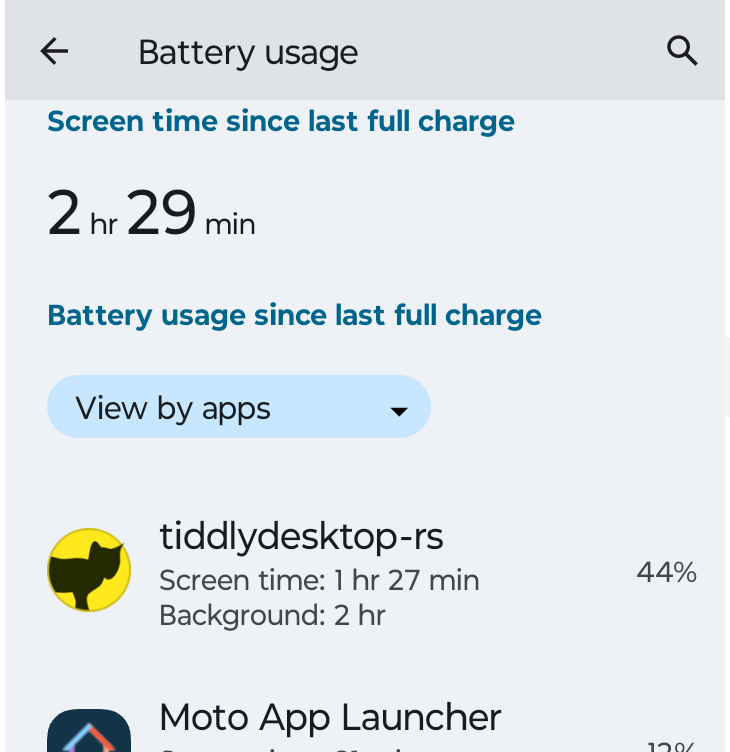
Yes it is. All involved wikis must sync. Not syncing them means to disconnect them from the updates.
Yes, it would be nice to be able to set up options for this, but now I really don’t want to overcomplicate this any further.

Yes it is. All involved wikis must sync. Not syncing them means to disconnect them from the updates.
Yes, it would be nice to be able to set up options for this, but now I really don’t want to overcomplicate this any further.
This might be a reason to disconnect when not in use. Not sure how unusual this is. Maybe if just switch to some other app it won’t be a problem?
Keep in mind if you run little else while using tiddlywiki it will statistically dominate. The Percentage may be the percentage of “power used” not the percentage of “total power available”, ie of battery capacity.
Yes. But my subjective experience is that the battery is discharging faster than usual. Need a better tool to gauge all that. So it’s mostly a thing to watch out for.
Hi @Mark_S the App is kept alive in the background if you see the notifications in the statusbar.
That’s so that you don’t lose changes made between “activations” of the wikis. Also, when sync is enabled, sync is kept alive. You should be able to see the notifications for open wikis and for sync on.
You need to close the wikis and the landing page from the “Recents” tab to stop the processes.
I don’t think I’ve seen any notifications from TDrs/A. And I tend to leave notifications up for weeks.
Checked my permissions – I’m set up to get notifications for “All tiddlydesktop-rs notifications”, for Sync (about 1 a day), for Wiki Server (about 3 per week), and for “Allow notification dot”, whatever that means.
But I don’t think I’ve ever gotten any.
Thanks!
Ok, thanks for reporting! What Android version are you working on?
Fourteen
And because discourse wants >20, let me say: 14
Ok thanks @Mark_S I’ll investigate this. For now remember to close the wikis and landing page from your “Recent” overview when you’re done editing - otherwise the processes are kept alive in the background and that consumes energy.
It’s meant to show a notification for each open wiki and for sync active so that you’re informed.
So my tablet is actually a Kindle Fire, which is based on Android 11. It does show one notice, telling me that a wiki is running in the background.
Edit: Actually there are two notices. A second notice tells me that sync is running.
So notices are showing for the older tablet, but not for the phone.
Can the android share option be developed a little more so that we can clip contents to the wiki from phone itself… There are web clippers extensions available in Firefox for Android like the obsidian clipper and linonetwo tidgi clipper… Can you take inspiration from them and add a few more features to the android share menu like ability to add type field as markdown or wikitext (similar to the tag option available currently) and to copy contents from the webpage into the text field of the imported tiddler in markdown format. In the near future there will be a official markdown to wikitext converter in the core. So we can easily convert such imported markdown files into wikitext if needed in the future.
On further testing, I found that I can use the copy to clipboard option (in markdown format) from obsidian clipper itself and send the clipboard content to tiddlydesktop-rs app. What I need is only an option to set the type as text/markdown from the android share menu itself
Ah! Basically, you’d need the option in the tiddlydesktop-rs “Share” menu to choose the tiddler type.
That’s doable.
On 0.7.15 . It seems to be resource intensive, even while there is not that much going. Lot’s of activity in the terminal, and HTOP tells me it’s running 9% of CPU capacity, and it seems like it might be triggering a lot of xorg activity too.
2 posts were merged into an existing topic: TiddlyDesktopRS - a new TiddlyWiki Desktop (RS) experience - Alpha / Beta
I have a large node js wiki in my laptop. I want to add tiddlers to this wiki in phone using android share feature. But I don’t want to fully load all the tiddlers into the app due to the size of the wiki. Is it possible to only import tiddlers via Android share option ?
You would need an option to sync only one-way, from Android to Desktop but not from Desktop to Android.
Currently Sync is bidirectional and there’s no such option you’re asking for.
But it would make sense to have it as an option, yes.
I’ll see what I can do.
This is an interesting request specifically with the desktop having a large folder wiki and a minimalist or selective wiki on my android. of course we may only need this if the mobile or tablet can’t handle the larger wiki.
it would be helpful if the tiddlers to be shared with the device could be specified by a filter to assist integration with existing wikis and for example latest or flagged Todo items or an address tiddler.
On reflection though we could build a saver in the desktop version to generate a fresh wiki with fresh content and save over a single wikifile that is synced with One or more devices mobile/tablet in my case.
Some time soon I may post a review and acclaim for what @BurningTreeC has achieved here, especially with simultaneous edit of a tiddler across a relay. A long sought set of features.
0.0.86
I set up the latest desktop and android. I set up 2 files on Android and a Room. Then I closed everything via the task list, intending to come back later and do some testing.
Came back later and all my settings were gone!
Set up new file and then closed everything. Came back and my original settings had been restored!
I know we had a similar problem on the desktop, where settings would disappear and then come back.
0.0.86
0.7.21
Desktop on “receive”. Phone on default (bidirectional). Closed connected wiki on phone. Create wiki on desktop.
When wiki on phone is re-opened, it receives the new tiddlers despite the desktop setting.