Hi @yan
could you try the following?
GDK_BACKEND=x11 ./tiddlydesktop-rs

Sure! Again using the RPM, this time version v0.1.6.1, here is the output up to loading my wiki, and then closing it again.
$ GDK_BACKEND=x11 tiddlydesktop-rs

[TiddlyDesktop] Linux: If you experience display issues (black artifacts, rendering problems), try:
[TiddlyDesktop]   WEBKIT_DISABLE_DMABUF_RENDERER=1 tiddlydesktop-rs
[TiddlyDesktop]   WEBKIT_DISABLE_COMPOSITING_MODE=1 tiddlydesktop-rs
[TiddlyDesktop]   TIDDLYDESKTOP_DISABLE_GPU=1 tiddlydesktop-rs  (disables all GPU acceleration)
[IPC] Server listening on port 45678
Main wiki path: "/home/yan/.local/share/com.burningtreec.tiddlydesktop-rs/tiddlydesktop.html"
[TiddlyDesktop] Linux: setup_drag_handlers called for window 'main'
[TiddlyDesktop] Native DnD: Detected Wayland display server
[TiddlyDesktop] Wayland: Initializing native DnD protocol handler
[TiddlyDesktop] Wayland: Found wl_seat v10
[TiddlyDesktop] Wayland: Found wl_data_device_manager v3
[TiddlyDesktop] Wayland: Seat capabilities: Value(Capability(Pointer | Keyboard))
[TiddlyDesktop] Wayland: Created data device for seat
[TiddlyDesktop] Wayland: Native DnD protocol handler initialized
[TiddlyDesktop] Wayland: Background event loop started
[TiddlyDesktop] Native DnD: Wayland backend initialized
[TiddlyDesktop] Linux: Native DnD protocol initialized
[TiddlyDesktop] Linux: Set GTK drag threshold to 4 pixels
[TiddlyDesktop] Linux: On main thread, setting up directly for 'main'
[TiddlyDesktop] Linux: Setting up GTK drag handlers for 'main'
[TiddlyDesktop] Linux: Setting up drag handlers on widget type: GtkApplicationWindow for window 'main'
[TiddlyDesktop] Linux: GTK3 drag-drop handlers connected on window
[TiddlyDesktop] Wayland: Starting event loop thread
[TiddlyDesktop] Linux: Found WebKit widget: WebKitWebView
[TiddlyDesktop] Linux: Registered WebKit widget 94654857944000 for 'main' for drag dest toggling
[TiddlyDesktop] Linux: Letting WebKit remain drag source (preserves caret)
[TiddlyDesktop] Linux: WebKit drag handlers set up
[TiddlyDesktop] Linux: Setting up outgoing drag handlers (WebKit-compatible)
[TiddlyDesktop] Linux: Outgoing drag handlers connected (WebKit-compatible)
[TiddlyDesktop] Linux: Registered GDK window 94654854103648 for 'main' (1x1)

(tiddlydesktop-rs:84977): Gdk-CRITICAL **: 15:27:33.140: gdk_wayland_window_get_wl_surface: assertion 'GDK_IS_WAYLAND_WINDOW (window)' failed
[TiddlyDesktop] Linux: Could not get Wayland surface for 'main'
[TiddlyDesktop] Linux: Set up pointer tracking for window 'main'

(tiddlydesktop-rs:84977): Gtk-WARNING **: 15:27:33.140: gtk_window_set_titlebar() called on a realized window

(tiddlydesktop-rs:84977): libayatana-appindicator-WARNING **: 15:27:33.218: libayatana-appindicator is deprecated. Please use libayatana-appindicator-glib in newly written code.
[TiddlyDesktop] JS: Main wiki - external attachments disabled
[TiddlyDesktop] Linux: Pointer entered window 'main' (mode: Normal)
[TiddlyDesktop] Favicon: Strategy 1 - checking pattern '"title":"$:/favicon.ico"' at index 2636791
[TiddlyDesktop] Favicon: extracted tiddler JSON (6404 bytes)
[TiddlyDesktop] Favicon: SUCCESS - type=image/png, base64_len=6288
[TiddlyDesktop] Spawning wiki process: /usr/bin/tiddlydesktop-rs --wiki /path/to/folder/REDACTED.html
[TiddlyDesktop] Wiki process spawned with PID: 85307
[TiddlyDesktop] Wiki mode: "/path/to/folder/REDACTED.html", tiddler: None
[IPC Client] Connected and registered: wiki=/path/to/folder/REDACTED.html, pid=85307
[TiddlyDesktop] Connected to IPC server
[IPC] New connection from 127.0.0.1:44012
[IPC] Register: wiki=/path/to/folder/REDACTED.html, pid=85307, tiddler_window=false
[TiddlyDesktop] Linux: Pointer left window 'main' (mode: Normal, detail: NonlinearVirtual)
[TiddlyDesktop] Linux: setup_drag_handlers called for window 'wiki-REDACTED-html'
[TiddlyDesktop] Native DnD: Detected Wayland display server
[TiddlyDesktop] Wayland: Initializing native DnD protocol handler
[TiddlyDesktop] Wayland: Found wl_seat v10
[TiddlyDesktop] Wayland: Found wl_data_device_manager v3
[TiddlyDesktop] Wayland: Seat capabilities: Value(Capability(Pointer | Keyboard))
[TiddlyDesktop] Wayland: Created data device for seat
[TiddlyDesktop] Wayland: Native DnD protocol handler initialized
[TiddlyDesktop] Wayland: Background event loop started
[TiddlyDesktop] Native DnD: Wayland backend initialized
[TiddlyDesktop] Linux: Native DnD protocol initialized
[TiddlyDesktop] Linux: Set GTK drag threshold to 4 pixels
[TiddlyDesktop] Linux: On main thread, setting up directly for 'wiki-REDACTED-html'
[TiddlyDesktop] Linux: Setting up GTK drag handlers for 'wiki-REDACTED-html'
[TiddlyDesktop] Linux: Setting up drag handlers on widget type: GtkApplicationWindow for window 'wiki-REDACTED-html'
[TiddlyDesktop] Wayland: Starting event loop thread
[TiddlyDesktop] Linux: GTK3 drag-drop handlers connected on window
[TiddlyDesktop] Linux: Found WebKit widget: WebKitWebView
[TiddlyDesktop] Linux: Registered WebKit widget 93931042161568 for 'wiki-REDACTED-html' for drag dest toggling
[TiddlyDesktop] Linux: Letting WebKit remain drag source (preserves caret)
[TiddlyDesktop] Linux: WebKit drag handlers set up
[TiddlyDesktop] Linux: Setting up outgoing drag handlers (WebKit-compatible)
[TiddlyDesktop] Linux: Outgoing drag handlers connected (WebKit-compatible)
[TiddlyDesktop] Linux: Registered GDK window 93931034442128 for 'wiki-REDACTED-html' (1x1)

(tiddlydesktop-rs:85307): Gdk-CRITICAL **: 15:27:36.609: gdk_wayland_window_get_wl_surface: assertion 'GDK_IS_WAYLAND_WINDOW (window)' failed
[TiddlyDesktop] Linux: Could not get Wayland surface for 'wiki-REDACTED-html'
[TiddlyDesktop] Linux: Set up pointer tracking for window 'wiki-REDACTED-html'

(tiddlydesktop-rs:85307): Gtk-WARNING **: 15:27:36.610: gtk_window_set_titlebar() called on a realized window
[TiddlyDesktop] Linux: Pointer entered window 'main' (mode: Normal)
[TiddlyDesktop] Wiki window created: wiki-REDACTED-html
[TiddlyDesktop] IPC listener thread started
[TiddlyDesktop] Linux: Pointer left window 'main' (mode: Normal, detail: NonlinearVirtual)
[TiddlyDesktop] Linux: Pointer entered window 'wiki-REDACTED-html' (mode: Normal)
[TiddlyDesktop] JS: Setting up drag-drop listeners for: /path/to/folder/REDACTED.html window: wiki-REDACTED-html (window-specific)
[TiddlyDesktop] JS: [drag] Tauri listen ready for: wiki-REDACTED-html
[TiddlyDesktop] JS: [drag] Setting up GTK event handlers
[TiddlyDesktop] JS: [drag] GTK event handlers ready
[IPC] UpdateFavicon request: wiki=/path/to/folder/REDACTED.html
[IPC] Update favicon request: wiki=/path/to/folder/REDACTED.html
[IPC] Connection closed from 127.0.0.1:44012
[IPC] Cleaned up client: wiki=/path/to/folder/REDACTED.html, pid=85307
[TiddlyDesktop] Wiki process (PID 85307) exited with status: exit status: 0
[TiddlyDesktop] Removed wiki process from tracking: /path/to/folder/REDACTED.html
[TiddlyDesktop] Linux: Pointer entered window 'main' (mode: Normal)
The performance is only slightly better.
The window was strangely small, not resizeable (also lacking min/maximise buttons). There are various strange bugs with this (e.g. holding down left click while the wiki loads to satisfy my compulsion to highlight causes a crash to desktop).
It started simple enough: users couldn’t drag text into input fields in TiddlyDesktopRS. A basic feature that works in every browser, every text editor, every application since the 1980s. How hard could it be?
Very hard, as it turned out.
We initially suspected WebKitGTK on Linux. After all, WebKitGTK has its quirks. We disabled Tauri’s drag-drop handler. We wrote custom GTK signal handlers. We intercepted connect_drag_drop, connect_drag_data_received, and connect_drag_leave. We checked drag_get_source_widget() to distinguish internal from external drops.
Nothing worked consistently.
We quit. We came back. We quit again.
Then came the breakthrough: testing with Epiphany, the GNOME browser that uses vanilla WebKitGTK. We dragged a file from Nautilus into an input field in a TiddlyWiki opened in Epiphany.
It worked. The filepath appeared in the input.
This changed everything. It wasn’t WebKitGTK’s fault. Something in our stack was intercepting and swallowing the drops before WebKit could handle them natively.
“What if we manually insert the dropped text?” we wondered. We could intercept the drop, extract the data, find the focused element, and programmatically insert the text.
“NO,” came the response. “We work with real events, OK?”
Fair enough. Synthetic events are a hack. They don’t trigger the same event cascade. They feel wrong. We needed the real thing.
The culprit was WRY, Tauri’s WebView abstraction layer. Deep in ~/.cargo/registry/src/, we found the dragon’s lair:
Linux (webkitgtk/drag_drop.rs):
webview.connect_drag_drop(move |_, ctx, x, y, time| {
    // ... emit Tauri event ...
    ctx.drop_finish(true, time);
    return true;  // <-- THE CULPRIT
});
Returning true means “I handled this, don’t let anyone else process it.” WebKit never saw the drop.
macOS (wkwebview/drag_drop.rs):
if !listener(DragDropEvent::Drop { paths, position }) {
    unsafe { objc2::msg_send![super(this), performDragOperation: drag_info] }
} else {
    Bool::YES  // <-- Only calls native if listener returns false
}
Windows (webview2/mod.rs):
RevokeDragDrop(hwnd);  // <-- REMOVES WebView2's native handler entirely
RegisterDragDrop(hwnd, &custom_target);  // Installs WRY's handler
Three platforms, three different architectures, one shared problem: WRY was stealing drops from the native webview.
We didn’t fork WRY. We didn’t wait for an upstream fix. We patched.
Linux fix: Return false after emitting the Tauri event, letting WebKit also handle the drop natively. Check source_widget to detect internal drops and skip our handler entirely.
macOS fix: Always call super after emitting the event. Both the JavaScript layer and the native webview get to process the drop.
Windows fix: The nuclear option. Don’t install WRY’s custom IDropTarget at all. WebView2’s native handling works fine. The Tauri drag-drop events won’t fire, but JavaScript’s native drop event still works.
There’s a lesson here about abstraction layers. WRY tried to provide a unified drag-drop API across platforms. Noble goal. But in doing so, it blocked the native behavior that users expect. Sometimes the abstraction needs to get out of the way.
We considered:
Patching the cargo cache and automating it in CI was the pragmatic middle ground.
The patches live in src-tauri/patches/wry+0.53.5.patch. The CI workflow runs cargo fetch, finds the WRY source directory, and applies the patches before building. On Linux and macOS, we use patch -p1. On Windows, git apply.
It’s not beautiful. It will break when WRY updates. But it works, and it ships.
Test with vanilla components. Epiphany revealed the truth that hours of debugging couldn’t.
"Real events" matter. Synthetic workarounds are technical debt with interest.
Read the framework source. The answer was always in drag_drop.rs.
Patches are valid solutions. Not everything needs to be upstreamed immediately.
Platform differences are real. Linux, macOS, and Windows needed completely different fixes.
Drag-and-drop works now. Text flows into inputs. Files drop where they should. The TiddlyWiki editor accepts content from the outside world.
Until the next WRY update breaks everything again.
Such is the way of software.
Written after mass coffee consumption and mass frustration, January 2026
Hi @BurningTreeC - congrats on solving the issue!
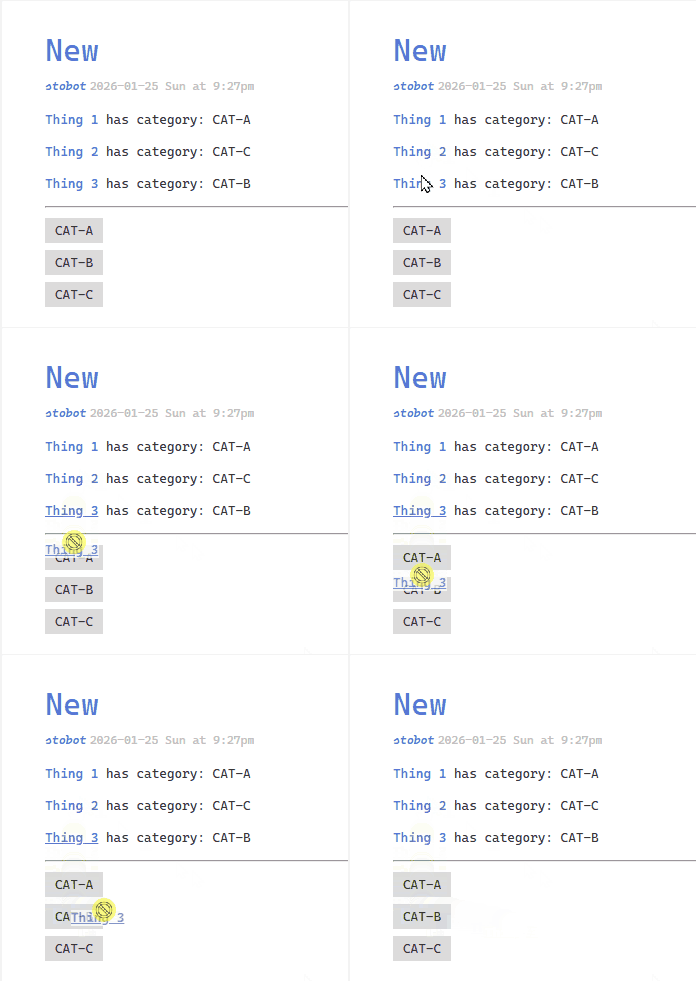
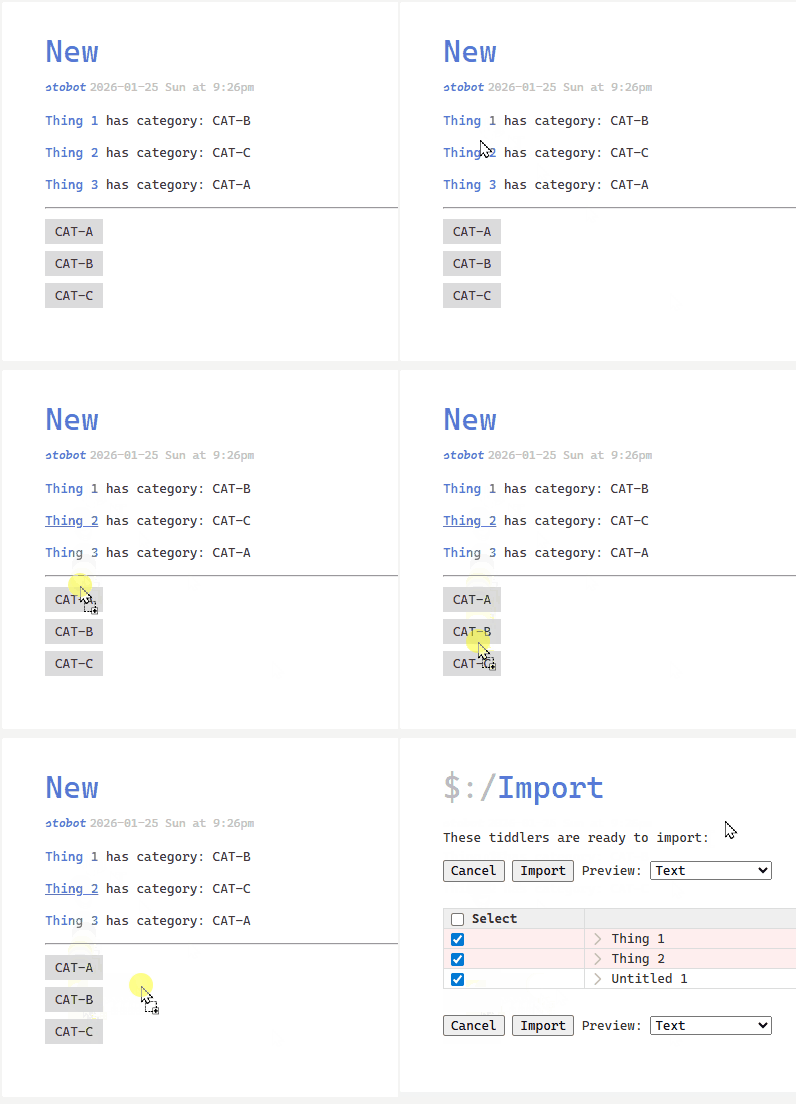
One small thing I’m noticing as I test is that when there’s not a drop zone (if I miss it slightly), things go right to import, while the browser doesn’t do that. The cursor also indicates as such.
Here’s a browser (desired behavior):
Here’s what it’s doing in TDRS
BurningTreeC, great work and great speed speed of motion!
What are the Linux distributions where people have the smoothest experience with TiddlyDesktopRS so far?
I am using Linux Mint, and responsiveness is quite a bit lower to compare with browser experience. I also manged to make the whole OS unresponsive a couple times by scrolling through a long list of titles of shadow tiddlers listed on the sidebar (tried WEBKIT_DISABLE_DMABUF_RENDERER=1 tiddlydesktop-rs; WEBKIT_DISABLE_COMPOSITING_MODE=1 tiddlydesktop-rs; TIDDLYDESKTOP_DISABLE_GPU=1 tiddlydesktop-rs, but the level of responsiveness was not increased by that). Also, the scrollbars of the story-river and the sidebar overlap.
The idea of TiddlyDesktop-RS Commands Plugin is great. I have tried it a little bit and I see that this could be quite useful!
Thank you for your massive work!
This document lists the system dependencies required for TiddlyDesktop-RS on Linux. Missing dependencies can cause performance issues, rendering problems, or missing features.
sudo apt install \
  libwebkit2gtk-4.1-0 \
  libgtk-3-0 \
  libglib2.0-0 \
  libayatana-appindicator3-1 \
  gstreamer1.0-plugins-base \
  gstreamer1.0-plugins-good \
  libva2 \
  libva-drm2 \
  libva-x11-2 \
  mesa-va-drivers \
  mesa-utils \
  libegl1 \
  libgl1
Optional for better media support:
sudo apt install \
  gstreamer1.0-plugins-bad \
  gstreamer1.0-plugins-ugly \
  gstreamer1.0-libav
sudo dnf install \
  webkit2gtk4.1 \
  gtk3 \
  glib2 \
  libayatana-appindicator-gtk3 \
  gstreamer1-plugins-base \
  gstreamer1-plugins-good \
  mesa-dri-drivers \
  mesa-va-drivers \
  libva \
  libva-utils \
  mesa-libEGL \
  mesa-libGL
Optional for better media support:
sudo dnf install \
  gstreamer1-plugins-bad-free \
  gstreamer1-plugins-ugly-free \
  gstreamer1-libav
sudo pacman -S \
  webkit2gtk-4.1 \
  gtk3 \
  glib2 \
  libayatana-appindicator \
  gst-plugins-base \
  gst-plugins-good \
  mesa \
  libva-mesa-driver \
  libva
Optional for better media support:
sudo pacman -S \
  gst-plugins-bad \
  gst-plugins-ugly \
  gst-libav
sudo zypper install \
  libwebkit2gtk-4_1-0 \
  gtk3 \
  glib2 \
  libayatana-appindicator3-1 \
  gstreamer-plugins-base \
  gstreamer-plugins-good \
  Mesa-dri \
  Mesa-libva \
  libva2
GTK applications on KDE benefit from proper GTK integration:
sudo apt install kde-config-gtk-style gtk3-nocsd
sudo dnf install kde-gtk-config
sudo pacman -S kde-gtk-config
Wiki folder support requires Node.js 18 or later. Single-file wikis work without Node.js.
Debian/Ubuntu (may have older version):
sudo apt install nodejs npm
Fedora:
sudo dnf install nodejs npm
Arch:
sudo pacman -S nodejs npm
# Node.js 20.x LTS
curl -fsSL https://deb.nodesource.com/setup_20.x | sudo -E bash -
sudo apt install nodejs
curl -o- https://raw.githubusercontent.com/nvm-sh/nvm/v0.39.0/install.sh | bash
source ~/.bashrc
nvm install 20
nvm use 20
Only needed if building from source.
sudo apt install \
  build-essential \
  curl \
  wget \
  file \
  libssl-dev \
  libgtk-3-dev \
  libwebkit2gtk-4.1-dev \
  libayatana-appindicator3-dev \
  librsvg2-dev \
  libglib2.0-dev \
  libcairo2-dev \
  libpango1.0-dev \
  libgdk-pixbuf-2.0-dev \
  libsoup-3.0-dev \
  libjavascriptcoregtk-4.1-dev
sudo dnf install \
  gcc \
  gcc-c++ \
  openssl-devel \
  gtk3-devel \
  webkit2gtk4.1-devel \
  libayatana-appindicator-gtk3-devel \
  librsvg2-devel \
  glib2-devel \
  cairo-devel \
  pango-devel \
  gdk-pixbuf2-devel \
  libsoup3-devel \
  javascriptcoregtk4.1-devel
sudo pacman -S \
  base-devel \
  openssl \
  gtk3 \
  webkit2gtk-4.1 \
  libayatana-appindicator \
  librsvg \
  glib2 \
  cairo \
  pango \
  gdk-pixbuf2 \
  libsoup3
pkg-config --modversion webkit2gtk-4.1
Version 2.40+ is recommended for best performance.
vainfo
If this command fails, install vainfo / libva-utils and ensure your GPU drivers support VA-API.
glxinfo | grep "OpenGL renderer"
Should show your GPU name. If it shows “llvmpipe” or “softpipe”, hardware acceleration is not working.
gst-inspect-1.0 --version
If you see errors like error while loading shared libraries: libXXX.so:
Search for the package containing the library:
apt-file search libXXX.so
dnf provides '*/libXXX.so*'
pkgfile libXXX.so
Install the package found
See the main README.md for environment variables to tune performance:
| Variable | Effect |
|---|---|
TIDDLYDESKTOP_DISABLE_GPU=1 |
Disable all GPU acceleration |
WEBKIT_DISABLE_DMABUF_RENDERER=1 |
Disable DMA-buf renderer |
WEBKIT_DISABLE_COMPOSITING_MODE=1 |
Disable compositing mode |
GDK_BACKEND=x11 |
Force X11 on Wayland |
GTK_USE_PORTAL=0 |
Disable GTK portal integration |
Issue when more monitors in use:
The Application starts always on that screen where the explorer window with tiddlydesktop-rs.exe is located.
Moving the started App to another monitor and launch the wiki
In Fedora, I get an an interesting bit of output…
$ pkg-config --modversion webkit2gtk-4.1

Package webkit2gtk-4.1 was not found in the pkg-config search path.
Perhaps you should add the directory containing `webkit2gtk-4.1.pc'
to the PKG_CONFIG_PATH environment variable
Package 'webkit2gtk-4.1' not found
Alas, I’m in the same boat as vylt above, continuing to see poor performance on Linux. All the libraries are there though and the OpenGL drivers are definitely loaded.
This was a really fun and enjoyable read by the way!  You’re a tremendous writer. Hopefully it’s the last you will hear of it.
I think it’d be worth sending it on to the Tauri team, not necessarily as a patch but at least as a real-world issue. They can then come up with a more strategic solution, as they have many users to consider.
It would be also fantastic if this and the other long pieces you have written (e.g. on dependencies, application structure), were placed in the repository.
Indeed, hereby I suggest bundling all these technical posts with releases. It won’t hurt having a doc/ directory with all the stuff in each of them. For example, while README.md has some technical details, it seems to be out of sync with this thread. Just above there’s a post with build dependencies. This info is missing in the main README.md on Github.
I’m interested to know whether all those huge (useful) docs you wrote by hand or used AI to generate.
Just wondering
TT
Technically, there’s no way to check if you’re AI or not, right? Don’t tickle my phobia 
@BurningTreeC is real. He’s a bloke in Northern Italy who likes to kayak on North Italian lakes.
His recent EXTENSIVE use of AI to create Docs is fine as long as they are ACCURATE.
They read okay to me so far.
MY QUESTION: Where is the short version?
TT
v0.2.3
Ok. So, I believe I got it working on Linux Mint:
“Package webkit2gtk-4.1 was not found in the pkg-config search path.
Perhaps you should add the directory containing `webkit2gtk-4.1.pc’
to the PKG_CONFIG_PATH environment variable
Package ‘webkit2gtk-4.1’ not found”
I reinstalled the dependencies and and now:
pkg-config --modversion webkit2gtk-4.1
2.50.4
2. Then I tried again
env WEBKIT_DISABLE_COMPOSITING_MODE=1 WEBKIT_DISABLE_DMABUF_RENDERER=1 TIDDLYDESKTOP_DISABLE_GPU=1 tiddlydesktop-rs
and this time scrolling through a long list of tiddler titles did not make the OS unresponsive.
GTK_OVERLAY_SCROLLING=0 solves the overlapping scrollbars issue.
The scrolling experience is still somewhat worse to compare with chromium/firefox, but it is totally workable.
I believe one can try Epiphany/GNOME Web browser (since it also uses WebKitGTK) and check what (scrolling) experience you get there. If it is comparable to how TiddlyDesktopRS behaves, you probably won’t get much from further tuning of TiddlyDesktopRS. For me in Epiphany browser scrolling was a little bit smoother, but not by a lot.
Unrelated issue: Ctrl+Z seems to not work.