[Release] Codemirror6 Plugin

<img alt="version" src="https://img.shields.io/badge/dynamic/json?url=https%3A%2F%2Fraw.githubusercontent.com%2Foeyoews%2Ftiddlywiki-codemirror6%2Fmain%2Fpackage.json&query=version&style=flat-square&logo=Codemirror&logoColor=white&label=codemirror&labelColor=black&color=black">

But that’s pulling from the online source which doesn’t tell the user what he has installed locally.

This is tw .com where cm6 is not installed:
Confirmed.    
:trophy:

1 Like

@BurningTreeC

Agreed and thanks for jumping in. Some of the color settings are pretty bad (worst at the moment are the choices used for text selection – almost no color/background contrast at all).

I’m trying to use this to override it:

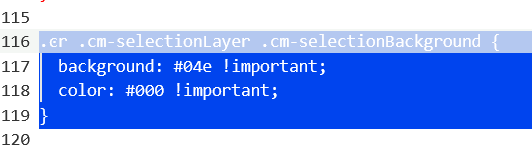
.ͼr .cm-selectionLayer .cm-selectionBackground {
  background: #04e !important;
  color: #000 !important;
}

The background almost works, but the color refuses to stick which suggests the color scheme is dynamic (overwritten). And even then, it’s not consistent. Look…

image

One selection, two different backgrounds, color:#000 completely ignored.

Where is your release, Simon?

@oeyoews

Issue 3

Steps:

  1. Create a new tiddler.
  2. Add some content to the body.
  3. Ctrl F
  4. Esc (to cancel the search)
  5. Tiddler is closed.

Escaping out of the Search panel should not close the tiddler. You need a delegate added to the Search panel to handle the Esc key.

I know this, codemirror6 also supports this, not sure why it doesn’t work in tiddlywiki, tiddlywiki’s global shortcut priority seems to break this

If you add your own delegate at the panel, this will be fixed.

Hi @CodaCoder @oeyoews

I’m not sure but I thought it works in my plugin version

@CodaCoder I’ll provide a link later

Hi @CodaCoder

This is the link to my version of the plugin:

https://burningtreec.github.io/tiddlywiki-codemirror-6/

Esc within the search panel isn’t working there either

1 Like

@BurningTreeC @oeyoews

Are either of you guys working on this? Where is the latest version? I’m finding quite a few issues…

1 Like

Is this project dead?

I’m left assuming it is and therefore reverting back to the CodeMirror5 plugin.

In so doing…

  1. The UX disabling and enabling plugins in ControlPanel is poor.
    Open the plugin (click far left), Click disable/enable button (click far right)
    Repeat N times. Thought I was watching tennis.
    @jeremyruston Any reason the enable/disable can’t be surfaced in the plugin header?

  2. Codemirror 6 leaves behind a modified text/vnd.tiddlywiki setting in ControlPanel (which needs to be removed and/or set to “codemirror” (in my case).

There are two branches I believe

@BurningTreeC provided a monolithic code mirror 6 to replace code mirror 5 and did this rapidly he has left it as delivered

@oeyoews broke it into pieces and rapidly added features and customisations

Neither made it clear the difference between each other’s implementation so it can be difficult to disambiguate each.

Both have provided a valuable product but are somewhat weak on internal explanations, configuration and documentation and the community could step in to help however, they first need to disambiguate.

  • Some of this info is available but not consolidated.

Sorry, the original intention of creating a new branch was to meet some of my own needs. After I finished these and fixed some bugs, it was stable enough for me personally, and I use it every day. As for the documentation, it is true that I haven’t done it well. Because the plugin involves quite fragmented things, I don’t know where to start, and another reason is that I don’t have much energy to improve the documentation.

1 Like

As I hope I illustrated all we need is enought info so we can install and use it, configure it and follow the basic structure. We need a kick start and the community can build on it.

  • I spent hours following each of the features you developed, reviewing and testing everything I could work out, I kept waiting for just a little more info so I could help build on it and share back.

@oeyoews
I use the autocomplete plugin from @Maurycy. There is a well-developed set of triggers from community (see for example Community Curated AutoComplete Triggers - Tips & Tricks - Talk TW (tiddlywiki.org)). Furthermore, the autocomplete works in fields other than text, so I like to keep both plugins autocomplete and codemirror6.

Are they compatible? My emphasis is on the autocomplete feature of Codemirror6.

1 Like

I tested autocomplete with the other codemirror6 and it was not working :frowning:

1 Like

If my AutoComplete plugin is not working with any plugin you’re aware of feel free to report it to me (preferably in the thread) and when I have the time I’ll (make an attempt to) ensure it’s compatible :slight_smile:

I did take a look at it just now, and the completions are really great, including some features that codemirror6 doesn’t have yet. I’ve never used any other completion plugins, so I haven’t done any compatibility testing yet. Sorry

For codemirror6’s completions, I thought it was necessary to give a brief introduction, so I spent an hour writing a short article.

Use autocompletion from CodeMirror6 to speed up your writing


Tag Autocompletion

  • When you type #, you’ll see a list of all your tags. Continue pressing Ctrl+j to quickly move to the next one. Of course, arrow keys work as well. Select the tag you want, then press Enter or Tab (mouse clicks are supported too). Your tiddler will then have the new tag added.

Try typing wiki to see what pops up!

Template Selection

  • When you type @t, a series of popups will appear. If this is your first time using it, you’ll see a tip—don’t hesitate, accept the current autocompletion. This should create a new tiddler titled $:/templates/new. In the tiddler’s text input field, type something, then return to your previous tiddler. When you type @t again, you’ll see the newly created tiddler. Accept the current autocompletion, and it will copy all the necessary fields from that tiddler to your current one. Be careful, as it will clear the current input box.

Tips: The template autocompletion window includes all tiddlers starting with $:/templates/ or $:/tags/TextEditor/Template.

Code Snippets

  • If you have content you need to input repeatedly, you may want to use code snippets.

  • When you type /, a list of code snippets should appear.

  • If you suddenly want to add a new code snippet while writing, just press @#add. A popup for adding a new snippet will appear. Click it, and you can quickly create a code snippet.

  • If you want to dynamically replace some content, you can use #{placeholder} or ${placeholder} instead. (One of my favorite features!)

<!-- for example -->
Your name is #{name1}, I am ${name2}

Images, Macros, and Other Autocompletions

  • As everyone knows, TiddlyWiki supports macros, widgets, image syntax, and embedding syntax. If you start typing these again, you’ll notice more autocompletion suggestions.

Emoji Autocompletion

  • Codemirror6 supports plugin extensions. You need to install tiddlywiki-cmp-emoji, then type : to select the emoji you want.

Autocompletion Cheat Sheet

Too many shortcut keys to remember? Just type /? to see all available autocompletion triggers.

For Vim Users

  • Codemirror6 autocompletion is so powerful, how could it not have a Vim mode? Enable Vim mode in your Codemirror settings. Of course, Vim lovers can set the jk shortcut too.

More Features

  • Codemirror6 has a lot of features. You can explore more details by visiting its settings page.

Bug Reporting

  • You might have noticed that Codemirror6 comes with a set of built-in commands. Type @#bug and press Enter to quickly submit an issue to the developer.
4 Likes

Thank you @oeyoews. Please also add this to the CodeMirror6 tutorial.

Small questions: where and how can I do the below adjustments?

  1. If I want to show the editor background and border like codemirror 5?
  2. If I want to add more commands?

Can I turn off syntax highlighting for TiddlyWiki itself? I mean the TW5 scripts not other languages.