Post inspired by Announcing Tiddly Date Input, a plugin that lets you edit dates easily
I’ve had a pure WikiText widget for a while similar to the one by TW_Tones which renders a native browser date input. This relies on Eric’s base macro of $:/TiddlyTools/Time/EditDate being available
These are the defaults:
<<edit-date-native
     field:"date"
     type:"date"
     class:""
     confirm:"no">>
Personally, I almost always call it with just <<edit-date-native field:"FIELDNAME">>
It creates a temp tiddler called $:/temp/edit-date/<title>/<field>.
How I use it
The main ones I change are field and type (I just use date and button).
Another way I couple it is with entry forms like this:
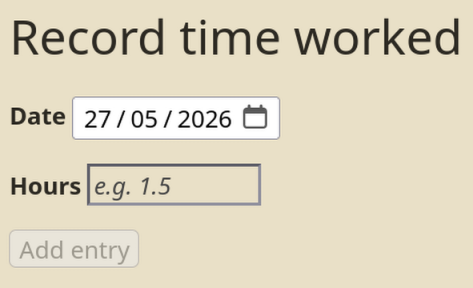
Code for work hours tracker
<$let
  data-tiddler="$:/yan/data/work-hours-tracker"
  temp-tiddler="$:/temp/work-hours-input"
>

! Record time worked

<$tiddler tiddler=<<temp-tiddler>>>

<form>

<label>''Date''
<<edit-date-native field:"date">>
</label>

<label>''Hours''
<$edit-text field="hours" placeholder="e.g. 1.5" size="10"/>
</label>

<$button disabled={{{ [<currentTiddler>has[date]has[hours]then[no]else[yes]] }}}>
Add entry
<$action-setfield $tiddler=<<data-tiddler>> $index={{!!date}} $value={{!!hours}} />
<$action-setfield $tiddler=<<temp-tiddler>> date="" hours="" />
</$button>

</form>

</$tiddler>
Persistently showing the date is a bit more involved, here is an example from my media library:
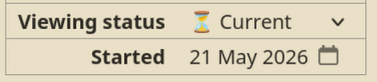
<th>Started</th>
<td><$view field="date started" format="date" template="DD mmm YYYY" /><<edit-date-native field:"date started" type:"button" class:"tc-btn-invisible">></td>
To add it to your wiki
- Get $:/TiddlyTools/Time/EditDate from Eric’s website
- Copy and paste the below to a new tiddler, tag it with
$:/tags/Global/View.
WikiText code
\procedure clear-hyphens()
<$action-setfield
    $tiddler=<<targetTiddler>>
    $field=<<targetField>>
    $value={{{ [<actionValue>search-replace:g[-],[]] }}} />
\end

\procedure edit-date-native(field, type:"date", class:"", confirm:"no")
<$let
    targetTiddler=<<currentTiddler>>
    targetField=<<field>>
    tempTitle={{{ [[$:/temp/edit-date/]addsuffix<currentTiddler>addsuffix[/]addsuffix<field>] }}}
    safeId={{{ [<field>search-replace:g[ ],[-]] }}}
>
  <$tiddler tiddler=<<tempTitle>>>
    <$transclude $variable="edit-date"
        format="YYYY0MM0DD"
        field="text"
        id=<<safeId>>
        type=<<type>>
        class=<<class>>
        confirm=<<confirm>>
        inputActions=<<clear-hyphens>>
    />
  </$tiddler>
</$let>
\end
The id field is so you don’t get problems when more than one is on the page, if I remember right. Wish I’d commented it.