TiddlyTools in-wiki Browser is super-useful

@EricShulman, following up on your great innovations I have one issue and some comments.
I’ll post first about the issue to get it out of the way.

One use of the miniBrowser for me is to iframe local TiddkyWikis so I can edit them.
In tests I’m finding saving is failing.

That leads to my question …

Q10: Is failing TW saving in miniBrowsers a sandbox issue?
Would "allow-downloads" solve it?

Wondering,
TT

A comment on layout of menus in the miniBrowser …

The miniBrowser is replete with excellent CSS.

For my use I need a very regular monospace layout on menus.

Easily achieved with …

/* DROPDOWN STYLING */
 button.tt-browser-mark {font-family:monospace;}

Result …

TT

Comment on a TRICK to Sort Menus as needed …

Issue: In long lists of bookmarks I need a few at the top.
Solution: Easy. Just prefix them with extra spaces.

Result: Screenshot 2026-01-07 18.49.01

Reuters comes first because the Bookmark started with a space …
Screenshot 2026-01-07 18.59.20

Useful info!
TT

UPDATE : No longer relevant because now all folders can be arranged through D&D.

Adding allow-downloads does fix that issue. However, instead of using allow-downloads, I just removed the sandbox="..." attribute entirely. This effectively permits almost all regular web page actions, including

  • allow-downloads for TiddlyWiki download saver handling
  • allow-popups for tm-open-external-window or <a href="..." target="_blank">...</a>
  • allow-modals for window.confirm(...) messages
  • allow-scripts for javascript execution

enjoy,
-e

Comment on #fun search.

Because the miniBrowser has such great flex on finding I can globally search for and isolate the hashtag #fun.

Result:

TT
meanwhile a Random Dog.

Comment on Browser Link takeover …

Thanks to the miniBrowser I can make a TW a better browser.

This is what I did after installing TiddlyTools Browser

  1. Make a TW JUST for browsing
  2. Create sidebar tabs that persist (see this)
  3. Create a TiddlyTools Browser (ever open) in the Sidebar with iframe name=minibrowser
  4. Modify core TW parsers to direct links to target=minibrowser

Result: Browse the net inside a TW and direct all links to the minibrowser.

Technical Notes:
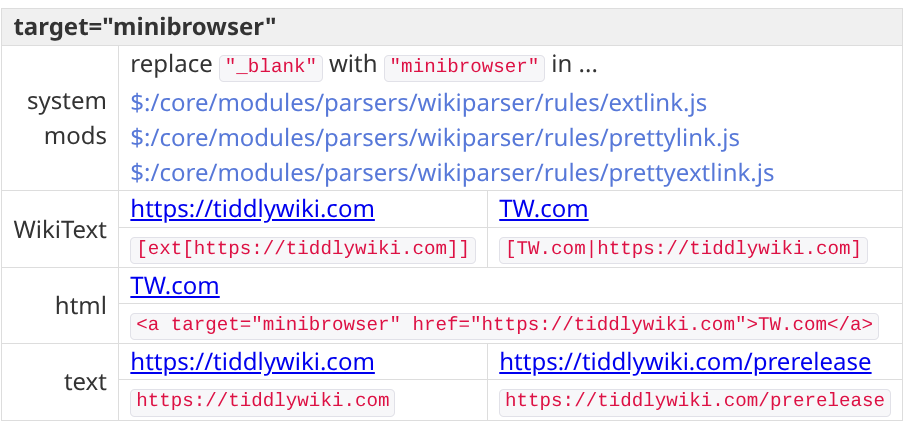
TT

1 Like

New feature: re-order the bookmarks using drag-and-drop in the bookmark folder popups!

Notes:

  • The custom bookmark order for each folder is stored the folder’s list field.
  • Dropping a bookmark always inserts it before the bookmark it is dropped upon.
    • To move a bookmark to the bottom of the list, first drop it onto the last item (to place it before that item), then drag the last item and drop it onto the 2nd -to-last item to swap their order.
  • It only works to re-order bookmarks in the same folder (i.e., you can’t drag-and-drop to move a bookmark between folders)
  • You can’t change the order of nested folders, which are always listed after the bookmark items, and are sorted in alpha order.

update: fixed a bug… deleting a bookmark now also removes it from the folder’s list field

-e

DRAG & DROP in miniBrowser

This is just a comment on the new excellent D&D …

FWIW, in a few of my Bookmark Folders having d&d really helps increase usability.
For example here is a complex, now better re-organized, folder of resources I often use for English…

TT

I assume that the dividers (i.e., ---- REFERENCE -------) are actually bookmarks with some “dummy” URL values, but I wonder why you didn’t just use separate sub folders?

-e

1 Like

Actually I just edited the JSON and the urls for them are all empty.
It seems to work fine!

If by accident you click on one of those “headings” the menu just seems to exit.

Am I doing something wrong?

TT

Ah. Good question.

Actually I will add folders to many resources later when I’ve prepared them.
For the use case that folder is the Single “Overview”.
I do want it undivided.

Best, TT

EASY APPLICATION, GREAT FUNCTION – #1

This is just an example of how flexible the miniBrowser is …

Background assumptions …

(1) you have converted a bunch of your browser Bookmarks to miniBrowser format that you’ll use regularly;
(2) you need a simple way to use those;
(3) you don’t need to edit them, only click them;
(4) you understand miniBrowser CSS.

The combination of “intelligent loading / unloading” of iframes in the miniBrowser WITH fine-grained CSS of it’s UI gives enormous scope on different ways to present output.

Here is one minimalist example I already use in the Sidebar …

I used miniBrowser CSS to hide the iframe until it is loaded. Hence only 3 icons show. Nothing else is needed.

The Down Arrow enables selection of any link …

Screenshot 2026-01-09 16.15.37

… that opens the selected address in an iframe, like this …

.

The Magnifying Glass Search is confined to externalised sites. Those with Suffix “+”

Click a link and a browser tab opens for it. In the TW nothing changes.

Clicking the X icon clears any iframed site.

The code for all this is …

<$let width="100%" height="50vh" name="br-bmk-only" folders="$:/config/TiddlyTools/Bookmarks" find="[suffix[+]]" extlink="+" zoom=".75,1">
 <span class="tt-bmk-only">{{TiddlyTools/Panels/Browser}}</span>
</$let>

[CSS omitted]

It is marvellous,
TT

Reminder: you don’t need to set variables if they are using the default built-in values. Thus, in your posted code, you can write:

<$let name="br-bmk-only" find="[suffix[+]]" zoom=".75,1">

Also, I’m interested in seeing your CSS so I can add “Customization” info in the help documentation.

-e

1 Like

Yeah. I know. And it is better that way.
I’m just trying to get a few more uptakers understand the options.

It is a brilliant tool
TT

1 Like

@EricShulman I wanted to follow up on this and thank you for allowing custom extlink.

I now have practical examples of how that helps (in combination with the find filter).

Case 1: Routine external links that can’t be iframed. I use standard suffix "+".

Case 2: Optional external links that can be iframed but sometimes need to open in a new tab for complex searches. I use suffix "⇗".

Case 3: Internal (local files) & external links to music. Some iframeable, some not. So, open in a new tab for audio player consistency. I use suffix "🎵".

You get the idea?
The suffix I’m using to good effect to easily differentiate types of link.

Just comments
TT

Update for drag-and-drop handling to re-arrange bookmarks:

Also, URLs are now automatically wikified before being applied. This allows you to use transclusion shortcut syntax (i.e., {{tiddler!!field}}) or global macros/procedures (i.e., <<getMyInput>>) within URL strings!

This makes it possible to use TiddlyTools/Panels/Browser to dynamically construct URLs for search engines. For example, to submit a Google search with the TiddlyWiki sidebar search input, you can use

https://www.google.com/search?q={{$:/temp/search}}

enjoy,
-e

Whoa! Super useful!

For instance I need to use a search engine without AI generated results sometimes.

Now I can via a “dynamic” miniBrowser bookmark! …

https://{{opts!!pre-ddg}}duckduckgo.com/?q={{$:/temp/search}}

... the value "pre-ddg" is set to "noai." if no AI is needed.

Efficient, easy.

TT

I assume that you are saying this within the in-wiki Browser solution specifically. Are you using the $wikify widget and could it have performance issues? I am just curious.

Yes… I am using $wikify within the TiddlyTools minibrowser, just before setting the URL in the IFRAME (or before sending tm-open-external-window).

This is a completely reasonable use of $wikify, since it enables URLs to be dynamically constructed from any wikiscript syntax you need (typically a simple transclusion of a field or index value).

Also note that the performance of the $wikify widget is generally only of concern when it is invoked multiple times from within a loop.

In the TiddlyTools minibrowser, this is not a problem because $wikify is being invoked just once in response to a deliberate user interaction (choosing a bookmark, pressing enter from the URL input, or clicking the “open in separate window” button).

-e

True, but functions or “Substituted attribute values” (backticks) can do this now as well, but I have not seen any performance comparisons.

I guessed this was the case here.