TiddlyTools in-wiki Browser is super-useful

Great! Now my sidebar has a file browser …

Screenshot 2025-12-28 18.02.25

… and a specialized, framed, TW image editor (live) …

Thanks!
TT

Comments on docs …

Overall: Clear and to the point!
Anyone interested in the full potential of TiddlyTools miniBrowsers should read it.

Small issues.

#1: Doesn’t the example need a closing “</$let>”? Wondering…

#2: In the various options I don’t see extlink="+" variants listed.
Is, for instance, this still valid? …

Best
TT

Comment on Bookmark folders=""

That is great! For instance using code like this …

folders="$:/config/TiddlyTools/bkm/inbox"

… means one can (1) define the bookmarks that a specific miniBrowser uses; (2) makes bookmark management a lot easier.

In my case a thousand bookmarks became much easier to maintain.

TT

Comment #1 on zoom=""

Very useful to able to set starting zoom levels differently in different miniBrowsers!

For instance on my moderate size Chromebook zoom=".5" is okay to see some websites, but too small text for serious reading.

I did some testing and found that tiddlywiki.com renders fine and readable set like this …

<$let name="tw-stuff" zoom=".75">

Here it is in the Sidebar where I consult it …

In short, the custom zoom setting is great for adapting the tool for different working environments.

TT

I had removed the extlink option to reduce code size, but since you’ve asked about it, I’ve now restored support for it (and added it to the documentation).

re: a closing </$let>… technically, this is not required since it will be automatically closed at the end of the tiddler. Nonetheless, I’ve added it into the documentation to avoid any confusion.

-e

Thanks! That is very helpful because I found I needed two types of external link. One that goes to _blank and one that goes to a unique-tab. Having more than one extlink suffix let’s me do that!

TT

Comment #2 on the zoom="<n>" new Slider

I dunno how to successfully describe the good and the not so good on the new Zoom Slider without getting in an explanatory pickle.
I’ll try. But please ask if it is unclear.

Two points to start …

  1. Customizable zoom is great!
  1. All my comments are coming from the “fat-finger situation” of a modest screened Chromebook with no pen or keyboard.

My needs on zooming?
Based on tests so far, for my environment …

  1. For NORMAL use I’m finding that ".5" ".75" & "1" work to cover most all use cases

A button to toggle between those three might work better for me than a range slider?

  1. For SPECIAL use, for instance as an adjunctive to Visual Art analysis already possible at the UK National Gallery

Here a range slider could add to that site’s existing zoom feature. But in a fat-finger environment it would probably need to be long & look like this … ??

What am I saying?

  • For (my) normal use I need no more than 3 zoom levels and a slider in a “smaller screen fat-finger situation” seems over ui’d.
    I’d prefer a toggle. Dunno!

  • For my special interests in visual art a big slider could be useful.

I hope this is clear enough to convey enough UI sense!
TT

I’ve just added handling for setting a zoom="min,max,step" variable to control the $range slider.

The default range is unchanged (i.e., zoom="0.5,5,0.25"), and the “,max,step” portion of the variable’s value can be omitted (e.g., zoom="1" is the same as zoom="1,5,0.25"). For your “NORMAL” usage, specify zoom="0.5,1"

The $range slider has class=tt-browser-zoom, so you can change its size (which defaults to width:5em) using custom CSS. For example:

<style>.my-art-browser .tt-browser-zoom { width:100% !important; }</style>
<$let zoom="1,10,1">
@@.my-art-browser {{TiddlyTools/Panels/Browser}}

and if, for some use-case, you want to a constant zoom value (e.g., zoom="2") you can, of course, hide the $range slider using:

<style>.my-special-browser .tt-browser-zoom { display:none; }</style>
<$let zoom="2">
@@.my-special-browser {{TiddlyTools/Panels/Browser}}

enjoy,
-e

Great! The small range 0.5,1 I confirm is now “fat-finger compatible.”

And thanks for the explanation of the ranges and the example!

TT

Hi @EricShulman

Love the ability to be able to choose zoom settings for the browser window. Sometimes it would be super useful to be able to set the zoom in a numeric box rather than by slider. I find 1.5X to be be perfect for one of the sites I am viewing.

Also my browser does not have the settings or help buttons. Can you say why?

Cheers, Rob

Settings and Help are optional extra add-ons:

For Settings, install TiddlyTools/Panels/Settings
For Help, install TiddlyTools/Panels/Help and TiddlyTools/Panels/Browser/Help

-e

Comment: Now we are Cooking By Gas !!

The miniBrowser is a solution to many issues.

I’ll give one example … Searching the internet from the TW Sidebar …
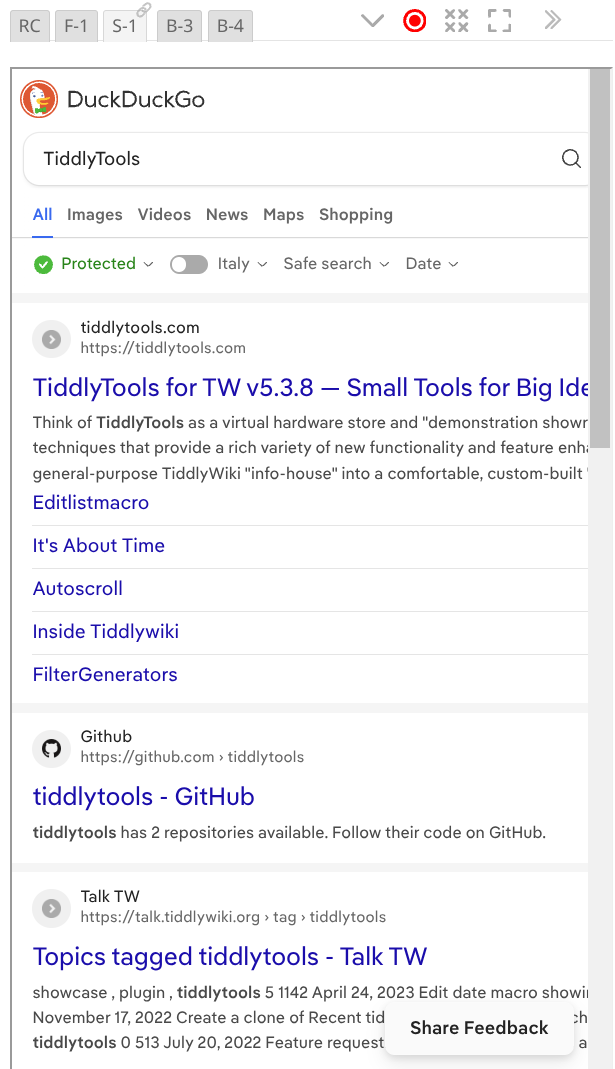
The tool has …

  • Easy Bookmarking
  • Bookmark Filters
  • Bookmark Folder Assignment to individual miniBrowsers — allowing independent hierarchies of Bookmarks
  • Ability to Auto-Open external Tabs/Windows for non-iframe-ables
  • Record of each miniBrowser’s last site
  • Configurable Zoom ranges in each miniBrowser

I can’t thank @EricShulman enough!
TT

1 Like

The most recent TiddlyTools Browser update (earlier today) no longer uses indexes in $:/config/TiddlyTools/Browser to store the current name and URL for each browser. Instead, it uses separate “qualified” temp tiddlers ($:/temp/TiddlyTools/Browser-1234543...). This was done to make the browser’s “state” information separate from the “config” settings, as well as making the code cleaner and more consistent.

Note that, while these temp tiddlers persist during the current session, they are not usually saved in the file. If you want these temp tiddlers to be saved, you can define a tiddler tagged with $:/tags/Global, containing a macro named publishFilter():

\define publishFilter() [prefix[$:/temp/TiddlyTools/Browser]]

-e

I think I do. They are kinda “where I am settings” worth persisting.

Thanks for the info.

TT

I’ve found a “limitation” when using a named minibrowser with an <a href=...> link.

Suppose you have a tiddler containing:

<$let name="somename">{{TiddlyTools/Panels/Browser}}</$let>

Then, in some other tiddler content, you write:

<a href="https://example.com" target="somename">click me</a>

with the intention of having that “click me” link shown in the aforementioned “somename” minibrowser.

The problem is that this only works if the “somename” minibrowser is already showing a rendered iframe. If it is showing “click to start” or “enter a url or select a bookmark”, then there is no actual iframe for the targeted link, and it will open in a separate tab instead.

-e

Eric, I just had a quick look in passing, and visited TiddlyTools for TW v5.3.8 — Small Tools for Big Ideas!™ just as a test I went to tiddlywiki.com and my knee jerk reactions was to apply one of my JavaScript bookmarklets, only to discover, as one may expect, they only apply to the parent wiki.

Dont go out of your way to resolve this but I just though I would ask if there is any opportunity to permit such bookmarklets to target the iframe window?

  • I was able to place the bookmarklet in a tiddler and drop it into the iframe and run it.

Update: I’ve added handling so a minibrowser IFRAME can be initially rendered by setting enable=yes and any non-blank default URL):

<$let name=somename enable=yes url=" ">
{{TiddlyTools/Panels/Browser}}

This allows you to successfully use <a href=...> syntax to target a specific named minibrowser:

<a href="https://example.com" target=somename>click me</a>

-e

Eric, I added a bookmark inside the mini-browser and provided a bookmarklet in stead of a url, ie a javascript payload and as may be expected it failed. I wonder if there is a way to accommodate these?

You can try this experiment:

In TiddlyTools/Panels/Browser setURL(), this line:

<$let url={{{ [<url>!regexp[^(http|\./|\.\./|file:)]addprefix[https://]] ~[<url>] }}}>

detects URLs that start with “http”, “./”, “../” or “file:”. If none of those patterns are found, then it assumes that there is a missing protocol prefix, and automatically adds "https:// to the URL.

I assume that your bookmarklets syntax starts with “javascript:”. Try changing the above line to:

<$let url={{{ [<url>!regexp[^(http|\./|\.\./|file:|javascript:)]addprefix[https://]] ~[<url>] }}}>

this should allow the IFRAME src param to be set to your bookmarklet code.

Let me know what happens…

-e

1 Like

This is just a comment.

Thanks for that info!

Actually my issue has gone away with your latest additions …

Now I can precisely set the start url and it always displays as I want!

I’ll comment more later.

Best
TT