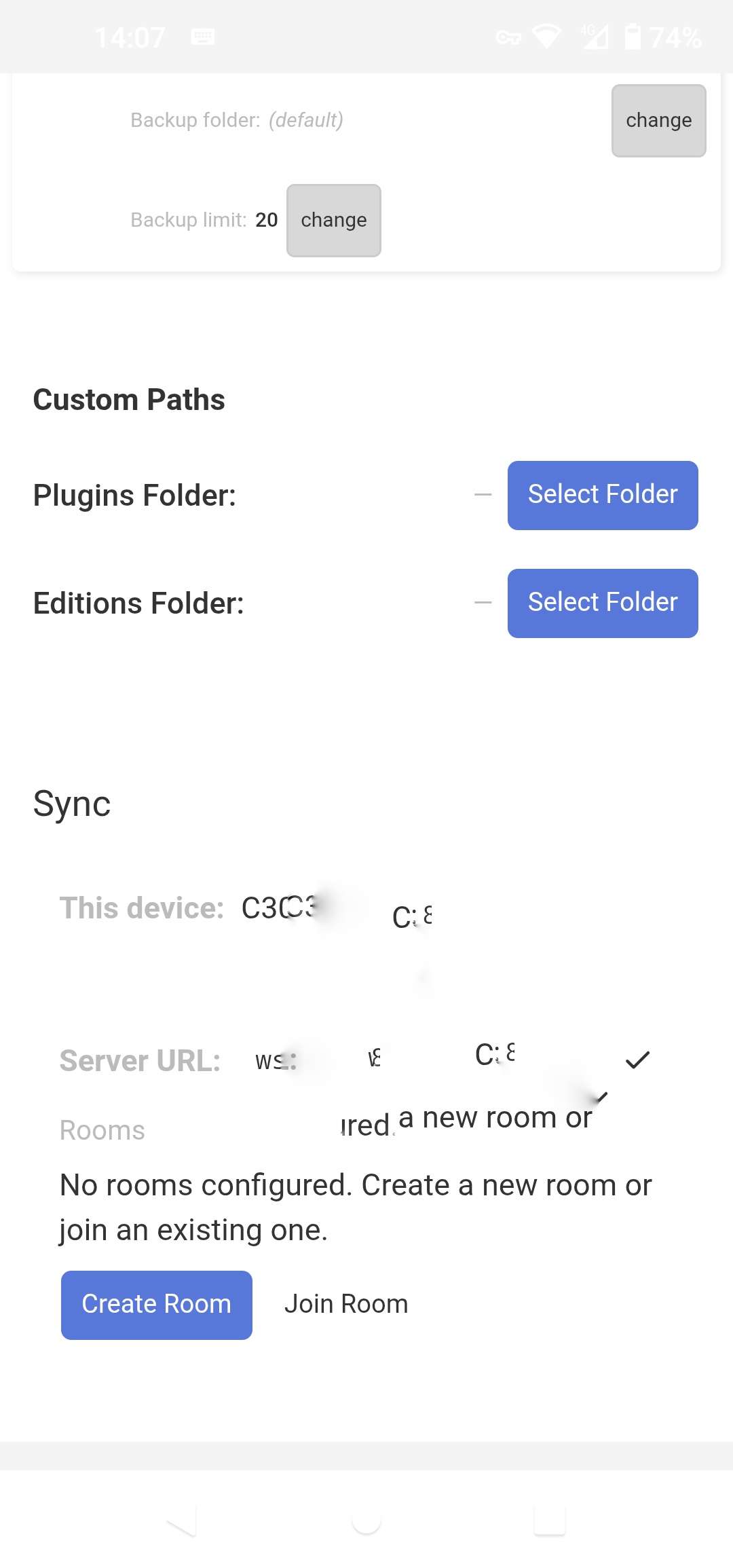
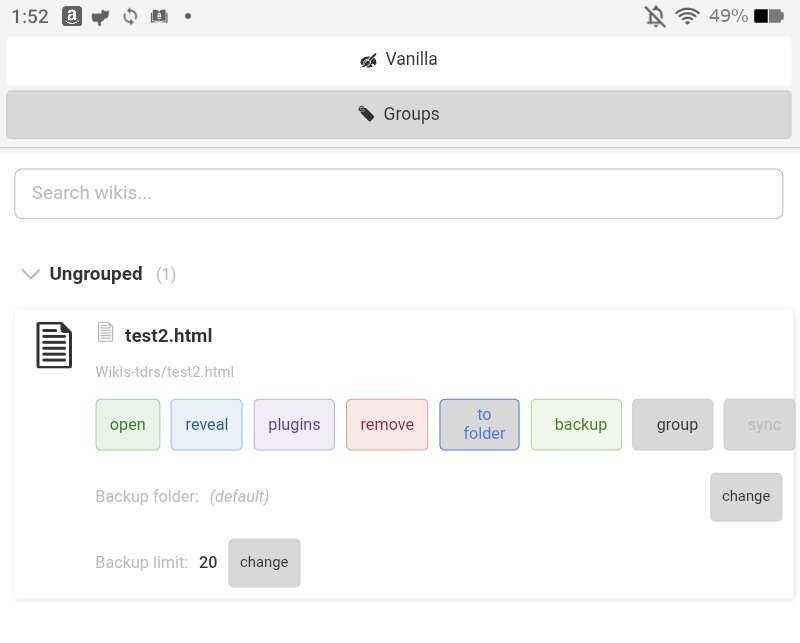
Vanilla theme dashboard (see bar at very bottom, slight drop shadow reveals otherwise invisible buttons, I redacted a few device details so ignore that. Bar at top with clock also obscured.)
Changing to dark theme helps with nav buttons but loses visibility on others!
Some real developments to catch up with Simon - so many possibilities! Phone, laptop. Laptop, phone, Frankfurt! Aunt in Ohio! I had wondered where she’d gone.
Because I am easily confused I’m trying to visualise ‘Rooms’ quite literally, thinking it will help me explain the idea to some new users on my network.
I can imagine creating a room with a name and code/password. Those 3 elements are the room’s address. It’s a nice, sunny room.
Different devices on my LAN, each with TD-RS installed, can see created rooms listed on their dashboards and join/enter them using the room names and code/passwords. They can create their own rooms too. Easy so far.
I now have 2 or more devices in a room, (sat in their armchairs, drinking coffee, admiring the monstera.)
This is where the metaphor breaks down for me a bit.
The devices in the room are sharing and coworking on wikis.
Is it correct to think of those wikis as documents shared on a shelf in a named room? Like editable books in a library?
All devices present in that room can read and edit those documents simultaneously, and any changes will propogate/sync across all copies instantly?
If one device leaves the room it takes it’s own copy of the document/wiki with it.
However that copy won’t get updated/synced until the device reenters the room and someone clicks save on that document.
Changes made to a copy edited outside the room will only get synced to all other devices in the room upon reentry? (Non-destructively? i.e nothing can be lost?)
Multiple rooms can be created, multiple devices can sit in them, and can be sat in multiple rooms at the same time. Multiple documents, sometimes the same document, can be put on the shelves in each room at the same time (By enabling sync in the dashboard at document level. )
If sync is enabled on a document it is editable in any room that the ‘owner device’ enters?
Any devices entering any room can edit and sync those documents and check a copy out when exiting the room. If they never exit the room the document remains editable.
Finally, if a remote server is specified, rooms can be entered by devices that are not on your LAN. That doesn’t mean the room is accessible to everyone on the web. Only to those who have the 3 elements; room name/code/password. They are therefore worth being careful with.
I told you I needed humouring, there’s nothing like stretching a metaphor! No need to waste your time explaining if I’m off track. But if this room/devices/shelf/wiki metaphor is correct it will help me understand what’s going on a lot.
Only the Code and the Password are actually the address, the Room name is arbitrary, just an identifier for you.
Once you’ve exchanged the room credentials, they have access to the room, if they activate the connection to it, yes.
Exactly, they are simultaneously editable by all users connected to the room the wiki is shared with.
As instantly as latency allows. The “further away” you are from the Relay server the worse it gets theoretically. Best performance if the devices are on the same network.
Yes. This isn’t meant to share passwords and sensitive data.
Correct. Wiki must be online / started, Sync must be enabled, another User must be in the Room, then Sync works.
Well good point! Deletions DO propagate. Conflicts like two tiddlers edited at the same time while offline bring up a “conflict resolver” with a diff and a “Keep local” or “Keep remote” button. But it’s still a little bit brittle. I want to work on that.
Multiple rooms can be created, yes. Multiple devices can sit in them, yes. A device can be in multiple rooms at the same time, check. But a document can be only in one room at the same time.
No, only in the assigned room.
Only the documents assigned to that room. If they never exit the room the document remains synced and changes made by another device will be applied next time both devices are online and connected to the room and have the wiki open.
No, the room is NOT accessible by everyone on the web. First of all, the devices must do a security handshake through the server to exchange information. And only after that handshake connection is established. And yes, Code and Password is sensitive information and therefore worth being careful with.
You’re right on track with your questions and I’m happy to explain!
When I try to navigate to a file, and finally click on one, it says “Use this folder”.
Folder? I didn’t want to use node.js yet.
So I use the system backout to back out. I back out several levels and then suddenly … the file I originally clicked is loaded.
So, why does it say “Use this folder” when I was selecting a file?
Once in the file, I don’t see how to get back to the dashboard. I use the Android system button and that sends me all the way back to the Android home screen.
So, how do I escape from a file I have loaded and return to the TDRS dashboard?
The folder permission is needed for the eventually used “attachments” directory if “External attachments” are enabled. This directory gets created beneath the wiki file / beneath the tiddlywiki.info
Android needs folder permissions on that folder and therefore I do it all in one step at wiki generation. Two steps for the user. But like this you do it once and it’s done.
In this step the folder containing the wiki file needs to be selected. If you give it access to a parent folder the app would have access to everything within that parent folder. If you don’t grant access, external attachments won’t work.
Going back to the dashboard needs to be done using the Android “Recent” screen or by going back to the Home screen and opening the App again.
Escaping from a file is just as simple as hitting the back button in the navigation bar or removing it from the Recent screen.
Is TDrs using webview? Since webview is chrome-like, I was wondering it would be possible to enable browser storage. The use-case is that on Android, Android can shut your app down any time it wants to recover memory, even if you still haven’t saved. This happens, for instance, if you switch over to a browser to verify some fact. When you switch back (to whatever App you were running, typically Tiddloid but now TDrs), your edits will have been lost.
Of course one solution would be to always save. But since the save button is at the top of the TW file, this isn’t always convenient. Scroll to the top, losing your place. Save. Scroll back.
Anyway, just asking in case it was an easy setting.
The problem with the attachments directory is that the standard node.js server only serves up from a files subdirectory. So if you want compatibility with standard node.js, you need either to use files, or the ability to set your own path name.
Is the Android version supposed to be able to create node.js versions? When I attempted to create a file (because there is no create folder option), and then followed up by selecting basic server, it created a 0 byte file.
Does the sync just work with stand-alone files? Or can it/will it work with nodejs?
That’s pretty amazing how the changes get shot over so fast.
Cosmetic issue – the buttons or tags below a file name don’t wrap and thus run off the screen, at least on my tablet. In this example, the “room” button is off the right edge.
What’s cool is that I was able to take a screenshot, share it with TDrs android, and then pick it up on the desktop for editing and posting here.
But what it does might be cooler than tabs. Each TW file is its own instance. So you can navigate to each TW file with the Android task manager. And at least from Android 14, you can split the task windows, so you can view 2 TW files, one on top of the other.
Or at least that’s what it’s looking like to me so far.
Does the Relay server relay just the network info, or the actual data in the TW files? It seems like the Relay server would get bogged down quickly if it had to handle all the (future) data passing through.
I’m pretty sure that on Tailscale and Syncthing, what they do is use a relay to just exchange network information. Then the instances talk directly with each other.
If you use a wifi extender, you can be on a different network even when only a room away. It seems a shame if all the data has to flow to Frankfurt just to cross the room.
I also agree with @Mark_S in this regard… All the attachments should be in a subdirectory folder called files for compatibility with other node js based implementations
Yes but the Relay-server approach is the most infrastructure-leightweigtht approach.
Note that if devices are on the same network they can and will still communicate with each other ONLY through that network - if the network allows it.
if the extender is in “bridge” or “access point” mode rather than “router” mode everything is kept on one network so sync stays local to the network.
Regarding the button wrap @Mark_S mentioned - if reorganising the Ui is on the roadmap I think you could simplify a lot and make it much more app like. Here’s one suggestion for the hat, other users will have different ideas I expect, but for me the USP of TD-RS is now the ‘rooms’ concept, it’s a ‘marketable’ idea, and something app users or newcomers might latch onto - there’s a room, it’s got shelves in, bring wikis to the shelves, users can share rooms and edit the wikis collaboratively.
The landing page is way too busy at the moment for an app imo, so here’s one declutter suggestion;
Landing page top buttons - Open wiki file, open wiki folder, create wiki file.
A config button - to set Language and theme, Custom Paths plugins/editions
D&D area
Wikiname as a button - click on wikiname calls dropdown/popup submenu with open, reveal, remove, convert (to folder) i.e all are ‘filesystem’ actions.
Rooms: (name of room wiki is in/none) button beside each wiki name. It calls the dropdown/popup list of rooms available to the wiki, create room, join room buttons and another submenu with the room info.
Residents button that calls a list of rooms the current device is in, and shows connected peers that share that room. Available from peers goes here too.
Co-work button calls a sub-menu with the groups (shelves) creator/selector, sync (share/check-in) dialogues.
Settings button calling menu for Plugins, backup, backup folder - change, backup limit - change.
Thanks for bringing this up! I will note all this for later, when all the functionality is done and doesn’t need any bigger changes anymore.
How about a button that slides the config section open, like the tiddler-info section?
Maybe also here, clicking on the wiki name slides the section open with these buttons…
Yes, the Room a wiki is in is an important info at should be more prominent! Thanks!
I would like to keep this information joined to the dedicated Room somehow.
That is interesting, how do you imagine groups? The creator of a Room is actually not traceable, but without server-side authentication I wouldn’t know how to trace the original creator.
Yes, also there I could imagine a slide-open section.
Thank you for your suggestions!
When I have time for refactoring the landing page I’ll try to make it more app-like!
By ‘Groups creator/selector’ I only meant the already existing buttons that create or select groups. Not creator id.
Groups seem to be similar to category tags. Shelves could be another name for them.
Maybe a toggle option between a ‘wikiname view’ and a ‘room name view’ would allow specific room info to be kept in the same space?