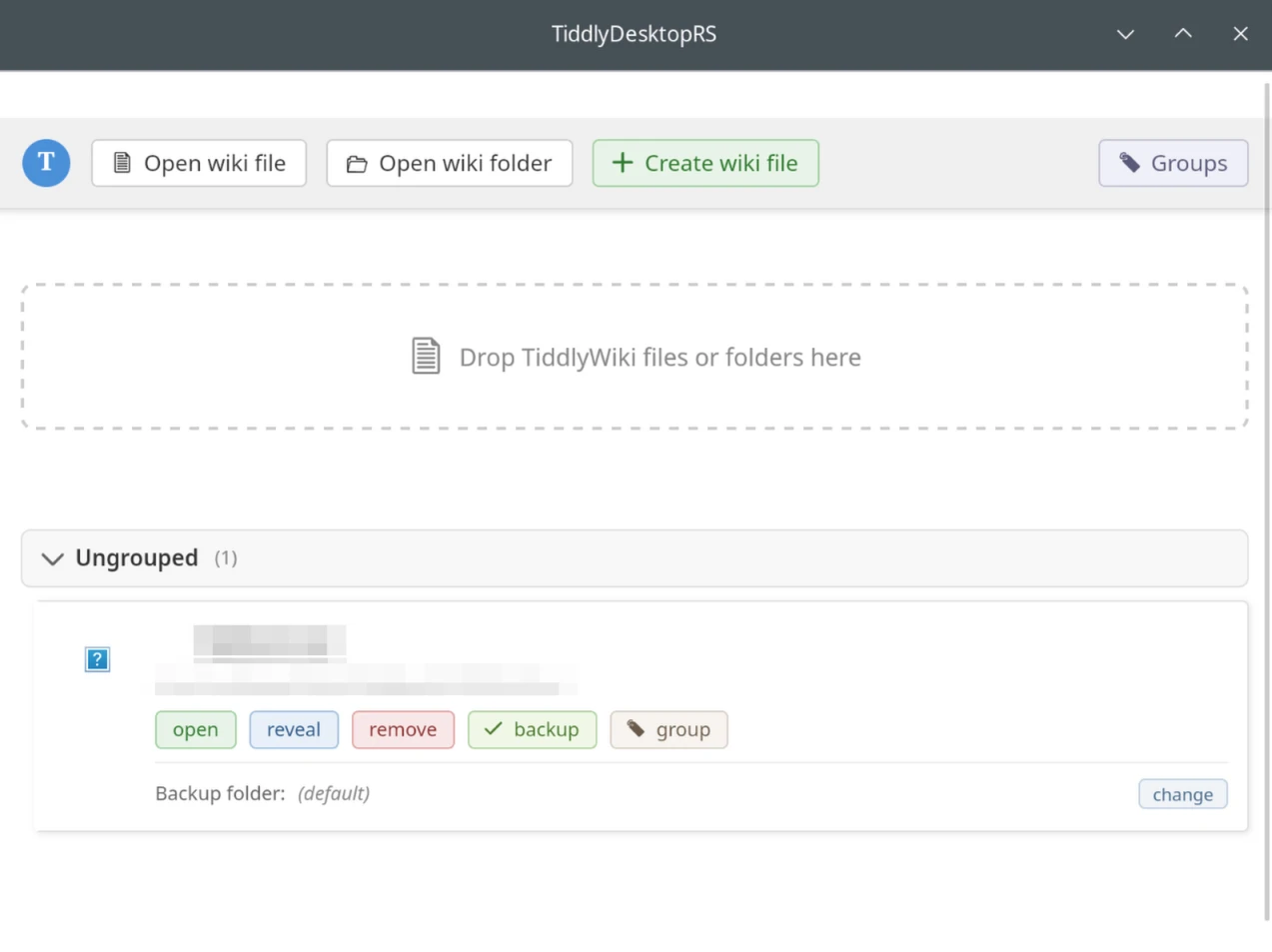
TiddlyDesktop-rs: A Modern Desktop Application for TiddlyWiki
Version 0.1.15 | MIT License | Author: BurningTreeC
Introduction
TiddlyDesktop-rs is a complete rewrite of the original TiddlyDesktop application, built from the ground up using Rust and Tauri 2. This new version delivers a lightweight, fast, and modern desktop experience for managing TiddlyWiki files and folders across Windows, macOS, and Linux.
What is Rust?
Rust is a systems programming language developed by Mozilla Research, first released in 2010 and reaching stability in 2015. It has consistently been voted the “most loved programming language” in Stack Overflow’s developer surveys for multiple years running.
Why Rust Matters for TiddlyDesktop
-
Memory Safety Without Garbage Collection: Rust’s ownership system guarantees memory safety at compile time, eliminating entire classes of bugs (null pointer dereferences, buffer overflows, data races) without the performance overhead of garbage collection.
-
Performance: Rust compiles to native machine code, delivering performance comparable to C and C++. TiddlyDesktop-rs starts faster and uses less memory than its NW.js-based predecessor.
-
Fearless Concurrency: Rust’s type system prevents data races at compile time, allowing safe multi-threaded code. This is crucial for handling file I/O, network requests, and UI responsiveness simultaneously.
-
Cross-Platform Compilation: A single Rust codebase compiles to native binaries for Windows, macOS, and Linux with platform-specific optimizations.
-
Modern Tooling: Cargo (Rust’s package manager and build system) provides dependency management, testing, documentation, and release builds in a unified tool.
What is Tauri?
Tauri is an open-source framework for building desktop applications using web technologies for the frontend while leveraging Rust for the backend. Version 2 (released 2024) brought significant improvements including mobile support, enhanced security, and a plugin ecosystem.
Tauri vs NW.js (node-webkit)
The original TiddlyDesktop was built with NW.js (formerly node-webkit), a framework similar to Electron that bundles Chromium and Node.js together.
| Aspect |
Tauri |
NW.js |
| Bundle Size |
~5-10 MB |
~100-150 MB |
| Memory Usage |
~30-80 MB |
~150-250 MB |
| Backend Language |
Rust |
JavaScript/Node.js |
| WebView |
System native (WebView2/WebKit) |
Bundled Chromium |
| Node.js Integration |
Optional (for wiki folders) |
Built-in, always bundled |
| Security |
Strict CSP, minimal attack surface |
Full Node.js access in renderer |
| Startup Time |
Fast |
Slower (loads Chromium) |
Technical Architecture
TiddlyDesktop-rs uses Tauri’s architecture:
-
Frontend: Pure HTML/JavaScript served through a custom wikifile:// protocol, allowing TiddlyWiki to run in the system’s native WebView (WebView2 on Windows, WebKit on macOS/Linux).
-
Backend: Rust code handles file operations, process management, drag-drop interception, clipboard access, and communication with the frontend through Tauri’s IPC (Inter-Process Communication) system.
-
Platform Integration: Native APIs for each operating system:
-
Windows: Win32 OLE drag-drop APIs, WebView2 COM interfaces, Windows Job Objects for process management
-
macOS: Objective-C runtime via objc2 bindings, NSDraggingDestination protocol, NSPasteboard for clipboard
-
Linux: GTK3 drag-drop handling, GDK clipboard, WebKitGTK integration
Features
Core Functionality
Single-File Wiki Support
-
Open and save TiddlyWiki HTML files directly from your filesystem
-
Automatic backup creation with configurable backup directory
-
Keeps up to 20 timestamped backups per wiki
-
Atomic save operations (write to temp file, then rename) to prevent data loss
-
Encrypted wiki support with favicon extraction after decryption
Wiki Folder Support
-
Open Node.js-based wiki folders (containing tiddlywiki.info)
-
Automatically starts a local TiddlyWiki server on an available port (starting from 8080)
-
Server process lifecycle management - servers are automatically killed when windows close
-
Platform-specific process orphan prevention:
-
Windows: Job Objects ensure child processes terminate with parent
-
Linux: PR_SET_PDEATHSIG ensures child processes receive SIGTERM
-
macOS: Process group management
Recent Files Management
-
Maintains a list of up to 50 recently opened wikis
-
Displays wiki favicon alongside filename for easy identification
-
Stores settings per-wiki: backup enabled/disabled, custom backup directory, group assignment
-
Remove individual wikis from recent list
Wiki Groups
-
Organize wikis into named groups
-
Create, rename, and delete groups
-
Move wikis between groups or to “Ungrouped”
Drag and Drop
One of the most complex features, with platform-specific implementations to handle both file drops and content drops (text, HTML, URLs from other applications).
Platform-Specific Implementations
Linux (GTK3/WebKitGTK):
-
Registers as drag destination on the WebKitWebView widget
-
Supports multiple MIME types: text/vnd.tiddler, text/html, text/plain, text/uri-list, URL, UTF8_STRING
-
Proper UTF-8/UTF-16 encoding detection and conversion
-
Sequential format request (GTK limitation) with state machine for collecting all formats
Windows (Win32 OLE):
-
Implements IDropTarget COM interface with custom vtable
-
Registers on WebView2’s Chrome_WidgetWin content window
-
Disables WebView2’s native AllowExternalDrop to intercept all drags
-
Handles CF_HDROP (file drops), CF_UNICODETEXT, HTML Format clipboard formats
-
Proper coordinate conversion from screen to client coordinates
macOS (Cocoa/AppKit):
-
Creates dynamic Objective-C subclass at runtime using isa-swizzling
-
Implements NSDraggingDestination protocol methods
-
Registers for pasteboard types: public.url, public.html, public.utf8-plain-text, public.file-url
-
Converts NSPoint coordinates from window to view coordinate system
What Gets Dropped
-
File Drops: Paths are extracted and passed to TiddlyWiki’s import handler, creating tiddlers for images, documents, etc.
-
Content Drops: Text, HTML, or URLs from browsers and other applications are imported as tiddlers
-
External Attachments: Files can be linked externally rather than embedded, with relative or absolute path options
External Attachments
The external attachments feature allows large files to be stored outside the wiki:
-
Enabled by default for wiki windows (disabled for main TiddlyDesktop wiki)
-
Files dropped into the wiki can be saved externally with a _canonical_uri field pointing to the file
-
Supports both relative paths (portable) and absolute paths
-
Configuration options per wiki:
-
enabled: Whether to use external attachments
-
use_absolute_for_descendents: Use absolute paths for files in wiki subdirectories
-
use_absolute_for_non_descendents: Use absolute paths for files outside wiki directory
Filesystem Path Support
TiddlyWiki’s $tw.utils.httpRequest is overridden to support local filesystem paths:
-
Absolute paths (/home/user/image.png, C:\Users\image.png) are resolved via Tauri IPC
-
Relative paths are resolved against the wiki’s directory
-
Media elements (<img>, <video>, <audio>, <iframe>) with filesystem src attributes are automatically converted to asset:// URLs that Tauri’s asset protocol can serve
Clipboard Integration
Native clipboard access for paste operations:
-
Linux: GTK3 clipboard API with async content retrieval and encoding detection
-
Windows: Win32 clipboard APIs for CF_UNICODETEXT and HTML Format
-
macOS: NSPasteboard general pasteboard access
Returns clipboard content in the same format as drag-drop for consistent processing by TiddlyWiki.
Find in Page
Custom find bar implementation (since WebView2 and WebKitGTK don’t expose native find-in-page UI):
-
Press Ctrl/Cmd+F to open find bar
-
Text highlighting with yellow background, current match in orange
-
Navigate with Enter/F3 (next) and Shift+Enter/Shift+F3 (previous)
-
Match counter showing current position
-
Escape to close
Session Isolation
Each wiki window runs in an isolated browser session:
-
Separate data directories for cookies, localStorage, IndexedDB
-
Supports session-based authentication for wiki-specific services
-
Configurable authentication URLs per wiki
Window Management
-
Unsaved changes detection with confirmation dialog on close
-
confirm() override to provide non-blocking modal dialogs (WebKitGTK blocks the UI on native confirm)
-
Window title updates based on TiddlyWiki’s document title
-
Automatic focus of existing window when opening an already-open wiki
-
System tray icon with quick access menu
Portable Mode (Windows)
On Windows, TiddlyDesktop-rs can run in portable mode:
-
Create a portable or portable.txt file next to the executable
-
All configuration and data stored next to the executable instead of %APPDATA%
-
Useful for USB drives or shared folders
Migration Support
Automatic migration when upgrading:
-
Reads $:/TiddlyDesktop/AppVersion tiddler to detect version
-
Preserves user data ($:/TiddlyDesktop/WikiList) when upgrading to newer bundled version
-
Seamless upgrade experience
Technical Implementation Details
Custom Protocol: wikifile://
TiddlyDesktop-rs uses a custom URI scheme to serve wiki content:
wikifile://localhost/{base64-encoded-path}
The protocol handler:
-
Decodes the path from the URL
-
Reads the wiki HTML file
-
Injects initialization scripts for TiddlyDesktop integration
-
Sets proper MIME type and headers
-
Serves the content to the WebView
Tauri Commands (IPC)
The Rust backend exposes these commands to the JavaScript frontend:
| Command |
Purpose |
open_wiki_window |
Open a single-file wiki |
open_wiki_folder |
Start server and open wiki folder |
save_wiki |
Save wiki content with backup |
load_wiki |
Read wiki file content |
get_recent_files |
Retrieve recent wikis list |
set_wiki_backups |
Enable/disable backups |
set_wiki_group |
Assign wiki to group |
get_clipboard_content |
Read system clipboard |
read_file_as_data_uri |
Read file and return as data URI |
execute_command |
Run shell command (for launchers) |
show_find_bar |
Display find-in-page UI |
Build Configuration
[dependencies]

tauri = { version = "2.9.5", features = ["protocol-asset", "tray-icon", "image-png"] }

tokio = { version = "1.49.0", features = ["fs", "sync", "rt"] }

# Platform-specific

[target.'cfg(target_os = "windows")'.dependencies]

windows = { version = "0.61", features = ["Win32_System_Ole", "Win32_UI_Shell", ...] }

webview2-com = "0.38"

[target.'cfg(target_os = "macos")'.dependencies]

objc2 = "0.6"

objc2-app-kit = { version = "0.3", features = ["NSDragging", "NSPasteboard", ...] }

[target.'cfg(target_os = "linux")'.dependencies]

gtk = "0.18"

webkit2gtk = "2.0.1"
New Features in Recent Versions
Version 0.1.15
-
Improved Windows drag-drop with recursive Chrome window detection
-
Enhanced diagnostic logging for drag-drop troubleshooting
-
Version bumps across all platform builds
Recent Additions
-
External attachments support for keeping large files outside wikis
-
Wiki grouping for better organization
-
Session isolation for multi-account scenarios
-
Custom find-in-page implementation
-
Clipboard integration for paste operations
-
UTF-16 encoding detection for international content
-
Improved favicon extraction from encrypted wikis
System Requirements
-
Windows: Windows 10/11 with WebView2 Runtime (usually pre-installed)
-
macOS: macOS 10.13 (High Sierra) or later
-
Linux: GTK3, WebKitGTK, libayatana-appindicator (for system tray)
For wiki folder support:
Comparison with Original TiddlyDesktop
| Feature |
Original (NW.js) |
TiddlyDesktop-rs (Tauri) |
| Download size |
~100-150 MB |
~10 MB |
| Memory usage |
~150-250 MB |
~50-80 MB |
| Startup time |
2-5 seconds |
<1 second |
| Single-file wikis |
Yes |
Yes |
| Wiki folders |
Yes |
Yes |
| External attachments |
Plugin-based |
Native support |
| Cross-platform drag-drop |
Chromium-based |
Native implementation |
| Clipboard paste |
Chromium-based |
Full native support |
| Find in page |
Chromium built-in |
Custom implementation |
| Framework |
NW.js (node-webkit) |
Tauri 2 + Rust |
Getting Started
-
Download the appropriate release for your platform
-
Install or extract the application
-
Launch TiddlyDesktop-rs
-
Click “Open Wiki” or drag a .html file onto the window
-
Your TiddlyWiki opens in a native window with full save capability
For wiki folders:
-
Ensure Node.js is installed
-
Use “Open Wiki Folder” to select a folder containing tiddlywiki.info
-
The server starts automatically and opens in a new window
Contributing
TiddlyDesktop-rs is open source. Contributions, bug reports, and feature requests are welcome on the project repository.
Built with Rust and Tauri for the TiddlyWiki community


 . I suggest adding this hint directly into the stdout of tiddlydesktop-rs. This way the program will become the “source of truth” and an end user will know what to try before reaching author/community support for assistance.