Hi @Eskha the missing Tab/Shift-Tab now is an oversight, I’ll readd it!
Should work in the above mentioned Pull Request

Hi @Eskha the missing Tab/Shift-Tab now is an oversight, I’ll readd it!
Should work in the above mentioned Pull Request
In the above mentioned Pull Request the preview is now rendered as Tiddler Body
Hi @Maurycy - I can add the necessary API so that your plugin works!
Do you have time to tell me the needed functions?
It works for me now, thanks.
Just to say I’ve dropped this into my wiki and it seems to play nice. The multi-colour wiki text is nice!
The latex language one doesn’t seem to do much multicouloring of KaTeX in tiddlers.
Thanks for the hard work!
First I’d also like to thank you for your effort and this excellent tool. It already makes writing code much easier 
I’ve got two issues up to now, I’m on iOS 26.2 and Safari:
A) I’m getting consistent Red Box Of Death alerts by using the backspace to delete text. Doesn’t matter if sext is selected or not, the message details is always:
RangeError: A document must have at least one line
Selecting text and overwriting it (with spaces for example) does not trigger the alert. Is there some way to send over detailed logs to help you with this?
B) I’ve had the same behavior with stock TW CM5 plugin, the native autocorrections of iOS are disabled. Thus, no easy corrections (teh→ the) or auto capitalization after a full stop. Is this something that can be adjusted somehow?
Hi @Lamnatos and thank you for your kind words!
does this error also happen here: https://deploy-preview-9556--tiddlywiki-previews.netlify.app/ ?
this should also work in the above link if you toggle “spellcheck” on
Hi @Ste_W
I plan switching in latex highlighting when $$ is detected and the KaTeX plugin is available
Thank you for your kind words and for trying this out!
Simon
No, the error does not happen on that version. Can I help you somehow to pinpoint why it happens in my case?
Enabling spellcheck also fixes the autocorrection, thanks for the tip
That version has less plugins. What CodeMirror 6 plugins are you using?
Thank you!
@BurningTreeC I am starting to use codemirror 6 more now. I am very impressed as apart from its general value the “tiddlywiki script” syntax highlighting and linting, look like being one of my favourite features, filling a gap I have perceived for a long time.
Friendly suggestions
[prefix[$:/plugins/BurningTreeC/tiddlywiki-codemirror]plugin-type[plugin]]
Possibly undefined variable / macro / procedure /
function: class
I will keep playing and seriously its wonderful.
I might add I see a number of my previous editor toolbar buttons are no longer needed.
More feedback
I find many of the button themes good looking but would prefer if they were as compact as the default ones.
The HTML Language plugin readme is not wikified (appears as code) same for;
Of particular note the “CodeMirror 6 TiddlyWiki Editor” readme is broken lower in its content around “Snippets”
I have a number of custom buttons around the use of auto complete, these do not work in codemirror, is there a condition we can test for to hide them when using codemirror?
Note: There may be value documenting all the new type values that codemirror can introduce. I for one am unsure of the appearance of both text/markdown and text/x-markdown
Note 2: I wonder if a new tiddler type for CSV and a simple view/edit template could be included with a supporting plugin as well?
[New note]
When editing existing text and I want to wrap it with quote or braces the auto close is immediate. Is it practical to be immediate eg; “”` if followed by a whitespace, otherwise close on the other side of the code already there? Determining the other side of the next code brace seems a little difficult, but would be nice.
I checked and didn’t see if this was asked, but is there anyway this could be made compatible with the “Streams” plugin? (It intercepts enter, tab and a few other button combinations for “block manipulation” while editing.)
Hi @Xyvir
Yes, it will be compatible with the Streams plugin.
I’ve continued updating the plugins at the GitHub pull request.
Simon
Hi @BurningTreeC, if I have an HTML comment somewhere in the pragma section, all following pragmas give this linter error:
Pragma \function must appear before any content in the tiddler
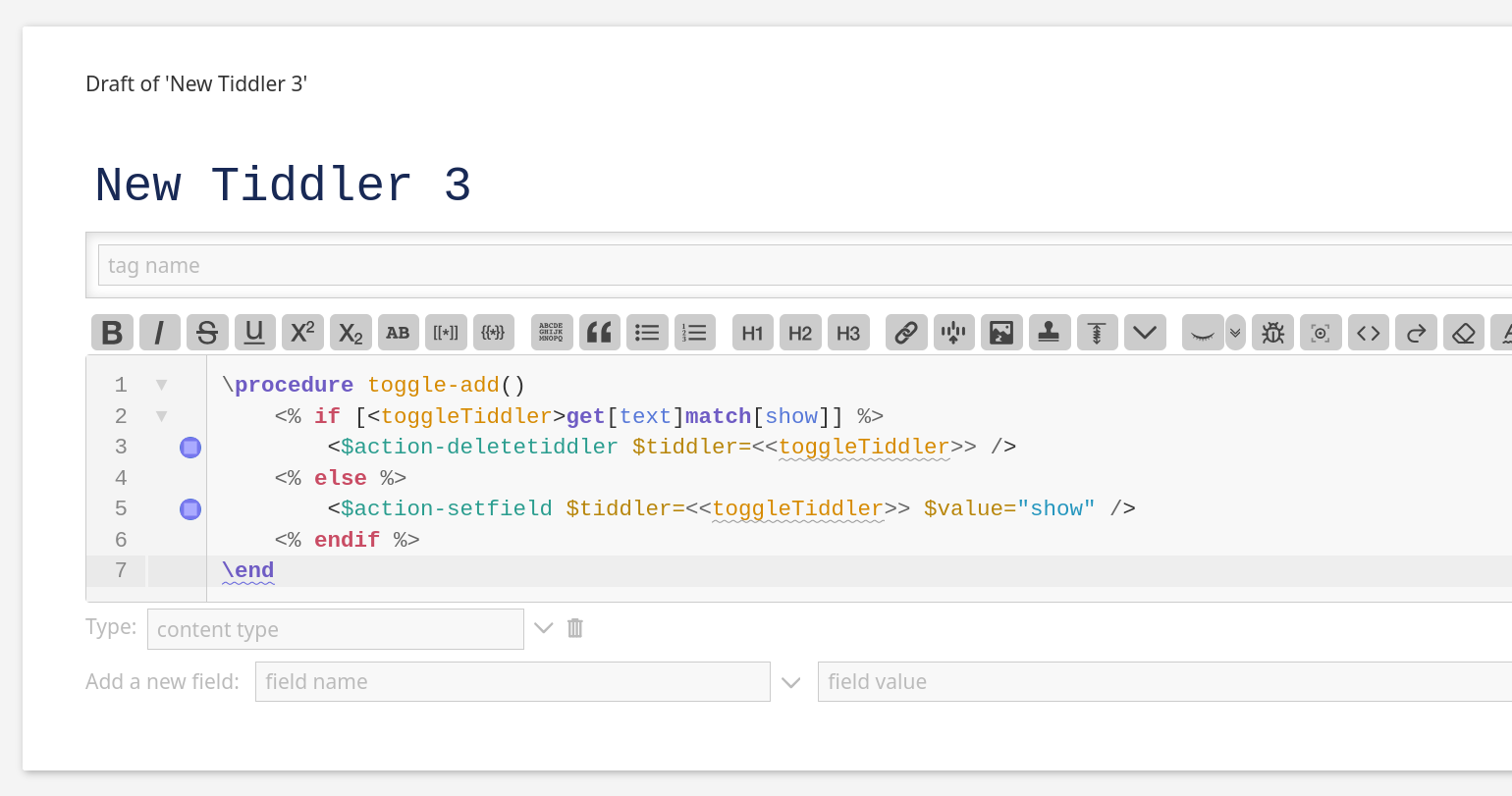
Also, this code gives me errors about unclosed <%if and <%endif in 0.0.20:
\procedure toggle-add()
	<% if [<toggleTiddler>get[text]match[show]] %>
		<$action-deletetiddler $tiddler=<<toggleTiddler>> />
	<% else %>
		<$action-setfield $tiddler=<<toggleTiddler>> $value="show" />
	<% endif %>
\end
with and without spaces between the % and if/endif and with or without the else clause.
Pretty much all <% statements give this linter error.