New CodeMirror 6 TiddlyWiki5 plugin

CodeMirror 6 for TiddlyWiki - What’s This All About?

Hey friends! :wave:

You know how TiddlyWiki has a text editor where you type your tiddlers? Well, we’re building a brand new editor using something called CodeMirror 6. Think of it like replacing an old bicycle with a shiny new one that has more gears and goes faster!

Here’s the link to the prototype demo page: click

What Does It Do?

When you edit a tiddler, this plugin makes it:

  • Pretty colors - Your WikiText lights up in different colors so you can see what’s what (links are one color, bold text is another, etc.)

  • Smart helpers - Start typing << and it suggests macros. Type [[ and it helps you find tiddlers. Type :smile and get emoji suggestions!

  • Line numbers - See exactly which line you’re on (optional plugin)

  • Find & replace - Search through your text easily

  • Themes - Pick from lots of color schemes (Dracula, Nord, Gruvbox, and many more!)

What’s Working Right Now?

:white_check_mark: Basic editing with syntax highlighting

:white_check_mark: Autocompletion for widgets, macros, tiddler links

:white_check_mark: Emoji picker (type : to see it)

:white_check_mark: 18 different color themes

:white_check_mark: Toolbar button styles (10 different looks!)

:white_check_mark: Zen mode for distraction-free writing

Optional plugins:

  • Line numbers and active line highlighting

  • Emoji picker with shortcode autocomplete

What’s Still Cooking?

:wrench: We’re still improving things and squashing bugs

:wrench: More features coming based on what people need

How Do I Try It?

This is still in development, so it’s for the adventurous! If you want to help test or just see what’s happening, check out the GitHub repository.


Questions? Ideas? Found a bug? Just reply below! We’d love to hear from you.

11 Likes

Just tested it out briefly on mobile, and it works great! no issue with zen mode or anything.

Regarding the more features people need, would this thread be an alright place for feature requests or should those be added to a github? (just asking in regards to having the ability to collapse indented bodies of text in the editor :grinning_face_with_smiling_eyes:)

1 Like

Can someone disambiguate the multiple claims of a new codemirror6 or codemirror 6 plugin here in talk.tiddlywiki ?

Very impressive. I am looking forward to there being a polished CM6 implementation that can actually replace the CM5 editor and has TW syntax highlighting.

What I would like to see:

  • Keymaps (e.g. Sublime Text)
  • Auto-closing of widgets, not only brackets
  • In the autocomplete popup, the background of the highlighted line matches the color of the matched text which then becomes invisible
  • It would be nice if the buttons of the search bar would get the same styling as the editor toolbar buttons
  • CM5 had a lot more configuration options, most of which would be nice to have here, too
2 Likes

Looking great so far!

Some formatting things to look at:

  • Preview window height is too small
  • Autocomplete popup color (Yaisog mentioned too) makes it somewhat unusable
  • Your settings tab (and dropdowns) would look better with a default

Auto-complete things (I’ll use the █ character to represent cursor)

  • Closing on <$lis returns <$list>█ with cursor at end
    • Would be nice to return <$list>█</$list> with cursor in middle
  • Single brackets all work great "█" '█' [█] {█} (█)
  • Links: [[Lorem returns [[Lorem Ipsum█]]
    • If the cursor was after the brackets, you could keep typing [[Lorem Ipsum]]█
  • Transclusion: {{Lorem returns {{Lorem Ipsum}}█}}
    • Too many right-brackets, would also like cursor at end {{Lorem Ipsum}}█
  • Parameters: <$list filte returns <$list filter="█
    • For consistency, maybe both quotes with cursor in middle <$list filter="█"
  • Is there still a way to control what’s available to auto-complete? (system tiddlers)

Feature ideas

  • Bullet list continuation is started (line starting with * returns a new line with same starting)
    • Would be nice if tab/untab added or removed *'s per list syntax
  • If bullet lists were figured out, wikitext syntax for tables could be added too
    • Line starting with |a|b|c| and then enter would start new row like |█|||

Anyways - thanks again, hope that’s helpful :slight_smile:

2 Likes

Cool, as a developer, I can see that CodeMirror 6’s code has undergone a major refactoring, or rather, it’s now a new code repository. It now supports installing sub-plugins, which is very cool. As an added note, the Wikitext syntax highlighting looks very good.

2 Likes

Hi @TW_Tones

TiddlyWiki CodeMirror 6 Plugin (New Implementation)

To clarify the CodeMirror 6 situation: my earlier CM6 plugin is now obsolete. This is a completely new implementation built from the ground up.

What’s Different

The core of this plugin is a proper Lezer-based parser for TiddlyWiki wikitext. Rather than regex-based highlighting, it builds a full syntax tree - the same approach CodeMirror 6 uses for languages like JavaScript or Python. This enables features that weren’t possible before.

Features (v0.0.2)

Syntax Highlighting

  • Full wikitext support: headings, formatting, links, transclusions, filtered transclusions

  • Widgets with attribute parsing

  • Pragmas (\define, \procedure, \function, \import, etc.)

  • Macro calls, filter expressions, tables, code blocks

  • Nested language highlighting in code blocks (JS, CSS, Python, HTML, and more)

Autocompletion

  • Tiddler titles after [[ and {{

  • Widget names and attributes after <$

  • Macro/procedure/function names after <<

  • Filter operators inside []

  • HTML tags and attributes

  • Emoji picker with :name: syntax

Editor Enhancements

  • Auto-close brackets, quotes, and tags

  • Smart Enter key (list continuation, indent between tags)

  • Code folding (headings, widgets, code blocks)

  • Search & replace panel (TiddlyWiki-styled)

  • Line numbers (optional)

  • 10 toolbar styles

17 Theme Plugins

  • Ayu, Catppuccin, Dracula, Everforest, Flexoki, GitHub, Gruvbox, Kanagawa, Material, Monokai, Nord, One, Palenight, Rose Pine, Solarized, Tokyo Night, Zenburn

  • Light and dark variants

Status

This is version 0.0.2 - functional but still in development. Feedback and bug reports welcome.

3 Likes

Hi @Yaisog

The default keymap is Sublime Text / VS Code
More keymaps (vim and emacs) coming within 15 minutes

Should work now

I think that’s fixed now

I will do my best :wink:

Wow, huge update! Very exciting to watch :slight_smile:

The link autocomplete is one character off right now, returns [[Changelog]█] instead of [[Changelog]]█

For the “list continuation” it appears to work well now for everything except mixed (like *#), wasn’t sure if that was intended to work yet or not.

I don’t know the right answer because the syntax between calling macros, procedures, and regular variables is the same <<, but I wonder about regular variables (like <<currentTiddler>>) which don’t pull up right now - probably for good reason. Maybe doing something like you had before ?? where ?? pulled up a list of variables, and then enter swapped them back to the <<variable>> syntax?

1 Like

@stobot Hi!

I’ll fix that asap, thanks for reporting!

Will fix that too asap.

I can pull in a list of variables (all variables available ?) and those set within the currently edited tiddler probably, too. I’ll test!

Thank you for your heads up,
Simon

2 Likes

Hi @oeyoews and thank you!

Yes it now supports installing plugins that register themselves in the engine.
If users are interested in developing plugins that’s a convenient entry point.
I’ll add documentation about how to register a plugin and the API

Wikitext syntax highlighting is only getting better, I also like it :slight_smile:

1 Like

Simon, what is the trigger/requirement for a macro to be included in the completions list? When I do this:

\define my-macro()
<!-- stuff -->
\end

<< ???

my-macro does not appear in the list.

Hi @CodaCoder

I’m currently working on making this more solid, but <<m should already autocomplete my-macro
If it doesn’t I’ll have to dig into this a little deeper

I don’t know but it may be similar to when functions were first developed. Have you saved and reopened since defining? Test a function the same way.

Could you maybe link that in the OP?

1 Like

Good catch @Yaisog

I was planning to make it public but I decided to wait a little bit until I have a stable codebase

Finally, there is a truly well‑integrated syntax highlighting solution for TiddlyWiki 5 – exactly what I have been hoping for over the past few years. As someone who uses TiddlyWiki as an end user from a USB stick on many different computers, with only basic experience in TW-Script (and no experience with node), this feels like a quantum leap in how I can work with it. I believe I speak for many users when I say that it fundamentally changes the way we can work with TiddlyWiki. It is a really wonderful tool, and I am sincerely grateful for the time and effort that went into creating it – thank you!!!

2 Likes

Wow, woke up to 0.0.8 already! Incredible continued progress!! Some more feedback after testing what was relevant for me:

Version 0.0.4

  • Multi-cursor editing: Works great! Super helpful!
  • Filter operator completions: Stuff like the all[ works fantastic!
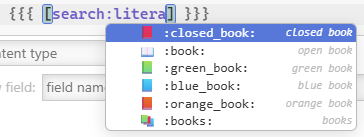
    • I can’t get the suffix ones to work, like search:
      • image
      • Might just be the emoji thing getting in the way
    • Note: Sometime bracket highlighting hides the cursor
      • image
  • Mixed lists working great!

Version 0.0.5

  • Variable completion works great!
    • Thinking through how I’ve learned other languages (Visual Basic), I actually think this will help people learn how TiddlyWiki works - unintended win!

Version 0.0.6

  • Snippets: I didn’t see any instructions, but in Advanced search found an example one to learn from
    • I’m assuming :default is limited to constant text, just confirming
    • The trigger field value seems to have limitations on naming, I tried using a ? prefix but that didn’t work, will probably use _ for myself in the future - cool feature!

Version 0.0.8

  • The field/index completion is awesome! This will be very handy!

Looks like the [[Link]█] bug is still there just as reminder

Many impressive things I didn’t mention, a few things I didn’t test as they were more technical, but awesome stuff!!

1 Like

Hi @BurningTreeC, is there something like the trailing space plugin that we had in CM5? I always found this to be very helpful.

Hi @Yaisog

what should the trailing space plugin exactly do?
Just show trailing whitespace or also remove it?