New CodeMirror 6 TiddlyWiki5 plugin

Thank you Simon for this impressive plugin.

Is it only intended for TW 5.4 ?
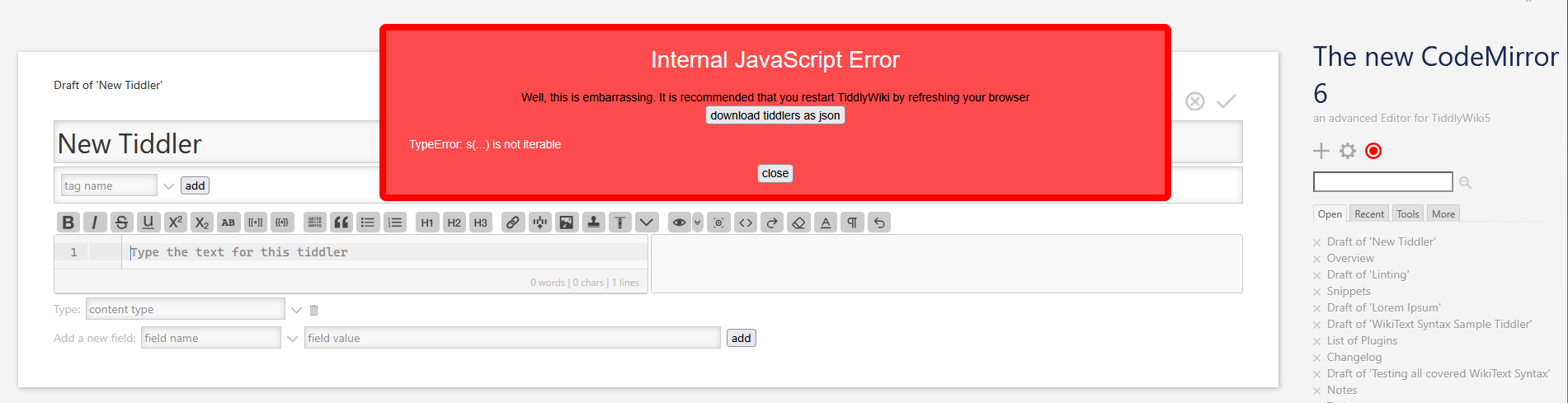
(RSOD at startup on 5.3.8 TW)

Would it be possible to:

  • remove leading * or a # when pressing SHIFT TAB (This is done for subsequent * or a # but not for a single one where we need to press ENTER)
  • when a line starts with ; having the next one starts with : instead of ;

Best regards.

Eskha

Hi @Eskha

I’ll fix the startup issue. Is it possible that you didn’t install all language packs? That causes an issue currently. But the fix is upcoming! And it should work on 5.3.8, too!

oh yes, that’s possible and I’ll put it on my list!

Is that intended behavior? I don’t ever use this markup, you know?

apologies in my prev. post, I see folding is mentioned, however I can only see the toggle arrow when using markdown and SQL, and only one indention level in.

is there a means to adjust which languages it will toggle for? also, it appears the editor will revert back to default even if you choose a different language using the toolbar button, unless your specific it in the content-type field such as text/markdown

also, it appears some of the toolbar button svg’s break when yrying the different toolbar styles, primarily the redo and undo icons.

also, is adding buttons the same as adding buttons to the normal editor? (just asking because mobile keyboards don’t have tab keys, so I’d need to make one in the wiki :sweat_smile:)

The bundler should be perfect for this. It was developed to “combine” stuff, you want to ship as 1 bundle.

Bundles do not behave like plugins. They just bundle tiddlers. So you can add whatever you want. Import it and remove the stuff you do not need in the new wiki.

If you import plugins, you may need to save and reload. But the TW import mechanism should tell you.

-m

1 Like

Note that Scott isn’t asking about combining plugins to make them easier to install, but rather about having fewer plugins installed in a wiki by combining sub plugins.

The closest we can get to this currently is by using sub plugins for a parent plugin, but the plugin listing needs to be updated to reflect that.

Yes, theoretically, one could have

; Term 1
: Definition 1a
: Definition 1b
: Definition 1c

; Term 2
: Definition 2a
: Definition 2b

...

But typically, you’ll see a one-to-one term-to-definition correspondence. So a : on the line after one starting with ; would be most helpful.

Thank you. I’ve seen that, but not spent much time with it, as I’ve always managed to do that myself from the Filter tab of Advanced Search.

But @saqimtiaz is correct that

The current scenario, where I might want to use the CodeMirror 6 editor, as well as two or three themes, nine languages, and Zen mode, means I end up using a dozen plugins for what is to me as the maintainer of my wiki, a single chunk of work. I do appreciate the granularity of being able to pick and choose the parts I want. But I would love it if this were packaged in a way that showed, at least in an initial view, all of these as a single plugin.

Although this isn’t what I was imagining, it would be perfect. It would be wonderful if next to readme, license, contents, etc. we could could have another autogenerated tab of subplugins when appropriate, and that that would include a tab-list of subplugins included, each one displaying like the main plugin tab itself.

If you want a practical use case, I actually do this at work. An example from a tiddler I often have open:

;Project Manager
:Alice
:Bob

In the context of that project, there are two people defined as project managers, so it is appropriate to have two definitions for that term.

This produces the following HTML:

<dl>
  <dt>Project Manager</dt>
  <dd>Alice</dd>
  <dd>Bob</dd>
</dl>

Meanwhile I’ve created a “Plugin Combiner” plugin that will be published soon.
It lets you choose from all installed plugins in a wiki and creates one single plugin from all the chosen ones.
If a plugin has dependents it will pull in the parent plugin (you can disable that).
At the end you can choose the name of the new plugin and some metadata and download it as JSON.

2 Likes

You might also try TiddlyTools/Search/SaveAs, which adds “save as plugin” and “save as import” buttons to the $:/AdvancedSearch > Filter tab.

You can then use the filter to select multiple plugins (e.g., “[prefix[$:/plugins/…]]”). When you then use “save as plugin”, it will automatically merge the contents from all the matched plugins into a single combined plugin.

-e

3 Likes

Arguably the various plugins we are looking at combing are sub-plugins and it makes sense group them under a master plugin, ideally with a dependency set. This was done in an earlier version of Codemirror. But notice it is not the same method used by relink and I think having the additional plugins listed at the same level is valid as the presence of additional plugins is important.

However, with the exception of the above, I would urge users not to necessarily adopt Scotts approach and minimise the number of plugins, because the freedom to add whatever you want to customise TiddlyWiki is one of its greatest features and we rarely see negative interactions.

  • Clearly @Scott_Sauyet’s approach and concerns about long list of plugins is a personal preference and arguable mostly aesthetic and not technically arguable.

Of course combining a set of plugins to assist shipping also makes sense.

I am going to research a publishers tool for JSON bundles.

1 Like

CodeMirror 6 Editor for TiddlyWiki - Version 0.0.16 Released

I’m happy to announce version 0.0.16 of the CodeMirror 6 Editor plugin for TiddlyWiki!

This release includes several bug fixes, new features, and comprehensive documentation updates.

Bug Fixes

  • Enter Key on Empty Lists - Pressing Enter on an empty list line now always removes the list marker, working consistently for bullet, numbered, and mixed lists.

  • Auto-Close Tags in Attributes - Fixed an issue where typing <$text text="<$set>"> would incorrectly insert </$text> when closing the inner widget. The editor now correctly detects when you’re inside attribute values.

  • Color Picker List Detection - The color picker no longer shows color swatches for #hexcolor values that are actually numbered list markers (when preceded only by whitespace).

  • Incomplete Block-Level Macros - <<macro on its own line now highlights correctly as an incomplete macro, giving visual feedback while you’re typing.

New Features

  • Typed Block Syntax Highlighting - Code blocks with file extensions like $$$.js, $$$.css, $$$.ts, $$$.py now use appropriate language highlighting. Supports common extensions including .js, .mjs, .ts, .tsx, .css, .html, .json, .md, .py, .sql, .xml, .yaml, and more.

  • Filter Run Prefix Completion - Filter run prefixes like :filter, :map, :reduce now autocomplete to :filter[] with the cursor positioned inside the brackets.

Linting Improvements

  • Built-in Variables - The linter now recognizes TiddlyWiki’s built-in variables (currentTiddler, storyTiddler, transclusion) and no longer flags them as undefined.

  • Updated Lint Messages - More accurate messaging: “possibly undefined variable / macro / procedure / function” instead of just “possibly undefined macro”.

UI Improvements

  • Toolbar Icon Sizing - Fixed toolbar button icons not fitting properly in various toolbar styles.

Documentation

  • Added readme files to 12 plugins that were missing documentation
  • Comprehensive README.md - Complete rewrite with full feature list, configuration options, keyboard shortcuts reference, developer guide, and build instructions

Plugin Combiner

Last but not least there’s a little plugin that combines a selection of plugins into one single plugin

  • Open the Control Panel
  • Click on Plugin Combiner
  • Insert a prefix of the plugins you want to bundle, like $:/plugins/BurningTreeC/tiddlywiki-codemirror
  • Select the plugins you want from the list below
  • Fill the metadata under Output plugin settings
  • Click on Download combined plugin

Links

Installation

Drag and drop the plugin files from the demo site into your TiddlyWiki, or install from the plugin library.


As always, feedback, bug reports, and feature requests are welcome! Feel free to reply to this thread.

Happy writing!

8 Likes

Hi @BurningTreeC, thanks for your continued efforts.

Could you maybe also look at these problems:

  • <% if [] %> and <% endif %> are currently not recognized by the linter, because they have spaces between the % and the keywords, even though this is valid syntax. I like to use these spaces because it looks cleaner.
  • At least some Sublime / VS Code shortcuts don’t work. I use Ctrl-Shift-K (delete line) and Ctrl-Shift-D (duplicate line) extensively, both don’t work or do something else.
    You can get the full keymap of the CM5 plugin from the readme tiddler of the CodeMirror Keymap Sublime Text sub-plugin, though personally I only use a very small subset of this.
2 Likes

Some items for polish, for your consideration:

  • For bulleted and numbered lists, it would be nice if they behaved more like Saq’s Editor Autolist plugin. Suppose I have a line like this, with | indicating the cursor:

    # |
    

    If I press Backspace at this point, the whole line is deleted. I often do this though to create a sub-list, e.g. to turn it into #*.
    I can of course just press the left arrow key, and I may just be too used to autolist at this point, but I prefer my input not being hijacked.

  • [ext[]] comes up as a ‘filter operand’ for tiddlers. I’m not sure this is desirable behaviour, as you would use a regular (internal) wikilink for that. Ext is normally used for creating <a href> links, which would typically be to a non-TiddlyWiki file. So I think you can skip the search in this case.

    It would be nice if this was recognised in the autocompletion, much like you already do for [img[]].

  • It would be nice if typing """ would automatically add two newlines and enter """ on the line after next, and maybe also move the cursor to then next line too.
    It should also be greyed-out (like --- is) or visually indicated in some other way, as it is syntax which causes new lines to be treated as line breaks.

  • Typing ``` should automatically add two newlines and enter a matching ``` on the line after next, but NOT move the cursor down a line. This is because the user may want to add in a language using the popular highlight plugin e.g. ```html

  • The ` character should also be greyed out when it matches another. Likewise for ``` in sequence.

  • The keyboard shortcuts for actions like bolding text seem to be hardcoded from my limited testing. It would be nice if they were retrieved from TiddlyWiki’s own shortcut settings. I don’t personally rely on this feature, but others might.

  • Stretch: not that TiddlyWiki supports it natively, but it would be phenomenal if you could at least create the opportunity in the code for something with the mimetype text/tab-separated-values to treat presses of the Tab key differently (e.g. when used inline in a typed block within a tiddler). Namely, that pressing Tab would insert a tab right where the cursor is.

Two more I thought of. Again, these are very much items for polish and not serious problems.

  • If CamelCase Linking is disabled, it is still syntax-highlighted when it happens in CodeMirror. The highlighting should depend on the TiddlyWiki setting IMO, which is determined on load.
  • Along the lines of tsv mentioned above, It would be nice if some support for text/csv as a mimetype, which is in fact built into TiddlyWiki.
    Edit: I found a very short one with rainbow highlights

Open a new tiddler an start typing will result in:

grafik

The new CodeMirror 6 — an advanced Editor for TiddlyWiki5 (Version 0.0.17)

@BurningTreeC if you do implement the equivalent of autolist it would be good if we could nominate additional characters that behave the same way, I use the tab key to add additional levels and shift tab to reduce depth eg;

* a
** aa
** ab
* b

I currently allow #*!: and some special chats for some of my own custom wiki text symbols

alternativly ensuring autolist just works in the code mirror editor may make sense.

Hi @StS
there’s a fix upcoming, I messed something up :grin:

Hi all and sorry for the JS RSOD

I’ve fixed the errors and fixed some bugs now with version 0.0.18

Additionally, many new language plugins:

Language Description File Extensions
C++ Systems programming and game development .cpp, .hpp, .h
Go Google’s programming language for servers .go
Java Enterprise and Android development .java
LaTeX Academic papers and math formulas .tex, .latex
Lezer Grammar definition language (for parser developers) .grammar
PHP Server-side web programming .php
Rust Safe systems programming .rs
Sass/SCSS CSS with superpowers (variables, nesting) .sass, .scss
WAST WebAssembly Text format .wast, .wat
2 Likes

Hi @TW_Tones

that works already

if I made the characters configurale?

what is necessary for it to work?