JanJo
March 20, 2024, 12:41am
1
Related to this discussion Teaching Tiddlywiki to Interactive Media & Game Design Students - #24 by telumire
I tried to build a gamingcard animation using this tutorial resp: this github
The problem I stumbled into is that it is hard to use the counter to set css-variables because of the -- which is transformed. Is there a solution for this?
<div class="cardcontainer">
<$list filter="[range[1;12]]" counter="counter">
<$wikify name="stylo" text={{{ [<counter>subtract[6]addprefix[--i:]] }}}>
<div class="ccard" style=<<stylo>> ><<stylo>>
</div>
</$wikify>
</$list>
</div>
<style>
* {
margin: 0;
padding: 0;
box-sizing: border-box;
}
.cardcontainer {
heigth:400px;
width: 100%;
display: flex;
justify-content: center;
align-items: center;
background-color:green
}
.cardcontainer .ccard {
position: absolute;
width: 240px;
height: 320px;
border-radius: 10px;
background: white;
display: flex;
justify-content: center;
align-items: center;
border: 10px solid white;
cursor: pointer;
transition: 0.5s;
transform-origin: 50% 100%;
}
.cardcontainer .ccard img {
width: 100%;
height: 100%;
}
.cardcontainer:hover .ccard {
transform: rotate(calc(var(--i)*5deg))translate(calc(var(--i)*50px), -40px);
}
.cardcontainer .ccard:active {
translate: calc(var(--i)*20px)-50px;
}
</style>
I’m not seeing the animation, and I didn’t investigate to find out why, but does this generate the markup you’re expecting?:
<div class="cardcontainer">
<$list filter="[range[1;12]]" counter="counter">
<$let stylo={{{ [<counter>subtract[6]addprefix[--i:]] }}}>
<div class="ccard" style=<<stylo>> ><$text text=<<stylo>> />
</div>
</$let>
</$list>
</div>
pmario
March 20, 2024, 7:13am
3
I think you do not need wikify.
To avoid parsing rules there is the \rules pragma. eg
\rules except dash
--i
The names can be found at: $:/ControlPanel → Info → Advanced → Parsing tab
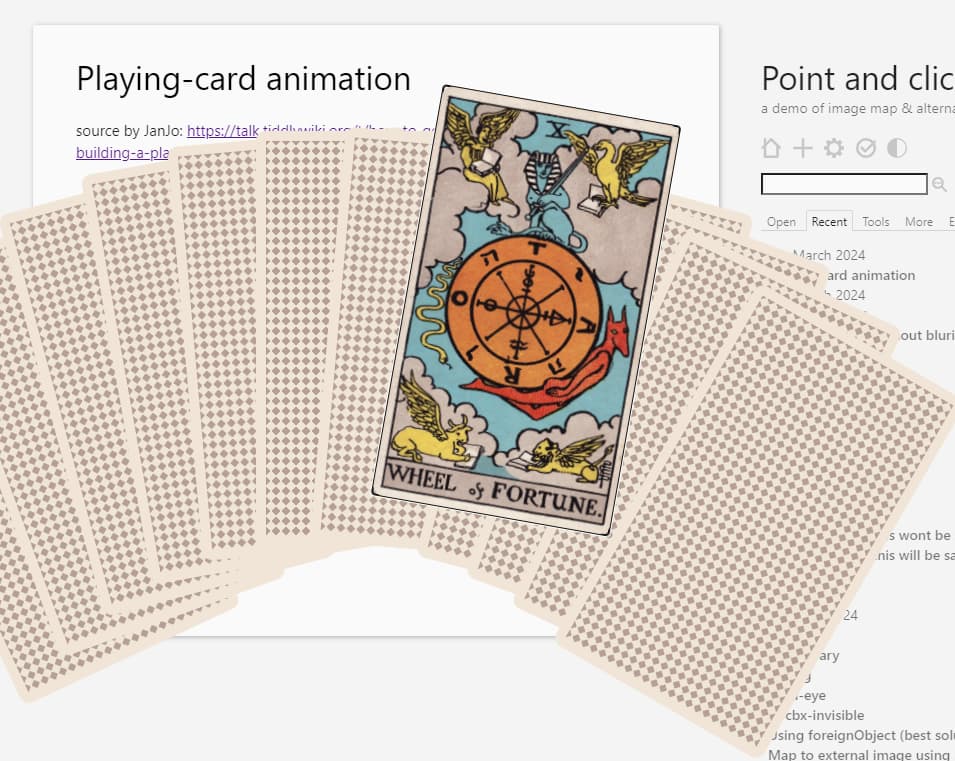
Very nice ! I tweaked the css a bit : Point and click — a demo of image map & alternatives
@@.cardcontainer
<$list filter="[range[1;12]]" counter="counter">
<div class="ccard" style=`--i:${ [<counter>subtract[6]] }$`>{{Tarot}}
</div>
</$list>
@@
$$$text/vnd.tiddlywiki
\rules except dash
<style>
.cardcontainer{
height:400px;
display:grid;
place-items: center;
& .ccard {
position: absolute;
width: 240px;
aspect-ratio: 0.75;
transition: 0.5s;
transform-origin: 50% 100%;
}
&:hover .ccard {
z-index:0;
transform:
rotate(calc(var(--i) * 5deg))
translate(calc(var(--i) * 50px), var(--y,-40px));
}
&:hover .ccard:hover{
--y:-90px;
}
& .ccard:active {
translate: calc(var(--i)*20px)-50px;
}
}
</style>
I like the idea of the last clicked card being shown over the others. Moving the tabindex to the div.ccard and using something like this might do the trick:
& .ccard:focus {
z-index:99;
}
You’re right, I added this in
JanJo
March 20, 2024, 9:17am
7
Hi @telumire , where is it gone, the last version was great.
I was just up to check @saqimtiaz ’ idea which seems to be a very good tweak, perhas one could even remove the tilt and transition of the card.
And perhaps you could use mklaubers shufflemchanism to shuffle the cards.
JanJo:
where is it gone
same link: Point and click — creating games with tw
the first version was the same but without transition on each card hovered / z-index change
JanJo
March 20, 2024, 9:34am
9
The current version is just stacked dots…
That’s weird ..
What browser are you using ?
JanJo
March 20, 2024, 9:40am
11
Hi, @telumire , Firefox
Looks nice…on the picture
…and on my mobile chrome…
But on FF:
It also work on firefox on my end, maybe an addon is interfering ? Or are you on an older version of firefox that doesn’t support nested css maybe ?
JanJo
March 20, 2024, 10:06am
13
Well, it seems to be a browser issue…but no it is a version updated twenty minutes ago…
You might be able to dispense with the z-index race ( ) and gain the same advantage with isolation:isolate . (Untested).
JanJo
March 20, 2024, 4:34pm
16
The last version works again with my FF.
It would be great to have a versionthat could the cards from different filters. The range-operator was a quick test to have ten cards. It would be good to have the shuffle-mechanism established there already. The resolution of the tarot card is so gigantic the first click may take some time.
JanJo
March 20, 2024, 6:31pm
17
Hi @telumire
I think I would like to have the game in a fullscreen-modal… but again, I have trouble getting this to work…
<$button class="tc-btn-invisible">
<$action-sendmessage $message="tm-modal" $param="Playing-cards" dictionary={{$:/temp/dictionary}} count={{$:/temp/count}}/>Test
</$button>
Count and dictionary to be chosen by selectors…
And here the modal:
\define dcards(dictionary, count)
@@.cardcontainer
<$list filter="[<dictionary>indexes[]shuffle[]limit<count>]" counter="c" variable="key">
<$list filter="[<c>multiply[2]subtract<count>subtract[1]divide[2]]" variable="n">
<div class="ccard" style=`--i:$(n)$`><<n>><<key>>{{tarot}}</div>
</$list>
</$list>
@@
\end
<<dcards>>
$$$text/vnd.tiddlywiki
\rules except dash
<style>
.cardcontainer{
container-type: inline-size;
height:100vh;
display:grid;
place-items: center;
}
.cardcontainer .ccard {
position: absolute;
background-color:black;
color:white;
width: 240px;
aspect-ratio: 0.75;
transition: 0.5s;
transform-origin: 50% 100%;
}
.cardcontainer:hover .ccard {
z-index:0;
transform:
rotate(calc(var(--i) * 5deg))
translate(calc(var(--i) * 40cqw/<<range>>), var(--y,-40px));
&:hover{--y:-90px;}
}
.cardcontainer .ccard:focus-within{
z-index:{{!!put-card-on-top}};
}
.cardcontainer .ccard:active {
translate: calc(var(--i)*20px)-50px;
}
</style>
I only need to set a z-index of 1 on the last focused card, so it’s still relatively clean but you’re right it would be interesting to do this with “isolation”, I’ll try
edit: as far as I understand it, isolation:isolate is creating a new staking context, allowing to calculate the stacking relatively to the parent in isolation to the rest of the document. So in this particular case, you still need to use z-index to put one card above the other despite the dom order (unless I’m using it wrong ?).
I think you are having the same issue than me: Bug ? “:has(:hover)” not working in single tindler window - Developers - Talk TW (tiddlywiki.org)
edit: I don’t know why, but if I specify the class then it works in both cases:
.cardcontainer{
container-type:inline-size;
height:100vh;
display:grid;
place-items: center;
grid-template-areas:"stack";
}
.cardcontainer .ccard {
grid-area:stack;
width: 240px;
aspect-ratio: 0.75;
transition: 0.5s;
transform-origin: 50% 100%;
}
.cardcontainer:has(.ccard:hover) .ccard{
transform:
rotate(calc(var(--i) * 5deg))
translate(calc(var(--i) * 40cqw/<<range>>), var(--y,-40px));
&:hover{
--y:-90px;
}
}
.cardcontainer .ccard:focus-within{
z-index: {{!!put-card-on-top}};
}
.cardcontainer .ccard:active {
translate: calc(var(--i)*20px)-50px;
}
JanJo
March 21, 2024, 12:36am
20
The animation is still not working alas, but here is the demo how this could look in a modal.
playingcardsmodal.json (5.9 KB)
Image and title are not synchonized so far… but it would be possible to have a front and a backside that match and for example could explain the meaning of the card.