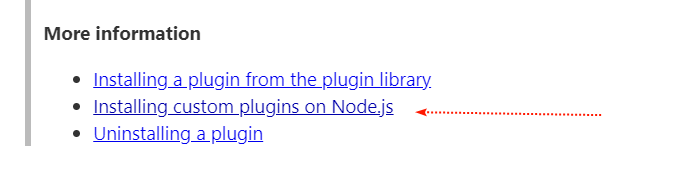
I would like to use Refnotes (by @Mohammad) to cite sources which where imported with the official bibtex-importer. I’m using TiddlyWiki 5.2.0 with node.js. Some questions:
How do you handle websites? I want not only save “classic” bibtex entries like books etc., but I also want to save websites in bibtex entries. I saw in the Refnotes demo website that there is a tiddler wikipedia_2021 with the field bibtex-entry-type = website, but website is not a official bibtex entry type. So I would guess that @Mohammad did a custom bibtex entry called website. Could you @Mohammad share how you generate website bibtex entries?
Is there a good way to automatically fetch new bibtex entries from a .bib file? Right now, I use JabRef to save my sources. JabRef saves by default everything in a .bib file. It would be nice if there would be a method with node.js to automatically load the .bib file everytime I save a new entry in JabRef. This would save me the time to call manually tiddlywiki --load sources.bib everytime I add a new source.
Any additional tips? Does anyone use a complete different workflow to save sources and cite it?
I do not think bibtex has any restriction in this regard
see the website format in APA7
you can add your own style
Refnotes has good documentation and examples, I recommend to take a look and see examples.
Refnotes has not all type of formatting but it is very flexible and you can hack it as you like!
Could some regular bibtext users do a short summary on its purpose and use in a How to post in talk.tiddlywiki.org so as to enlighten the unenlightened like me?
It takes an identified need for people to learn something new, and the more people that make use of a specific solution the larger your community and the more possible contributors.
I have a new problem: when I import a bib file through --load command or through drag-and-drop I don’t get the bibtex-entry tag anymore. I get the tiddler with all bibtex fields but no tag. I can’t reproduce this and don’t know when this starts to happen. Previously, I got the bibtex-entry tag for every new imported bibtex entry. Very confusing. Does anyone know how to fix that? @Mohammad@jeremyruston
I don’t mean a new style. I mean a new Bibtex entry type, like book, article, phdthesis .Here you will find all standard Bibtex entry types. As you can see there is no website entry type. In the standard JabRef installation there are only standard Bibtex entry types available. Before I can use your APA7 style for website I need an entry type website in my .bib-file.
I solved this by creating an new custom entry in JabRef called website. I struggled (and therefore created this thread here) because I did a mistake and forget to include the author field in my .bib-file. I thought you did your citation like [publisher], ([year]), but this was wrong and instead you do it as [author], ([year]).
It comes from Refnotes and not related to the core!
In the sidebar there is a button in Bibliography tab and you can click to add tag to any new entry!
I am not update with latest change! I will have a look later this weekends to see what is the problem!
I appreciate to submit your issues or ideas in GitHub repo page!
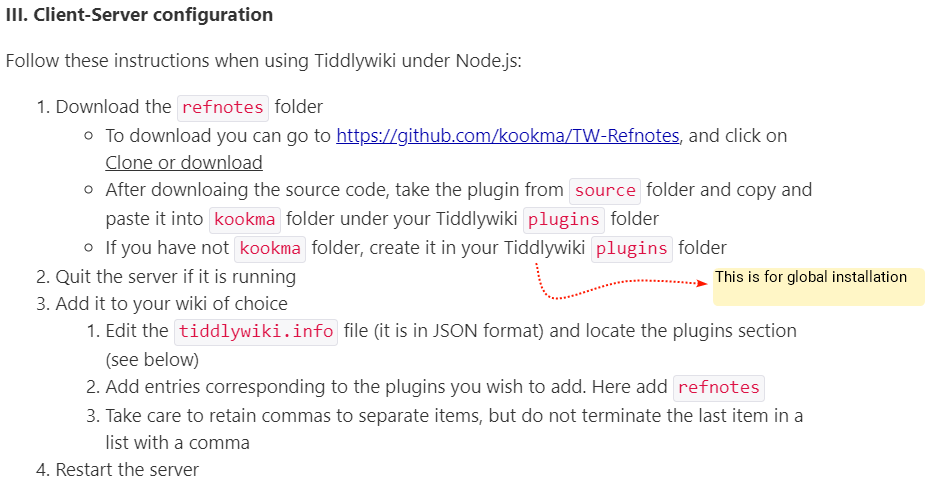
I would like to second @TW_Tones 's general request for a “How To” article. I’m trying to get Refnotes to work on my TW, trying to follow the rules for installing on Node.js, and it has been a total failure so far. An extra sad situation because the plugin looks so valuable!
kookma tools are among the best in term of documentation and distribution! You have three options
use kookma library
use standalone install by visiting website and drag and drop
download the repo and install on Node.JS
I understand official TW documentation are confusing for using plugins with Node.JS so, it is not Refnotes, it is difficulty with TW+Node.JS by the way
I will update the kookma plugins installation on Node.JS for all plugins. I will try to give simpler procedure and I would be happy to see if there is a more descriptive, more clear doc out there to be used!
I did a GitHub Issue. @ahollar maybe this solves your Issue. @TW_Tones I tried to described the workflow a little bit, maybe this helps to understand how to use Refnotes.
 )
)