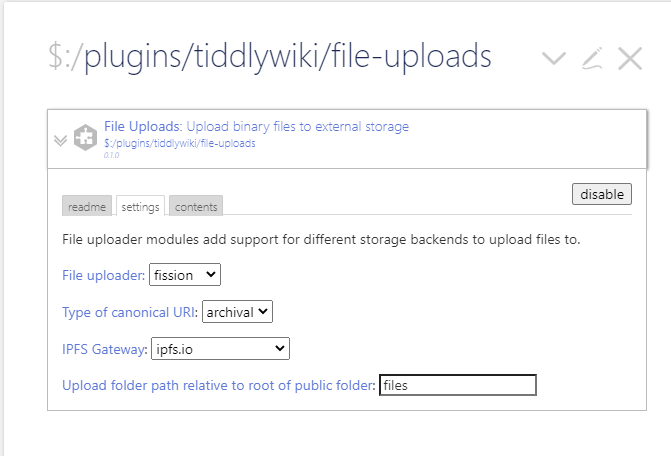
I’ve set the path to twgroceries and I have an index.html where the wiki file is.
I’d like an option where the option is there to select an IPFS gateway like ipfs.runfission.com or ipfs.io. This might be similar to the base URL for people who mix on and offline wikis.
Canonical URIs would include the IPFS hash like this:
With https://ipfs.runfission.com/ipfs/ being added / managed by the plugin.
I’ve shown this as using the hash of the folder to get named files, but I think using JUST the hash for the image itself would also solve the upload / DNS issue since it would be immediately available locally?
This IPFS stuff is a bit tricky, but the nice thing is you can treat the entire Internet as one big file system and links will never break!
I’ve tagged this with #feature-request, hope that works for you.
Hi @boris the request makes sense and it matches my own realization that for some uploaders there will be a need for configuration options with regards to how the canonical URI are created, for example relative vs absolute paths or in this case archival links vs public (DNS) links.
Since you are our resident Fission expert, please let me know if this sounds correct:
a setting to choose whether archival or public links should be used for canonical URIs.
if archival links is chosen in (1), then there is another setting to choose the IPFS gateway.
changing these settings will not change the canonical URI for existing tiddlers.
What IPFS gateway should be used as the default value?
Is there any documentation or example code for this that you can point me at for getting the hash for a file?
I have been looking at the “sharing public files” example, however that generates links to named files.
@boris is there formal terminology for the different kinds of links to a resource on Fission/IPFS?
If not, would the below terminology work?
public link:
https://saqimtiaz.files.fission.name/p/files/image-from-rawpixel-id-3282400-original.jpg

archival link:
https://ipfs.runfission.com/ipfs/bafybeigycxaqrhlyl74aendthumvpostfgrpplljboh5dfk2dfmkvoi6hi/p/files/image-from-rawpixel-id-3282400-original.jpg

CID link, or direct link:
https://ipfs.runfission.com/ipfs/bafybeigxw52wvvwtajmfphpacierrb5onp6mnomdtftgje7fi44v3y6bk4
What makes more sense here from your perspective, a <select> pre-populated with ipfs gateways (as specified in a tiddler) or a simple input field where the user can enter text?
A select is potentially less error prone whereas an input field is more flexible, though I am unsure how common a use case it is for a Fission user to need to change IPFS gateway settings.
Just a raw text field will give the most flexibility.
There isn’t other than literally the post you saw there. Our file system adds versioning (which IPFS doesn’t have natively — each changed file just gets a new CID hash, but no link to the old one), and we’re also the ones making DNS and IPFS play nicely together for accounts.
I think that Public Link or Direct IPFS Link should be the two that are supported.
Public is relative and uses DNS and thus can be updated in place as long as the file name is kept, but is tied directly to Fission. The Direct IPFS is to that particular version of a file and will work on any IPFS gateway — and lets us say IPFS in the description to help people start getting exposed to that.
The archival / versioned link I don’t think has a good use case unless someone asks (there are some nuances about getting MIME type from a file name with this one, but TW sets the type already, so not a concern), so I wouldn’t bother including it for now.
I have just now. Initially I thought I hit some bugs…but rather, I hadn’t configured it, and it was set to “dummy” uploader by default. I was wondering why it seemed to upload instantly! And where the myusername URL came from!
I set it up using the Fission uploader, and as direct IPFS, and it works great.
I was initially confused about ALSO having the path in there, but I realize it also does need to go somewhere.
I like how you’ve shown the example of the public path with the username for the public setting. I think it should also show in the direct IPFS setting – it really helps understand what that folder path means. And maybe also show a sample “direct IPFS” link.
e.g. “Direct IPFS links show the content address of the file. The file with its original filename is still uploaded to the folder you specify”.
Right, I’ve thought about this a bit during the last round of changes, and the challenge is not confusing users with two URLs, one of which looks nothing like the resultant canonical URI generated. I’ll have another look and see if we can present the information more intuitively.