
Experimental public instance of tiddlypwa server

I find @valpackett’s tiddlypwa (consider supporting her on Patreon) extremely useful, and I believe many TiddlyWiki users would benefit from it as well. While the initial setup can be a hurdle, once it’s done the experience is excellent.

The biggest barrier is setting up the tiddlypwa server. To help encourage wider adoption, I’m hosting an experimental public instance of tiddlypwa for the community. If you’re interested in trying it out, please let me know here on TWtalk. As the administrator of this instance, I will create five wiki slots for you and share the corresponding access tokens.

I can send the tokens via a private TWtalk message, or if you’d prefer something more private and secure through a service like https://plaintext.world.

how to use it?

Once you have a token from me, perform one or more of following procedures.

There are many steps to follow, but the payoff is worth it!

Steps to create a new wiki

  1. go to https://tiddly.packett.cool/#UploadApp
  2. in the URL field, enter https://tiddlypwa.taild603.ts.net/tid.dly
  3. in the token field, paste one of the tokens I provided to you
  4. click the upload button
  5. on successful upload, an app url will appear (something like https://tiddlypwa.taild603.ts.net/xxxxxxxxxxxxxxxxxxxxx/app.html). Click on this link to visit your new wiki.
  6. in the sync token field enter the same token used in step 3
  7. in the password field enter a password you want to use (losing access to this password will cause you to lose your access to all your tiddler data!)
  8. enjoy your wiki!

Steps to convert a pre-existing single-html file wiki

  1. follow steps 1-7 from the above steps to create a new wiki
  2. drag and drop the html file of the pre-existing wiki onto your tiddlypwa wiki page to import its plugins and contents. Click the import button
  3. hit Ctrl-S (or click the save button) to bring up the tiddlypwa save dialog
  4. click the “upload the app wiki button” and wait for a message like: “Uploaded: * https://tiddlypwa.taild603.ts.net/xxxxxxxxxxxxxxxxxxxxx/app.html — current page”
  5. refresh the browser page
  6. enjoy your wiki!

Steps to access your wiki from another device

The other device will need these 3 pieces of information

  1. the app wiki url (i.e. shaped like this: https://tiddlypwa.taild603.ts.net/xxxxxxxxxxxxxxxxxxxxx/app.html)
  2. the full token (this can be found in Control Panel => Storage and Sync tab => Synchronization tab)
  3. your wiki password (you’d better know this! Otherwise you won’t be able to setup the other device)

Follow these steps:

  1. Visit the app wiki url in the browser of your other device
  2. in the sync token field enter/paste the token
  3. in the password field enter the wiki password

password? token? what do these mean and how must they be cared for?

password

  • all tiddlers not in the app wiki are encrypted using this password
  • if you permanently forget or lose this password, then all your tiddler data will be unrecoverable
  • if you decide to use the tiddlypwa “remember it” feature to save the password in the local storage of your device, it is still important not to forget it.
  • you will need this password (and the token) every time you setup access to this wiki on a new browser or new device
  • recommend you decline your browser’s offer to save the password. Use an external password manager instead
  • frequently export a backup! This can be done by clicking the save button, then in the “Export single file” tab, click the “save this wiki without TiddlyPWA”
  • if your password leaks to someone who also has the token for your wiki, then they will have full read/write access.

token

  • if you lose access to the token, but still have access to your wiki, you can find it at Control Panel => Storage and Sync tab => Synchronization tab
  • if the token leaks to someone else before you claim the wiki slot with the procedure in how to use it?, then that person will be able to claim the slot for themselves and you won’t be able to use it.
  • if the token leaks to someone else after you already claimed the wiki slot, that person will still be unable to access your tiddler data because access is protected by your password
  • the tiddlypwa admin (me) has access to the token, but the admin also has access to the underlying sqlite database which is just as powerful as having access to the tokens. However, the tiddlers in that database are encrypted, so the admin is still locked out from accessing the data.

what is tiddlypwa good for and not good for?

Good:

  • read/write access across multiple devices
    • This works even for collaborating with multiple people (though I’m not sure how well it will work for multiple people to simultaneously edit the same tiddler)
  • offline access - all changes will be synced to and from the server after coming back online

Not good:

  • publicly sharing a wiki
    • giving access to a wiki is all or nothing read/write. If you have access to read, then you can also write
    • giving access to the wiki involves sharing url, token, and wiki password.
    • though it could be a good solution for privately authoring the wiki and then publishing it to some other public server
  • storing super-sensitive information. Everything is encrypted, but who knows (see these encryption details)?
5 Likes

Thanks for the generous offer!

I’m very interested to try, I left Val a message on her last thread after Glitch went down and didn’t get a reply. I’m not very technical in this area and got lost trying before, but your instructions look very doable.

You mention and emphasize it’s an experiment. If I try it and love it (expecting I might, I’ve struggled with cross device synching forever) and your experiment ends, where would that leave me/us?

1 Like

Since all the tiddler data is propagated to local storage in all devices, you would still be able to “eject” your data to a single file wiki and carry on without the sync features.

Tiddlypwa supports configuring multiple sync servers. If you or someone else spins up a sync server, you can easily migrate to it.

I will PM you some tokens and you can at least play with it even if you are not satisfied by the above answer.

1 Like

I would love to take you up on your extremely kind offer.

I’ve been meaning to investigate TWPWA for a while, and this is clearly a simple way in.

I am up and running now! After getting lost and stuck when the PWA solution originally came out, using this process thanks to the generosity of @btheado was MUCH more understandable.

I agree with the spirit of the effort here as well - this may be objectively the best way of using TiddlyWiki for some of us (including me). If this post hadn’t come out, I would’ve remained too intimidated to use it. Benefits are already listed above, but just for emphasis.

  • Multi-device: I have the same wiki on a windows laptop and iPhone, changes happen in a couple of seconds! Even two tabs in the same browser (just for emphasis) - not Node’s ~ 1min wait time.
  • Offline: Huge benefit for me during commutes where internet is patchy!
  • Simplicity: Nothing to install on iPhone or laptop!

I love Stow, TiddlyHost, NodeJS, TiddlyWiki App, and many other systems, but they’ve all been missing a piece of the puzzle. This feels like a huge step - this is a service I’d be willing to pay for - (with some higher limits and further simplification).

Thanks again!

2 Likes

I would like to try if you still have some room. I have long sought to promote the development of a PWA so I think I should have a go. If this could be deployed similar to tiddlyhost I think it could be a game changer.

One of the big advantages of the PWA syncing mechanism is the fact that it’s fast, automatic, and at the tiddler level - even for a “single file wiki”, which means conflicts can be nearly eliminated, even among multiple authors (or single author on multiple devices) if you’re careful. Using a server like this thread suggests also means it’s internet facing (vs say BOB which was only LAN capable out of the box).

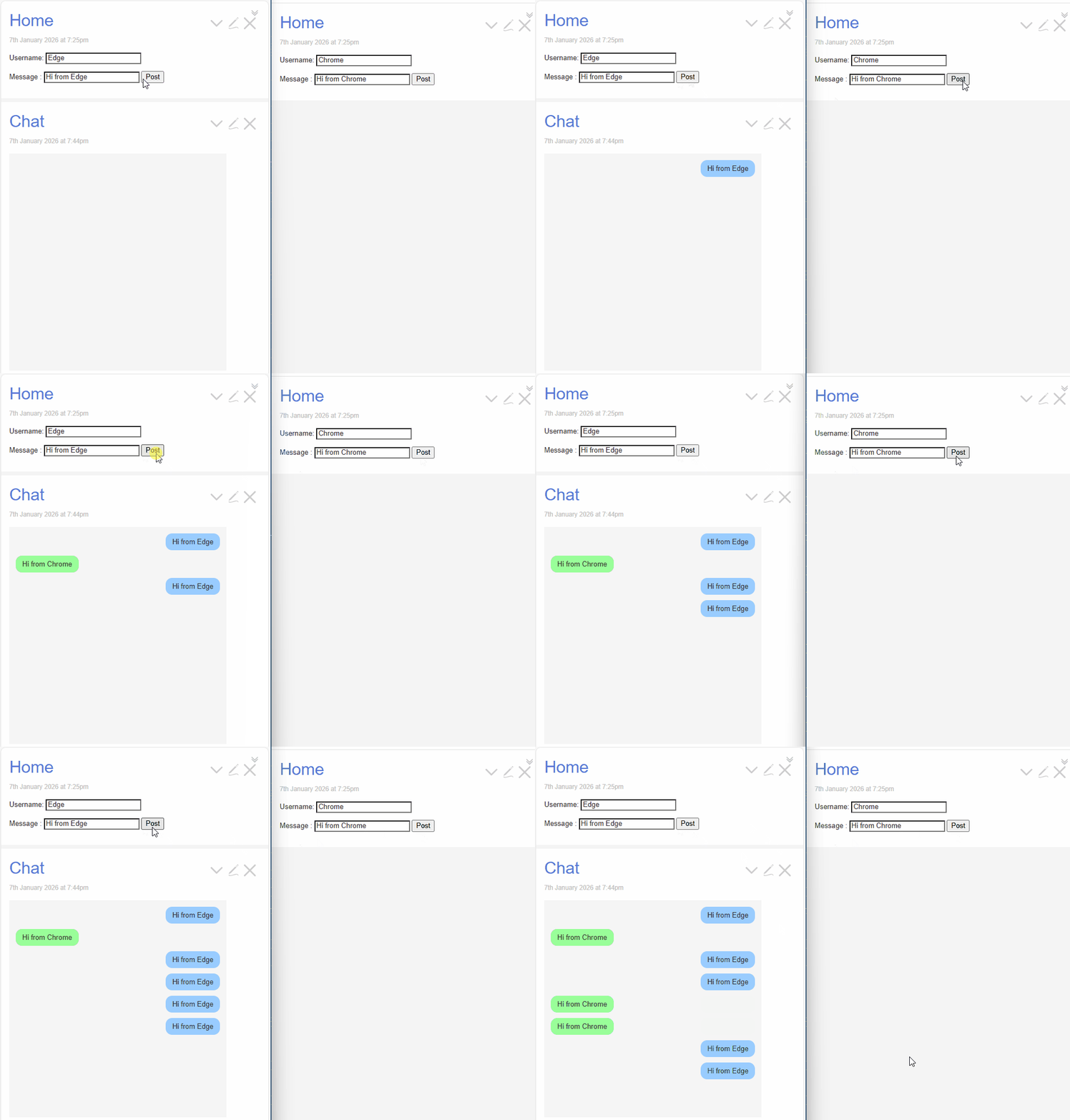
As just a visual proof-of-concept, I’ve got one wiki here open in two different browsers - Edge and Chrome on Windows. I also have it open on my iPhone to follow along (though I’m not showing that). Essentially I’m testing simultaneous creating of tiddlers and you can see the ~ 3 seconds it takes for the “pull” process to happen and reflect, but it’s very obvious that the sync is at tiddler level, not wiki level. While this is perhaps obvious, the distinction is important in how this can be used!

Now building a chat program is probably not the realistic use case here, but I’ve long thought about team-based project management. I know there are some D&D people here - possibly an application to think about as well. There’s no “read-only” access with this, so I don’t want to get ahead of myself, but just generating ideas for the future.

Animation

(note that I’m not showing the chat window simultaneously on the right just because it becomes a bit visually confusing)

4 Likes

I’d also like to chime in and say that I find TiddlyPWA to be an excellent solution for keeping wikis sync’ed across multiple devices. I’ve been using it for around a month and a half, and it’s the best experience I’ve had with using my wiki across a laptop, eink tablet, and phone. I’ve previously used a git repo to sync between devices, but this is just a smoother, less fiddly experience once it’s up and working.

I first tried it by following instructions to setup a TiddlyPWA sync server on Glitch hosting service. When that got shutdown I decided to setup a TiddlyPWA sync server on a raspberry pi on my home network.

I also had a plan to enable access to my pi server over the internet when I’m away from home by setting up a Wireguard endpoint and tunnel to the pi from a VPS (cheap self hosting server purchased from some place like racknerd). So far I haven’t felt the need to set that up yet, because I can just work with the local copy of my wikis while I’m away from home and sync when I’m back on my home LAN / WiFi.

The real time syncing mechanism between wikis on different devices that @stobot showed in his post is a really nice feature. One example where I’ve used the syncing is where I have notes for a DIY project and make a list of the items I need to buy while researching on my laptop. Then when I’m ready to head out and go shopping, I just open the wiki on my phone (which I have bookmarked and just keep open in a tab) and it automatically connects to the TiddlyPWA sync server and downloads the project tiddlers I edited on my laptop. The fact that you can continue to use the local copy of your wikis while “offline” and disconnected from the sync server, and then auto sync when you’re back online is very convenient.

Once it’s all setup it works very smoothly, but the initial setup is definitely fairly complicated despite some nice documentation on the TiddlyPWA site. There were several details around setting up the sync server (including setting up Caddy for SSL), and understanding the steps to initialize new wiki instances on the sync server that I found confusing. Hopefully guides like the post by @btheado will make it easier for people to figure out.

I think covering a few more things like how to install tiddlywiki plugins, and how to update the tiddlywiki core to a new version would be helpful.

4 Likes

I wonder whether tiddlyPWA could be a parallel saving mechanism not for the whole wiki but just for let us say tiddlers that fit a filter. Could be a workaround for the missing backchannel ?

This looks great @stobot and I think it may be “killing two/three/four birds with one stone”;

  • Multidevice access
  • Multi-user access
  • Internet facing multi-user (without your own server, proxies etc…)

And as may come to be;

  • Mass read-only Publishing on the internet

I think being able to include a read only or published version is not necessary, however it could prove useful in team situations, for example the vast majority of users visit the site and use the content therein, potentially using local storage and various customisations but not at all permitted to save back. There may be a need to flag conflicts that emanate from updates by other users, but only such the individual read only user may need change things.

  • I don’t think we should underestimate adding and controlling TiddlyWiki not only in the infrastructure as provided by node or TiddlyPWA but by a smart software layer, such as leveraging the username, modifying buttons to create tiddlers in a new namespace eg $:/username/tiddlername and many others.
  • But it is true the ability to browse as the public, in what we call a read only state, or without authorisation even for someone with the editor rights, in some applications, edit will be rare.
  • Another example may be giving people one off passwords, retracted after a period etc…

Note: Thanks for the codes, my apologies I am struggling to get time to play.

Perhaps you could collaborate with @simon of tiddlyhost (I am a paid user) or publish your own service with some fundraising/subscriptions.

I’d be curious to know if the steps in my guide cover the parts you found most difficult: Setup your own TiddlyPWA server on Raspberry Pi 5 (using cloudflare tunnel)

Oh excellent guide! It definitely would have saved me time in several spots like in creating the systemd file to run TiddlyPWA as a service on startup of the Raspberry Pi.

As for parts that I had difficulties with. This part from your guide wasn’t quite as straightforward in my setup:

At this point, the TiddlyPWA server should be accessible on your local network by entering in a web browser the url : raspberrypi:8000.

There were a couple extra steps related to network connectivity from other devices on my LAN to the Pi / TiddlyPWA server that I needed to do that it seems like you didn’t need in your setup / guide:

  • HTTPS - If I remember right, when I tried to connect from a browser using plain http://mypi:8000 I got a page saying that HTTPS is required.

    So I setup the Caddy reverse proxy as suggested on ServerHosting/DIY from the docs at TiddlyPWA — TiddlyWiki Storage & Sync Solution. Setting up Caddy with automatic HTTPs–which uses an auto-generated Caddy SSL certificate–then finding the Caddy root certificate and installing it into the trusted certificates of the browsers on my laptop, phone, and tablet, took some time to work out.
  • mDNS (Multicast DNS) - Without this I couldn’t connect to the Pi using just the hostname (e.g. mypi) because the hostname mypi doesn’t automatically resolve from other devices on my LAN. After setting up mDNS I could connect using the name: mypi.local. Note: all of my devices are connected to the same WiFi network.

With the HTTPs and mDNS setup I am able connect from my other devices using https://mypi.local.