
"XMLHttpRequest error code: 400" on dockerised TW5

I am hosting a small wiki with TiddlyWiki5 to document our progress in a role-playing campaign. I love the ability to easily create filtered lists to dynamically create lists of tagged pages. The tw instance is hosted via docker and so far it worked beautifully for our small group and I am reluctant to switch to another wiki (coming from Dokuwiki a few years ago).

TW is hosted with the following docker-compose.yml:

tiddly-symbaroum:
  image: nicolaw/tiddlywiki
  container_name: tiddly-symbaroum
  volumes:
    - /opt/tiddly_symbaroum:/var/lib/tiddlywiki
  ports:
    - 8096:8080
  restart: unless-stopped

There is nothing special in the container’s logs and the following error message is all I get: Sync error while processing save of '$:/StoryList': XMLHttpRequest Fehler-Code: 400

The folder (/opt/tiddly_symbaroum) is writable and the standard user owns the folder. It worked until a few weeks ago and to my knowledge I did not tinker too much.
I also tried spinning up a new instance and the same error is present there, so I can rule out anything plug-in-related or tinkering with the TW files themselves. I tried hosting on Github pages but transferring my old wiki over there would be quite cumbersome.

Any idea what could be the culprit here or if there are better ways of running TW for a group of people?
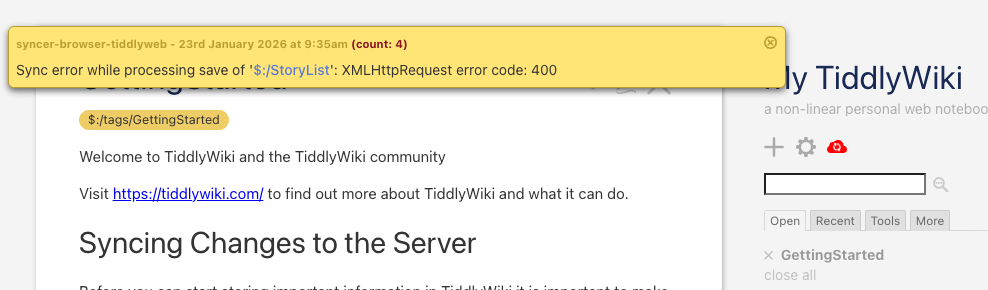
1 Like

Hi @Cantello I am not technical enough to answer your question, but there’s recent discussion around the PWA method of using TW, and although it’s not really setup for this, I created a little demo showing that because PWA syncs near real-time at a tiddler level, it makes a pretty good platform to build multi-user on top of if you fully trust each other with credentials.

Have you checked the docker logs of your tiddly-symbaroum container? There might be more details there.

Also, the network traffic in the browser developer tools might provide more clues. If you find the request which matches the 400 response code, there might be more information in the details.

As @stobot mentioned, I am running a public tiddlypwa server and I’m happy to share some slots. If you like it enough setup your own, it is very easy to move to a different tiddlypwa server.

As mentioned in that other thread. Anyone you share read access with will also have write access. If that doesn’t suit your use case, tiddlypwa is a non-starter.

The other possible challenge here is that you need a single-file version of your wiki to get migrated into tiddlypwa. But that should be easily solved by opening $:/core/ui/DownloadFullWiki in your wiki and clicking the download button.

Thanks, this sounds like a beautiful idea but currently I try to limit myself to containerised applications via docker compose. If I use the semi-public option mentioned in the thread, I’d have to use the given URL and I really wanted to not confuse my players any more with a different URL than the one they are used to.
I might come back to this but only after I tried debugging my current solution.

Unfortunately there is not much to look at if I am doing this correctly, neither in the browser console, not in the container logs. Must be something local to my server and I am too blind to see what it could be.

browser console:

performance: Execute $tw.perf.log(); to see filter execution timings $:/core/modules/utils/logger.js:53:26
TiddlyWebAdaptor: Getting status $:/core/modules/utils/logger.js:53:26
TiddlyWebAdaptor: Status: {"username":"","anonymous":true,"read_only":false,"logout_is_available":false,"space":{"recipe":"default"},"tiddlywiki_version":"5.3.6"} $:/core/modules/utils/logger.js:53:26
syncer-browser-tiddlyweb: Dispatching 'save' task: $:/StoryList $:/core/modules/utils/logger.js:53:26
syncer-browser-tiddlyweb: Sync error while processing save of '$:/StoryList': XMLHttpRequest Fehler-Code: 400 $:/core/modules/utils/logger.js:53:26
syncer-browser-tiddlyweb: Dispatching 'save' task: $:/StoryList $:/core/modules/utils/logger.js:53:26
syncer-browser-tiddlyweb: Sync error while processing save of '$:/StoryList': XMLHttpRequest Fehler-Code: 400 $:/core/modules/utils/logger.js:53:26
syncer-browser-tiddlyweb: Dispatching 'save' task: $:/StoryList $:/core/modules/utils/logger.js:53:26
XHRPUT
https://sub.domain.org/recipes/default/tiddlers/$:/StoryList
[HTTP/2 400  17ms]

docker log:

syncer-server-filesystem: Dispatching 'save' task: $:/StoryList
Serving on http://0.0.0.0:8080
(press ctrl-C to exit)
syncer-server-filesystem: Dispatching 'save' task: $:/StoryList
Serving on http://0.0.0.0:8080
(press ctrl-C to exit)

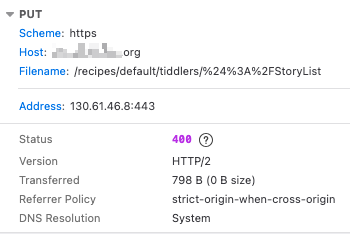
The browser console is different from the network traffic. Usually the console is just one tab in the browser developer tools. There should be another tab labelled “Network”. After reloading the page, one line will appear per network request. Select the one which is returning 400. Is there anything in the response headers or in the response body mre than just “400” response code?

Is your server headless or can you navigate to 127.0.0.1:8096 ?

I’m also using nicolaw’s image, but with the build option and using tailscale to serve it. I haven’t run it in months but just tested and it still seems to work.

I’m trying to understand how this is possible. I doubt you own domain.org

Is it possible something has changed with your proxy server or with your domain name?

Good luck!

You were totally right, this would be the output from the network requests:

image

Response headers:

HTTP/2 400 
content-length: 0
date: Tue, 27 Jan 2026 08:23:32 GMT
X-Firefox-Spdy: h2

Request headers:

PUT /recipes/default/tiddlers/%24%3A%2FStoryList HTTP/2
Host: hexxen.hekla.org
User-Agent: Mozilla/5.0 (Macintosh; Intel Mac OS X 10.15; rv:146.0) Gecko/20100101 Firefox/146.0
Accept: */*
Accept-Language: en-GB,en;q=0.5
Accept-Encoding: gzip, deflate, br, zstd
Content-type: application/json
X-Requested-With: TiddlyWiki
Content-Length: 142
Origin: https://hexxen.hekla.org
Connection: keep-alive
Referer: https://hexxen.hekla.org/
Sec-Fetch-Dest: empty
Sec-Fetch-Mode: cors
Sec-Fetch-Site: same-origin
Pragma: no-cache
Cache-Control: no-cache

No, I just edited the actual domain. I left it in this time in the above logs, so I can edit it out maybe later.
I think it has something to do with my reverse proxy (pangolin) but I have no idea what it could be - and it is only Tiddlywiki that is misbehaving at the moment, that’s why I thought it could be something tw-related.