Using the evencatcher widget, we can create clickable areas on an image that will scale responsively, without requiring external tools:
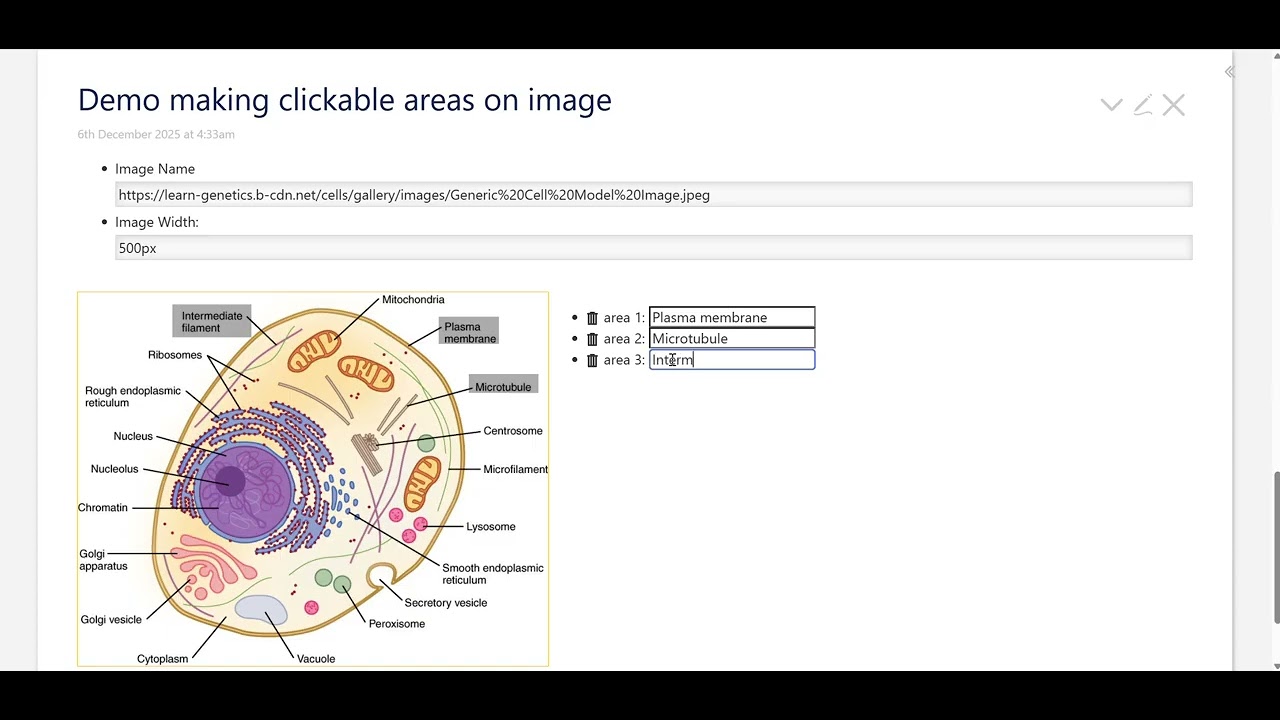
\function get-marker-pos()
=[<event-fromcatcher-posx>divide<tv-widgetnode-width>multiply[100]fixed[2]]
=[<event-fromcatcher-posy>divide<tv-widgetnode-height>multiply[100]fixed[2]]
+[join[ ]]
\end

\procedure click-actions()
<$action-setmultiplefields
$fields="prev-pos current-pos"
$values="=[{!!current-pos}] =[<get-marker-pos>]"
/>
</$let>
\end

\procedure edit-field(field,placeholder,type:text)
<$edit-text field=<<field>> class="tc-edit-texteditor tc-edit-texteditor-body" placeholder=<<placeholder>> type=<<type>>/>
\end

\function rect-area()
"
${[{!!prev-pos}]}$
${[{!!prev-pos}split[ ]nth[1]]}$ ${[{!!current-pos}split[ ]nth[2]]}$
${[{!!current-pos}]}$
${[{!!current-pos}split[ ]nth[1]]}$ ${[{!!prev-pos}split[ ]nth[2]]}$
"
+[substitute[]]
\end

\procedure add-area-btn()
<$button>add area
<$action-setfield $tiddler="$:/state/map" $index={{{ [[$:/state/map]indexes[]last[]else[0]add[1]] }}} $value=<<rect-area>>/>
<$action-setmultiplefields
$fields="prev-pos current-pos history"
$values="=[[]] =[[]]"
/>
</$button>
\end

* Image Name<<edit-field "img" "Enter image name or url">>
* Image Width: <<edit-field "width" "Enter image width">>

<style>
.img-wrapper{
outline:solid 1px red;
display:inline-flex;
width:fit-content;
height:fit-content;
position:relative;
}
</style>

<p style="display:inline-grid;grid-template-columns:1fr max-content;">
<$eventcatcher selector="svg.map" $click=<<click-actions>> usemap="map" class="img-wrapper">
<$image source={{!!img}} width={{!!width}}/>
<svg class="map" style="width:100%;height:100%;outline:solid 1px orange;position:absolute; top:0; left:0;" viewbox="0 0 100 100">
<%if [{!!current-pos}!is[blank]]%>
<circle cx=`${[enlist{!!current-pos}nth[1]]}$%` cy=`${[enlist{!!current-pos}nth[2]]}$%` r="3"/>
<%endif%>
<svg width='100%' height='100%' viewBox="0 0 100 100" preserveAspectRatio="none">
<polygon points=<<rect-area>> fill="black" opacity=".11"/>
<$list filter="[[$:/state/map]indexes[]]" variable="index">
<$link to={{{ [[$:/state/map/links]getindex<index>] }}}>
<polygon points={{{ [[$:/state/map]getindex<index>join[ ]] }}} fill="black" opacity=".33"/>
</$link>
</$list>
</svg>
</svg>
</$eventcatcher>
<ul>
<$list filter="[[$:/state/map]indexes[]]:sort:number[{!!title}]" variable="index">
<li>
<$button class="tc-btn-invisible">{{$:/core/images/delete-button}}
<$action-setfield $tiddler="$:/state/map" $index=<<index>>/>
<$action-setfield $tiddler="$:/state/map/links" $index=<<index>>/>
</$button>
area <<index>>:  <$edit-text tag="input" tiddler="$:/state/map/links" index=<<index>>/>
</li>
</$list>
<%if =[{!!current-pos}] =[{!!prev-pos}] +[!is[blank]count[]match[2]]%>
<<add-area-btn>>
<%endif%>
</ul>
</p>
demo: share

(related: SVG Image Maps From PNG Using Inkscape - #29 by Scott_Sauyet)