SVG Image Maps From PNG Using Inkscape

I updated the example
Old XBox Controller.json (451.6 KB)

Best I could do is update the tooltips, but I couldn’t add buttons or anything. Let me know if there’s a solution to that.

A good use for this might be to create diagram menus, that look like MS Visio flow charts to serve as menus or visual aids.

This thread has stuff about buttons in svg:

1 Like

Thanks to this thread I have managed to return to satisfy a desire to get images or perhaps more importiantly diagrams which represent common venn diagram relationships. I just wanted to make a set of svg’s that can be edited and used to represent such combinations visualy. But I want to also allow links from those diagrams, which is solved as a result of theis thread.

Of course I am lazy and using an LLM to generate these, but in this case it is a quite deterministic request, and ChatGPT is quite knowlegble about SVG’s.

  • The diagrams have lables for each region resulting using set annotations, but appear in the wrong place, when you deside the names to use your will need to nudge them into place.
  • It would be possible to wrap a link around each label using the methods in this topic. In some maybe even a region.
  • With some the lable only appears if in a tiddler with the type “image/svg+xml”

Anyone want me to share these here?, or shall I in a seperate topic?

The following 2 SVG’s are for two common forms of venn diagram that you could apply the above hints to, perhaps just the labels are sufficent?

<svg xmlns="http://www.w3.org/2000/svg" viewBox="0 0 300 180" width="300" role="img" aria-labelledby="title desc">
  <title id="title">Two overlapping circles with labels</title>
  <desc id="desc">Left circle A, right circle B, overlap labeled A ∩ B</desc>

  <!-- circles -->
  <circle cx="120" cy="90" r="70" fill="rgba(0,136,255,0.35)" stroke="#1f6fb2" stroke-width="3"/>
  <circle cx="180" cy="90" r="70" fill="rgba(255,0,128,0.35)" stroke="#b21f6f" stroke-width="3"/>

  <!-- labels -->
  <g font-family="system-ui, sans-serif" font-size="20" fill="#111" text-anchor="middle" dominant-baseline="middle"
     style="paint-order: stroke; stroke: #fff; stroke-width: 4">
    <text x="90" y="90">A</text>
    <text x="210" y="90">B</text>
    <text x="150" y="90">A ∩ B</text>
  </g>
</svg>

<svg xmlns="http://www.w3.org/2000/svg" viewBox="0 0 320 230" width="320" role="img" aria-labelledby="title desc">
  <title id="title">Three overlapping circles with labels</title>
  <desc id="desc">Labeled Venn diagram of sets A, B, and C with intersection labels</desc>

  <!-- circles -->
  <circle cx="140" cy="100" r="70" fill="rgba(0,136,255,0.35)" stroke="#1f6fb2" stroke-width="3"/>
  <circle cx="180" cy="100" r="70" fill="rgba(255,0,128,0.35)" stroke="#b21f6f" stroke-width="3"/>
  <circle cx="160" cy="150" r="70" fill="rgba(255,215,0,0.35)" stroke="#c49b00" stroke-width="3"/>

  <!-- labels -->
  <g font-family="system-ui, sans-serif" font-size="18" fill="#111" text-anchor="middle" dominant-baseline="middle"
     style="paint-order: stroke; stroke: #fff; stroke-width: 4">
    <!-- individual sets -->
    <text x="90" y="85">A</text>
    <text x="230" y="85">B</text>
    <text x="160" y="195">C</text>

    <!-- pairwise overlaps -->
    <text x="160" y="65">A ∩ B</text>
    <text x="120" y="140">A ∩ C</text>
    <text x="210" y="140">B ∩ C</text>

    <!-- triple overlap -->
    <text x="160" y="115">A ∩ B ∩ C</text>
  </g>
</svg>

2025-11-03_19-40-45

I am experimenting with other forms and additional unions but these two possibly for 60% of the most common ven diagrams. Any way when you go above three other shapes are needed like this;

This is interesting but wrong.
2025-11-03_19-45-46

Doing 4 n 5 region union disagams are difficuly of not prohibited by 2d maths

1 Like

interestingly, this may be related to the “four colour theorem”

They are not impossible, and Venn himself did four- and five-combinations ones, but it’s provable that they cannot be done with circles alone. I believe there are constructions to allow for arbitrary numbers, but they are usually done with more and more unwieldly shapes. I know I’ve seen more pleasing versions of four, and maybe of five as well. But these are probably hand-drawn, not using such constructions.

1 Like

Brilliant. I forget to re-check the forum when new question arise after the old ones.

Thank you for your examples in the thread. I am able to use it around individual elements inside the <g> tags. I’m pretty sure it will work in multiple locations with a parameter to modify the macro/procedure.

And this is also built in to TiddlyWiki, because I originally did not want to use it thinking it was a custom widget.

Thanks for highlighting this! I’ve just tried out the same. Since I have many svg projects, often serving some kind of diagramming function, this is a perfect tip! (Until now, I’ve settled for putting links into text objects embedded in the svg, but it’s ideal to have the whole shapes function as links!)

Edit to add: If you want a cursor to help viewers recognize the link, you’ll need a special style declaration, as in this model:

<svg viewBox="0 0 350 250">
  <$link to="svg fun"><circle cx="225" cy="85" r="80" fill="red" class="flex-circle"/></$link>
<style>
.flex-circle { cursor: pointer; } 
</style>
</svg>
1 Like

Hold the phone.

Where do the text objects show up? Can you control their location?

<$text>text object </$text>

Sure, here’s a working demo of a dynamic svg with bits of embedded text, drawing from fields and such, one of which is a link.

2 Likes
<foreignObject x="64" y="50" width="150" height="120"><body>@@.hlw  {{!!left_label}} @@</body></foreignObject>

What is the point of @@.hlw ---- @@

The syntax @@.class-name @@ syntax allows application of a css class to whatever comes between the @@ flags. See documentation here.

This is much more efficient than micro-managing the colors for each label etc. I can change the definition of the hlw class once, and the change propagates throughout the wiki wherever it’s being used. Also, a style like this can include dynamic elements, such as palette-responsive colors. I originally called it hlw because it was personal shorthand for “highlight-white” — a pale background color for whatever was inside. In this demo, it has morphed a bit from that model.)

1 Like

Using the event catcher, it should be possible to avoid the need of using inkscape. It gives all the info required to build the svg path:

\procedure clickactions()
<$action-setfield  click=`
* event-fromselected-posx: $(event-fromselected-posx)$ (x position of the event relative to the selected DOM node)
* event-fromselected-posy: $(event-fromselected-posy)$ (y position of the event relative to the selected DOM node)
* tv-selectednode-width: $(tv-selectednode-width)$ (width of the selected DOM node)
* tv-selectednode-height: $(tv-selectednode-height)$ (height of to the selected DOM node)
` />
\end

<$transclude field="click" mode="block"/>

<$eventcatcher selector="img" $click=<<clickactions>>>
[img[Motovun Jack.jpg]]
</$eventcatcher>

I’ll try to make a demo when I have the time

Here’s a WIP:

Demo making usemap from tiddlywiki (2).json (4.1 KB)

2 Likes

Would it be more elegant to have a plugin with some sliders and options (How many colors, methods etc) that can use edge detection that automatically vectorizes a PNG?

Similar to Inkscape’s “Trace Bitmap” function, which is really good for doing such a task.

I don’t know about all that. I am not a plugin person (yet). But if it suits others to create one then great. I am not sure I am really fully a Tiddlywiki developer in general, or even getting into Javascript for that matter.

I am sort of, tentatively trying to work out a general set of use cases for SVGs, and did not know how “cut and dry” they could be until recently.

Inkscape is good for people who already use it, almost like a utility. . . . Because it’s true: Inkscape is a massive tool to use just for this.

1 Like

When this thread came out, I meant to investigate more thoroughly, as I loved the idea and the demo.

I still mean to do so, but I stopped when I saw this:

I have done related things a few times, and thought I knew how to do this part at least. I got it working well enough to prove out the concept:

Old XBox Controller with hover.json (452.3 KB)

This is only a proof-of-concept. I didn’t use your table, although clearly I could have done so. Instead, we have a second, temporary table, that is pulled from the field names (and so ordered alphabetically, and not the way you would like).

But on hover of one of the rows on this table, the equivalent control is highlighted in the SVG and vice versa.

This is done through CSS’s :has pseudo-class. I needed to do one thing to your markup to make this work:

<$link to="A Button" ><path class="ctrlr abtn" d={{!!abtn}} ><title> {{!!abtntxt}} </title></path></$link>
<!--                                     ^^^^     added                                              -->
<!--                                     vvvv     added                                              -->
<$link to="X Button" ><path class="ctrlr xbtn" d={{!!xbtn}} ><title> {{!!xbtntxt}} </title></path></$link>

Other than that, I added my table, which looks like this:

<table class="hoverme">
<$list filter="[fields[]removesuffix[txt]]" variable="section">
<tr class=<<section>>><td><$view field=`$(section)$txt` /></td></tr>
</$list>
</table>

and two dynamic CSS blocks:

<$list filter="[fields[]removesuffix[txt]]" variable="section">
  <$text text=`div.wrapper:has(path.ctrlr.$(section)$:hover) .hoverme .$(section)$,`/>
</$list>
.hoverme td:hover {background-color: #cfc;}

which expands into something like

div.wrapper:has(path.ctrlr.abtn:hover) .hoverme .abtn,
div.wrapper:has(path.ctrlr.backbtn:hover) .hoverme .backbtn,
div.wrapper:has(path.ctrlr.bbtn:hover) .hoverme .bbtn,
/* ... */
div.wrapper:has(path.ctrlr.ybtn:hover) .hoverme .ybtn,
.hoverme td:hover {background-color: #cfc;}

and

<$list filter="[fields[]removesuffix[txt]]" variable="section">
  <$text text=`div.wrapper:has(.hoverme .$(section)$:hover) path.ctrlr.$(section)$,`/>
</$list>
  path.ctrlr:hover {
  fill: rgba(145, 0, 0, 0.6);
  stroke: rgba(145, 0, 0, 0.6);
  stroke-width: .5px;
  transition: fill 0.2s;
}

which becomes

div.wrapper:has(.hoverme .abtn:hover) path.ctrlr.abtn,
div.wrapper:has(.hoverme .backbtn:hover) path.ctrlr.backbtn,
div.wrapper:has(.hoverme .bbtn:hover) path.ctrlr.bbtn,
/* ... */
div.wrapper:has(.hoverme .ybtn:hover) path.ctrlr.ybtn,
path.ctrlr:hover {
  fill: rgba(145, 0, 0, 0.6);
  stroke: rgba(145, 0, 0, 0.6);
  stroke-width: .5px;
  transition: fill 0.2s;
}

I hope to look over the rest of the tutorial this weekend, and see if there’s a good way to automate some of this.

2 Likes

The tables did not show up for me.

(I had no idea you could use those tiddlywiki widgets in css! Wow! Anyway, maybe that is something I have not accommodated.)

For some reason the “vice versa” just impressed the heck out of me.

I think I’d like to try an analog of this on my polar alpha-chart, so that the legend and pie-slices call each other out more dramatically.

It does seem like it should be harder, but at a technical level it uses exactly the same mechanism.

The only real requirements are a container that holds both groups and distinct names for each related pair, which you can use directly as—or transform into—class names for the elements.

Hmm, I wonder why. Did you try this on something like tiddlywiki.com? Or was it on another site where custom CSS might have been interfering? In any case, I made another version that uses a modification of your table to hook the hovering to:
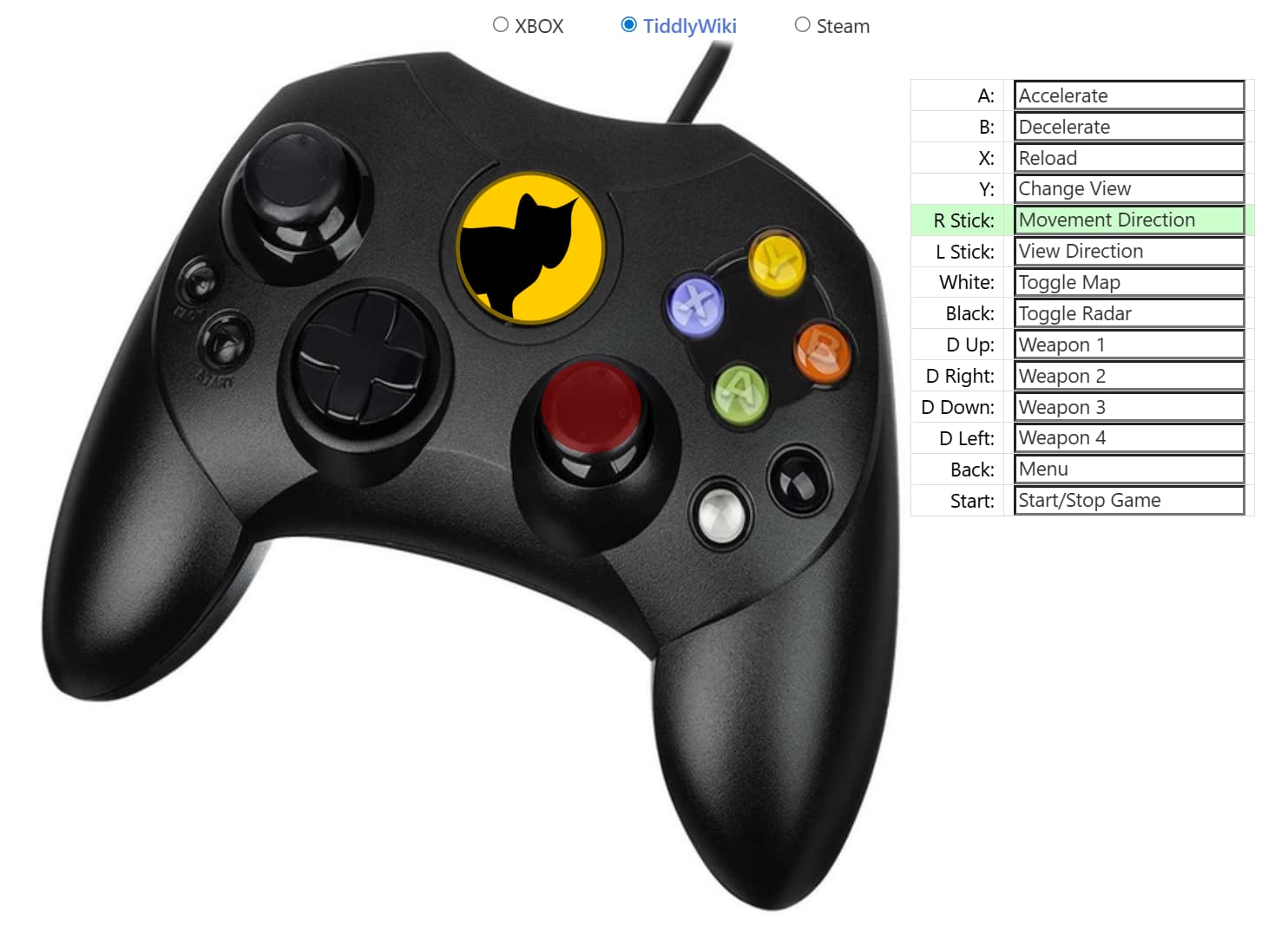
It’s here: Old XBox Controller with hover 2.json (452.8 KB)

Well, it’s more that you can generate CSS with wikitext. This doesn’t work in a tiddler with type text/css, since there wikitext markup is not rendered. But with the default type, you can generate the CSS that you might need. That’s what we do here.