I can think of several techniques. You can test them all by downloading this and dragging it onto a wiki:
highlight-cells.json (3.0 KB)
The one I called Highlight One Cell - Take 3 is probably the closest to your needs:
|myClass3 |k
....
|Body row 3| Column 2 | Column 3 | Column 4 | Column 5 |
|Body row 4| @@.disabled Column 2@@ | Column 3 | Column 4 | Column 5 |
|Body row 5| Column 2 | Column 3 | Column 4 | Column 5 |
...

<style>
table.myClass3 tbody td:has(.disabled) {background: lightgreen;}
</style>
This uses the :has pseudoclass, which Firefox only added fairly recently, although it’s been available in WebKit browsers for a while.
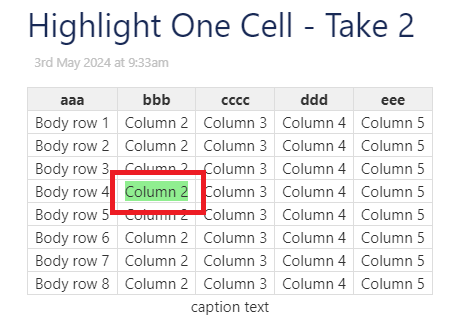
Highlight One Cell - Take 2 is simpler and doesn’t require the separate stylesheet, but it highlights only the content of the cell, leaving the cell’s padding unhighlighted:
|myClass2 |k
...
|Body row 3| Column 2 | Column 3 | Column 4 | Column 5 |
|Body row 4| @@background:lightgreen;Column 2@@ | Column 3 | Column 4 | Column 5 |
|Body row 5| Column 2 | Column 3 | Column 4 | Column 5 |
...
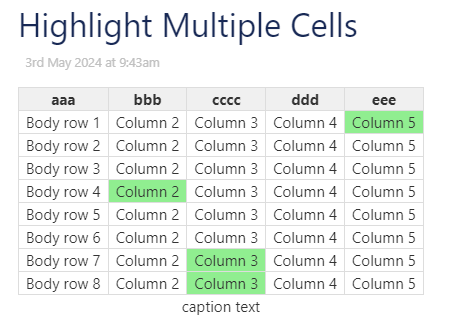
Highlight One Cell probably offers you no advantages, but it also leads to Highlight Multiple Cells, which, while likely not what you’re looking for, is an interesting approach if you have a handful of cells you want to highlight:
<style>
<$list filter="4-2   7-3   8-3   1-5">
table.myClass4 tbody tr:nth-child(<$text text={{{ [<currentTiddler>split[-]nth[1]] }}}/>) td:nth-child(<$text text={{{ [<currentTiddler>split[-]nth[2]] }}}/>) {background-color: lightgreen;}
</$list>
</style>
Here, we’re going to highlight the cells (4, 2), (7, 3), (8, 3), and (1, 5):