I found a set of applications that would benefit from the ability to build a single filter from one or more filters. However I want one or more additional filters selectively added.
Has anyone faced this challenge them self and can share any code patterns you came up with?
For example
We have a primary filter say [all[]tag[tagname]]
Then we may want to click a check box that applies -[subfilter<subfiltername>] at the end to remove items in the subfilter,
Then we may want to add another title [[tiddlername]] +[putfirst[]] and put first
Then we may want to sort +[sort]]
then with all this applied we use a list that combines the lot.
Now I am happy for custom lists to use nested listwidgets with each selected filter being applied to the results of each previous filter:
However I would also like to put thse newly constructed filters into some existing core functions. So I would like to;
Be able to replace an existing filter with the compound filter in place without needing to modify other parts of the code.
i believe you could also use a :cascade and have those checkboxes / UI items toggle a tag on tiddlers containing their corresponding filters? then you could do e.g
[all[]tag[tagname]] :cascade[tag[theFilters]]
if I understand cascade correctly, that should apply all the filters in the text fields of tiddlers tagged theFilters to the initial run, and allow you to add whatever filter(s) you want.
edit: i looked at the :cascade prefix docs and it appears that will only return the first non-empty result from the list of filters. not quite what you were looking for, sorry!
Thanks Eric, I will have a look for your code patterns in use, but rather than a general interactive solution I want to build a specific interactive solution.
The key desire is to modify the filter(s) used in a single list widget.
I am trying to get a code pattern that can be used by the community for a class of solutions not currently supported in tiddlywiki.
Example;
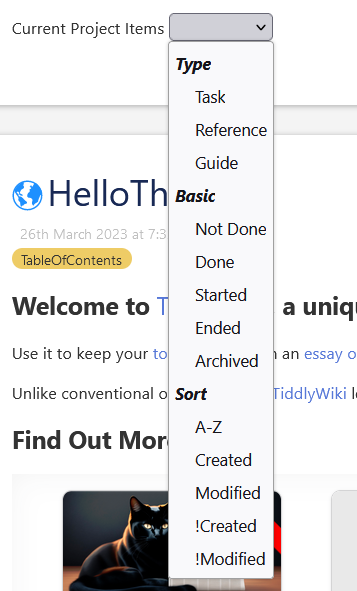
Imagin you have a project view that lists a range of resources for the project, perhaps any project related item has the project names tag. We will have tasks, done tasks, references, guides etc… with a range of methods used, field/values, tags or even field existence vs containing a date stamp eg done-date.
So the “root filter” would be [tag[<currentTiddler>] where current tiddler is a project name.
Lets say I want a single list of items by default it would be tasks not done [tag[<currentTiddler>] -[tag[task]has[done-date]]
Or done items [tag[<currentTiddler>] +[tag[task]has[done-date]]
Or references (not archived) [tag[<currentTiddler>] +[tag[reference]!has[archive-date]]
But then we may want to show in created order [tag[<currentTiddler>] +[tag[reference]!has[archive-date]] +[!sort[created]]
I would like to allow the user to simply select/check to add a named filter to the single list filter to get whatever result they want. Thus they could even mix tiddlers such as tasks and references.
They will not see the filters needed or generated, just select what they want.
The above is a real example I hope to use, but the reason I want to find a way to build the filters for use in an existing list filter is because I want to build such selection capacity into parts of the core. for example consider $:/tags/ViewTemplate iterated in $:/core/ui/ViewTemplate
Currently the filter is [all[shadows+tiddlers]tag[$:/tags/ViewTemplate]!has[draft.of]]
I would for example like to provide a way to select say “bottom tags” wich would alter the above filter to have appended to it, the following filter;
=$:/core/ui/ViewTemplate/tags +[putafter[$:/core/ui/ViewTemplate/body]] which would also display the tags below the body
Or “hide tags” may append the filter -[[$:/core/ui/ViewTemplate/tags]]
The extended dream here is to allow each tiddler, or a class of tiddlers, to customise what they see, or the order of the elements presented by the view template. While still respecting additional elements introduced by the use of $:/tags/ViewTemplate.
I could see a similar selection process applied to a dynamic table.
[Edited] I may also like to add filters to the single filter that include conditions, for example;
Display an additional tags view to tiddler listing more than N items

This reminds me of an idea that I posted here : a filter “extension” for the list widget. In your case, you could store a the extension in a macro/tiddler/field and append it in the original filter expression.
Thanks all for your contributions, keep them coming;
Here I am a little more specific about what I am looking for, which is in many ways a much more general solution we can all use and in any tiddler.
I have extended my requirements now to accept the first filter, eg [tag<currentTiddler>] that defines the first list.
Then analyse all tiddlers found with this to;
Identify tags in use
Fields and values in use (subset only perhaps)
Then construct a set of filters we need to query / filter / limit the first list
Apply the selected filters to the list filter above
eg It a I find a “done” tag provide done and !done addon filter
[tag<currentTiddler>] +[tag[done]]
[tag<currentTiddler>] +[!tag[done]]
Lets say we also find amongst the resulting tiddlers includes a “priority” field with three values no field, priority=1 priority=2.
Then I want to provide selector to allow us to limit the list by
[tag<currentTiddler>] +[has[priority]]
[tag<currentTiddler>] +[priority[1]]
and others etc…
Including in combination with [tag<currentTiddler>] +[!tag[done]] +[priority[1]]
It is this last step of combining the primary filter with zero or more additional filters (generated programmatically) to apply to a list that I need the code pattern for.
This would be useful in a generic way and could perhaps, be placed behind the tiddler in the info dropdown
My interest is to simplify this by making use of the content found in the primary filter and simplify the options available according to the primary list.
I hope to reduce this to a single line query bar or similar