ANN: Introducing the Simple Outline Plugin

I needed a simple outline for a wiki I’m building. I usually do these with complex filters, and recursive procedure/function calls. This time I wanted something simpler. I rememberd this thread, where I had written such a thing as a JS proof-of-concept. I decided it was time to turn that into something real.

Simple Outline Plugin → (GitHub)


What it does

The <$simple-outline> widget takes a plain-text outline description and renders it as a collapsible, nested hierarchy using native HTML <details>/<summary> elements. Each node can reference a tiddler; when the tiddler has body text, the node becomes expandable and shows that content inline. Open/closed state is preserved for the duration of the session.

Installation: drag $__plugins_crosseye_simple-outline.json (25.6 KB) into your wiki and save. Requires TW 5.3.0+.


The outline format

<$simple-outline text="""
!! Section heading

  Group label
    + tiddler-name
    + Display Text :: another-tiddler

  Another group
    + yet-another-tiddler

!! Another heading
""" class="outline"/>
Syntax Meaning
!! text Section header (<h2>)
+ tiddler-title Tiddler reference — expandable if the tiddler has body text
display text :: tiddler-title Tiddler reference with an explicit display label
Plain text Structural group — collapsible if it has children
Indentation Each level of leading spaces is one level of nesting

The label shown for a tiddler reference is taken from the first of these fields that exists: summarycaption → the name as written in the outline.


Demos

1 — History of Computing

A personal knowledge-management example showing 4–5 levels of nesting. Each + note-* entry references a real tiddler with a summary field (used as the label) and body text (shown when expanded). This is the most straightforward use of the plugin: write the outline, create the note tiddlers, and the structure takes care of itself.

This demo uses the default styling. The only attribute in play is class="outline", which is also the default — so you could omit it entirely.


2 — Acts 7 Outline (class and summary-template)
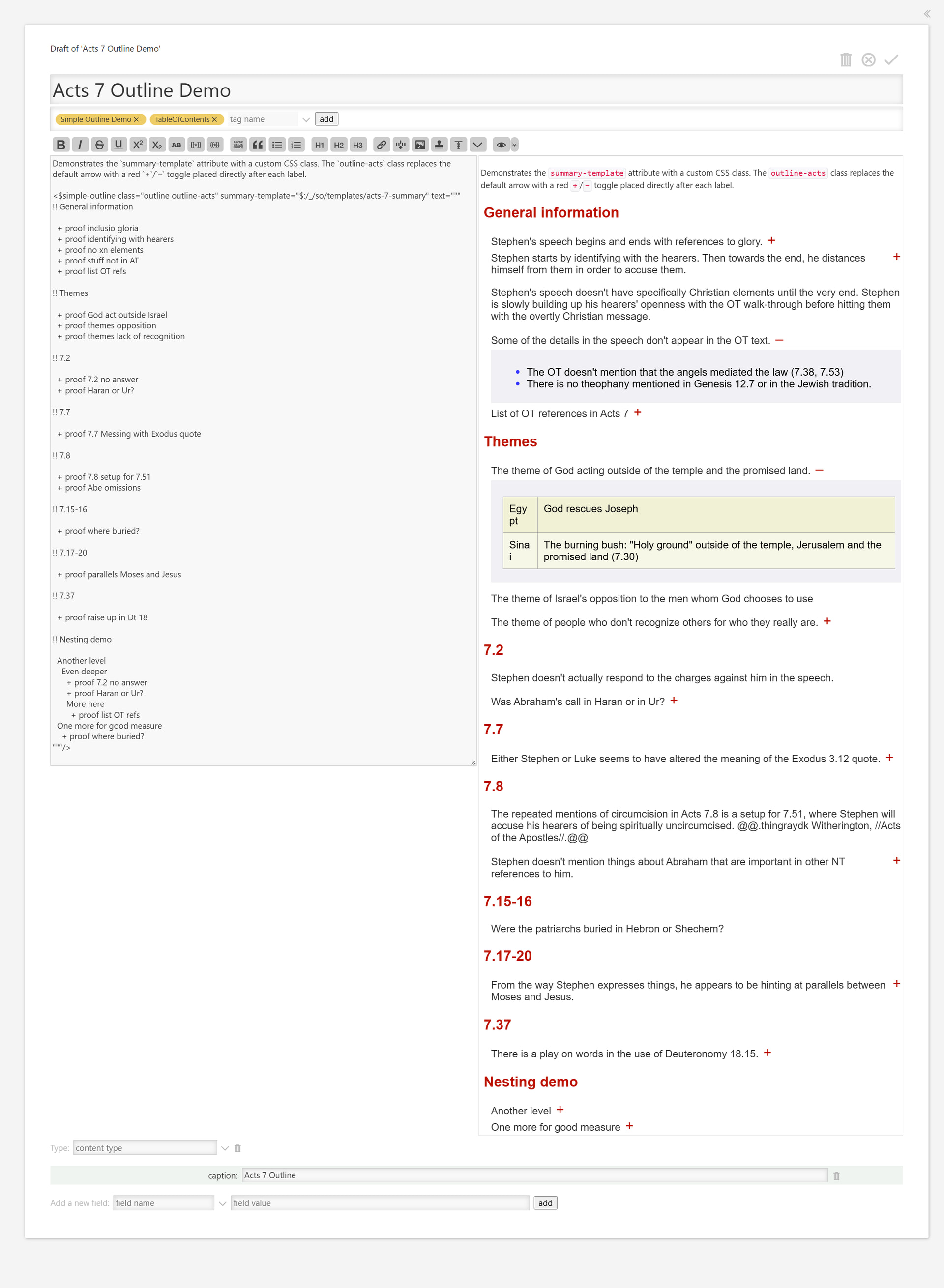
This is a working outline of an exegetical paper on Acts 7. It demonstrates two of the three extension points. This was the original inspiration for the idea here. I’d especially like to hear what @DaveGifford has to say about this.

class — the CSS class on the container <div>. Here it is set to "outline outline-acts". The outline-acts class is defined in a standalone stylesheet tiddler and replaces the default rotating arrow with a red +/ toggle placed directly after each label — no changes to the plugin required.

summary-template — a tiddler rendered inside each <summary> element in place of plain text. Two variables are available: <<currentTiddler>> (the item’s tiddler title) and <<so-label>> (the pre-computed display label). The template used here is just two spans:

<span class="so-label"><<so-label>></span><span class="so-toggle"></span>

The .so-toggle span is empty by default; the outline-acts stylesheet targets it with ::before to show the +/ indicator. Together, class and summary-template let you replace the entire visual language of the widget without touching any plugin code.


3 — Detail Template Test (detail-template)
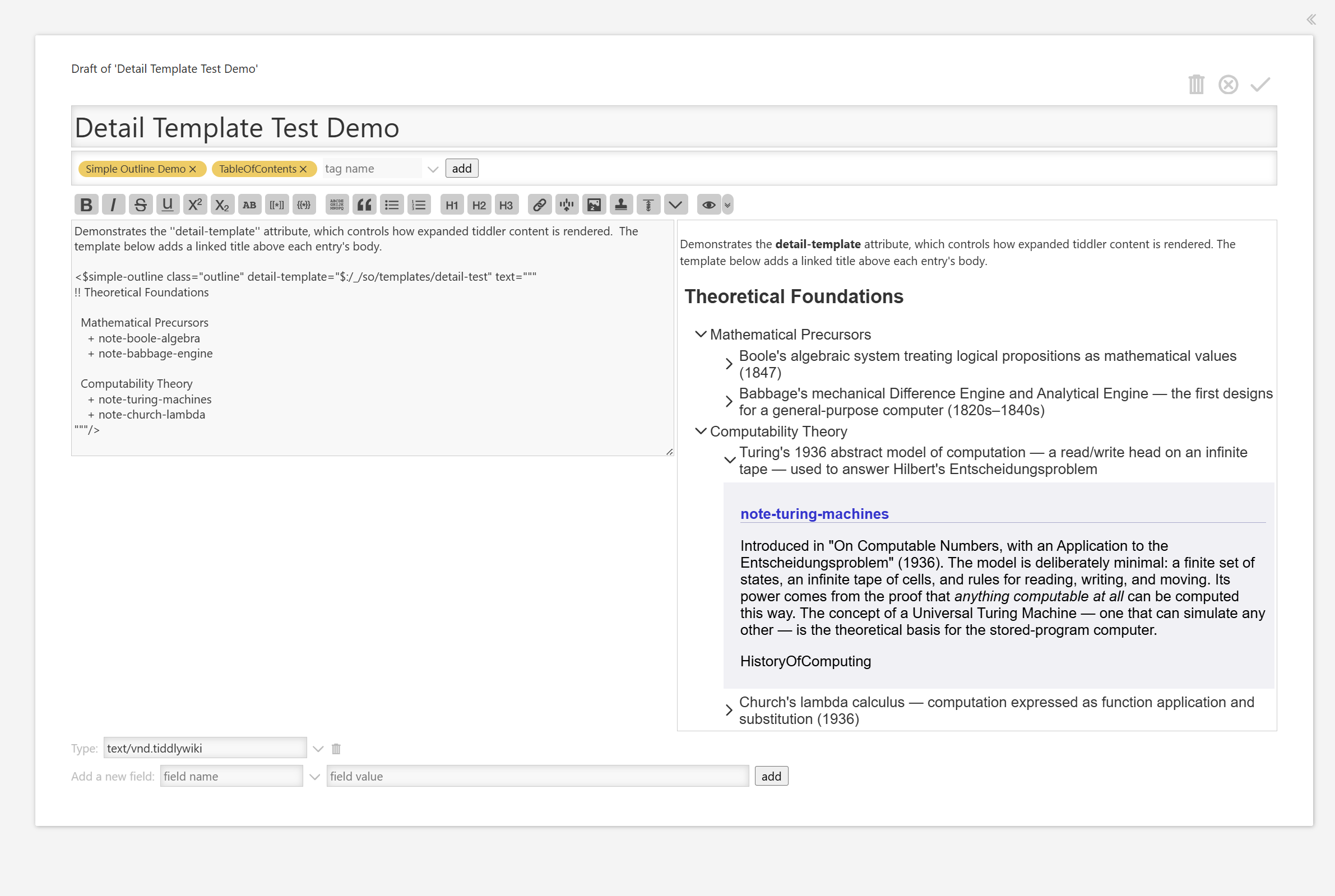
detail-template — a tiddler rendered as the expanded body for each item, instead of transcluding the tiddler’s own body directly. The same <<currentTiddler>> and <<so-label>> variables are available.

The template used here adds a linked title above the body text, so the reader can navigate to the source tiddler directly:

<$link to=<<currentTiddler>> class="so-detail-title"><<currentTiddler>></$link>
<$transclude $tiddler=<<currentTiddler>> $mode="block"/>

A small CSS rule makes .so-detail-title stand out as a styled header link. Combined with summary-template, this gives you full control over both the collapsed and expanded views.


4 — WikiText Reference Outline
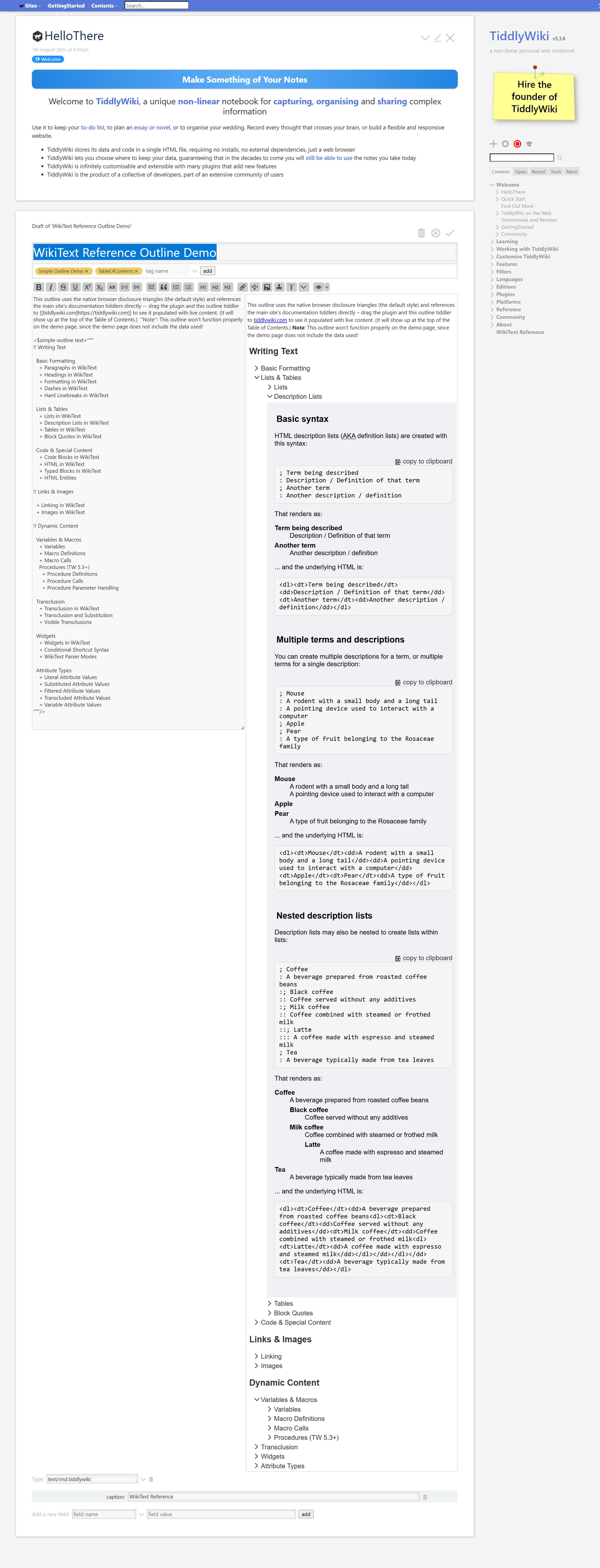
This demo references tiddlers from tiddlywiki.com — documentation pages that don’t exist in the demo wiki itself. The outline renders fine (all nodes just appear unexpanded), and if you drag the plugin and the outline tiddler across to a copy of tiddlywiki.com, save, and refresh, it comes alive with the real content.

This is a useful property in general: the widget degrades gracefully when tiddlers are missing, so you can sketch an outline before all the content exists.


Links


A note on maintenance

I built this to scratch my own itch and I’m sharing it in case it’s useful to others. I’m not planning to maintain it actively over the long term, but I will look at feature requests and especially bug reports that come in soon after this post. If you find something broken or have a well-scoped idea, please open an issue on GitHub or reply here.

6 Likes

Die, heretic!!! Just kidding. This is very similar to stuff I have done / stuff I am doing now, in terms of the final look of it, right down to the color scheme. To the point that anyone who uses my website would assume I did this Acts 7 outline. At one point I even had colored + / - to the right of short points that opened more content underneath. I eventually went back to using my old subsume plugins, which can be nested. Visually my current system puts the open / close button as an arrow to the left of the visible text, which is not as nice.

I will try your system out as an experiment because I do like the simplicity of it and the output is so similar to what I do.

:laughing:

This looks really good. I’ll have a play when I’m back at my desk!

I would hope so! That whole example came from the thread that inspired this work! The goal of my POC was to make something that matched your output but used a simpler input to get there. This work used that as direct inspiration.

I just realized this and came back here to mention it, but you beat me to it.

The only issue I see with this, and was an issue with my experiment too, is that there is no simple way from the view template to click to open the tiddler to edit it. That is why I went back to my subsume plugin. See [here]( Hechos de los apóstoles ) for an example of what I am doing now. The asterisk opens the tiddler. The trade off is that it will not work with static htmls but I have gone back to using full tw files.

Not to detract from your plugin, which I like and want to play with, but only for continued inspiration for you (since you drew off of my other project): Here is the [current project]( El Evangelio de Mateo I am working on, on the Lord’s Prayer. It shows examples of the <<subsumegray>> and <<subsumebold>> macros in the first section. I normally use gray for unfinished items, and bold for sliders to other lists of sliders.

The drawback of my current approach is that it loses the ‘sentence’ approach of my Acts 7 project, and moves back to a more ‘label’ approach. I do like the sentence approach, and that is why I want to play around with your plugin.

[I see I am going to have to relearn how to do links here…]

I remembered your little gray asterisks as things I just dropped because I didn’t understand them. (I later came to realize they only showed if another switch was toggled somewhere.)

I wanted to see if the code would support that easily enough, and it does… with a caveat. I needed to do a little extra work to avoid having clicks on those asterisks also toggling the state of the tree. While this works, and is not particularly difficult, it still shows a gap I would like to address in the plugin.

My version looks like this:

https://crosseye.github.io/TW5-SimpleOutlinePlugin/demos/AsteriskLinksDemo.html

This is the code:

<$simple-outline summary-template="asterisk-link-template" text="""

!! Matthew 6:9–13 — The Lord's Prayer

  Address
    + Our Father

  The first three petitions (God's glory)
    + Hallowed be thy name
    + Thy kingdom come
    + Thy will be done

  The last four petitions (human need)
    + Give us this day our daily bread
    + Forgive us our debts
    + Lead us not into temptation
    + Deliver us from evil

"""/>

Using some simple-enough CSS, and a template that looks like this:

<span class="so-label"><<so-label>></span>
<span onclick="event.stopPropagation()">
  <$link to=<<currentTiddler>> class="so-open-link">&#x2731;</$link>
</span>

Please don’t think I’m trying hard to push this on you. I just like the challenge of seeing whether what I’ve built is extensible enough to do the sorts of things I’d want. When I first posted, I thought I was in good shape, but I already have some new features I want to include. We’ll see.

1 Like

I’ve tried it out. It seems useful. It offers a bit more flexibility than TiddlyWiki’s TOC macro.

No worries about ‘pushing’. This is just a conversation.

One documentation omission: specifying that for the !! header formatting to display with the css, the text under it apparently needs to be indented a space or two. If you could eliminate that need for indentation, I think users would be less confused about the heading formatting not showing up, and they would appreciate having fewer clicks to do for the group labels and tiddler names.

[edit: also, not only does a tiddler need to exist, it needs to have text in the text field in order to be displayed with the arrow. Not a problem for me, but you probably need to alert users to this odd behavior]

Bonus feature to brag about in your documentation: I discovered that adding <b> and </b> to the summary field text made it bold in the outline. The same was true with <span class=”red”> and </span>.

Yes, and a bit less too, in a different way.

The built-in TOC macros are fantastic if your menu setup is strictly recursive. That is, if each child level is designed the same way as its parent level. But there are plenty of times when I don’t want that. I want one submenu to be the result of a complex filter, then next one to be the results of a simple filter, sorted by descending date, and the third one to sort people by last name then first name. Those are all individually doable with the TOC macros. But in combination it’s extremely difficult, perhaps impossible.

And there’s another sort of menu, the kind that this tool designed around: the hard-coded menu. With list-field sorting , there is a reasonable way to design ordering for your TOC, but it is very fragile. This just makes the layout entirely explicit.

And I want to move it toward doing some of the dynamic submenus as well. I think I have a design that won’t add much complexity, and allow for two levels of dynamism. We’ll see. But this will never get to the degree of dynamic inclusion that the TOC headers have.

That’s ok, though. It’s designed for a different job.

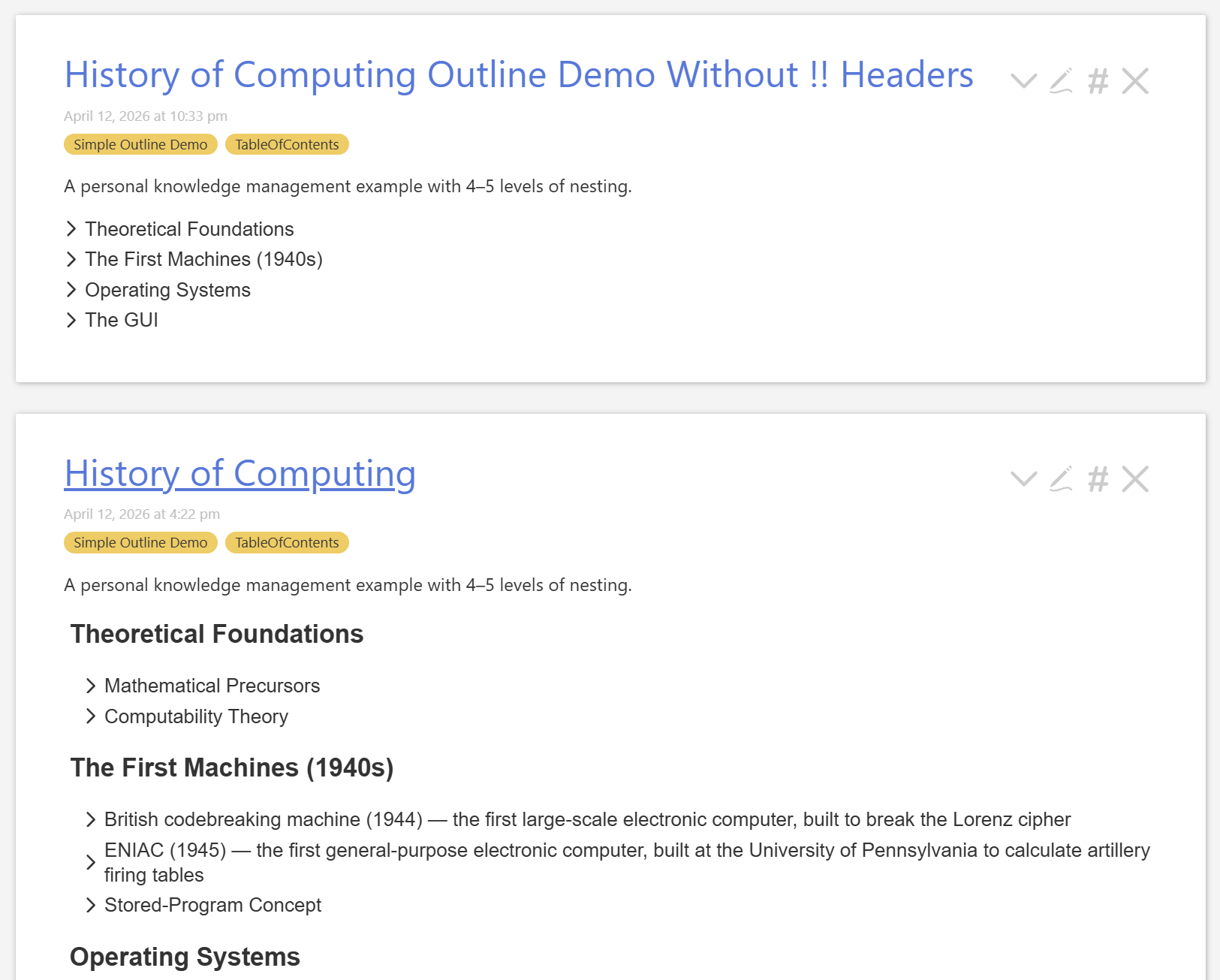
I guess I’m not following this exactly. The indentation is the point, really. The outline nesting levels are controlled entirely by this indentation. The !! is simply to allow some root level headers that do not collapse. It’s this difference:

I may eventually add other levels of non-collapsing headers, but I’ve never needed them myself.

But am I missing your point? I’m not really understanding what part is confusing or broken.

One of my next releases will have separate formatting for missing tiddlers. I haven’t quite worked out my preferred look for that though.

Ha! I didn’t realize at all. If I’d thought about it, of course that’s true, for the same reason that these sorts of things work with caption.


Thank you very much for the feedback!

What I mean is, you can do a tiddler (+ foo) without indenting and without a group, and it will display with the arrow if the tiddler exists and has text. And because of the arrow the text itself is slightly indented from the header. So users might want to use this and skip the group labels. But doing this disables the css class of the header. So is there a way to do skip groups, do the first level without indenting (thus saving a click each line), and yet have the header formatting work?

Also, thank you for getting me to research where the plus is on the Spanish Windows keyboard (second key to the right of P)

Sorry to over-respond here, but I thought I would mention that you can use my viewtoolbar buttons to open and close all sliders with your Simple Outline Plugin. See the following tiddlers in the Hechos de los apóstoles file. Feel free to swipe them / adapt them, etc, if they are helpful.

$:/.giffmex/ViewToolbar/Deslizadores

$:/widgets/action-showdetails.js

I’m going to have to look at this with a fresh brain. Not enough sleep lately, and I seem unable to parse this. I’m guessing that with a fresh brain tomorrow or some evening soon I’ll be able to make sense of it.

In the meantime, the latest published version does give an option for those asterisks.

ANN: Introducing the Simple Outline Plugin

Dear Ann (@Scott_Sauyet )

I only just looked at this. Looks really good to me; espec. the nested folding.

Clean and uncomplicated.


However my deeper comment is on the content, not just the presentation.

I thought your harvesting of significant Computing History really good.

For instance you quickly got the nuances of Turing’s influence & sequester.

Regarding Colossus, the Brit. secret computing project (revealed in the 1970’s) — I have often wondered if it inspired the doomsday computing film of the same name (released 1970) …

Colossus: The Forbin Project …

https://youtu.be/kyOEwiQhzMI

TT

That’s a much shortened version of one of the real projects inspiring this, one that will likely never see the light of day, but is a fun little pastime.

The current TOC
!! Theoretical Foundations

  Mathematical Precursors
    + note-leibniz-calculus-ratiocinator
    + note-jacquard-loom
    + note-boole-algebra
    + note-babbage-engine
    + note-lovelace-notes

  Computability Theory
    Formal Models
      + note-turing-machines
      + note-church-lambda
      + note-post-correspondence
    Limits of Computation
      + note-goedel-incompleteness
      + note-halting-problem
      + note-rice-theorem

  Information Theory
    + note-nyquist-sampling
    + note-shannon-information
    + note-shannon-communication-channel

  Cybernetics
    + note-wiener-cybernetics
    + note-von-foerster-second-order

!! The First Machines (1930s–1940s)

  Electromechanical Computers
    + note-zuse-z1
    + note-zuse-z3
    + note-harvard-mark-i

  Wartime Vacuum Tube Machines
    + note-colossus
    + note-eniac
    + note-bombe-cryptanalysis

  Stored-Program Architecture
    + note-von-neumann-architecture
    + note-edvac-report
    + note-manchester-baby
    + note-edsac
    + note-ias-machine

!! The Mainframe Era (1950s–1960s)

  Commercial Firsts
    + note-univac-i
    + note-ibm-701
    + note-ibm-360

  Programming Languages
    Early Languages
      + note-fortran
      + note-cobol
      + note-lisp
    Structured Languages
      + note-algol-60
      + note-simula
      + note-apl

  Semiconductor Revolution
    + note-transistor-invention
    + note-integrated-circuit-kilby
    + note-moores-law

  Time-Sharing and Interaction
    + note-sketchpad-sutherland
    + note-ctss-timesharing
    + note-multics

!! Operating Systems

  Batch Processing
    + note-ibm-os-360
    + note-job-control-language

  Unix and C
    + note-unix-origins
    + note-c-language
    + note-thompson-ritchie
    + note-unix-philosophy
    + note-bsd-unix

  Microcomputer OSes
    + note-cp-m
    + note-ms-dos
    + note-apple-dos

!! Minicomputers and Interactive Computing (1960s–1970s)

  DEC and the PDP Line
    + note-pdp-1
    + note-pdp-8
    + note-pdp-11

  Human-Computer Interaction
    + note-engelbart-mother-of-all-demos
    + note-hypertext-nelson
    + note-alto-research-context

!! Networking

  Early Packet Switching
    + note-arpanet-origins
    + note-packet-switching-theory
    + note-ncp-protocol

  TCP/IP and the Internet
    + note-cerf-kahn-tcp-ip
    + note-dns-system
    + note-ethernet-metcalfe
    + note-usenet

!! The PC Revolution (1970s–1980s)

  Microprocessors
    + note-intel-4004
    + note-intel-8080
    + note-motorola-68000

  Early Personal Computers
    + note-altair-8800
    + note-apple-i
    + note-apple-ii
    + note-tandy-trs-80

  The IBM PC Era
    + note-ibm-pc-1981
    + note-dos-microsoft
    + note-ibm-pc-clones
    + note-intel-x86-dominance

!! The GUI Era

  Research Origins
    + note-xerox-alto
    + note-smalltalk-kay
    + note-xerox-star

  Commercial Adoption
    + note-lisa-and-mac
    + note-mac-hci-innovations
    + note-windows-1-0
    + note-amiga-atari-st

!! The Open Source and Internet Age (1990s)

  Free and Open Source Software
    + note-gnu-project-stallman
    + note-linux-torvalds
    + note-gcc-toolchain
    + note-open-source-initiative

  The World Wide Web
    + note-berners-lee-www
    + note-mosaic-browser
    + note-html-css-early
    + note-netscape-navigator

  Search and Platforms
    + note-altavista-early-search
    + note-google-pagerank
    + note-amazon-web-services-early
    + note-dot-com-boom-bust

!! Modern Computing (2000s–present)

  Mobile and Ubiquitous Computing
    + note-iphone-2007
    + note-android-platform
    + note-app-store-model

  Cloud and Distributed Systems
    + note-mapreduce-google
    + note-aws-ec2
    + note-containerization-docker

  AI and Machine Learning Resurgence
    + note-deep-learning-breakthrough
    + note-imagenet-competition
    + note-transformer-architecture
    + note-llm-gpt-era

About 3/4 of that has at least some content, and a few sections are quite fleshed out. The remaining quarter don’t even have the gloss I call note-xyz yet. Maybe one day it will be in shape to share!

And if I keep fiddling around with TiddlyWiki plugins, I’ll never get back to it!

I’ll have to check it out… in all my spare time.

1 Like

This looks really interesting. I’m sure I could find a use for it…

The only comment I have to make is the use of the term “label”, which appears to be a synonym for “summary”. So label-fieldssummary-fields. I’m not sure where so-label fits in? There’s no so-anything-else (I’m guessing so stands for “Simple Outline”), so I’m finding references to that confusing. Should that be summary too?

Yes, the terminology changed mid-stream. I’ll normalize it before 1.0. And yes, “so-” is “simple-outline”. Here summary is the default tiddler field used to display the label, but there could be others. If it doesn’t exist, we look to caption and then title. And that sequence (summary → caption → title) is overridable too, so finding correct terminology is… complicated.

It’s been a productive few days since the initial announcement, and the plugin has grown considerably.

Here’s a summary of what’s new.


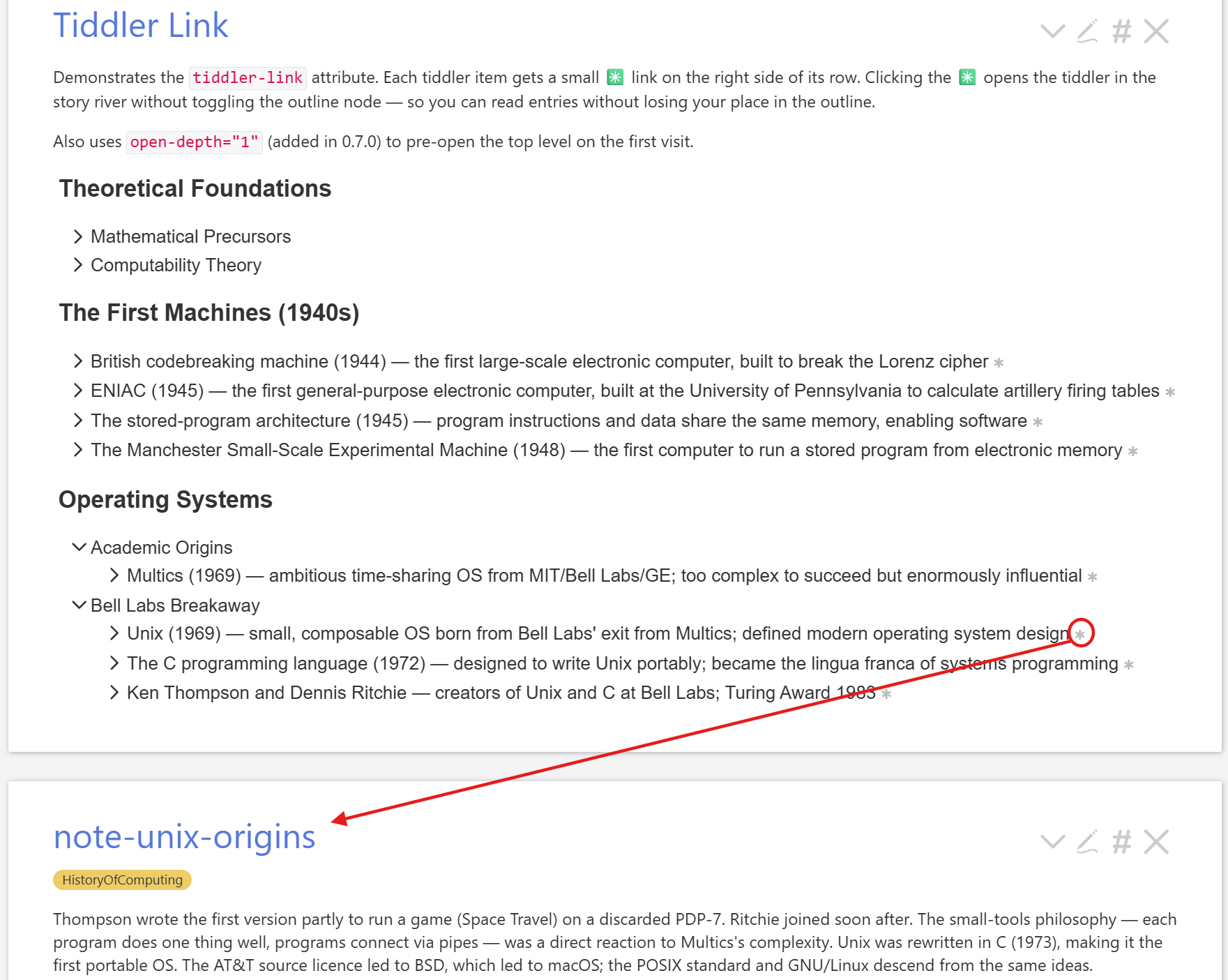
tiddler-link

Setting tiddler-link="yes" adds a small glyph (default , configurable via tiddler-link-label) to the right of every tiddler item’s summary row. Clicking it opens the tiddler in the story river.


open-depth

Pre-opens nodes by level on first render. open-depth="1" opens the top level automatically; deeper levels start closed. Once a user has toggled a node, their choice takes precedence.


label-fields

Controls which tiddler fields are consulted (in order) for the display label. The default is
"summary caption", but you can pin to a single field or extend the chain:

<$simple-outline text={{MyOutline}} label-fields="name caption title"/>

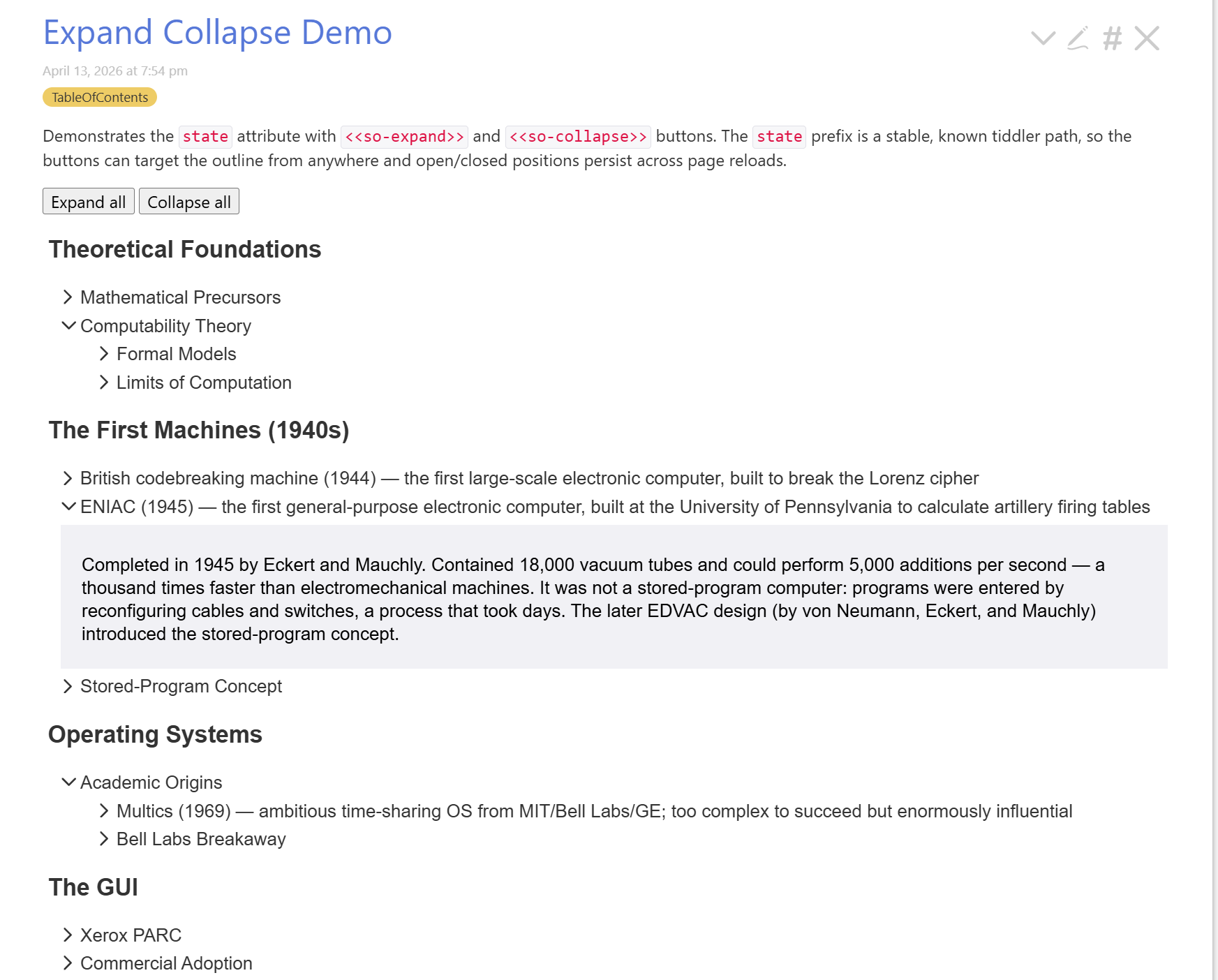
state + expand / collapse

Supply an explicit state prefix to make open/closed positions persistent across reloads and addressable from outside the widget:

<$simple-outline text={{MyOutline}} state="$:/my-wiki/outline/main"/>

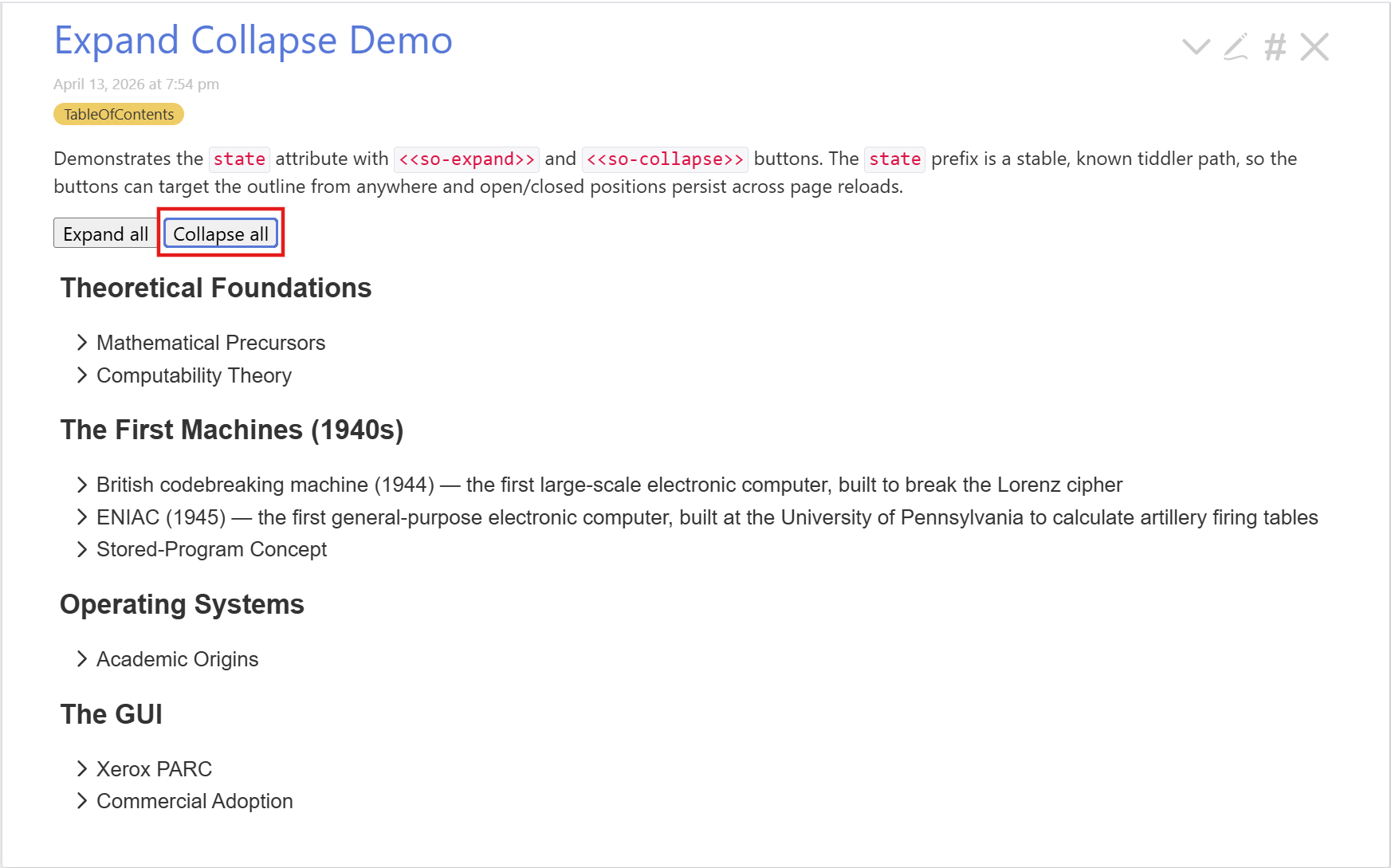
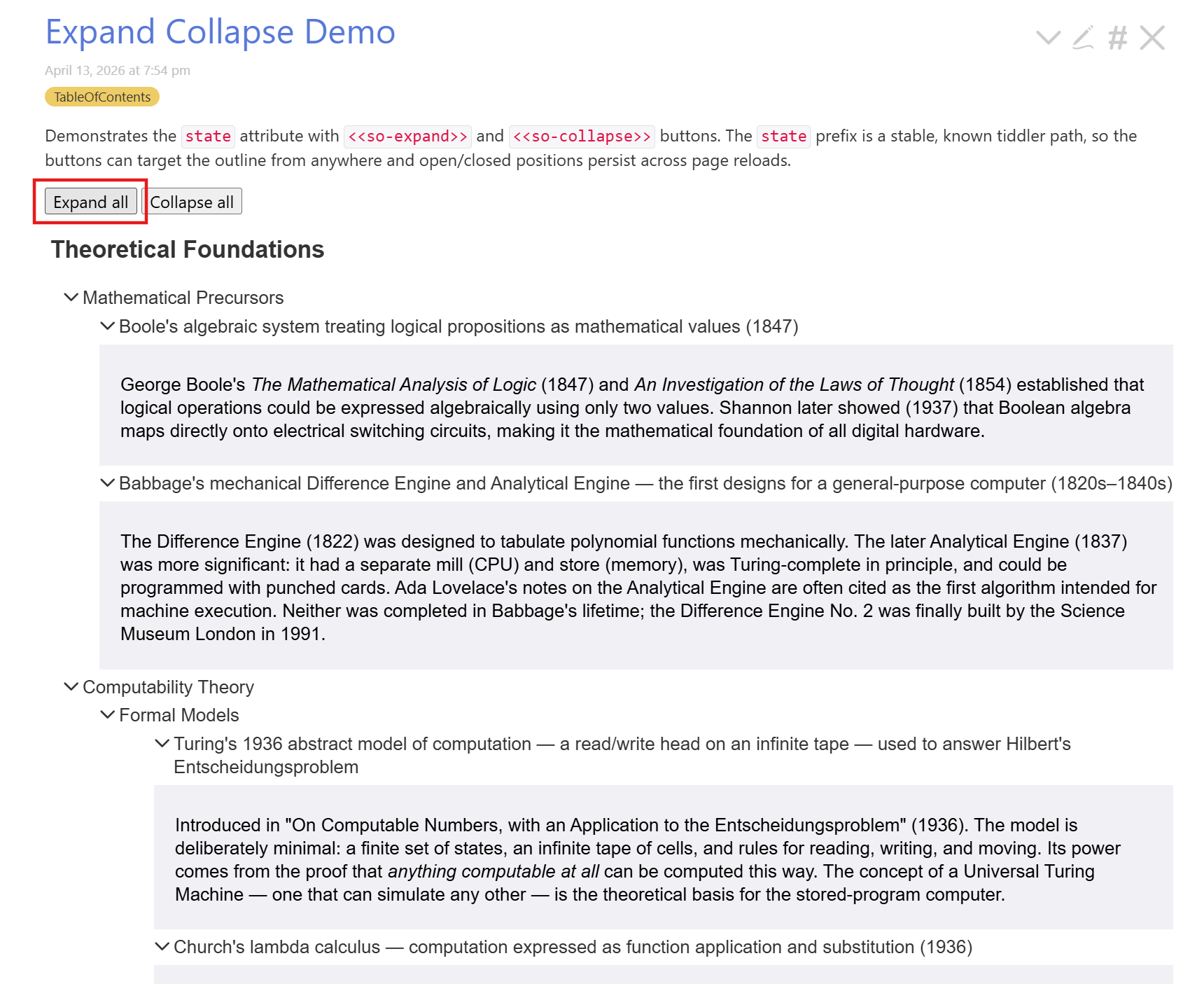
The <<so-expand>> and <<so-collapse>> procedures can then target the outline from any button:

<$button>Expand all  <<so-expand  "$:/my-wiki/outline/main">></$button>
<$button>Collapse all<<so-collapse "$:/my-wiki/outline/main">></$button>


Template attributes

Four attributes let you customise rendered markup without touching the plugin:

Attribute What it replaces
summary-template The <summary> content for tiddler items
detail-template The expanded body for tiddler items
group-template The <summary> content for group nodes
header-template The !! section header

All templates receive <<so-label>>; tiddler templates also receive <<currentTiddler>>.


++ filter lines

A line beginning with ++ is a TW filter expression evaluated at render time. Each matching tiddler becomes a regular item, and all the usual attributes (label-fields, summary-template, detail-template, tiddler-link, open-depth) apply to the results. Outlines with filter lines re-render automatically when the store changes.

!! My Notes
  ++ [tag[reading-notes]sort[title]]

group-by on ++ lines

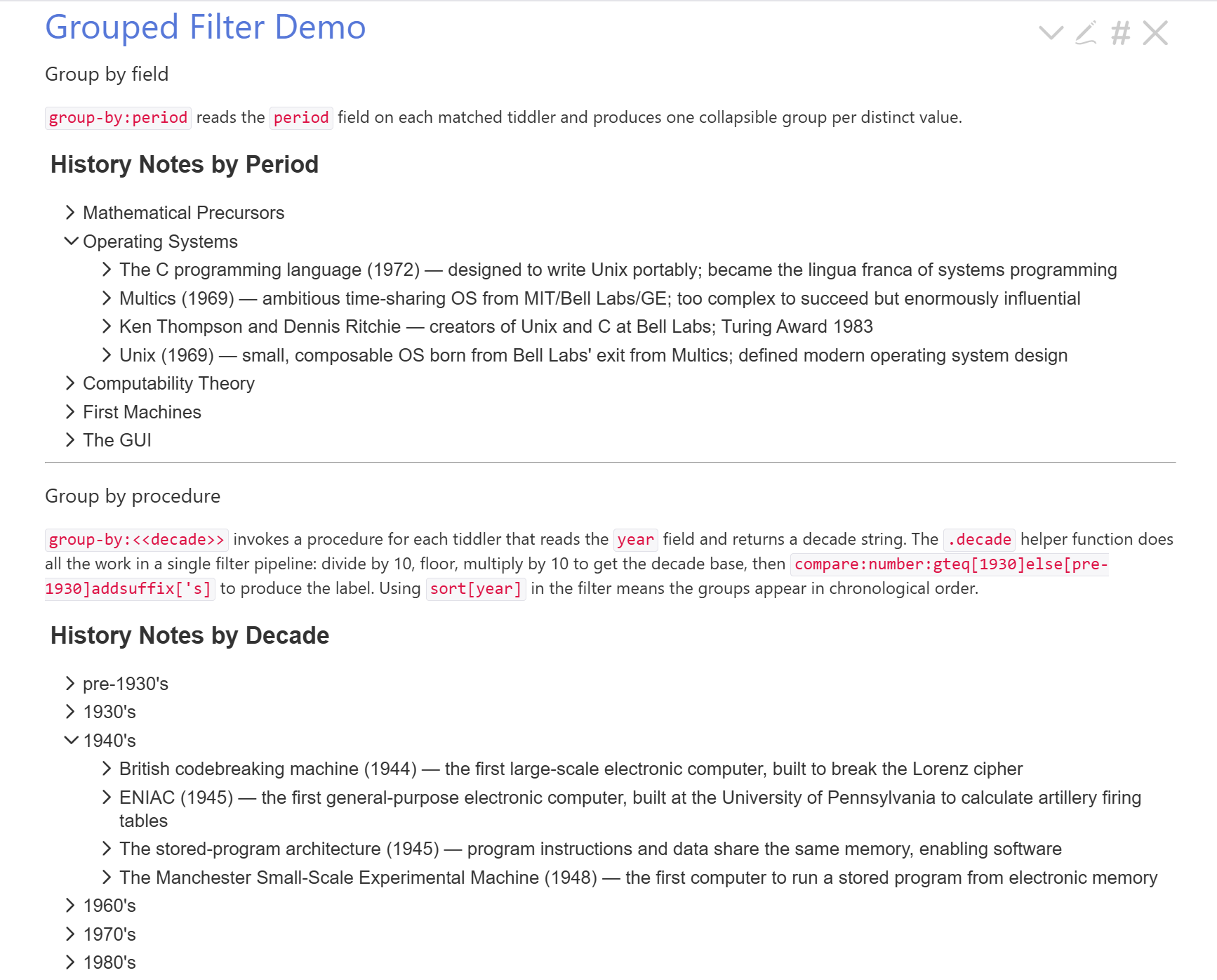
Filter results can be grouped into collapsible sub-nodes. Supply a field name or a procedure call:

!! Notes by Period
  ++ [tag[HistoryOfComputing]sort[title]] group-by:period

!! Notes by Decade
  ++ [tag[HistoryOfComputing]sort[year]] group-by:<<decade>>

The procedure variant is called once per tiddler with <<currentTiddler>> set; its plain-text output is used as the group key. The <<decade>> procedure in the demo uses a \function with filter arithmetic to bucket years into decade strings — no explicit range comparisons needed:

\function .decade(n)
[<n>divide[10]floor[]multiply[10]compare:number:gteq[1930]else[pre-1930]addsuffix['s]]
\end

\procedure decade()
<$let year={{{ [<currentTiddler>get[year]] }}}>
<$text text={{{ [.decade<year>] }}}/></$let>
\end


New CSS hooks

Several new classes make the DOM more targetable:

Class Element
.so-arrow <span> inside <summary> holding the rotating arrow icon
.so-label <span> wrapping the display text inside <summary>
.so-toggle Empty <span> after .so-label when summary-template is active — hook for custom expand/collapse indicators
.so-missing Added to .so-leaf when the referenced tiddler doesn’t exist
.so-tiddler-link The link element added by tiddler-link

To replace the default arrow with a + / toggle entirely in CSS:

.my-outline .so-arrow { display: none !important; }
.my-outline details > summary .so-toggle::before { content: "+"; }
.my-outline details[open] > summary .so-toggle::before { content: "−"; }

The Acts 7 demo uses exactly this technique with a red +/ and no arrow.


Keyboard navigation

Standard tree key contract: / move between visible items, / expand/collapse or move to child/parent, Home/End jump to first/last item.


.so-missing CSS class

Added to leaf nodes whose referenced tiddler doesn’t exist, so you can style them distinctly from normal non-expandable items.


New demos

All demos are live at
https://crosseye.github.io/TW5-SimpleOutlinePlugin/

  • Expand Collapse Demostate + external expand/collapse buttons
  • Tiddler Link Demotiddler-link with open-depth="1"
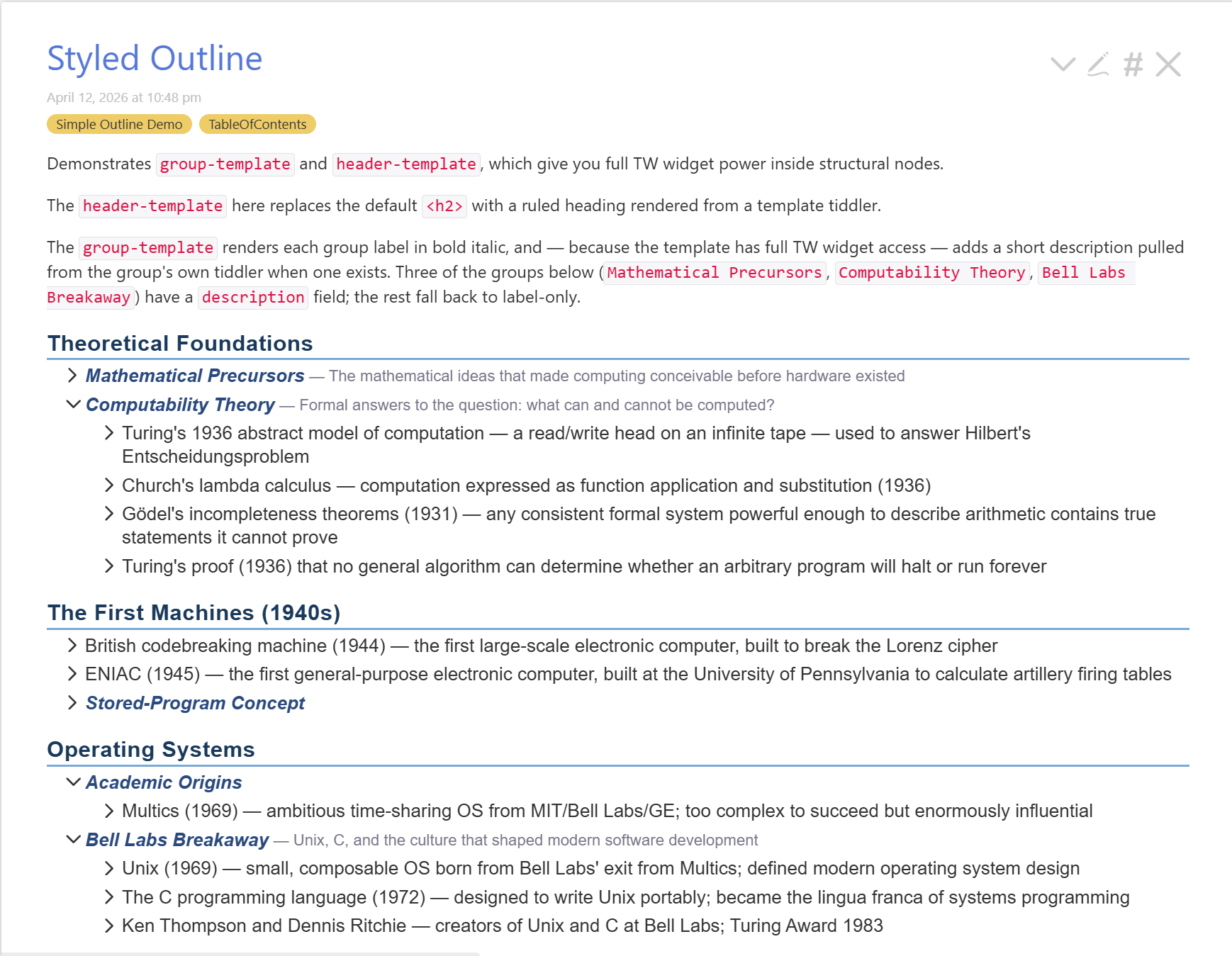
  • Styled Outline Demogroup-template + header-template together
  • Filter Demo++ lines, static and dynamic mixed
  • Grouped Filter Demogroup-by:field and group-by:<<procedure>>

Terminology note

@andrewg_oz asked about label vs summary. The variable passed to templates is <<so-label>> (the computed display text for the item). The label-fields attribute controls which tiddler fields are used to compute it. The word “summary” is now reserved for the HTML <summary> element throughout the docs.


You can drag the plugin tiddler directly into your own wiki to try it. TW 5.3.0+ required.

3 Likes