When I export static files, a red error window pops up. Is this problem unsolvable?
Hey, a bug report! Obviously I hadn’t tried that. The fix is in 0.12.1, which is now the default.
I hadn’t mentioned this before, but https://crosseye.github.io/TW5-SimpleOutlinePlugin/ should always point to the latest version. You can see the Changelog for previous versions.
Great. It exports all the content. Plus, the content can still be collapsed on the exported static pages.
1 Like
I’ve discovered that `simple-outline` can be nested. A node can also be a `simple-outline`.
I don’t know if anything can be done about this, but I first tried setting tiddler-link-label to {{$:/core/images/link|10px}}, but that didn’t work. Then I tried 🔗 and that didn’t work either. Then I checked the widget JS and found you’re using textContent so the only thing that would work is ‘typing’ the link emoji character itself  - which does work.
Is there any way to get that parameter parsed somehow so that fancier options are possible?
I have to admit that HTML exports weren’t on my in mental list at all when I thought of this.
(No, I don’t! I didn’t have to admit anything. It was just pure genius! Really it was!)
But using native HTML widgets certain makes certain things really easy.
I think this is fixed. But I did it in a hurry, so no guarantees.
Check out the Tiddler Link Label Demo.
1 Like
Great. But I’m a bit hazy on what you mean by …
The first outline … uses a core SVG icon …
The second uses the
I’m not clear which is the first or second since both all seem visually identical.
Maybe I’m Lost In Spacing?
TT
They’re not exactly identical. The SVG image uses a solid line style, while the HTML entity uses an outline with shading. Also, the SVG image will appear the same on all platforms, but the HTML entity can vary somewhat based on your particular platform and/or the font being used to display the character.
-e
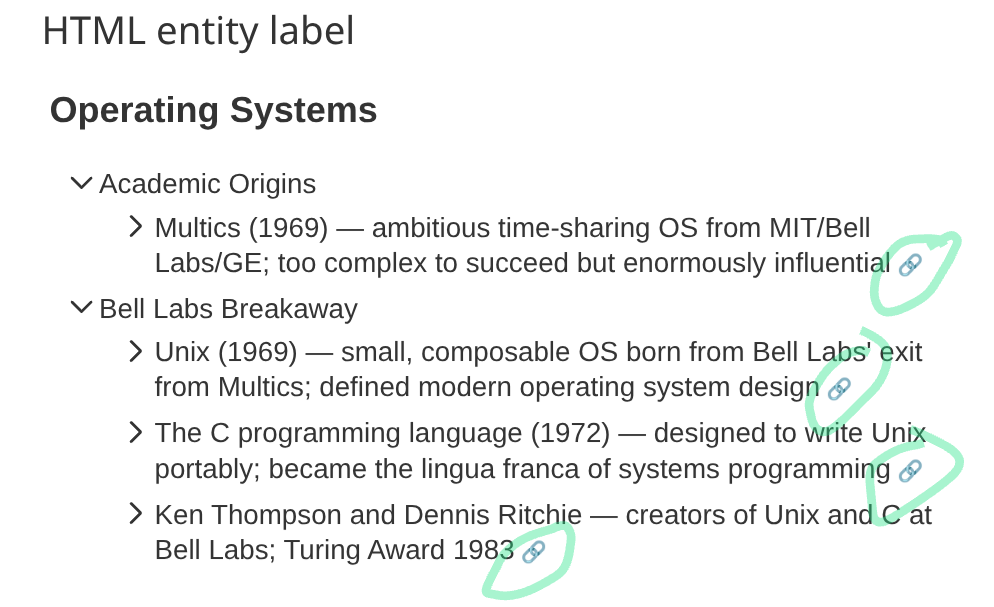
That’s exactly what I was hoping for! Both of them  I’ll have to see how you’ve done it, because that could be very useful…
The link only appears for existing and lowest indentation level tiddlers (e.g. in your example, there’s no link to ‘Mathematical Precursors’ tiddler).
Is it possible to include links for all tiddlers, including missing ones? This way, one could work ‘top-down’: write the outline first, then add individual tiddlers.
Adding a link to a missing tiddler, though, leads to another question: is it possible to automatically tag a newly created tiddler with whatever is there above it in the outline?
Thanks for the feedback — this pushed the plugin in a genuinely useful direction.
A quick clarification on how the current behaviour works: the tiddler-link glyph appears on every node that carries a + prefix, at any depth. Plain text lines (no +) are structural group labels with no associated tiddler, so they don’t get a link. In the standard examples, the group labels (“Mathematical Precursors”, etc.) are plain text rather than + references — that’s why they have no link, not because of their indentation level.
That said, you identified two real gaps, and both are addressed in 0.13.0:
+ nodes can now have children
A + tiddler reference can have indented children. It renders as an expandable row: the tiddler’s own body (if it exists and has content) appears in the expanded panel, followed by the child nodes. This means every level of a hierarchy can be a tiddler:
<$simple-outline text="""

+ my-top-level-tiddler
    + my-mid-level-tiddler
        + my-leaf-tiddler

""" tiddler-label-link="yes"/>
tiddler-label-link attribute
Setting tiddler-label-link="yes" makes each tiddler item’s label itself a clickable navigation link. The disclosure arrows remain the only way to toggle a node open or closed. Navigating to a missing tiddler opens TiddlyWiki’s new-tiddler editor, so the outline doubles as a top-down scaffold: write the full structure first, then click labels to fill in tiddlers one by one.
Missing tiddlers now get the tiddler-link glyph too
Previously the  glyph was suppressed for tiddlers that didn’t exist yet. That restriction is lifted — the glyph appears on all tiddler items regardless of whether the tiddler exists.
The Cuisine Outline demo illustrates all three features with a recipe-wiki outline where every level is a + tiddler and several entries are deliberately left as placeholders.
Auto-tagging
Automatically tagging a newly created tiddler with its outline context is an interesting idea, but it’s complex enough — and specific enough to individual workflows — that I’d rather not bake it into the plugin itself. TiddlyWiki already has good primitives for this ($:/config/NewTiddler/Tags, button action widgets, and so on), so a per-wiki solution is probably cleaner than a general-purpose plugin feature.
1 Like
The first is an image. The second is just a character you could type, if you only had the right keyboard!
1 Like
Hello @DaveGifford
sorry to interrupt this post but $:/.giffmex/ViewToolbar/Deslizadores has a
`<span class='tiny'>`
Could you please tell me which Stylesheet has the span class, as I would like to use your viewtoolbar buttons
oops! .tiny {font-size:9pt;}
The stylesheet at the Subsume site is $:/.giffmex/.Stylesheet/FontBasic
Thank You Dave, love the buttons.
v1.0.0 is now out — a polish pass on top of 0.13.0:
- Removed a stray empty CSS rule left over from the 0.13.0 refactor.
- When
tiddler-label-linkandtiddler-linkare both set, the glyph anchor is now removed from the tab order so each row has a single Tab stop rather than two. usage.tid: added a note thattiddler-label-linkis ignored whensummary-templateis set (the template owns the summary structure).- Rewrote the “What It Does” paragraph in the plugin’s overview tiddler to reflect the
+-with-children andtiddler-label-linkadditions from 0.13.0.
No behaviour changes — just the kind of cleanup that felt right before calling it 1.0.
5 Likes