Hi,
I have been searching for a countdown-timer for my workout-TW.
In time-based exercises I need such with saved times (exercise A: 50 seconds, exercise B 5 minutes,…).
I found 3 possibilities, but none of them have all functions what I need.
Which one would be the most simplest way to implement the missing features?
My requirements are:
- Play sound at the reached end of countdown.
- BIG: It doesn’t matter if a circle or a bar or any other shape- or even only color-changing-numbers, but it should be quite big.
- The actual remaining time should be shown with numbers.
- Some kind of colour coding (background or shape or the remaining time itself): After half of the time other f.e. yellow, after three-quarters f.e. orange, at the end f.e. red.
I found these:
- TiddlyTools (SampleCountdown) by @EricShulman : Fantastic, but not big (maybe easy to change size), no color, good really big message, no sound. No idea if possible & how to implement automatic audio-playing at countdown-end.
- TalkTimer by @sukima : Really huge & clear color coding not by percent but by time, but no sound, maybe not so good to use on mobile, because I cannot click
Alton mobile for resetting timer (but maybe not so difficult to create button for that), No idea if possible & how to implement automatic audio-playing at countdown-end.
- Soundcite by Florian Kohrt: Plays sound. But again very small, no color. And I also don’t know if and how I could easily change times, especially on mobile. (f.e. “yesterday I did exercise A for 2 minutes, today I’ll do it for 3 minutes”).
So, do you know, which one I could edit to my goal the most easiest?
Or did I even overlook any other plugin, that does this already have?
Thanks in advance!
That link is VERY old (23rd September 2020), and has been replaced by
https://tiddlytools.com/#SampleCountdown
Note that to use SampleCountdown, you also need:
TiddlyTools/Time/CountDown
TiddlyTools/Time/Ticker
TiddlyTools/Time/action-timeout.js
It is also possible to customize the CountDown to
- change size
- add color
- play sounds
Give me a little while, and I will post a solution that includes the above customizations.
-e
Oh, that would be my jackpot 
Huge thanks!
Give this a try:
- Install
- Create a tiddler named “Workout-Countdown” containing:
\import TiddlyTools/Time/CountDown
\define done() <$macrocall $name=showMessage msg="$(here)$ done!<br><<playsound done.mp3>>"/>
\define show()
<style>
.myWorkout-$(class)$ .tt-countdown { background:<<bg>>;color:contrast-color(<<bg>>); }
</style>
@@font-size:2em;.myWorkout-$(class)$ <<getCountdown>> <<start>> <<pause>> <<reset>>@@
\end
<$let here=<<currentTiddler>> class={{{ [<here>slugify[]search-replace[.],[_]] }}}
      time={{{ [{!!hours}multiply[60]add{!!mins}multiply[60]add{!!secs}] }}}
   percent={{{ [<temp>get[text]divide<time>] }}}
        bg={{{
         [<percent>match[]then[default]]
        ~[<percent>match[NaN]then[default]]
        ~[<percent>compare:number:lteq[0.00]then[red]]
        ~[<percent>compare:number:lteq[0.25]then[orange]]
        ~[<percent>compare:number:lteq[0.50]then[yellow]]
     }}}>
<<show>>
- Create a tiddler (e.g., “Exercise A”) containing the following fields:
text: {{||Workout-Countdown}}
hours: 0
mins: 0
secs: 50
- Create another tiddler (e.g., “Exercise B”) containing the following fields:
text: {{||Workout-Countdown}}
hours: 0
mins: 5
secs: 0
- Import an .mp3 file. After importing, rename the tiddler “done.mp3”.
- Alternatively, you can just put a file named “done.mp3” in the same local folder as your TiddlyWiki
Let me know how it goes…
enjoy,
-e
Oh, you are really fast @EricShulman - thanks a lot!
And: It was almost perfect 
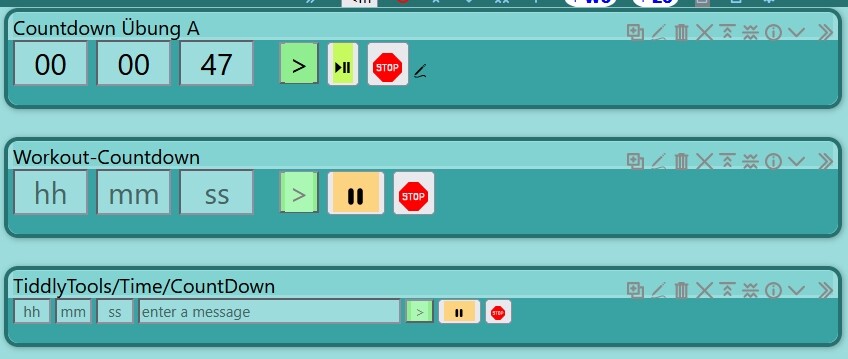
The only thing, what I changed (and couldn’t manage completely), was the style of the buttons. I gave them other “text” /images and some color.
What I could not manage- but this is really finetuning, much more important for me is, that it works and I can handle it on mobile in an easy & fast way. These 2 goals are 100% reached !
So, what I could not manage, is that the text or the transcluded {{images}}are centered in the button and with transcluded image, that the background is completely filled with color.
Screenshot:
Oh, forgot to write, that I also edited the Count-down-Template:
Instead of <<show>>
I have now
<<show>> 
<$appear state="$:/temp/state-countdown" show={{$:/core/images/edit-button}} hide={{$:/core/images/up-arrow}}>
<$edit-text field="hours" size=1/>
<$edit-text field="mins" size=1/>
<$edit-text field="secs" size=1/>
</$appear>
So I am able, to edit the count-down-time easily & fastly
I’d very much prefer that you don’t directly modify TiddlyTools/Time/CountDown to use your custom button text/images. Instead, I’ve made a small update to TiddlyTools/Time/CountDown so you can now specify your custom button text/images as parameters to the <<start>>, <<pause>>, and <<stop>> macros.
After installing the update, you can change the following line in “Workout-Countdown”:
@@font-size:2em;.myWorkout-$(class)$ <<getCountdown>> <<start>> <<pause>> <<reset>>@@
to something like this:
@@font-size:2em;.myWorkout-$(class)$
<<getCountdown>>
<<start "{{$:/core/images/done-button}}">>
<<pause "{{$:/core/images/timestamp-off}}" "{{$:/core/images/timestamp-on}}">>
<<reset "{{$:/core/images/cancel-button}}">>
@@
-e
Hello @EricShulman ,
I am very sorry bothering you in any kind.
Instead I have been really happy being able to manage some things by myself, not always needing to ask. I like to learn things. And with this I have been able to learn.
But ok, sorry. So, should I delete my previous post or the code or the image or all of it? Because I do not want to bother people who helped me.
Don’t delete any of your posts. They illustrate how end-user feedback helps to drive improvements to my TiddlyTools add-ons to support desired customizations.
Just re-import TiddlyTools/Time/CountDown to get the latest revision, and then make your changes in Workout-Countdown to apply your custom button text/images. Feel free to alter the Workout-Countdown tiddler in any way you want, since I provided it as a custom implementation to address your specific use-case.
-e