
Working on a "show-fields" field, and having an issue with field names with spaces?

I’ve found myself using the hide-body field quite a bit lately, and decided it might be useful to decide on a tiddler by tiddler basis to show specific fields in place of the body, or maybe even included with the body.

So, I’ve started working on the beginning layout of it, with the intent to turn the final result into a viewTemplate.

Though, while I was working on making the field names look nice using titlecase[], I’ve encountered an odd situation where if I have a field I want to show that is seperated by spaces, it will show as two different fields, but with the same field values duplicated.

It might make sense to show what I mean…
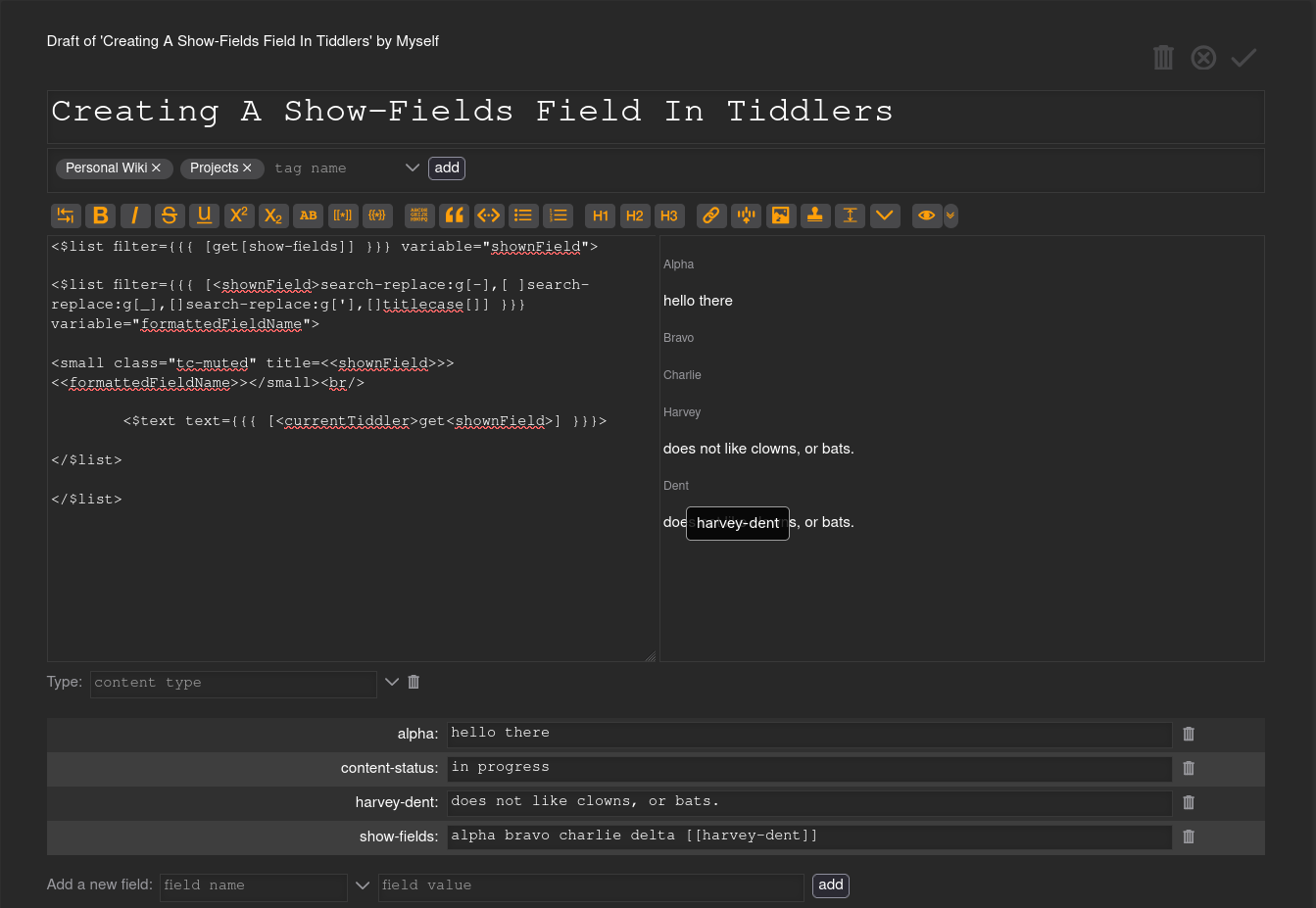
Creating A Show-Fields Field In Tiddlers.json (751 Bytes)

At the bottom of the preview-preview, you’ll notice that harvey-dent is showing as two sections, “Harvey” and “Dent” rather than just as “Harvey Dent”.

Does anyone have any suggestions on fixing this behavior?
I’m a bit stumped to be honest :sweat_smile:

Any help will be greatly appreciated.

Edit: actually, looking at it, I think the Harvey portion is somehow replacing the Delta field. I’m… not entirely sure what is going on with that. Nevermind, it just wasn’t rendering the delta for some reason.

A few problems:

  • The most important issue is that you’ve enclosed your filters within {{{ ... }}} (“filtered transclusion”) which has the effect of performing “double filtering”. First the {{{ ... }}} is processed, and then that result is being used as the flter parameter of the $list widget. For your purposes, you want to use simple double-quotes around the filter syntax.

  • [get[show-fields]] retrieves the entire list as a single string. To get the list as separate items, you want to use
    [enlist{!!show-fields}]. Also, for future reference, note that starting a filter with get[...] has an implied all[tiddlers] preceding it, so it gets that field value from ALL tiddlers, rather than just the current tiddler.

  • There is also a minor issue with your output: the content of the $text widget is always ignored, so it needs to end with /> instead of just >, and you should have a <br/> following the $text widget to ensure the next field name doesn’t appear on the same line as the field value that precedes it. Alternatively, you can use <div>...</div> around your lines of output to achieve the same result.

Try this:

<$list filter="[enlist{!!show-fields}]" variable="shownField">
   <$list filter="[<shownField>search-replace:g[-],[ ]search-replace:g[_],[]search-replace:g['],[]titlecase[]]" variable="formattedFieldName">
      <div><small class="tc-muted" title=<<shownField>>><<formattedFieldName>></small></div>
      <div><$text text={{{ [<currentTiddler>get<shownField>] }}}/></div>
   </$list>
</$list>

enjoy,
-e

bullet #1: did not know that, but that explains a few times I’ve had to use it over just a normal filter. Neat!
bullet #2: huh, I had tried get{!!show-fields} earlier but never saw any text as a result of it, I must have placed it in the wrong spot lol

bullet #2b: ah, so I would want [<currentTddler>enlist{!!show-field}] for better optimization then, correct?

bullet #3:

I… partially understand this. I understood the format needed for it, but I don’t quite understand what it means for the content to always be ignored, when the result of the text parameter of the $text widget showing?

That looks a lot better haha Thank you Eric! :grinning_face_with_smiling_eyes:

The enlist[...] filter operator is a Selection Constructor, which ignores the results of any preceding filter syntax. Thus, there is no need to use <currentTiddler> here, and it actually ADDS a tiny bit of extra processing with no actual benefit.

Widget “content” is what occurs in between <$somewidget>...stuff here...</$somewidget>. For the $text widget, the text=... parameter value is displayed, and any ...stuff here... is ignored, so you can either write:

<$text text=...></$text>

or use the /> “self-closing” HTML syntax:

<$text text=.../>

-e

1 Like

Ohh, okay, like using all or is or has to start a filter, got it.

OH okay yes, I was familiar with that, sorry about that! funnily enough I used to get that mixed up with how you could nest $view widgets to show content depending on if something was blank or not.