WikiLabs DevTools Plugin — Browser-Side Developer Tools for TiddlyWiki

Experimental – Experimental – Experimental – Experimental – Experimental

Only works with v5.4.0-prerelease and later

Hi everyone,

I’d like to share the DevTools plugin from the WikiLabs collection. It adds browser-side inspection capabilities to TiddlyWiki — hover tooltips, a context menu, a source viewer, and a variable inspector. It helps you understand how rendered output maps back to wikitext source, across transclusion boundaries, macros, procedures, and list widgets.

Demo & docs: DevTools — For TiddlyWiki developers

Quick Start

  1. Install the plugin from the demo page

  2. Go to Control Panel → Settings → Source Position Tracking and enable it

  3. Save and reload the page

  4. Hover any element to see its source position

  5. Right-click any element for the full context menu

Features

Hover Tooltip
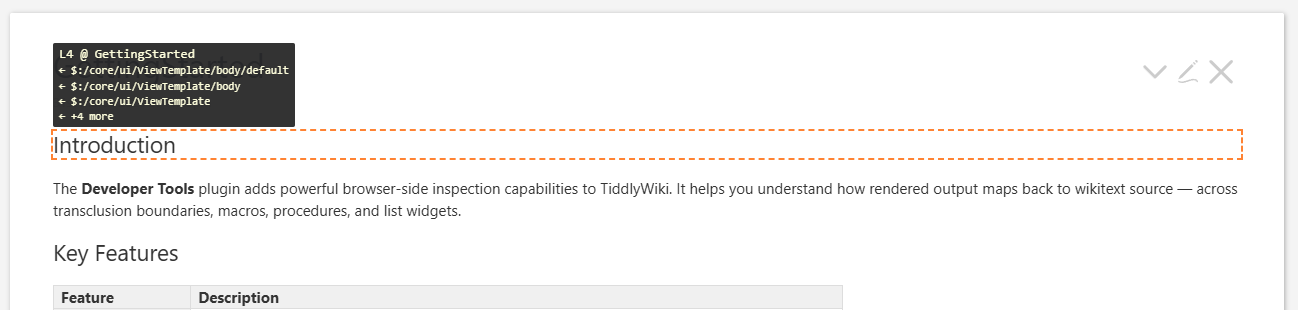
Hovering over any rendered element shows a tooltip after a short delay (400ms). It displays:

  • Source position — e.g., L3 @ GettingStarted

  • Transclusion caller chain — traces back through ViewTemplate, PageTemplate, etc.

  • Context — shows currentTiddler when it differs from the source tiddler (useful for list widgets)

The hovered element gets an orange dashed outline. Parent outlines are hidden when a child is hovered, so only the innermost element is highlighted.

Context Menu
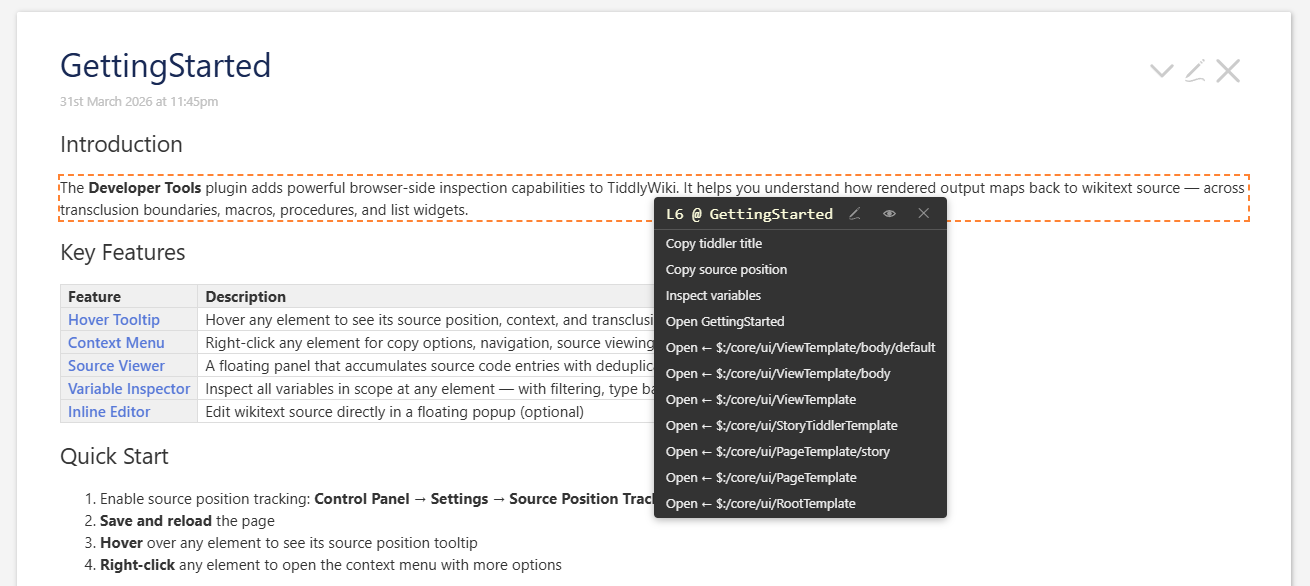
Right-clicking any tracked element opens a custom context menu (use Ctrl+right-click for the native browser menu).

The menu header shows the source position with icon buttons:

  • Pencil — opens the tiddler in edit mode and auto-selects the corresponding source text

  • Eye — appends the source code to the Source Viewer panel

Below the header:

  • Copy tiddler title / Copy source position — clipboard actions

  • Inspect variables — opens the Variable Inspector

  • Open tiddlerTitle — navigates to the source tiddler

  • Open ← callerTitle — one entry per caller in the transclusion chain

Variable Inspector
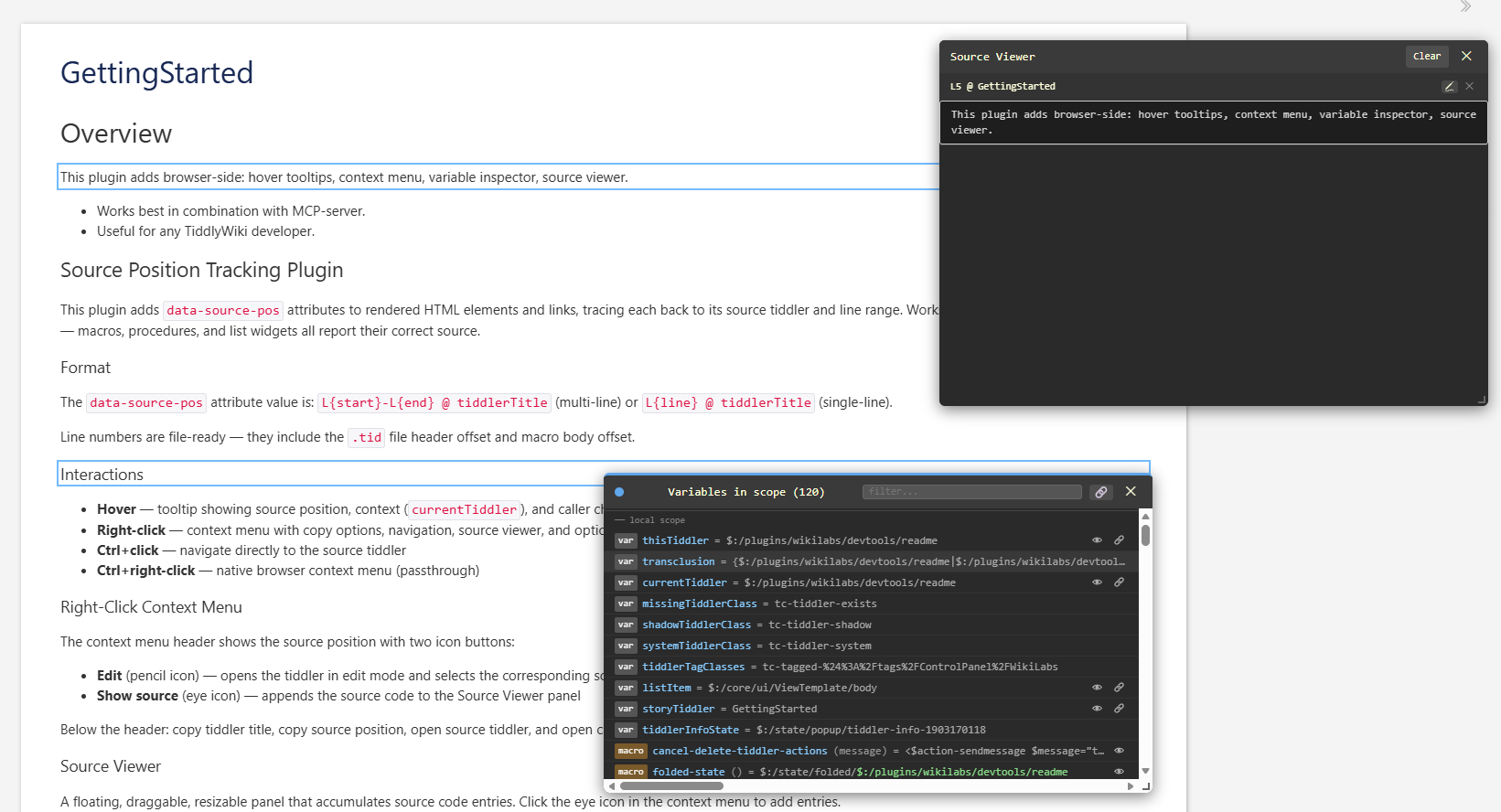
Shows all variables in scope at a specific element. Open multiple inspectors simultaneously, each with its own colour.

  • Type badgesvar, macro, proc, def, fn, widget with colour coding

  • Grouping — variables grouped by source tiddler, local scope first

  • Smart filtering — type keywords match the badge; other terms match name/value

  • Previews — eye icon toggles inline previews for tiddler references and definitions

  • Linked panels — filter, size, and previews can be synced across all open inspectors

  • Live updates — variables re-collected after each TW page refresh

  • Macro substitution — evaluated body shown with green (matched) / red (missing) colour coding

Source Viewer
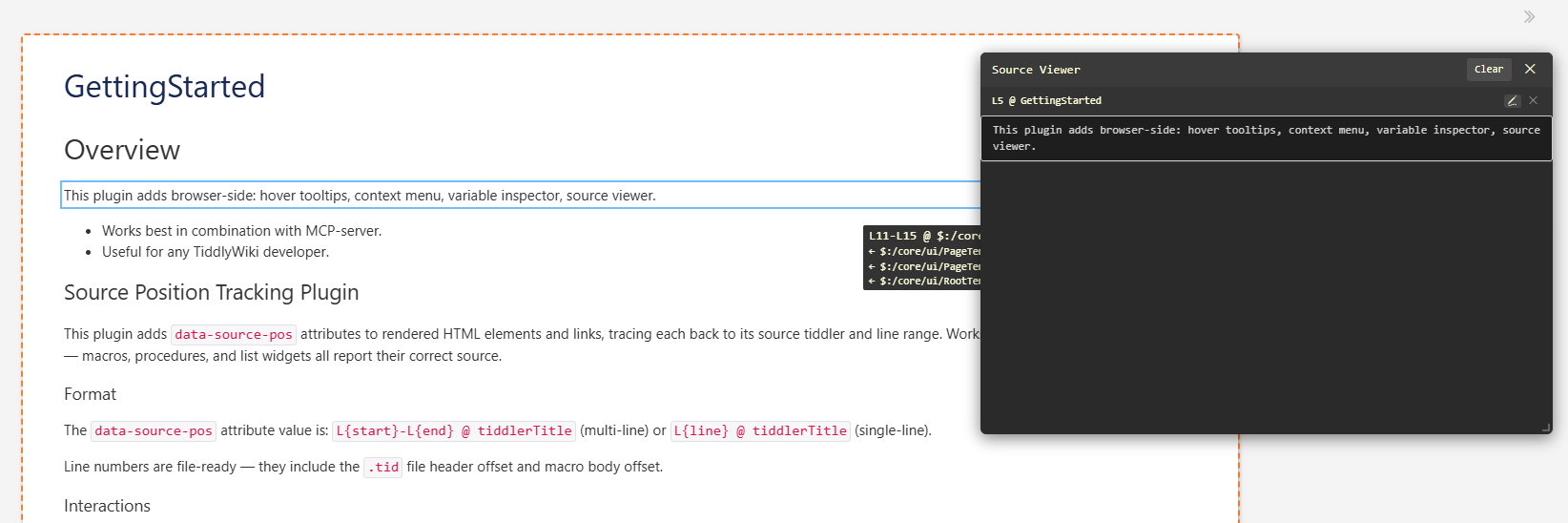
A floating, draggable, resizable panel that accumulates source code entries. Click the eye icon in the context menu to add entries.

Key features:

  • Deduplication — same source from different contexts adds a new header above the existing code block instead of duplicating it

  • Origin highlighting — hover an entry header to blink the origin element 3× in red, then show a steady blue outline

  • Procedure extraction — if the source is inside a \procedure, \define, \widget, or \function, the entire definition is shown

  • Supports up to 100 entries; layout is stored in-memory (no store writes)

How It Works

The plugin uses TiddlyWiki’s hook system — zero overhead when disabled:

  • th-dom-rendering-element — tracks HTML elements

  • th-dom-rendering-link — tracks link elements

  • th-dom-rendering-codeblock — tracks code blocks

  • Monkey-patches the transclude widget to track source context across transclusion boundaries

Line numbers are file-ready — they include the .tid file header offset and macro body offset, so they match exactly what your text editor shows. No core file modifications are required.

Configuration

Tiddler Values Description
$:/config/wikilabs/SourcePositionTracking yes / no Master switch (default: yes)

Status

The plugin is currently marked as EXPERIMENTAL. Feedback, bug reports, and ideas are very welcome!
7 Likes

Just a placeholder for additional info

1 Like

Mario, This looks wonderful, I look forward to checking it out.

It seems to me it would help people learning TiddlyWiki at a deeper level and some features may be useful to ongoing development of tools, reverse engineering and self documentation (or less documentation) because the methods used can be quickly (re)determined.

2 Likes

I think one interesting feature will be the “jump to source”, which probably could be useful as a stand-alone feature. … It will need some code changes in the core. At the moment is a “monkey patch” and therefore could be considered a bit hacky.

So v5.5.0 may have a possibility to “Edit at position”, even if the content tiddler is a transclusion. It is able to follow that “trail” and open the right tiddler.

3 Likes

I am reviewing this now on the Demo site and it is very good. I think I would be inclined to install this on a copy of tiddlyWiki.com and would hope it becomes a plugin edition like those here https://tiddlywiki.com/#OfficialPlugins allowing us to visit when needed to research mechanisms, ideally with local storage available.

  • It would be nice if we could hide the tools perhaps toggle with a shortcut key, then when hidden use a ctrl mouse over to selectively display the debug popups.
  • I like the r-click tool, but there are cases I want to access the Browser r-click menu while designing/debugging.

I would also like to see a way we can annotate objects we find, although I have many tools for this, it would be nice if they are somewhat integrated so as to have notes be visible where they exist. See “Tags during debug and research” as an example of something to annotate (if not automate).

  • No touch annotation is also the best way to implement this

Tags during debug and research

Another thing I would find useful is to annotate come code tiddlers which are driven by particular tags, for example $:/AdvancedSearch is driven by $:/tags/AdvancedSearch and more precisely tabsList="[all[shadows+tiddlers]tag[$:/tags/AdvancedSearch]!has[draft.of]] and has the state stored in explicitState="$:/state/tab--1498284803" but then each of these tabs are also driven by particular tags and state tiddlers.

  • Perhaps only for $:/tags/... is sufficient.
  • I note this appears in the vars such as var __tabsList__ but if there is a way to guide us to this. The tabs macro is after all a core macro.

Finally I can just install the link to tabs tool, but perhaps a form of it also belongs in this solution.

  • I am just exploring a way to list below a tiddler “all tags named within the body of a tiddler”, not tagging the tiddler, annotate this and provide tools to copy and apply such tags.

I noticed a small z-index issue in the variable list;

  • What is the info and is it under the current window?

CTRL right-click … will open the native brwoser right-click menu

Currently macros have no “origin” info, that “bubbles” up to the widget-tree. But I think it could be done. Not sure yet.

The DevTools should not create debug info. So I’ll remove that.

1 Like

The TiddlyWiki Developer Tools plugin is part of the WikiLabs collection of plugins for TiddlyWiki. It adds powerful browser-side inspection capabilities, helping you understand how rendered output maps back to wikitext source — across transclusion boundaries, macros, procedures, and list widgets.

[my emphasis]

@pmario I hope you get more feedback!

I am NOT a developer. But I like this tool because, in my testing, it clearly shows, in context, much of what is going on.

In my case it already helped me sort out a complex CSS cascade issue I had created.

Best, TT

Super useful. I tried it & was impressed.

That behaviour is really useful even alone!

TT

Thanks for testing.

I mainly use it together with the new tw-mcp server. MCP understands the “postion code”, that can be created by the devtools.

So it is possible to ask the LLM eg: Tell me more about this element and it’s source code. …

That’s extremely powerfull.

Directly “jump to the source code” is very useful as you found out. I’ll try to get that functionality into the core with v5.5.0 …

Be aware, that I do update that plugin frequently, when I find out, what’s missing using in conjunction whit the mcp-server

1 Like