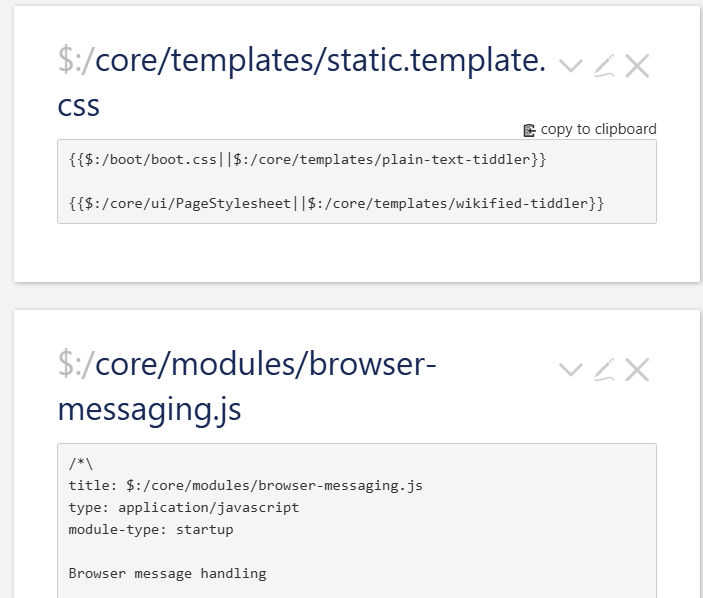
I noticed that .css files have a copy to clipboard button in view mode, but .js files don’t. I was wondering what the rationale behind that was? It seems to me that it would be useful to copy either kind of tiddler to clipboard via the button. Unless I am missing something?
1 Like
CSS is more likely to be transferable, in your example it is not.
It should be trivial to extend this, I have with my own code view extension.
- you can even create a view toolbar button to copy the body to the clipboard
Unless you are using tiddlywiki as a code repository this would not be a very common use.
- If you are going to clone and modify in wiki use the clone button.
Remember TiddlyWiki is a platform built on JavaScript, it has not being designed to write JavaScript solutions, although it can they should always be written to integrate with the TiddlyWiki Platform.
- A lot of experienced JavaScript coders add javascript modules to TiddlyWiki when the native TiddlyWiki Script can already do what they seek. Which is odd because you can always ask how to do it in this community.
Although this is true, there are times when a tw script cannot do what is needed, or it is much easier to do it another way.
I write lots of wikitext - which is good at synthesizing tiddlers to create solutions. However I find that using ‘action scripts’ to update tiddlers to be limited and there comes a point where I turn to the TiddlyClip scripting language for complex tiddlers updates. I also write lots and lots of javascript for my tiddlywiki solutions where speed is needed (interactive graphics) or where I need to use complicated json tiddlers or I want to use functionality provide by third party libraries etc.
I feel that a lack of a javascript api for tiddlywiki hinders its use. In my integration for preact into tiddlywiki I have provided apis, for example Tw apis in preact integration. In my option it would better to have these apis in the core.
Usually you should not mess with core JS components. Changing something there can have unwanted side effects, that are really hard to find.
Especially if users forget, that they did change something. From time to time the core devs get help requests or bug reports, for errors coming from modified core code.
They are hard to find and bind a lot of resources, that could be spent in a better way.
That’s the main reason, why we always ask, if a problem can be replicated at tw-com. If it can’t there is a chance it’s a plugin, or modified core components.
Looking into this, see the copy to clipboard button on things tagged $:/tags/Macro, but not reliably on things that are CSS (my own content tagged $:/tags/Stylesheet do not get that copy button, for instance). Confusingly, $:/core/templates/static.template.css from your example does.
Would be good to get clarification on what the conditions are that makes this appear, and if those conditions are easily modifiable, and how to shift where it appears (I dont see it as an obvious item in $:/tags/ViewTemplate)
For my taste, I’d like to have it on every tid, but rather than directly on the page view, have it in the ‘More actions’ menu.
1 Like
Yeah that’s my point,
I would assume out of the box the copy button would be on every code box tiddler in view mode; but that doesnt seem to be the case?
See $:/ControlPanel > Info > Advanced > Cascades > View Template Body.
The 2nd to last cascade filter ( $:/config/ViewTemplateBodyFilters/system), is defined as:
There are also two other View Template Body cascade filters that apply $:/core/ui/ViewTemplate/body/code:
$:/config/ViewTemplateBodyFilters/core-ui-tags, which is defined as:
and $:/config/ViewTemplateBodyFilters/code-body, which is defined as:
Next, note that $:/core/ui/ViewTemplate/body/code contains:
<%if [<currentTiddler>is[missing]] :and[!is[shadow]] %>
<$transclude tiddler="$:/language/MissingTiddler/Hint"/>
<%else%>
<$transclude $variable="copy-to-clipboard-above-right" src={{{ [<currentTiddler>get[text]] }}} />
<$codeblock code={{{ [<currentTiddler>get[text]] }}} language={{{ [<currentTiddler>get[type]else[text/vnd.tiddlywiki]] }}}/>
<%endif%>
which is responsible for showing the “copy-to-clipboard” button as well as the $codeblock for the tiddler’s text content.
In addition to the above cascade handling, there is also $:/core/modules/parsers/textparser.js, which defines a TextParser module that applies a $codeblock widget to the following tiddler types:
exports["text/plain"] = TextParser;
exports["text/x-tiddlywiki"] = TextParser;
exports["application/javascript"] = TextParser;
exports["application/json"] = TextParser;
exports["text/css"] = TextParser;
exports["application/x-tiddler-dictionary"] = TextParser;
The result is that these specific tiddler types are also shown as code blocks, but do NOT show the “copy-to-clipboard” button that the cascade-driven tiddlers do.
If you want these tiddler types to also show the “copy-to-clipboard” button, you can add a new cascade definition by creating a new tiddler (e.g., $:/config/ViewTemplateBodyFilters/code-with-copy), tagged with $:/tags/ViewTemplateBodyFilter and add a list-before field but leave the field value empty. Enter the following text into the tiddler:
[type[text/plain]]
[type[text/x-tiddlywiki]]
[type[application/javascript]]
[type[application/json]]
[type[text/css]]
[type[application/x-tiddler-dictionary]]
 :then[[$:/core/ui/ViewTemplate/body/code]]
Alternatively, you could just add the above [type[...]] filter runs to $:/config/ViewTemplateBodyFilters/system rather than adding a separate custom cascade definition, but that would modify an existing shadow tiddler which might complicate things if that tiddler is ever changed by a future TWCore update.
-e
3 Likes
Thanks for the detailed explanation! This would have taken me a minute to try to step through manually, I really appreciate it.
One more follow question;
I like this welk-tweak that adds a discrete copy button on most codeblocks:
wilk-tweaks — TW tweaks, settings, styles, palettes.
However out of the box it also doesn’t seem to apply it’s copy button to js codeblocks in view-mode; what would be the proper way to modify this plugin to add it’s button here as well?

Thanks in advance for the help, sorry to be a bother.
1 Like
Hi @Xyvir,
In the tweak, @vilc redefines the <$codeblock> widget, thus the tweak only applies to code blocks.
JS tiddlers are not displayed through a code block, AFAICT, but maybe they could with the appropriate cascade?
Fred
1 Like
Well, it looks like it’s possible!
Download this file js-template.json (371 Bytes) and import it in your wiki, along with @vilc 's tweak.
JS tiddlers should now use the new codeblock.
Fred
2 Likes
Yes based on EricShulman’s post I believe javascript tiddlers ARE being displayed as ‘codeblcoks’ just in such a way as to prevent the vanilla ‘copy to code’ button from being added.