
Which TiddlyWiki Setup Should I Use?

Hi everyone. I’m unsure how to structure my TiddlyWiki setup. Technically everything works fine — I just can’t decide which option or combination to choose.

I’ve analyzed these options:

1 - stand-alone / single-file
2 - Node.js version
3 - MultiWikiServer version
4 - TiddlyHost version

1 - The single-file version was my entry point. Once you get into TW, there’s no going back. But it no longer meets my needs given my new goals.

2 - I’ve tested the Node.js version extensively and really liked the fact that it saves each note as a .tid file, which could make automatic note generation much easier in the future. However, I believe that if I want to use more than one TiddlyWiki, I would need multiple Node.js instances. Am I correct?

I also noticed that I can export a TW to a single HTML file, either directly from the browser or via the terminal using:

tiddlywiki <name> --output <output folder> --build index

I was also able to configure HTTPS/SSL successfully. I’m currently starting it with:

tiddlywiki <note> --password <pass> --listen username=<user> password=<pass> host=0.0.0.0 tls-cert=<pem> tls-key=<key.pem> gzip=yes --verbose

3 - I tested the MultiWikiServer version and I was honestly surprised. It was easy to install and configure. I explored the SQLite database file and liked its structure.

It’s also possible to export a TW to a single file directly from the browser, but I couldn’t find a way to export just one recipe via the command line, using:

npx mws save-archive output

it exports all bags and recipes, but I didn’t find a way to export only a specific recipe.

I also miss some of the Node.js parameters like:

--password <pass> --listen username=<user> password=<pass>

At least I couldn’t find their equivalents in MWS.

I’m currently starting it with:

npx mws listen --listener port=8081 host="0.0.0.0" secure=true key=<key.pem> cert=<pem>

4 - I had high hopes for this option, but mainly due to lack of time and my limited knowledge of Rails, I couldn’t get it working properly. The closest I got was loading the page in the browser, but it shows “502 Bad Gateway” in the middle of it. Is there any step-by-step tutorial available?

Anyway, my main goal is to edit my TWs remotely, accessing them from any device and from anywhere. So I’ll definitely be using my server for that.

For those of you who no longer use the single-file version, which setup are you using and why?
You should request a new feature at: Bring me your MWS "Multi-wiki Server" feature requests

Incorrect, subwikis can be hosted in folders, under vanilla Node. You can use one of the server or Desktop versions to do this such as TiddlyDesktop versions and implementations like TiddlyDeskyouRS

I can’t reply anymore just now to your post as it is not really a question, Does not contain many requirements, and demonstrates you already know a lot. Perhaps you should reframe this and/or ask some more specific questions if you want to get some more support.

How to do this @TW_Tones . I couldn’t find anything in the Tiddlywiki documentation regarding this.

I’ll take a look at and analyze the page you suggested. Thank you.

Like @arunnbabu81, I would also like to know how to do this. Thank you @TW_Tones

@Tiago_Sanches and @arunnbabu81

You find this mentioned in a number of places, I made use of it, as did the Bob wiki, which I think may be obsolete now and if you see the documentation it is stated here TiddlyWiki on Node.js is says;

The ability to build multiple wikis that blend different combinations of shared and unique content

because Bob made this easy for me I have not actually implemented it myself. I have used TiddlyServer as well as it allows which effectively serves multiple file and folder wikis at a single IP address

If I follow your post, option 4 is TiddlyHost. So I’m baffled: no knowledge of Rails is needed!

TiddlyHost is in many ways the most end-user-friendly of interfaces for saving and potentially serving up TiddlyWiki projects. I recommend it as ideal so long as a fairly consistent web connection is available to you, so long as you’re not likely to need and use multi-user intranet features, and so long as you’re not handling top-secret information that must not exist on servers (even in password-protected form).

All of that is FREE! But if you support TiddlyHost with a modest monthly donation, you support this fantastic hub for the community and get free rolling backups (up to 100 versions of each wiki).

2 Likes

IIRC, you can also install TiddlyHost locally to set up your own private hosting service, which uses Rails.

See GitHub - tiddlyhost/tiddlyhost-com: Rails application for creating and hosting TiddlyWiki sites, plus resources for deploying it to https://tiddlyhost.com/

2 Likes

Naturally it comes down to your personal preferences, use case and privacy needs. After starting with the file version I moved on to node.js running on a raspberry in my home network. That was 5+ years ago … never looked back. Working mostly from home that’s perfect for me.
I built a series of integrations on node-red that use the API of the node tiddly. E.g. I use a telegram bot as quick inbox mechanism. Through that I can create generic tiddlers or specific ones (task, shopping list, journal, … )
Also have a search & get feature that send rendered tiddlers via email.

That kinda says it can be done. Not how. I’ve also seen forum threads saying it’s not possible, and each node based wiki needs it’s own node instance (which is what I’ve done to date)

I say “kinda” because that wording could also be read as meaning “one node wiki can be used as a source for multiple single-file TW’s that are each a subset of the singular node original”

Anyway, I’m also in the “am interested in learning how” camp.

Keep in mind a lot of different people discuss how to install plugins into node because doing so makes the accessible in all subwikis so it is a 100% fact. Now just because I don’t use node except in bundled solutions it is I who is ignorant of the details. So someone else should just be jumping in, I will mention @pmario because I believe he knows. As I expect @BurningTreeC @stobot and other would.

I can tell you once you have subwikis they are in folders below the root wiki and can be accessed at the same url as the root wiki including the folder http://192.168.0.1\subwikifolder keeping in mind MWS is specifically for this but also improving the management of such subwikis.

I am fairly confident you just create a folder below the root folder and add something there in to create your subwiki. However I am confident a new wiki can be added or created to node using a folder address somewhere.

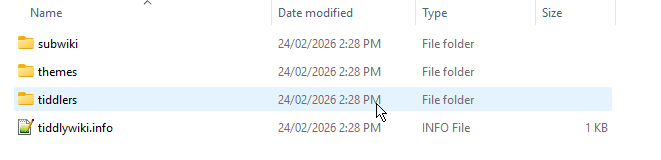
  • I did this using tiddlywiki-app and this was placed in the target folder I created and selected 2026-02-24_14-31-54
  • It can be accessed at http://localhost:9090/ which was generated by tiddlywiki-app and served by it.
  • It demonstrates a folder with the tiddlywiki.info and subfolders may be all that are needed.

It is true searching for subwiki has got me somewhere, but there seems to be no robust documentation on tiddlywiki.com

  • This supports my observation that using node falls into a developer space rather than having documentation that helps enthusiasts bridge into using node.