I would like to create <a> element to open a tiddler in story river as the same behaviour of <$link /> widget.
This is my current method
var li = document.createElement('li');
var opts = {
    "class": "tc-tiddlylink tc-tiddlylink-resolves",
     text: title ,
     attributes: { href: '#'+ title }
};
var tidlink = $tw.utils.domMaker("a", opts);
li.appendChild(tidlink);
It does create a link. However, this link will open tiddler at the top of story river (my setup is bottom), and also modify the URL with anchor link to tiddler.
How should I create link same as <$link /> widget using js?
If you use the link widget this is in fact what it generates and A record to the tiddler in the current wiki.
If this is because you are trying to encode it in a bigger solution you are developing in Javascript you should ask this in the developer forum, not in the general discussion forum.
This could mislead people into thinking it is necessary to use JavaScript, it is not.
Use the browser inspect to see what the link widget does produce to make sure you comply with the standards.
There is a tiddlywiki default as to where to open a tiddler which works at least for standard navigation links see Control Panel > Settings > tiddlywiki > Tiddler Opening Behaviour
However you can also add and remove items from $:/StoryList list field, and do so in the order you wish to open a tiddler whereever you want in the story.
“TiddlyWiki Script” is already designed to cater for this kind or manipulation so in most cases one should not revert to JavaScript, unless necessary.
If you use the standard approaches your solutions will be more interoperable with other tiddlywiki solutions and plugins. By coding in JavaScript you should be sticking with the core development standards and if you do not you risk making incompatible solutions, especially after a core upgrade.
It would be interesting to know why you want to use javascript to create list elements?
Can you be a bit more specific, using plain text, what you try to achieve?
Usually it’s not needed to do it that way. Your solution does no work, because the list-widget also establishes an event-handler, that sends a “navigate to” signal to the navigator-widget if a link is clicked. The navigator widget then takes care to open the tiddler in the right place according to global settings.
The HREF attribute of the anchor element that you create will activate default browser behaviour and writes a new URL into the browser address bar. Changing the browser address bar will activate a completely different mechanism in the core. That’s the reason, why it does not work.
Thanks for your reply. Sorry for the misleading information.
I want to create a list or calendar to display anniversary based on data structure in Memory Keeper, i.e. anniversary events are tagged with event and anniversary, and have a field date. Until here I know how to create a list with only wikiText.
My challenge is that date are mixed with lunar and solar/gregorian dates. So I add a new field date-type to indicate whether it is a lunar date. Then I have to call a js library to convert lunarmonth and day in the current or previous years (if month is November or December) into Gregorian date in current year and sort by month and day in new Gregorian dates.
I have the js to convert date and sorting, but have trouble to create a element to link to tiddler.
It is better to use wikitext to create the display elements. It is possible to return a (sorted) list of tiddler titles from a javascript macro and pass that to the list widget:
Creating a widget would be the best way, because widgets can handle their updates by themselves, but they are more complex to create.
I think buggyj is on the way here. It would be possible to create a macro, that does the work and writes the “converted” information back to the tiddlers or tw-variables
IMO this workflow is a bit hacky, but js-macros are easier to create.
The info should only be written once.
So existing tiddlers have to be read.
The date calculation should be executed.
IMO This should optional. If you know that you need to recalculate it.
Compare the new result with the existing value in the tiddler and
only update if there is a difference.
This workflow should avoid unnecessary UI updates.
Whenever a tiddler is modified in the tiddler store TW automatically does a refresh for all UI elements that are rendered and have been changed.
Then your macro can create a TitleList as an output. JS-macros can only return text-strings.
If that TitleList will be passed to a list-widget as buggyj suggested you should be good to go. – At least I think so.
I did change the thread title to a more generic one, which IMO is a better fit, what actually should be achieved.
@Zheng_Bangyou If you think the title should be different you can change it again. If you cannot change it. Just tell me the new title, so I’ll change it again
Thanks for all your help. @jeremyruston Very appreciate it if tiddlywiki can support a plugin for calendars.
After searching and testing lots of library, I finally use shiren calendar which uses MIT license. Other similar libraries don’t have license file or more restriction license, or I don’t know how to use them.
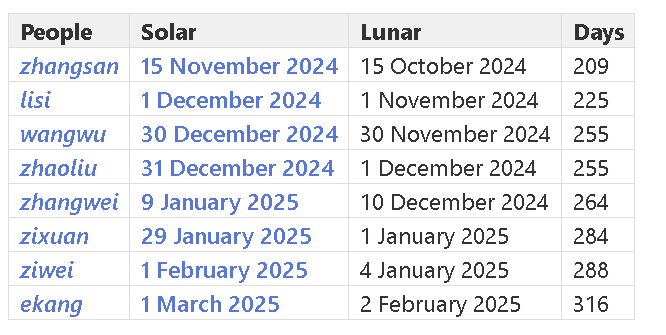
With suggestion from this community, I can produce an anniversary table to list all people, solar dates, lunar dates and days until next anniversary.
Thanks @Zheng_Bangyou@linonetwo. I think a Chinese speaker might need to take a lead on this; the documentation and usage of the library you mention is difficult for me. But I’d be very happy to make the required core modifications.