That’s correct, it only works with wikitext examples. For HTML examples like that you’d perhaps be best off with an iframe fed from the contents of a tiddler?
$$$text/vnd.tiddlywiki
\rules except dash list
<style>..</style>
$$$
-- and : are used for css variables and for pseudo selector so it’s usefull to be able to use the rules pragma to disable the wikitext parsing in arbitrary places in a tiddler (you might want to use dash and list elsewhere in the tiddler). If you use the text/css context, the code is rendered inside a code element which disable the style inside the typed block.
It does work in a wikitext typed block, but the style tag is needed :
hmmm. That’s tricky stuff. On the one hand it’s sophisticated. On the other hand it’s ugly, because of its complexity.
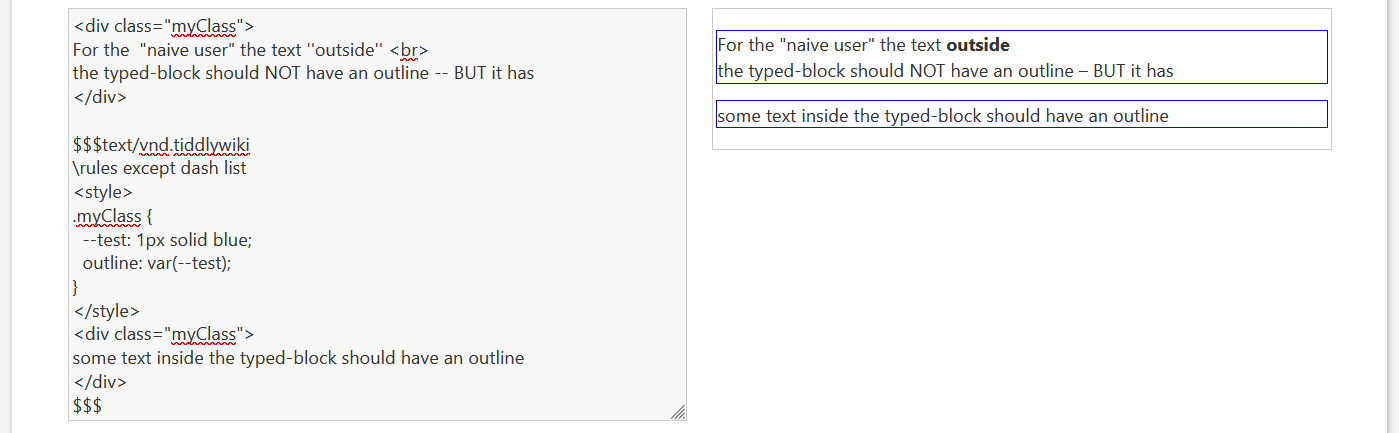
IMO – The things going on with this type of code is too brittle, because the intuition is, that there is a “style” scope. BUT in reality the STYLE tag inside the typed block leaks.
<div class="myClass">
For the "naive user" the text ''outside'' <br>
the typed-block should NOT have an outline -- BUT it has
</div>
$$$text/vnd.tiddlywiki
\rules except dash list
<style>
.myClass {
--test: 1px solid blue;
outline: var(--test);
}
</style>
<div class="myClass">
some text inside the typed-block should have an outline
</div>
$$$
I think I get what you mean. So the typed block is supposed to act like a sandbox / iframe ? It would be useful for scoping style but again, I found that it is useful to be able to have “leaking” styles, for single tiddler solution, showcasing a demo or doing a quick test.
But yes it’s better to use a dedicated stylesheet tiddler whenever possible.
For those interested, I created an easy way to scope css using wikitext, maybe this can be useful for showcasing CSS snippets for the doc?
That’s what users may think it is. BUT it is not .. It starts a new parser instance. So it’s possible to have a \rules pragma in the middle of wikitext.
But it renders all the stuff into a DIV … That’s it. No sandbox. No iframe