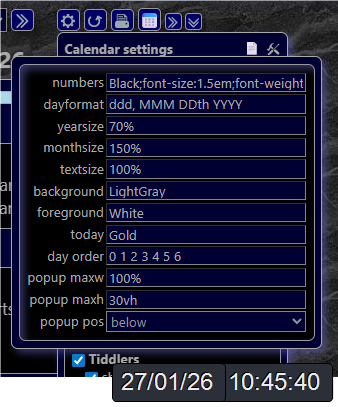
Probably one for Eric:
Is it possible to change the default journal tag? I already have a journal with the same tag and wanted to differentiate that journal from the calendar journal.
Thanks
Jon
Probably one for Eric:
Is it possible to change the default journal tag? I already have a journal with the same tag and wanted to differentiate that journal from the calendar journal.
Thanks
Jon
I’ve added handling for using a calendar_journaltags “hidden” setting as an alternative to the TWCore’s $:/config/NewJournal/Tags value.
There are two places in the TiddlyTools Calendar that are affected:
To define the calendar_journaltags value, you can either:
<$let calendar_journaltags="sometagvalue">{{TiddlyTools/Time/Calendar}}</$let>
Get the update here: TiddlyTools/Time/Calendar
Let me know if this satisfies your particular use-case.
enjoy,
-e
The “journal tags” input field was added following the “day order” input.
Perhaps you are looking at a cached version of TiddlyTools.com?
You can use SHIFT-F5 to reload with a forced refresh.
As if by magic! Yes, it’s there now.
Strange - I clicked your link to get to the site (although I visited last night).
I’ll remember the refresh in future.
Hi Eric,
More strangeness. The ‘more settings’ box won’t stay open and closes when clicking in an entry. I thought it might be due to the recent tiddlydesktop, but behaviour is the same in the browser, and the same for 3 diffferent wikis…
Works perfectly on your site so I must have something in my wikis which is causing the behaviour - I’ll try and track it down.
… managed to copy & paste new tag into the more settings box before it closes, so can use the new tag in the mean time.
Thanks Eric.
The “more settings” box uses the tc-popup-handle classname to keep the popup from closing prematurely. This classname doesn’t actually have any CSS attribute definitions. Instead, it is used by the TWCore shadow $:/core/modules/utils/dom/popup.js Popup.prototype.popupInfo() function to set the “isHandle” flag.
if($tw.utils.hasClass(node,"tc-popup-handle")) {
	isHandle = true;
	popupCount++;
}
Then, the isHandle flag is used in Popup.prototype.handleEvent when processing click events:
Popup.prototype.handleEvent = function(event) {
	if(event.type === "click") {
		// Find out what was clicked on
		var info = this.popupInfo(event.target),
			cancelLevel = info.popupLevel - 1;
		// Don't remove the level that was clicked on if we clicked on a handle
		if(info.isHandle) {
			cancelLevel++;
		}
		// Cancel
		this.cancel(cancelLevel);
	}
};
Check if your TiddlyWiki has a version of the $:/core/modules/utils/dom/popup.js tiddler that was edited at some point or overwritten by a plugin in such a way that the tc-popup-handle logic is different.
-e
Hi Eric, I put that into the Advanced Search and $:/plugins/tobibeer/appear came up. Once disabled, everything works as expected - so that is the culprit.https://tobibeer.github.io/tw5-plugins/#appear
However, I do use it quite a lot so until I find an alternative, I can still use it knowing I can do the copy/paste trick for your calendar.
Thanks again,
Jon
Tobi’s appear plugin is VERY old (2015) and, as you’ve noted, overrides some central TWCore functions (specifically popup.js and widget.js). By using these non-standard handlers, you are bypassing 11 years of TWCore improvements in those modules!
While TiddlyTools Calendar’s use of tc-popup-handle is perhaps the first time you’ve noticed a problem, there are almost certainly other places where this “ancient” non-standard handling will be an issue.
Please give some examples of how you are using the $appear widget so I (and others) can help you to use TWCore standard widgets instead.
-e
Ah, OK - I probably thought as much but as things were working up to now, I just carried on with it.
I use it for a variety of pop-up situations.
e.g. I have a series of template tiddlers A, B, C etc which are small tables and then use the appear widget to pop up the page when clicking “Template”
<$appear type="popup" $state="1" show="Template">


{{||A}} {{||B}} {{||C}}


</$appear>
Also, when needing a series of popups one after the other, so each then has a different state number.
I’ve experimented with other popups before, but I’ve found that things tend to work as expected within it, for instance formatting like bullets etc.
Give this a try:
<$button class="tc-btn-invisible tc-tiddlylink" popup=<<qualify "$:/state/popup/1">>>Template</$button>
<$reveal type="popup" state=<<qualify "$:/state/popup/1">> class="tc-drop-down" style="min-width:auto;">

{{||A}} {{||B}} {{||C}}

</$reveal>
-e
Hi Eric,
really appreciate your help.
Visually that looked like a direct replacement for what I had but when entering values into the templates, the popup then closes (even after disabling the appear plugin)
So for instance, this is one of the templates
1 <$radio field="Q" value="1"> </$radio>
2 <$radio field="Q" value="2"> </$radio>
3 <$radio field="Q" value="3"> </$radio>
0 <$radio field="Q" value="0"> </$radio>
Entering a value closes the whole page whereas before, the whole page stays open so that values can be entered into the subsequent templates.
change to class="tc-drop-down tc-popup-handle"
-e
That works Eric, many thanks - so in this more technical wiki, I can replace the ancient appear widget with the ‘proper’ way of doing things.
I’ve got other wikis going back years with the old method embedded in mainly text tiddlers, so I suppose I’ll have to keep the plugin working for those.
Thanks again
Jon