TiddlyDesktopRS - a new TiddlyWiki Desktop (RS) experience - Alpha / Beta

@BurningTreeC

Another suggestion; it seems like the ‘to folder’ conversion button only works if you have fully opened the HTML wiki in twdesktop-rs and saved at least once beforehand. Unless I just goofed something on my end. But if this is the case you might want to make the to-folder button ‘greyed out’ until the first save.

What happened in my case is I

  1. Opened a HTML wiki file and closed the Wiki pop-open window immediately.
  2. Click the “To Folder” button.
  3. Click the ‘save’ button in the to-folder save dialog and it didn’t seem to do anything, even when supplying a folder name.

When I reopened the HTML wiki and saved once and repeated the above it worked.

Also the dialog doesn’t seem to automatically close on a successful save either, which is a unintuitive.

Thanks for all the hard work, I hope this feedback is helpful.

-Tyler

Hi @Xyvir

Which version are you using and on what OS?
The conversion should work without even opening the wiki, the tiddlywiki command just loads the given html file and converts it to a wiki folder… I’d need to investigate this more.

Also, are you using the installed version or the “portable” version?

Sorry should’ve included more info.

I’m on Windows 11; using ‘portable’ version.

It’s also possible I goofed something on my end if you aren’t able to reproduce.

-Xyvir

Hi @BurningTreeC,
I’m not able to add a wiki to the Desktop - open Wiki or drag&drop → remains empty…

Deleted everything and installed latest version (tiddlydesktop-rs_0.3.4_x64-setup.exe) → same issue
(running on Win 11 / portable)

Edit:
works fine with tiddlydesktop-rs_0.2.19_x64-setup.exe

Whats wrong?

There has been a lot of discussion here about drag&drop. So, I see you can drag&drop pieces of text successfully. But (at least for me) it is not possible to properly drag&drop tiddlers (including plug-ins). Would you have some comments?

Unrelated small thing: there is no minimization button next to the close button at the top right corner.

Which Operating system? In windows I see the OS minimise, restorr and close

Hi @vylt

Can you please tell me if you’re using X11 or Wayland?
I know about the minimization button, I’d like to leave it like that on Linux I’ve added it

Thank you! I see the minimization button in the latest version.

Regarding drag&drop, i have tried it on Linux Mint/CachyOS, both X11 and Wayland, but had no success.

In Linux Mint, X11, when I drag&drop tiddler title to a Wiki which is opened via TiddlyDesktopRS, $:/Import is opened but instead of the Actual tiddler title I see Untitled among “These tiddlers are ready to import:” And the Actual tiddler title goes as text field of the imported tiddler. Maybe i’m still missing some dependency…

@vylt

where do you drag the tiddler title FROM?

Great question! I was trying to drag&drop from tiddlywikis loaded in chromium! So this cross-platform drag&drop works only in one direction - from TiddlyDesktopRS to chromium it works, whereas from chromium to the Desktop app it does not. When two wikis are open in TiddlyDesktopRS I can drag&drop between them correctly.

1 Like

Hi @vylt

Thanks for reporting, bug reports like these are very valuable, I appreciate!
In fact, dragging from Firefox works (where I tested) but from Chromium based browsers not yet correctly.
So now I’m testing with Chrome and I’ll fix this bug soon…

2 Likes

Hi @StS

Yes I made a big overhaul of the Windows architecture and you may have found a version where I was not yet there.
But anyway, now I believe this is fixed. If not then it has to do with the portable install and I’ll investigate.

Thank you,
Simon

Hi @TW_Tones

now TiddlyDesktopRS checks if a port is already taken and takes the next available one.
Is that what you meant?
By design TiddlyDesktopRS uses localhost only. I was thinking about options for network access but I’m not there yet.
For single-file wikis it’s not possible to access them on localhost since they are not served through an http server.

Can you elaborate a bit on this idea? I don’t understand what you mean.

I would have security concerns with this proposal.

You’ll need to research a bit - I don’t know how this works

Thank you for your valuable feedback!
Simon

All we need is access to the listen command or config file, Rather than automatic, I you could just default to any local address other than 127.0.0.1 such as 127.20.23.1 (where 20 is T and 23 is W) or just 127.0.1.1 anything that is not 127.0.0.1 as I often install server like apps that use this at startup, I then reconfigure to another address.

Again this need only be the same as above, for example if my IP Address was 192.168.10.1 I could get a static address such as 192.168.10.200 and bind it to my laptop, then use 192.168.10.200 in the listen command and both I and everyone on the LAN can access the wiki at that address.

  • After I have built my wiki folder I can move that IP to another advice

The earlier TiddlyServer was able to do exactly this, and I have seen it elsewhere, I will raise a developer issue, and when we know you can decided if you want to do it or not.

Re: Independent or common wiki window bar
Basically having the ability to take a tiddler in the index.html and have it displayed at the top of each wiki window served by TiddlyDesktopTS. This effectively would give the user the ability to introduce a TiddlyWiki Wikitext/script equivalent to a browser address bar.

  • In my case I could share a rich collection of Bookmarklets I use in browsers also in TiddlyDesktopTS.
  • I am aware this is a real extension to functionality but think it would be of great value, it would in effect give TiddlyDesktopTS extended browser like features.

I don’t think there are any, all it is the addition of a UI element like browser bookmarklets. The user / owner must install/configure and click.

I will !

I am happy to hear some bug reports are useful!

Now, the drag&drop from chromium works well. Thank you!

I was playing around with a Linux Mint (Cinnamon X11), Linux CachyOS (KDE Plasma, Wayland) and a little bit with Windows 11 to understand where graphics rendering is the best. I can confirm, that in Windows, the experience is great - same as Chromium. With CachyOS experience is good: a little bit worse than Chromium, but almost no difference compared to Epiphany browser. Therefore I’d argue that at least for KDE Plasma (GTK_USE_PORTAL=0 GTK_OVERLAY_SCROLLING=0) we probably get almost everything we can out of WebKitGTK architecture. In Cinnamon X11 graphics rendering is a bit worse than that, but quite ok.

I also believe that these environment variables: WEBKIT_DISABLE_DMABUF_RENDERER=1, WEBKIT_DISABLE_COMPOSITING_MODE=1, TIDDLYDESKTOP_DISABLE_GPU=1 should be used only if serious graphics glitches appear. They can make the system more stable, but the graphics rendering potential somewhat decreases with them.

Theoretical question: are there some more advanced architectures for Linux than the one given by WebKitGTK which, from graphics rendering perspective, would match chromium/firefox?

Sidenote: I am trying to run away from Windows 11 and Microsoft ecosystem overall. Therefore I am looking for the best possible Linux experience :slight_smile:

Hi @BurningTreeC,
thanks, it’s fixed now. :+1:

Small issue:
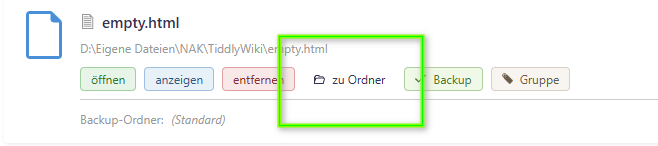
grafik

Sounds great! Can I limit the number of backups in TDRS on Mac?

Hi @Ellen

Thank you for your feedback!
Currently the last 20 backups are kept, but wait for the next release, there you will be able to choose if keeping all or only the last x backups.

Best wishes,
Simon

Thank you, Simon, I just hit the WATCH button in your Github rep.

1 Like

TiddlyServer only used a port because it was a server. If I had implemented it as a desktop app, I don’t think I would have used any ports at all, not even for folder wikis (since TiddlyServer sort of had a solution for that).

You can load a TiddlyWiki instance in the same process instead of using ports but that breaks some advanced features like websockets, though server-sent events still work fine.