Hi @BurningTreeC,
Upgraded to latest windows version (v0.3.23) and no wiki files will open, either by using the button or drag drop.

Hi @BurningTreeC,
Upgraded to latest windows version (v0.3.23) and no wiki files will open, either by using the button or drag drop.
Another (possibly big) ask but an extended search feature that can search normal tiddler body content across all loaded wiki’s similar to SearchWikis Plugin 1.4.0 — search multiple wikis through index ?? Is this possible?
Just let me know thanks.
I tried to save in Linux CachyOS TiddlyWiki 5.3.6, but it does not do that. I think this might be a bug. With version 5.3.7 or 5.3.8 everything is alright.
Ideally the port could be set, if on another IP Address than 127.0.0.1 it can be set to 80 which means browsers can load the wiki without a port being provided, I think 8080 also works.
I have seen variations in solutions, one being Bob, that could be configured, although it needed a little hacking. Of course native node allows this in the config or listen command. The reason I thought it may be possible in TiddlyDesktopTS as it includes the server for folder wikis. Perhaps your @Arlen22 knowledge combined with @BurningTreeC could make it possible?
Hi @BurningTreeC, just had a quick test with your latest release for Mac. Man, this is great!
Finally, we have backup limits and I can drop my Hazel rules – cool!
Flawless experience so far (3 test wikis), will evaluate it further in the next few days. Big thanks again!
Hi @BurningTreeC I test on mac and I have a situation. I can’t save modifications on any wiki. The save button is red as usual but clicking on it doesn’t trigger anything. And if I clos the wiki’s windows, it is asked if I want to quit without saving… (by the way, this message is not translated (I’m french)).
Anoher strange thing, I have a list of 3 wikis on the startup page. If I try to change the nb of backups of first or second wiki on the list, the chosen setting is applied to the last wiki.
I use Version 0.3.26 (0.3.26)
Yes. I will update the wikis and test again.
Just tested with 5.3.7 version of TW and saving is OK. Automatic saving on change and saving button OK.
But the nb of backups bug still remains.
It’s better if I update the code to support the older versions, too. I’ll do that.
Sorry for the backups bug, I’ll have a look!
I also tried to transform a wiki from file to directory. The files are created correctly and the new wiki directory appears in the start window. But I can’t open it.
While I click on the icon or link to the wiki or the open button nothing happen.
I have identified a bug on TiddlyDesktop-RS for Windows 10 and realise it is related to this point above.
When I hit “export tiddler” and export as “JSON file”, a prompt appears asking where to save the file.
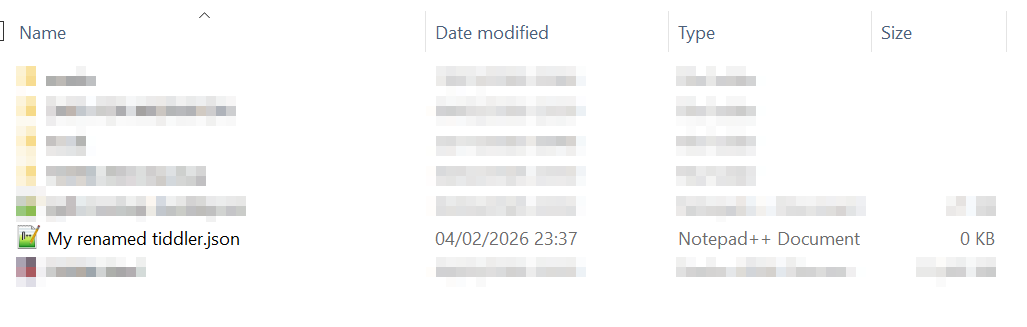
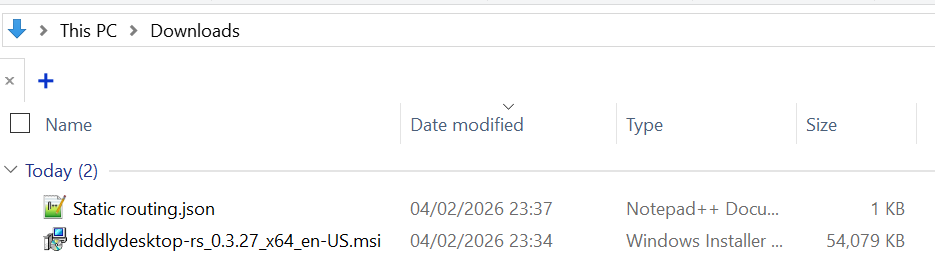
If I select any folder other than “Downloads”, then TiddlyDesktop-RS will save to that folder but the file will be just 0 bytes. The file, with its on-TW name, will be stored to “Downloads”.
The problem here – which makes it a bug IMO, is that the program brings up a file-save prompt. If you’re giving the user that choice, then I should reasonably expect to be able to be able to save to a location other than “Downloads”. It is also a regression in functionality relative to classic TiddlyDesktop.
If this was a standard browser, it may be restricting the downloads to one folder, but its not.
Make sure you are testing on the latest release of TiddlyDesktopTS
It is happening on the latest version, 0.3.2.7.
I took screenshots to prove it.
Target folder, which has my JSON tiddler with the file I gave it, but it is empty (0 KB):
Downloads folder which inexplicably has the exported JSON tiddler. Note it uses the tiddler’s actual title.
Note this is on a single-file wiki in case that makes a difference. I have not tested in Linux but I likely won’t be using this program there for a while anyway due to unfortunately poor performance.
Hi @yan
Yes this is a bug and will be resolved
Bug reports like these are so valuable, thank you very much!
Simon
Hi
I wanted to ask what kind of drag and drop problems do we have? All kinds of it? Someone mentioned dragging and plugins from the browser doesn’t work for them. I use windows 10 firefox and it works. Also between two wikis. My drag and drop problems are like this:
I drag a single file wiki into the app starting page, and it doesn’t load and nothing happens.
I try to sort dynamic lists like an empty wiki open tab tiddlers with drag and drop. Some tiddler with a random long name is opened (which doesn’t exist).
Can’t access here with my desktop right now and thus I can’t provide screenshots.
Drag and drop now seems to work on Windows 10, but it seems we have lost the standard ↔ indicator for resizing windows.
TiddlyDesktop-RS window:

Regular Windows application:
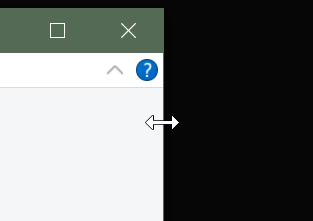
It is still possible to resize the window, you just have to make it pixel perfect. It would be good if this indicator could be restore, just to make it behave more like a normal windowed application, but appreciate this likely isn’t a priority.
Thanks very much for this BTC, here’s some feedback on version 0.3.52 running on Linux Mint 22.3.
Working
Not working
Wishlist
Only feedback, ignore anything that doesn’t make sense. It’s a really great app so thanks very much, I will keep trying the updates.
Hi @Watt
Thanks for your feedback, makes perfectly sense.
About wiki folders, do you have nodeJS installed? On Linux the user needs to install it for the wiki folder functionality.
I believe it’s apt install nodejs but I’m not sure, I’m on fedora currently.
About resizing I’ll have to test, i thought that would work out of the box. Also d&d should work but it may differ if you’re using X11 instead of Wayland, i don’t know what’s the default on Linux Mint.
The open wiki folder button does two things. If your picked folder contains a tiddlywiki.info it just opens the wiki. If not it initializes the wiki and lets you choose Edition and plugins.
The layout of the landing page / dashboard… yes, I’ll think about it.
The LAN server operation would be cool  yes, I need to get some info about security and then let’s see.
Thanks again for your feedback!
Simon