Hi @TiddlyTitch - yes it’s possible to implement
How about an action widget that lets you choose the command, the arguments and the working directory and saves the output of the command optionally in a tiddler?
Just downloaded and ran https://github.com/BurningTreeC/tiddlydesktop-rs/releases/download/v0.0.22/tiddlydesktop-rs_0.0.22_amd64.AppImage on Linux. The screenshot is attached:
There’s no relevant output in console.
I tried on a very old desktop with Nvidia GPU and nouveau if it matters.
Hi @vuk - Oh yes! I’ve seen it now, the AppImage has an issue, a big one!
New Release - v0.0.24
- added action-run-command plugin, add it when creating a new wiki from the plugin chooser
- backups should work now
- drag&drop made reliable
- this is the last version that ships a non-functional AppImage. Due to sandbox restrictions it will be removed. With an unsecure workaround AppImage could run but that’s not worth the risk
- tm-open-window / tm-close-window now work
- tm-open-external-window opens in default web browser
Unbelievable output @BurningTreeC
- Is RS short for Rust ?
- to the unaware can you give a high level explanation of Rust and Tauri please?
Issues;
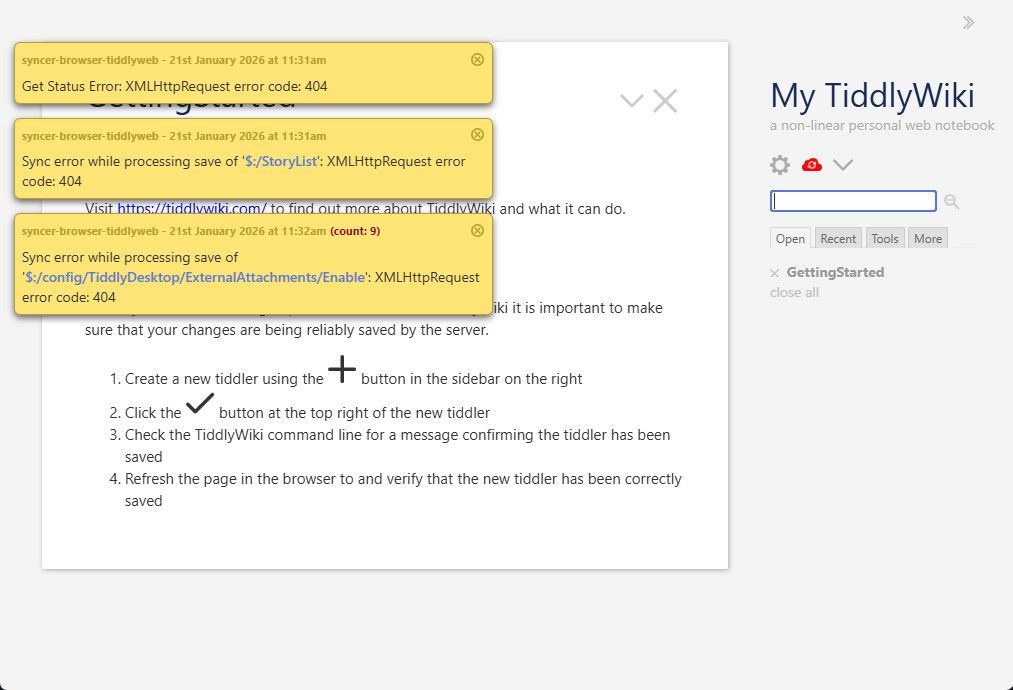
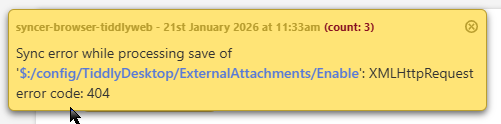
I have installed it and created a tw-com wiki and I am getting the attached message including re-occuring 404’s as I click on each link dur to a save error. I expected these to be local wiki single files not getting 404 errors, is this to do with the save or backup mechanisium?
I think a key problem with Poly was no straightforward explanation of how it operates. What are the key features?, not the details, summary of its mechanism. It was a long time since I looked but I was there at its genesis and even I got lost in the complexity. It is hard to adopt something you cant get a high level understanding of.
Tiddlydesktop TS feedback
Similar results as above creating a empty wiki
Opening an existing TiddlyWiki version 5.2.3 seem fine.
- However I can’t seem to drop tiddlers on it (from FireFox)
I like how from the file system we can open with tiddlydesktop-rs but not the tiddler does not enter the list of wikis. I way to do this would be nice.
A limitation also with tiddlydesktop was from memory if you use a lot of wikis the list length gets unmanagable. A Way to organisa/groups wikis would be nice.
Hi @TW_Tones
do you have by any chance the TiddlyWiki “External Attachments” plugin installed?
It’s not needed in TiddlyDesktopRS since it handles External Attachments internally.
But anyway, I will need to handle the case where the plugin is installed…
I will investigate the issues you reported, they are likely because of interferring plugins
I only used empty and another edition built within tiddlydesktop ts, and did not install any other plugin
That sounds ideal!
TT
Backups working now - would be good in a future release to be able to specify location of backup folder.
Thanks for all your hard work on this!
Jon
Is it fair to consider that Linux users are generally out of luck if they don’t use rpm/deb based distros now that the AppImage is gone?
I’ll describe my adventures.
Downloaded https://github.com/BurningTreeC/tiddlydesktop-rs/releases/download/v0.0.37/tiddlydesktop-rs-0.0.37-1-x86_64.pkg.tar.zst , extracted things, ran the binary
./tiddlydesktop-rs
./tiddlydesktop-rs: error while loading shared libraries: libwebkit2gtk-4.1.so.0: cannot open shared object file: No such file
 or directory
I have a libwebkit2gtk-4.0.so file in my Slackware64 -current (15.0+) system. I went and created a symlink, albeit it’s a bad idea to do it like this.
./tiddlydesktop-rs
./tiddlydesktop-rs: error while loading shared libraries: libjavascriptcoregtk-4.1.so.0: cannot open shared object file: No such file or directory
Same.
./tiddlydesktop-rs

(process:5664): libsoup-ERROR **: 17:11:27.455: libsoup3 symbols detected. Using libsoup2 and libsoup3 in the same process is not supported.
Trace/breakpoint trap      ./tiddlydesktop-rs
Full stop this time. I don’t know how to proceed further.
Since I’m AppImage illiterate (in terms of how it works), it’s probably not worth for you to elaborate on your decision why it is gone, since I won’t understand anyway. But from a strictly end user point of view, an AppImage is clearly handy - just one file to download, all dependencies included (so the situation above should never happen), make it executable and run it. Not to mention the selfish and mercantile end user argument “how come there are AppImages for many programs but not for this one”.
As for building from source, I don’t know if it’s worth trying on old hardware.
Hi @vuk are you on Arch Linux?
not Arch, see above (twenty chars, because the quote is not counted)
the pkg.tar.zst is an Arch package for installation with pacman.
Does slackware have an option to convert .deb or .rpm packages?
Oh I thought that’s just a binary tarball that can run everywhere 
I think there are tools for converting deb/rpm, I’ve been avoiding them because sometimes library version mismatches can happen as well. I’ll report back if I succeed to produce something that works from one of those packages.
@vuk please avoid the .deb / .rpm conversions
I’ll have a look what I can do for your case
Too late I already tried  For both rpm and deb after installing the converted Slackware package and running
 tiddlydesktop-rs, I get the libsoup error that I posted above.
@vuk - a new Release is online with a .tar.gz tarball that doesn’t have to be installed. Maybe you have more luck with this
Will it change any existing Arch (Manjaro actually) dependencies?
Thanks!
Batch file system using Windows Powershell to restore TiddlyWiki files from download directory to their original home directory
Features list at …
But apps like BTC has built are the probably the way forward. My problem with TD is that it almost always broke in some way. And it has a huge resource footprint.
@BurningTreeC Just noticed that it doesn’t appear to open encrypted wikis - tested by removing encryption and reapplying.
Thanks
Jon