
I would like to see my tags in a tree-like form, or atleast in some kinda graphic view. So I got ahead and downloaded and installed the release from GitHub - tiddly-gittly/tiddlywiki-tag-tree-picker-macro: Tree style tag picker
Then
ptr@pop-os tiddlywiki --server 8081
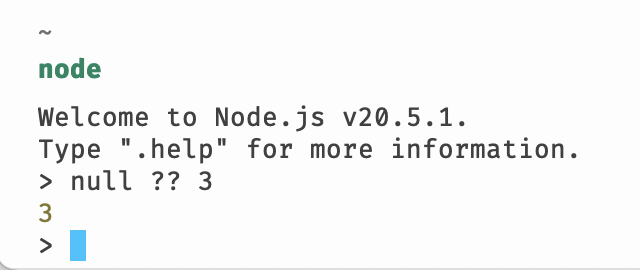
Error executing boot module $:/plugins/linonetwo/tag-tree-picker-macro/tagTreeMacro.js: SyntaxError: Unexpected token '?'

$:/plugins/linonetwo/tag-tree-picker-macro/tagTreeMacro.js:38
    if ((tiddler.fields.tags ?? []).some((tagOfTag) => tags.includes(tagOfTag))) return false;
                              ^
SyntaxError: Unexpected token '?'
and some more lines.
So I
ptr@pop-os echo $TIDDLYWIKI_PLUGIN_PATH
/home/ptr/.config/.tiddlywiki/plugins
ptr@pop-os cd "$TIDDLYWIKI_PLUGIN_PATH"/tiddly-gittly/tag-tree-picker-macro
ptr@pop-os find ./ -type f -iname  t'*tagTreeMacro*.*'
ptr@pop-os
ptr@pop-os grep -ri tagTreeMacro.js ./
./tag-tree-picker-macro/tagTreeMacro.ts.meta:title: $:/plugins/linonetwo/tag-tree-picker-macro/tagTreeMacro.js
ptr@pop-os find ./ -type f -iname '*linonetwo*.*'
ptr@pop-os
at the end of github (README.md) there is
## Usage
See [doc site](https://tiddly-gittly.github.io/tiddlywiki-tag-tree-picker-macro/).
## Install
From [CPL](https://github.com/tiddly-gittly/TiddlyWiki-CPL).
doc site is a demosite for tag-tree-picker-macro.
When in that site I insepect path for the plugin, it says $:/plugins/linonetwo/tag-tree-picker-macro/
Ohh,
One last try.
ptr@pop-os git clone  https://github.com/tiddly-gittly/tiddlywiki-tag-tree-picker-macro
ptr@pop-os cd ./tiddlywiki-tag-tree-picker-macro
ptr@pop-os find ./ -type f -iname '*linonetwo*.*'
./tiddlywiki-tag-tree-picker-macro/wiki/tiddlers/$__plugins_linonetwo_prevent-edit.json
./tiddlywiki-tag-tree-picker-macro/wiki/tiddlers/$__plugins_linonetwo_prevent-edit.json.meta
Any idea?

 and have spent way to much time with scripting for bash.