
For tiddlers where the color field is set — how could I get that value on a per-tiddler basis and style .tc-title so that my tiddler titles match the tiddler color?
I was hoping to do it purely with a stylesheet tiddler, but it looks like I may need to tinker with $:/core/ui/ViewTemplate/title also. I can see that tiddler changes the color of SVG icons by wrapping them in a span with a fill property — but given all the text styling, it’s a little trickier (at least for me) to style the text transclusion itself.
Anyone done this before?
In a tiddler with the tag $:/tags/Stylesheet and the type text/vnd.tiddlywiki (default):
<$list filter="[each:list-item[color]]" variable="color">
:is(<$list filter="[<color>listed[color]]">[data-tiddler-title="{{!!title}}"],</$list>) .tc-title {color:<<color>>;}
</$list>
Alternative: Create a custom viewtemplate for the title if the tiddler has a color field.
In a tiddler with the tag $:/tags/ViewTemplateTitleFilter and the list-before field set to empty:
[has[color]then[ViewTemplate/title/color]]
In a tiddler named “ViewTemplate/title/color” :
<span style.color={{!!color}}>{{||$:/core/ui/ViewTemplate/title/default}}</span>
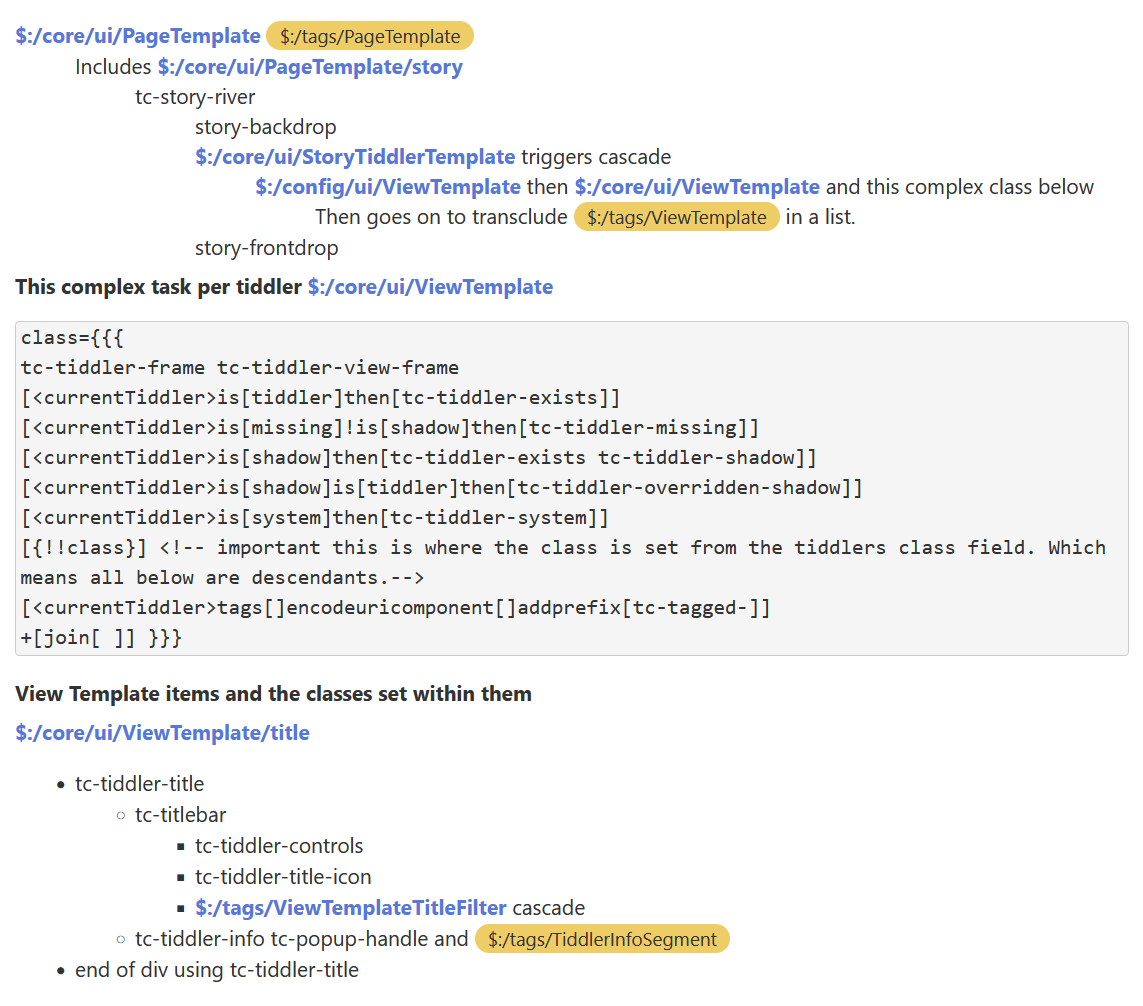
So I am trying to extract from this more general knowledge how tiddlywiki sets the various tc-classnames
So looking at @Mohammad’s solution you set the tiddlers class field to
title-primary then his stylesheet says;
.title-primary .tc-title {
color: #007bff;
}
This is according to W3Schools an example of
.class1 .class2 OR .name1 .name2 Selects all elements with name2 that is a descendant of an element with name1
- From this we can deduce the “class field in tiddlers” sets a class for which tc-title is a descendant of.
- I am now looking at recording the full heirachy of tc-classnames so I can learn how to write similar css overrides via the class field.
Right on! Could be real useful.
The Tiddler “class:” field is one of the neatest features in TW.
TT
If you want to help documenting the doc, you might want to look at this GitHub discussion: Improving Tiddlywiki’s CSS: Documentation for the css classes used by the core #6980
For the class field, the filter constructing the class of a tiddler is the following:
$:/core/ui/ViewTemplate
...
<div
data-tiddler-title=<<currentTiddler>>
data-tags={{!!tags}}
class={{{
tc-tiddler-frame
tc-tiddler-view-frame
[<currentTiddler>is[tiddler]then[tc-tiddler-exists]]
[<currentTiddler>is[missing]!is[shadow]then[tc-tiddler-missing]]
[<currentTiddler>is[shadow]then[tc-tiddler-exists tc-tiddler-shadow]]
[<currentTiddler>is[shadow]is[tiddler]then[tc-tiddler-overridden-shadow]]
[<currentTiddler>is[system]then[tc-tiddler-system]]
[{!!class}]
[<currentTiddler>tags[]encodeuricomponent[]addprefix[tc-tagged-]] +[join[ ]] }}}
role="article">
...
</div>
As you can see, the field class is mentioned with the filter run [{!!class}]
thanks, great minds think alike.
example of my progress
You guys are the BEST!
Sorry I dropped off the radar so long; it’s been a crazy couple of weeks, and I’m just now getting back the TiddlyProjects I left lying around. 
@Mohammad, I remembered seeing this in Shiraz and was trying to decipher just how you were were going about it.
This is one of a couple of things I’ve tried to reverse-engineer from your beautiful plugin in an effort to improve my own wikis and my understanding of how they work.
What I did not realize is that you were leveraging the class field from the TiddlyWiki core , which @TW_Tones and @TiddlyTitch zeroed in on right away. I was too focused on $:/core/ui/ViewTemplate/title and too fixated on the need for a $:/tags/Stylesheet tiddler to do what I wanted.
That’s why I started with @telumire’s filter-based solution. But as I struggled to grasp how it was applying its logic to tiddler titles, what he was saying about the ViewTemplate title template began to dawn on me — and that solution is closer to how I view my wikis and have them organized, so that’s the approach I took.