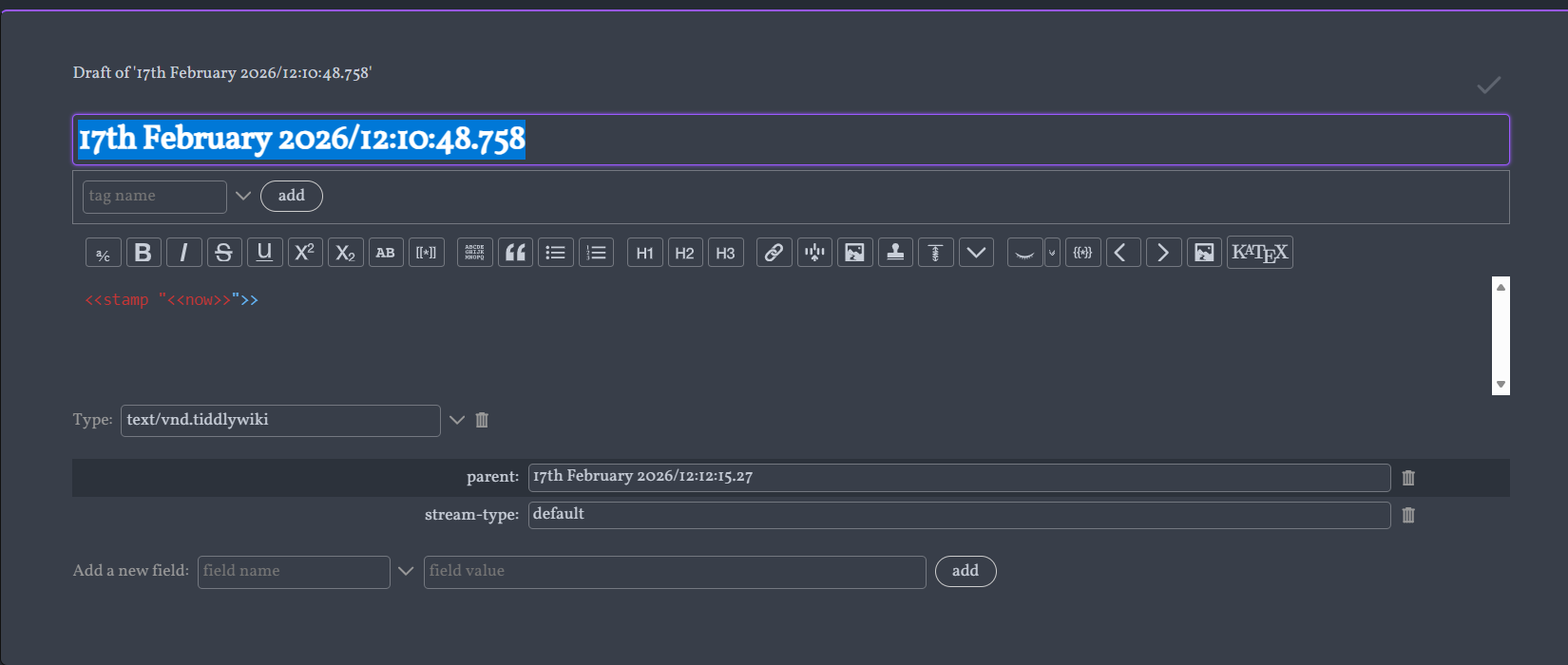
"Stamp" self-rewriting pseudo-macro concept

Hello All,

I know what I am trying to accomplish below is likely antithetical to TiddlyWiki design principals but I am humbly asking you would humor me.

I’m imagining a sort of macro, or function, or something, that will self-rewrite itself in it’s tiddler body location with the output another invoked macro.

For instance:

<<stamp '<<now>>' >>

Would dynamically re-write itself on tiddler save with plaintext as:

08:07, 11th February 2026

similarly

<<stamp '<<now "DD MMM YYYY">>' >>

would rewrite itself as:

11 February 2026

(I also thought it would be neat to be able to manipulate fields in this fashion, so you can provide an optional second parameter being a field key that will write the macros output to that field key’s value and remove itself from the body; this workflow seems silly in TW but it’s inspired from logseq who actually uses key:value pairs defined/embedded in the block bodies themselves)

After vibing with Gemini a bit I got a ‘working’ implementation, but it’s quite hacky and could use a lot of improvement:

  1. the text replacement happens immediately when you finish typing the macro anywhere instead of only on tiddler save; which is kinda unintuitive.

  2. It’s not very TW-native, and not a true macro; it just uses a bunch of javascript and regex to do the replacing.

Anyways I’m not trying to re-invent the wheel, and I know one possible workflow is just to copy paste a macro from view mode back into edit mode of a tiddler, plus this goes against the dynamism and bottom-up design of TiddlyWiki; but I think it could have some uses to people who come from the more casual “PKMS” sphere and are used to having similar functionality.

So if this or similair has been done before, or perhaps can already be done more elegantly and natively in TiddlyWiki, I’d love to hear your thoughts.

-Xyvir

(In the demo site below I use snowgoons comptext to mimic discord-like ‘slashcommands’ and /now and /timestamp implement the <<stamp >> pseudo-macro as described above)
stamp demo site

Here is the current hacky implementation:

/*\
title: $:/lithic/modules/startup/stamp-macro.js
type: application/javascript
module-type: startup

Stamp Macro Hook (v11 - Shielded Monkeypatch)
- Overrides addTiddler with aggressive null-checks.
- Prevents "undefined" crashes on state tiddlers.

\*/

(function(){

/*jslint node: true, browser: true */
/*global $tw: false */
"use strict";

exports.name = "stamp-macro-monkeypatch";
exports.platforms = ["browser"];
exports.after = ["startup"];
exports.synchronous = true;

exports.startup = function() {

	var originalAddTiddler = $tw.wiki.addTiddler;

	function processStampLogic(tiddler) {
		// --- SAFETY SHIELD ---
		// If it's not a real object, or doesn't have fields, or text isn't a string: skip.
		if(!tiddler || !tiddler.fields || typeof tiddler.fields.text !== "string") {
			return tiddler;
		}
		
		var text = tiddler.fields.text;
		
		// Optimization: If the word "stamp" isn't even in the text, skip regex entirely.
		if(text.indexOf("stamp") === -1) {
			return tiddler;
		}

		var fieldUpdates = {};
		var hasFieldUpdates = false;

		// Dormancy Check (---)
		var fenceRegex = /(?:^|\n)\s*---+\s*(?:\n|$)/;
		var fenceMatch = fenceRegex.exec(text);
		var fenceIndex = fenceMatch ? fenceMatch.index : Infinity;

		// Stamp Regex (Flexible spaces)
		var stampRegex = /<<stamp\s*(?:"""([\s\S]*?)"""|"([^"]*)"|'([^']*)')(?:(?:\s+)(?:"""([\s\S]*?)"""|"([^"]*)"|'([^']*)'))?\s*>>/g;

		if(!stampRegex.test(text)) {
			return tiddler;
		}

		stampRegex.lastIndex = 0;
		var newText = text.replace(stampRegex, function(match, c3, c2, c1, f3, f2, f1, offset) {
			if (offset > fenceIndex) return match;

			var contentToStamp = c3 || c2 || c1;
			var targetField = f3 || f2 || f1;
			if (!contentToStamp) return match;

			var renderedResult = "";
			try {
				renderedResult = $tw.wiki.renderText(
					"text/plain", 
					"text/vnd.tiddlywiki", 
					contentToStamp, 
					{ variables: { currentTiddler: tiddler.fields.title } }
				);
			} catch (e) {
				return match;
			}

			if (targetField) {
				if (tiddler.fields[targetField] === renderedResult) {
					fieldUpdates[targetField] = undefined;
				} else {
					fieldUpdates[targetField] = renderedResult;
				}
				hasFieldUpdates = true;
				return "";
			}
			return renderedResult;
		});

		if(newText !== text || hasFieldUpdates) {
			return new $tw.Tiddler(tiddler, fieldUpdates, {text: newText});
		}

		return tiddler;
	}

	// Override core function
	$tw.wiki.addTiddler = function(tiddler) {
		// Ensure we are working with the tiddler object
		var processedTiddler = processStampLogic(tiddler);
		return originalAddTiddler.call($tw.wiki, processedTiddler);
	};
};

})();
@Xyvir I value you looking at opportunities to innovate on top of TiddlyWiki and I urge you to continue, here are some of the ways you can do this without these “meta macros”;

  • I have a set of editor toolbar buttons that insert a time stamp “value” into the text, you could give them a shortcut key as well.
  • Some of the autocomplete solutions allow one to insert content and could have timestamp insertion included (if not already)
    • However perhaps the auto-complete solution could be extended to allow an inserted macro be “rendered” and only the result inserted.
  • You could look at defining additional TW-Wiki text symbols to be updated with content through the existing parser, but to rewrite you need a trigger, be this inserting time stamps or replacing with the output.
  • You could put an action on the done button to check for patterns in the body of a tiddler, compute values and replace the pattern with the desired result.
  • We could have buttons in the editor toolbar or in a side bar tab that generates the output from a macro or string such as a time stamp and copies it into the clipboard, you can then ctrl-V paste it into your text one or more times.
  • Another method is set a field value to the time stamp, then insert a reference to that in the text. This allows the field to be searched for and sorted on and retains the reference to the field in the text for searching eg {{!!time-stamp}} similarly we can use {{!!created}} or other versions as {{!!created}} {{!!modified}} is already date format transformed (try it).
  • I have a set of editor toolbar buttons that insert a time stamp “value” into the text, you could give them a shortcut key as well.

Following after the UI design principals of Notion, Logseq, etc; I’m actively trying to do away with all toolbars in my customized TW edition lol. Implementing discord-like /slashcommands I think goes a long way to accomplishing this since you invoke everything from the keyboard as you type for keyword actions in a semantic fashion.

That being said, Having a specific keyboard shortcut to render a highlighted macro to static text is certainly a very interesting idea and doesn’t really impact the existing workflow besides giving another way to do so

  • Some of the autocomplete solutions allow one to insert content and could have timestamp insertion included (if not already) However perhaps the auto-complete solution could be extended to allow an inserted macro be “rendered” and only the result inserted.

This was exactly the impetus, currently using snowgoon88 old comp-text plugin (which can insert arbitrary tiddler body content) to insert <<stamp '<<macro>> "" ' >> as a solution to do ‘autocomplete’ with computed-yet-static arbitrary macro outputs.

  • You could look at defining additional TW-Wiki text symbols to be updated with content through the existing parser, but to rewrite you need a trigger, be this inserting time stamps or replacing with the output.

I’m not familiar enough yet with TW inner-workings to make sense of this; I’d have to learn more to proceed in this direction.

  • You could put an action on the done button to check for patterns in the body of a tiddler, compute values and replace the pattern with the desired result."

I intend for the streams-plugin editing experience to be the primary one, which doesn’t use the done button, however I could certain hook into it’s existing action-macros which i hadn’t considered just the same as I could hook into the default edit/view experience. This is a solid candidate approach.

  • We could have buttons in the editor toolbar or in a side bar tab that generates the output from a macro or string such as a time stamp and copies it into the clipboard, you can then ctrl-V paste it into your text one or more times.

A sidebar widget/button to copy a rendered macro string to the clipboard is an interesting idea; though I am aiming to be able to do everything edit-wise with the keyboard as much as possible.

  • Another method is set a field value to the time stamp, then insert a reference to that in the text. This allows the field to be searched for and sorted on and retains the reference to the field in the text for searching eg {{!!time-stamp}} similarly we can use {{!!created}} or other versions as {{!!created}} {{!!modified}} is already date format transformed (try it).

I have considered a similar method, which is good because you make a ‘template’ tiddler with a particular ‘prettified’ format, transclude it, and then fill in the arbitrary data using fields below.

However I don’t much care for the vanilla ‘fields’ experience at the moment.

Anyway thanks for the great thoughts, lots of ideas that are much better conceived than this janky proof of concept lol.

If you haven’t encountered it yet, you might like Auto Complete as a modern alternative that supports filter transformations. My quick test suggests that it can’t currently convert [<now>] to the appropriate static timestamp (perhaps @Maurycy can weigh in on whether this would be possible in the future?) but I have found it very useful for inserting other dynamically-composed static strings, and you could preconfigure whatever trigger strings you prefer, e.g. \now in place of <<stamp '<<now>>' >>.

2 Likes

Yes I have ran across it and it’s quite good! I couldn’t get it to play nice the ‘overtype’ editor I use for streams, though that is probably quite possible.

After fussing with it awhile with no luck, while managing to get snowgoon comptext to work how I liked, I shelved autocomplete for now.

I maybe give it a shot another day but I don’t have a lot of motivation on that front at the moment.

@Maurycy has historically been very proactive about making Auto Complete compatible with other tools, so this might be worth asking him about.

In any case, I do think that leveraging the action hooks in Streams is probably the best solution — particularly if you want the replacement to happen on tiddler save. And conversely, if you wanted the replacements to happen while editing, I’d strongly recommend revisiting one of the auto-complete solutions. You’re right that Gemini’s JS solution doesn’t really align with TW principles, and IMO one of the biggest “violations” in this regard is that of the idea that all transformations should be user-initiated. In the TW core, we see this with action widgets, which must be paired with triggering widgets like $button — and IIRC, both Maurycy’s Auto Complete and snowgoon’s original plugin also require the user to select an option from the dropdown before any substitutions take place. As a user and a designer, I’d be very wary of automatic, “silent” substitutions.

1 Like

Yeah I fully admit that it’s not a great workflow as is, which is why I came here and asked for help.

Maybe the Autocomplete dev will chime in but as far as I know I’m the only one who uses overtype.js as an editor in Tiddlywiki at the moment; so it’s probably not gonna be a huge priority for them.

It’s overtype.js used as a plugin? If you tell me how to set it up I can take a look!

Are you sure about this? Let’s assume you have a system, that silently and automatically transforms the string /now into a formatted date string on tiddler save.

Now you want to create some documentation text, which describes the behaviour of this functionality. Eg:

If you type /now it will be automatically converted into a formatted date output.

eg: /now

The output will be:

If you type 2026-02-12, it will automatically converted into a formatted date output.

eg: 2026-02-12


The same thing is true for “automatic” autocomplete. As soon as you write /now it will be converted. So you are basically unable to write /now as plain text ever again.


IMO “autocorrect common typing errors” was the worst thing MS Word ever forced on its users. The first thing to do was to disable it.

2 Likes

It’s okay I just use a magic symbol (markdown page break ---) to disable it untill the end of the tiddler.

(Yes I know this is also terrible lol)

Yes you can check out overtype at the demo site I gave above, it is set as the default editor for streams there:

At some point I want to generalize the various custom plugins I’ve bolted on to my TW edition (and add good readmes etc) but for the time being I can’t guarantee they will work elsewhere (they come as a unit)

Please forgive me for the WIP of it all.

-Xyvir

Yes, we’re in agreement; it struck me as a bad idea for all the reasons you outlined. But thank you for making the potential issues more explicit!

1 Like

I’m reading through threads fairly quickly, and I may not understand this fully, but I’m wondering if a useful alternative would be some keystroke in your editor that pulls up an autofocused input box – ideally inline at the cursor, but if necessary in an overlay. You can type your command in that box, like /now or /now DD MMM YYYY When you leave the box your command is parsed, the input box is removed and the parsed output is inserted at the cursor.

I’m not sure how to do that, but I’m guessing people here could help if you would find that useful.

There are different reasons, why most browser actions and therefore TW actions need a “manual trigger”. As so often, they are security related.

The main browsers contain some web APIs, that don’t even work if they are not triggered from a user event, like click, scroll or an other site interaction.

One prominent example is the clipboard API. Additionally many of those APIs only can be used in secure contexts.

Secure context means https://, which makes it impossible to be used with wikis loaded from a file:// URL.

So making functions “auto magic” in browsers is tricky. Especially in file:// based wikis. Why browsers treat file URLs like a “poor cousin” may have other reasons, than security, too.

-m

Hello,

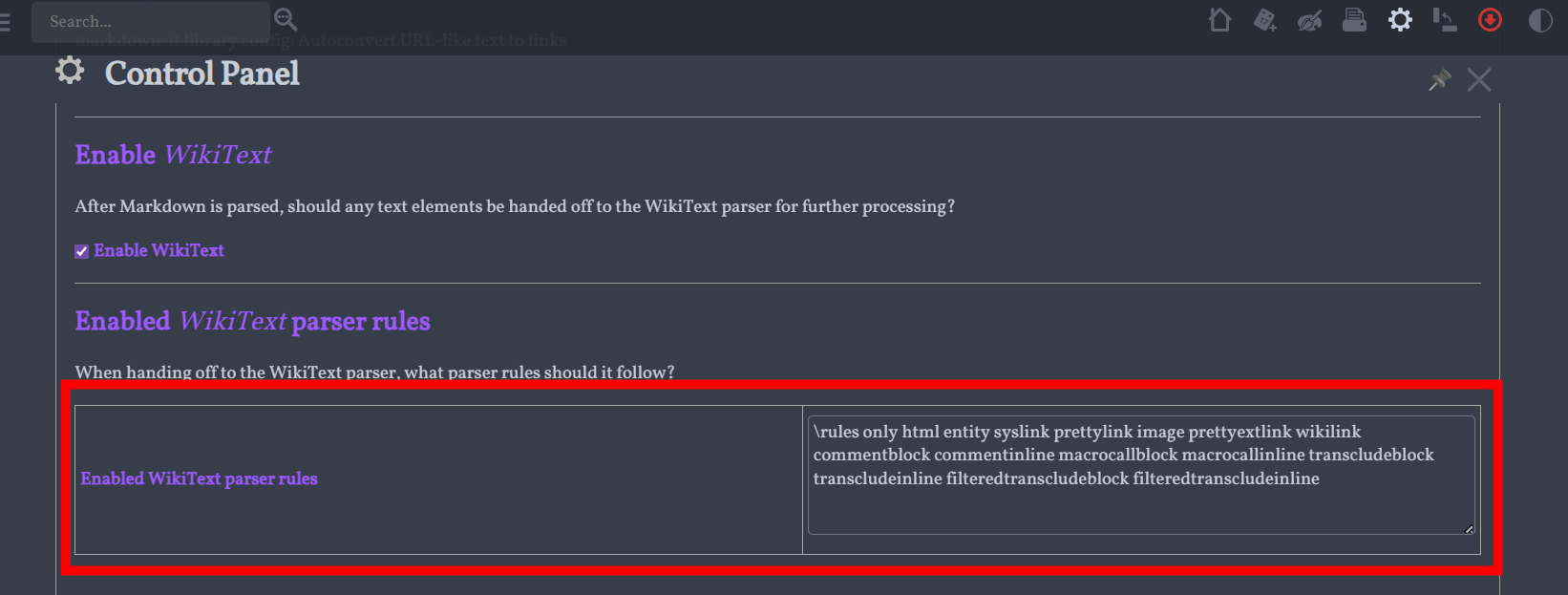
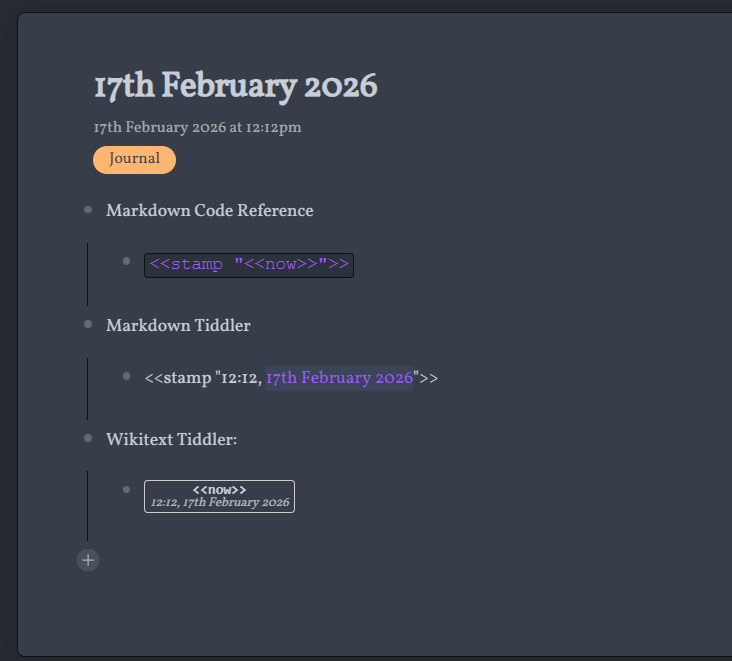
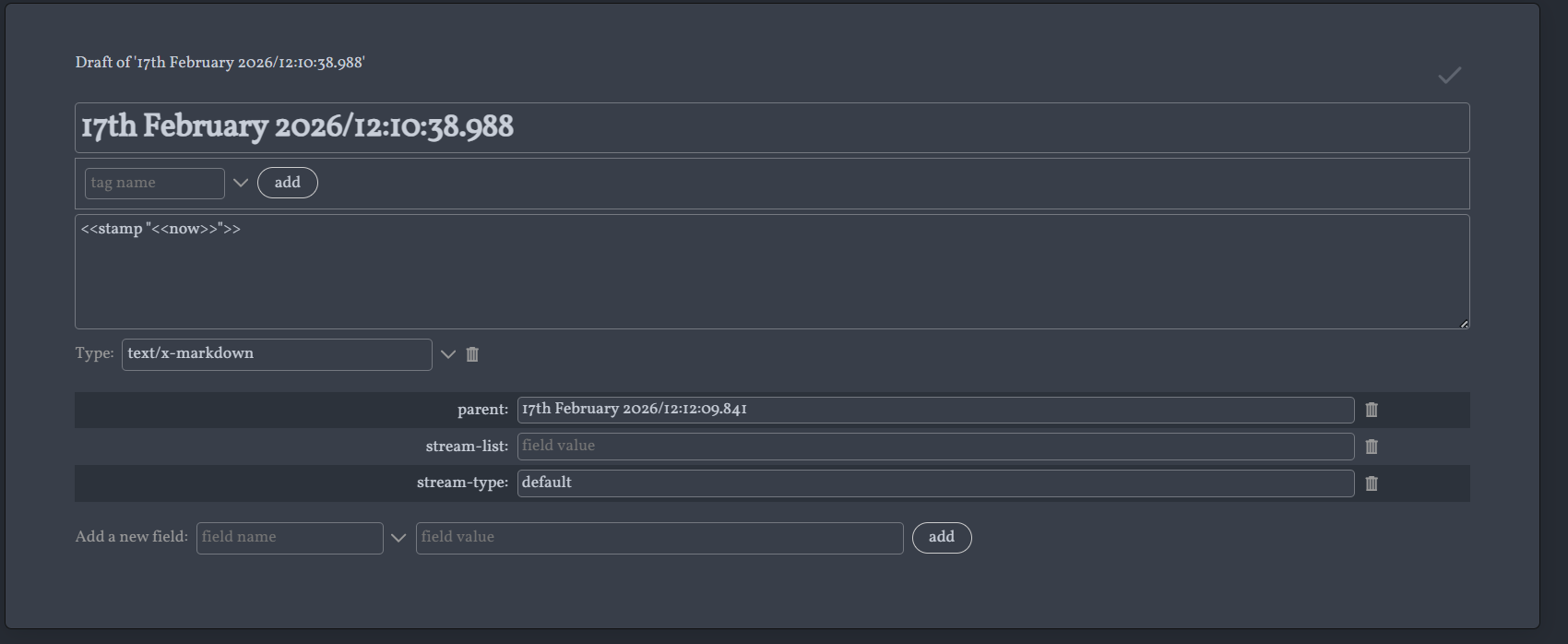
I have re-tweaked the previous macro to be a button that re-writes itself in view mode when clicked. I Think this is much more wikitext friendly. However, for some reason; this don’t work in markdown-type tiddlers (even though I have the enable-wikitext option enabled)

Lithic — a portability-first Outliner PKMS


Is it due to something missing in the wikitext parser rules? I’m not sure how to fix this.

-Xyvir

\define stamp(text)
<$wikify name="result" text=<<__text__>>>
  <$button 
    tooltip="Click to stamp"
    style={{{ 
      [[background-color:]] [[message-background-warning]colour[]] [[;]]
      [[color:]] [[message-foreground-warning]colour[]] [[;]]
      [[border: 1px solid]] [[message-border-warning]colour[]] [[;]]
      [[padding: 1px 4px; border-radius: 3px; font-size: 0.8em; line-height: 1.1; text-align: center; vertical-align: middle;]] 
      +[join[]] 
    }}}
  >
    <span style="font-family: monospace; font-weight: bold; display: block;">
      <$text text=<<__text__>>/>
    </span>

    <span style="font-style: italic; font-size: 0.9em; opacity: 0.85; display: block;">
      <<result>>
    </span>

    <$vars 
       raw=<<__text__>>
    >
      <$vars 
        s-single={{{ [<raw>addprefix[<<stamp ']addsuffix['>>]] }}}
        s-double={{{ [<raw>addprefix[<<stamp "]addsuffix[">>]] }}}
      >
        <$action-setfield text={{{ 
            [{!!text}search-replace<s-single>,<result>search-replace<s-double>,<result>] 
        }}} /> 
      </$vars>
    </$vars>

  </$button>
</$wikify>
\end
1 Like

@Mohammad

Would you mind taking a look? You seem to have good understanding about these kinds of Wikitext-related things.