Hello to all CSS wizards out there
I am experimenting with creating custom buttons using CSS and have made the following stylesheet
.button1
{
width: auto ;
height: auto ;
border:none ;
border-bottom: 1px solid grey ;
border-radius: 0 ;
outline: none ;
background-color: #e7e7e7 ;
font-size: 12px ;
}
This works perfectly when used in a wiki with the basic Vanilla theme.
When I change the theme to the Notebook Theme the custom buttons are replaced by the default style. ( see my reply below!!)
I have done some research and have checked the position of my custom stylesheet in the list of stylesheets and it is at the bottom the list. I have also tried adding !important to the stylesheet entries and that has no affect.
Please, can anyone offer some guidance?
Cheers, Rob
Hi all
I have subsequently found that it is not the Notebook Theme that is causing the issue.
The two wikis have similar plugins and themes installed and yet the stylesheet works in one and not in the other !!
I’m not sure how to debug this and from the above it is probably difficult for anyone to say what is going wrong!
But still any advice would be appreciated
Cheers, Rob
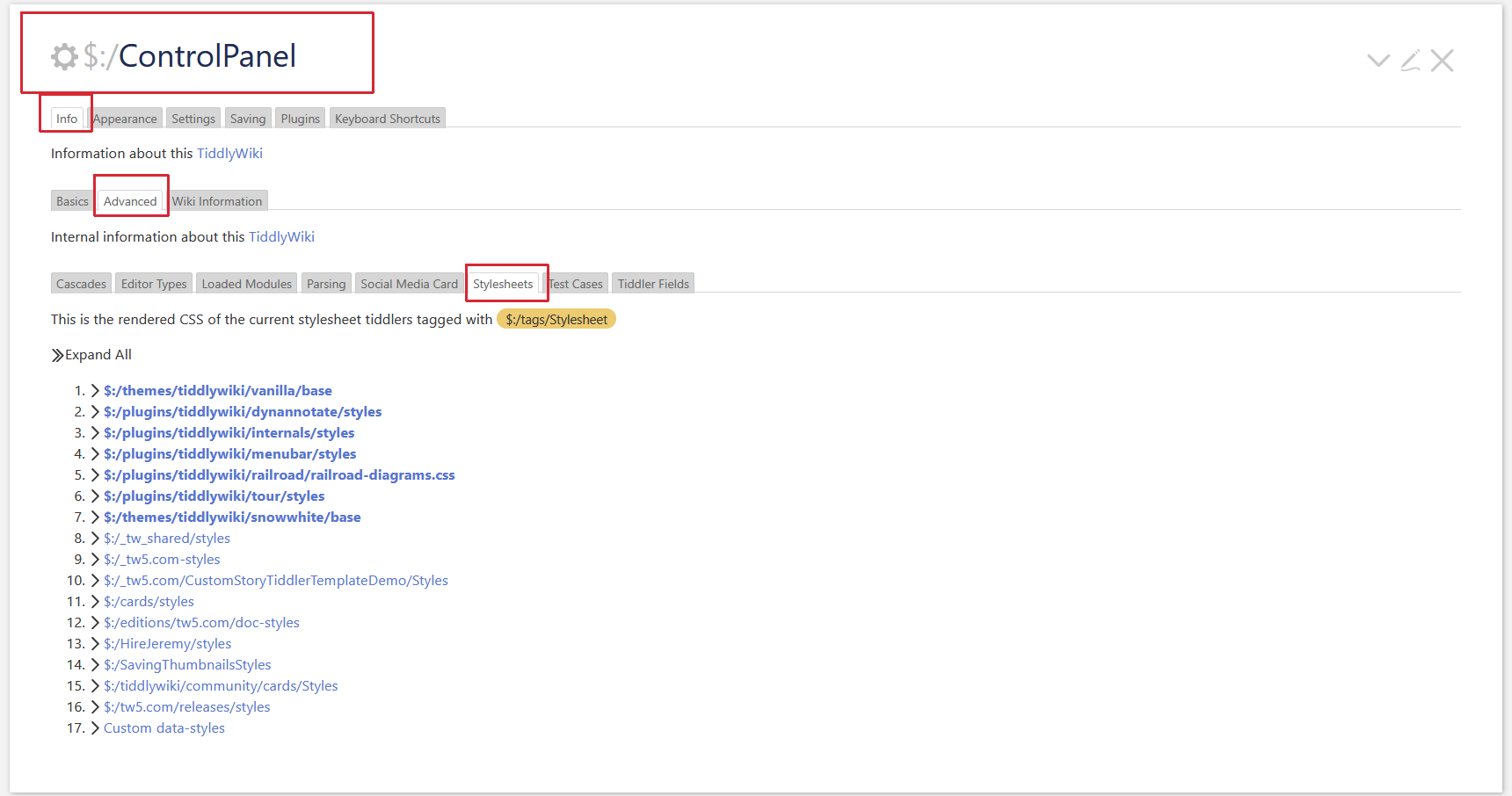
Have a look at the ControlPanel → Info → Advanced → Stylesheets
There you can see, the order the style sheets are evaluated. The lower in the list will take precedence.
So in the screenshot tw-com the 17. Custom data-styles will win
Rather than changing global styles perhaps write a custom class and apply that on the $button widget for targeted buttons.
There are oh so many ways to apply CSS and tiddlywiki adds to the cascade with its own style sheet ordering. It is wise to keep it as simple as possible according to your needs and avoid !importantat all cost or it just gets more difficult.
- Remember in many browsers r-click inspect may help identify the style/class applied and then you can use advanced search to find where it is defined. Similarly keep this in mind in your own styles, make it easy for the future you.
Thankyou @pmario and @TW_Tones for your responses.
I have not solved the issue, but I have found away around it by defining the style within the tiddler with the buttons. Not ideal as I will have to do this every time there is a button in a tiddler.
Originally I created a custom stylesheet called class-menu-button with the following code:
.rj-menu-button {
width: auto;
height: auto;
border:none;
border-bottom: 1px solid grey;
border-radius: 0; outline: none; background-color: #e7e7e7;
font-size: 14px;
padding: 5px 10px;
}
My experimental tiddler has the following code
\procedure button1()
<$button class=rj-menu-button>
<$action-navigate $to=“Hello World”/>
Press me
</$button>
\end
<>
The following stylesheets are present in the wiki where the code does NOT work as intended
$:/themes/tiddlywiki/vanilla/base
$:/plugins/BTC/PrintRiver/styles
$:/plugins/kookma/commander/styles/buttons
$:/plugins/kookma/commander/styles/compInspect/table
$:/plugins/kookma/commander/styles/log
$:/plugins/kookma/commander/styles/other
$:/plugins/kookma/commander/styles/select-width
$:/plugins/kookma/commander/styles/snr/flexbox
$:/plugins/kookma/commander/styles/snr/form
$:/plugins/kookma/commander/styles/tiddler-list
$:/plugins/kookma/utility/reader-mode/styles
$:/plugins/kookma/utility/styles/code
$:/plugins/kookma/utility/styles/controls-on-shadows
$:/plugins/kookma/utility/styles/doc-svg
$:/plugins/kookma/utility/styles/password
$:/plugins/kookma/utility/styles/reveal-code
$:/plugins/kookma/utility/styles/subtitle
$:/plugins/kookma/utility/styles/tiddler-size
$:/plugins/kookma/utility/styles/tw-version
$:/plugins/kookma/utility/styles/wikitext-macro
$:/plugins/tg/ro/styles
$:/plugins/tiddlywiki/geospatial/leaflet.css
$:/plugins/tiddlywiki/geospatial/leaflet.MarkerCluster.css
$:/plugins/tiddlywiki/geospatial/leaflet.MarkerCluster.Default.css
$:/plugins/tiddlywiki/geospatial/styles
class modal-image
class-floating-image
class-menu-button
class-no-indent
In another wiki with the same stylesheets and others the button works as intended.
Although I now have a workaround it would like to know why there is an issue.
I opened up the developer tools in my browser but have to say I did not know how to find the element and the class applied to it. Some guidance on how to use this tool would be appreciated.
Cheers, Rob
AN UPDATE!
I took a clean version of Tiddlywiki 5.4.0, imported all of the non-system tiddlers from my previous wiki and copied across all of the plugins that I use.
Hey presto, my button stylesheet now appears to work !!
Cheers, Rob