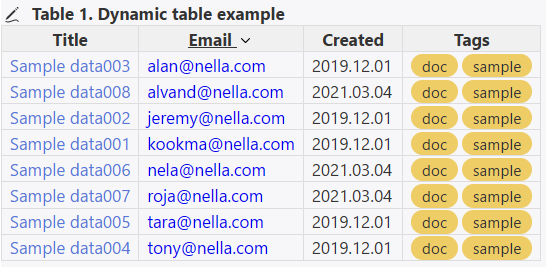
Shiraz’s dynamic table sorting is itself dynamic, based on column headers rather than any sorting operators used in the filter. Try clicking on the “sort-key” header in your table; it should automatically sort (or reverse sort) the table based on values in that column.
Here’s an example from the Shiraz documentation that I just sorted by the email field:
I know about that solution, but I was looking for something that would sort by the sort-key column by default instead of clicking on the column heading. Also there may be a case when I don’t want that column to be visible.
Thank you for the reply. The test on the Shiraz website works, but unfortunately it does not work for me in my wiki as regards sorting by sort-key by default.
I could be totally wrong, but I think that Shiraz tables are sorted alphabetically by tiddler title by default, but one can click on the headers to change the sorting of any column.
The link I provided to the Shiraz site was for an old version 2.9.7
Shiraz was updated by @Mohammad a while back and there were some differences.
What version of shiraz are you using? Maybe that is the reason for the problem.
Regarding the smart quotes, search this forum for “smart quotes” for other solutions/problems.
@Mohammad had started working on Shiraz 3.0 a couple of years ago (see the GitHub branch and the discussion thread here) but as he lives in Iran, I’m not sure when he’ll be able to return to it.
In Shiraz 2.9.7, dynamic table sorting-by-column is ultimately hardcoded into the macro (and IIRC this was not intended to change in 3.x). Here’s the relevant bit of code:
$(inputFilter)$ refers to the filter:"..." you used in your macrocall.
It’s followed by a second filter run, +[$(sortneg)$$(sortType)${$(tempTableSort)$##sortIndex}], where…
$(sortneg)$ handles “reverse” sorting if you click on one of the header buttons
$(sortType)$ is based on the (optional) sortOp parameter supplied in the table-dynamic macrocall: “the sort operator used to sort column like sort, sortcs, nsort, nsortcs, sortan … The default value is sort.”
{$(tempTableSort)$##sortIndex} retrieves the name of the field used for sorting; it’s set in a temporary tiddler if/when you click on a column header.
If you don’t click on an a column header, this entire filter run will default to +[sort[]], i.e. “sort by title”.
Since this filter run always follows the filter you supply in the macrocall (and thus overrides any alternate sort you specify), the table will always be sorted by tiddler title unless you click on a header.
Unfortunately there’s no simple way to modify this behavior, as the dynamic table macro is very complex. If you need this sort of control over the sorting, it’s probably not a good solution for you.
@Lamnatos and @etardiff thank you for the information. It puts my mind at ease. I’ll happily continue using v.2.9.7 now that I know its capabilities and limitations.