Retag into structured TOC

Folks, I have a wiki I collect various content relating to tiddlywiki, in particular one I call “TiddlyWiki blog to self” where I log notes, discoveries, ideas and research notes. I have being prolific for so long they now number 1,444 items. You could say for now it is a flat list with a single tag.

I know want to gradually work through this content and recategorize into categories and subcategories and looking for tools to assist in manually retagging thousands of items. Clearly some design effort could make this quicker and easier.

I have started this discussion to raise the question, solicit prior work/art, and share my journey to the solution I design or adopt.

Current design approach

  • Create a sidebar tab containing the beginning of a custom TOC
  • Permit new here subcategories to be added to the TOC as I go, ideally from the existing TOC entries and in a structure multiple levels deep
  • The ability to drag any item from my big list and drop it on a subcategory where the new tag is added and the original tag removed (leaving any others untouched)
  • Permit more than one content category tag on any give item.
    • To do this I think I will install my tool that lets me drop any title (including from the custom toc) on a tiddler to give it that tag. It may as well remove the original tag at the same time.
  • Permit a mode to move to another category tag by removing the current in only adding the new (opposite to last) ge ctrl-drag

So with the above approach I can build my TOC as I go and be able to reorganise it by dragging to or from the new TOC.

You may be able to see how this could be usable in many everyday manipulations and if others need to structure content. So hopefully the result will be useful to others.

  • I would argue the enabling TiddlyWiki script would also contain useful tools.

Thinking ahead

Tools to do the following may help;

  • Combine one or more tiddlers into one if they cover a similar subject. Append one to the text of another with the original title and meta data eg; tags, dates
  • Splitting a tiddler into two around perhaps selected text used as the title and give the new item the selected tag.

Give TiddlyTools/TOC a try.

It includes drag-and-drop handling that enables you to easily restructure an existing tree or start with a flat list where all the tiddlers share one common tag (i.e., a “tree” that is one level deep).

You can grab any draggable tiddler title (e.g., a link within tiddler content or an item already in the tree) and drop it onto a tree item to tag it with that item (creating or adding to a subcatgory).

If you drag a tiddler title from within the tree and drop it onto another tree item, it is moved into that subcategory and automatically updates its tags accordingly.

If you hold ctrl while dropping an item, then instead of dropping it into the subcategory, it is placed as a sibling before the item it is dropped on; similarly, holding shift while dropping an item places it as a sibling after the item it is dropped on.

enjoy,
-e

3 Likes

Excelent @EricShulman looks exactly like I need, I should have checked TiddlyTools First :frowning:

I suspect I am going to need to create a lot of new subcategories, so need to find the best approach. Perhaps a custom new button, with the target tag.

  • As a Blog the order would be better initially to be last created first.

1,444 Tiddlers is a lot, so I am trying to make this as easy as possible. It would be nice if the “folder tiddlers” remained at the top of the list (or one to the side) and a limited number of items not yet in a folder were listed below and I could either move them, or create a new folder then move them.

  • Perhaps I can make my own custom list(s) to help?

What would help is if I could filter the long toc in a few ways for example

  • Only those with the toc tag, with the role of folder.
    • A place to drop items from the following list
    • [Note] Naming the folders \foldername do this alphabetically
  • Only those with the toc tag, limited to say 50 items without a role of folder.
    • The ability to preview the tiddlers without opening them

Issues with TiddlyTools/TOC

  • Drop Zone whole row, always opens other rows and take a lot of time. Idea: Reduce dropzone to only text of Tiddler not whole row

I see a typo in that tiddler. <<toc-all> is missing a char.

typo fixed. thanks.

-e

I’ve done similar things several times… but never with TiddlyWiki. I doubt I have a copy of the tool I wrote for this (in JS many years ago, pre-Node) as I left that job long ago. But, from ancient memory, it worked somewhat similarly to what you’re looking for. The goals were quite the same: recategorize and retag over a thousand documents whose tagging had gotten overwhelming and chaotic.

I don’t know if its design, which is slightly different from what you suggest, would help, but I think it would be very easy to replicate in TW if it did what you wanted.

I had decided to work in small batches at a time. And I decided to choose the items to recategorize randomly. I would pick a random seven—I think; I know it was between five and ten—items that I could do in a few minutes whenever I had a few minutes, but one at a time made the total job seem unattainable. 5 - 10 was a nice range… The goal was to be able to do a block in under five minutes. I’d select one of those seven and the rest of the page would fade most of the way out. I would have a large left panel which showed the link/title and, when possible, an iframe with the content.

On top I had two topic (i.e. “tag”) bars. The muted, uneditable one showed the existing tags. The other one was the current topic list, which started blank. I could type to search my new topics (all prefixed n: for “new”). I could also click the existing topics and it would add a n:-prefixed version. But whenever I tried to add a topic that wasn’t already on my new list, there was a very intentional slow-down. If the topic I was adding was not already in the list, I required the user (in the end only me and one intern, although I didn’t know that when writing the tool; I thought we’d all chip in) to scan the list of existing topics and type the name again. The idea was to insist that the topic namespace was free, but shouldn’t be polluted. I found that by putting that re-entry box at the bottom of the list of new topics, I often would find an existing one that did just as well as the one I was about to create.

On the right I had a hierarchy panel. I didn’t have any sophisticated drag-and-drop (not as easy in 2008 as today), but it was equivalent to our selective expandable TOCs. and I could simply click on buttons to “add inside” any folder or “add after”, or “add before” any item. (This system did not have TW’s brilliant everything is a tiddler philosophy and folders were different from items.) There were also arrows to move things up and down. I could add an item in multiple locations, but there was another slow-down of the “are you sure you really want to do that sort”; I can’t quite remember the UI for that.

There was also a progress bar at the bottom showing that I’d updated, say, 571 of the 1256 items.

I used this on one project in all the interstitial times in my day over maybe two weeks, for around 1200 items. At the end I ran a quick batch job that stripped out any tag not beginning with n: and removed that prefix from the remaining ones.

As no good deed goes unpunished, my boss’s boss noted how fast I was at this and asked me to do the same for another group of items, where I didn’t know the material as well. I said that these 3500-ish items would take me as much as four weeks, but given that nearly half were dead links, I managed it in two. As they were about to assign me another group, I noted that we now had an intern on the team, and I could show her my tool in just a few minutes. She did the next set of 2000 (?) items, and I don’t think we ever did that again.

I actually wish I still had that source code; it was one of my favorite examples of writing code to help me make a task much more manageable.

So I guess this was more a stroll down memory lane than actual helpful advice. But if there’s anything helpful in there, feel free to use it. I think it would be much easier to do in TW than in JS-with-jQuery.

2 Likes

For moving tiddlers around a ToC, if that choice existed, I would certainly pick a two-pane setup a la Midnight Commander. Instead of modufying tags by hand (which I’m currently doing) or using drag-and-drop (which is tricky on mobile, and which for some reason I always perceived too unnatural and “windowsesque”), I’d happily use the mc workflow - Enter to navigate between nest levels, Insert to select/deselect nodes, and F5/F6 to copy/move them around.

Thanks Scott, My journey is very similar to you though in this case my 1,400 items all have the same general tag and I am “moving them into groups”. I was using @EricShulman suggested TOC which would be ideal once I have them organised, but without the ability to limit the display the performance is not good enough.

I have being here myself in the past, I love automating things but I also know how to make a minimalist solution and “putting the hours in”, sometimes its more efficient and accurate than automation.

Thanks I will, a bit of a hybrid.

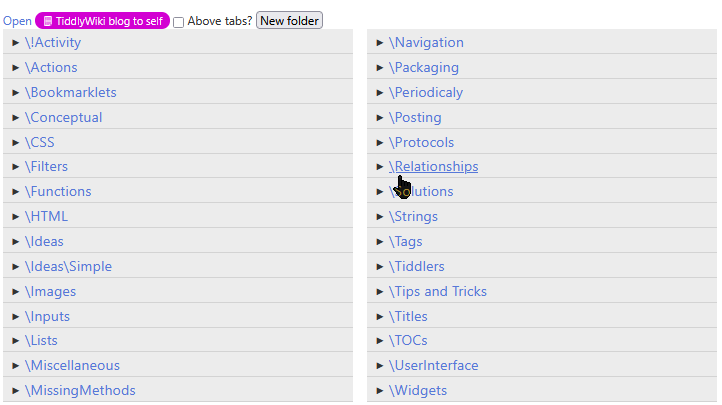
As far as I can see now the most useful thing would be the ability to list a set of items, in this case what I deem to be “folders” or “Group tiddlers” and provide a some drop action such as remove this tag and apply the current folder as tag. A sidebar tab with this list of “folders” and in the story tiddler I can just list and review tiddler by whatever list mechanism suits me, dragging titles to “a Folder” as needed.

Some little observations;

  • Setting so called folder tiddlers to have a prefix of \ bring folders to the top of the list and lets them be listed separately. I can always batch rename later. But it looks alright
  • I am having trouble remembering the popular two story solution, which is helpful on a large screen.
  • Partial, temporary automations are useful, such as a button to create a new “folder tiddler”, or drop here on folders.

Some possible contenders:

  • Krystal
  • Stroll - use toolbar buttons or shift-click to open a link in the second column, as powered by @saqimtiaz’s Stories plugin (not available on his site, as far as I can tell)
  • For greater flexibility and/or more columns: MultiColumn Layout