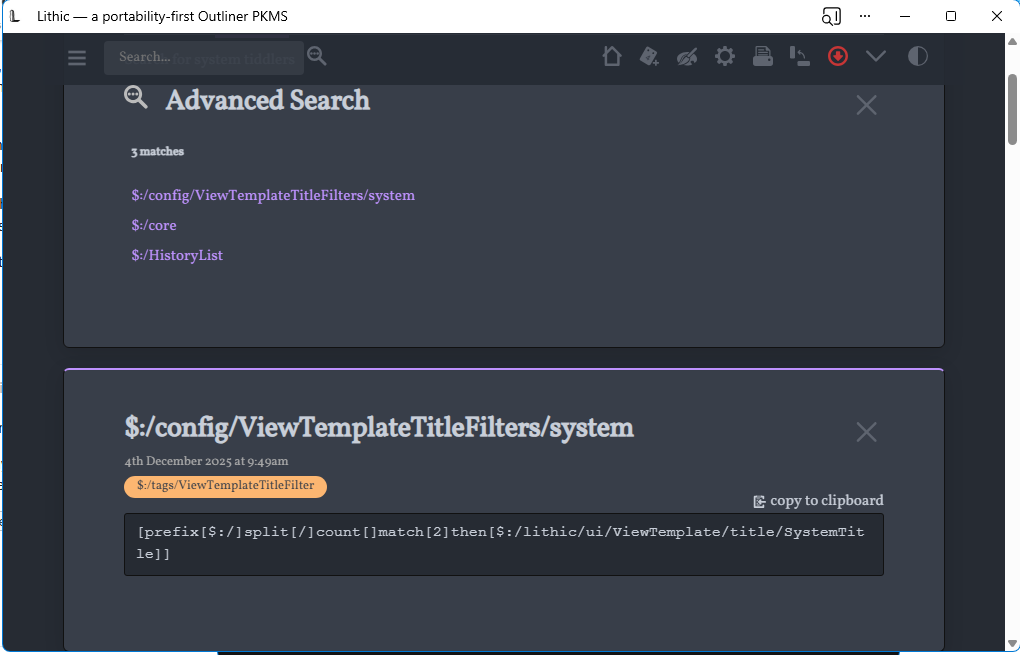
One of my pet peeves with the UI is when you click on the gear icon⚙️ and up comes $:/ControlPanel . Likewise the search button and you get $:/AdvancedSearch… I know these are system tiddlers but as part of the UI - i’d like to have better titles on these since they are used frequently … Likewise if I need a configuration component in a plugin - I’d also like a clean title but keep it hidden as a system tiddler
Well now I can … first I cloned the tiddler $:/core/ui/ViewTemplate/title/default and tweaked the wikitext a little so it is now :
In case anyone’s interested in a variant: I have all tiddlers in the story river default to caption (if it exists) in title area (with small cue for official title, so that it’s obvious). Adding a caption field with value Control Panel would thus have the same effect you’re going for…
In my case, the initial inspiration was wanting bibliographic tiddlers to display titles that look like Murdoch, Sovereignty of Good (2021) — which is not possible (in actual tiddler title) because of the style complexity (mix of italics and regular).
But then this same solution is also helpful for various other uses, such as for system tiddlers (whose titles would wrap to a second line, and/or which varied from one another by little squinty details, etc.).
Side-effect, of course, is that some system tiddlers (such as sidebar tabs) may have a caption that’s not the same as what you’d like to see. It’s easy enough to complicate the solution so that a story-river-caption field would take precedence iff it exists, etc.
I do something similar, although for a slightly different reason. I often want opaque titles like Person/12345 for uniqueness reasons, but still want to display Fred Flintstone. I know there are others who do this too.
For users like us, I think it would be a useful little tweak if such core tiddlers could have simple captions like Control Panel built in, probably meditated by the language mechanism.
Hey, I’m on my phone and couldn’t easily look it up. You’re just lucky I didn’t just say i18n and confuse all the non-programmers!
The clone button’s caption field contains something like {{$:/language/Buttons/Clone/Caption}} (don’t hold me to the details). And that tiddler defaults to clone, but it’s overridden with a different value when you change languages. And there’s something similar with the hint fields.
So the caption should read Control Panel if you’re working on English and the appropriate translation for other languages.
In keeping with tips and tricks it is possible to just create a tiddler called Advanced search, and transclude the system tiddler which is then searchable. if important you could edit the button to open this tiddler instead.
 and you get