
Folks;
The attached json installs a new editor toolbar button you can quickly use to wrap a selection such as
<name>selection</name>
Where you can add and delete different “names” eg;
<span>selection</span>
It is my first foray into some utility Editor toolbar buttons I hope to develop.
You can drop this on tiddlywiki.com or any wiki
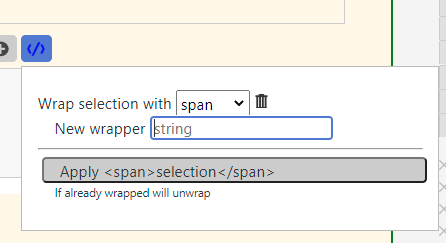
Suggestions or encouragement welcome
EditorToolbar-wrapper.json (5.2 KB)
Perhaps find another way to unwrap - like holding down Shift? Or, to <wrap><wrap>target text</wrap></wrap> hold down Ctrl?
<div>
<div>
//Target text//
</div>
</div>
EDIT: Actually, thinking about it, unwrapping could be a minefield.
If I understood short cuts I would add a wrap shortcut, however this can be used to unwrap, as long as you have the correct text selection and wrapper set.
In the long run I plan to make a more advanced one with named prefix/suffix sets;
eg to wrap “selection”, a filter. Not an automatic single work prefix/suffix as currently.
<$list filter="selection">
</$list>
I may be able to make a removal;
- Copy “selection” to clipboard
- Select whole statement
- Open editorToolbar button
- paste selection into a keep this field
- Replace all with the selection wrapped differently
Eg between the above list and and
{{{ selection )))
I have been using the stamp tool (aka “insert pre-configured snippet of text”) to insert “wrapper” text. It also has the capability of defining prefix and suffix text for the text wrapper. One example I have is to make the selected text highlight in red. I defined a prefix of <mark style="background-color:#FF8484">with a suffix of </mark>. This would be a great feature for your edit button. I find your drop-down interface is quicker for the user, not to mention easier to understand for end-users when they want to add a new entry.