
Hi @pmario that would be interesting to explore but I doubt that’s doable using CM6, maybe another library
1 Like
Maybe it it easier to put the search panel back to the bottom (as it was in the old CM 6 version)
THX
CodeMirror 6 Plugin Update - Version 0.0.28
Hello TiddlyWiki community!
We’re excited to announce a new alpha (experimental) release of the CodeMirror 6 editor plugins for TiddlyWiki. This update brings significant improvements to cursor handling, performance optimizations, theme support, and linting capabilities.
Highlights
Unified Cursor Rendering & Synchronized Blinking
One of the most visible changes in this release is a completely reworked cursor system:
-
All cursors now blink in sync - Previously, the primary cursor used the native browser caret while secondary cursors (in multi-cursor mode) used CodeMirror overlays, causing them to blink independently. Now all cursors are rendered through CodeMirror’s cursor layer.
-
Consistent cursor appearance - Primary and secondary cursors now look identical (same width, color, and positioning).
-
High-contrast cursor near brackets - When your cursor is positioned next to a bracket character
(),[],{}, or<>, the cursor automatically turns bright orange (#ff6600) for improved visibility against bracket highlighting.
Technical insight: We moved cursor rendering from being multi-cursor-dependent to a core feature. The cursor layer is now always present, drawing both .cm-cursor-primary and .cm-cursor-secondary elements. The native browser caret is hidden via caret-color: transparent, and blinking is achieved through a CSS opacity animation on the .cm-cursorLayer container, ensuring all cursors animate together.
Performance: Extension Caching
Editor instantiation is now faster thanks to stateless extension caching:
// These extensions are identical across all editor instances

var cached = getCachedExtensions();

// Returns: history, historyKeymap, bracketMatching,

// closeBrackets, syntaxHighlighting, defaultKeymap
Extensions that don’t vary between instances (like bracket matching, syntax highlighting, and default keymaps) are now created once and shared across all CodeMirror instances. This reduces memory usage and speeds up editor creation, especially noticeable when opening multiple tiddlers.
Zen Mode Theme Fix
Zen mode now properly respects your theme selection:
-
Fixed an issue where zen mode showed a light background even when using dark themes (like Gruvbox Dark)
-
The overlay now correctly reads the theme from
engine.domNodeand properly implements the auto-match-palette fallback logic -
The editor wrapper inside zen mode is now transparent, allowing the overlay’s themed background to show through
Sticky Search Panel
The search panel (Ctrl+F) now stays visible when scrolling through long documents:
.cm-panels-top {

position: sticky;

top: var(--tc-menubar-height, 0px);

z-index: 100;

}
The panel intelligently accounts for TiddlyWiki’s menubar height using a CSS custom property that’s dynamically set via JavaScript with a ResizeObserver for responsive tracking.
Linter Improvements
The linter received substantial enhancements:
Smart Self-Closing Tag Detection
The linter now intelligently detects whether a tag actually needs closing:
-
Recognizes HTML void elements (
<br>,<img>,<input>, etc.) -
Knows about self-closing TiddlyWiki widgets (
$action-*,$importvariables, etc.) -
Scans document context to find matching closing tags, properly skipping protected contexts like code blocks, comments, macros, and transclusions
$(variable)$ Substitution Validation
-
Correctly flags
$(variable)$syntax as invalid inside\procedurebodies (only valid in\definemacros) -
But properly allows it inside substituted attributes:
attr=`$(variable)$`(processed at render time)
Technical insight: The linter walks up the AST to check for AttributeSubstituted parent nodes before flagging substitution syntax errors.
Goto Line Panel Styling
The “Go to Line” panel (Ctrl+G) received a visual refresh with a more compact design that matches the search panel aesthetic.
All Changes
Editor Core (editor/)
-
Cursor layer now always present (not just for multi-cursor)
-
Extension caching for stateless extensions
-
Menubar height tracking for sticky panels
-
Improved cursor styling and bracket-match highlighting
-
Blink animation changed from
border-colortoopacityfor proper layer-wide effect
Zen Mode (zen-mode/)
-
Fixed theme detection to respect auto-match-palette
-
Made editor wrapper transparent inside overlay
-
Updated CSS variable references from
--zen-*to--wt-*
Linter (lint/)
-
Smart tag scanning for auto-close detection
-
Protected context skipping (code blocks, macros, etc.)
-
Improved
$(variable)$validation with attribute context awareness -
Self-closing widget/element recognition
Styles
-
Search panel now sticky below menubar
-
Goto Line panel compact redesign
-
Unified cursor styling across themes
-
High-contrast bracket-adjacent cursor
Version Numbers
All 55 plugins have been bumped:
-
54 plugins: 0.0.27 → 0.0.28
-
1 plugin: 0.0.8 → 0.0.9
Upgrade Notes
This is a drop-in replacement. Simply update your plugins to the latest version. The cursor changes are purely visual improvements with no configuration required.
If you’ve customized cursor styling in your own stylesheets, note that:
-
.cm-cursor-secondarycolor override has been removed (all cursors now use the same color) -
The cursor layer is always present, even with multi-cursor disabled
-
Native browser caret is now hidden in favor of CodeMirror-rendered cursors
Feedback Welcome!
As always, we’d love to hear your feedback. Please report any issues on GitHub or discuss here in the forum.
Happy editing!
5 Likes

Hi @Yaisog - now you’ll see the cursor I hope!
It’s now working for me in FireFox on Linux, I hope it works for you, too
Best wishes, Simon

Amazing. Just amazing. Thank you for your continued effort on this. I am struggling to come up with feedback, but I have a few things that came to mind.
-
It is not possible to see the Find (Ctrl+F) panel when something else is sticking to the top. I use sticky titles (under Appearance → Theme Tweaks or
$:/themes/tiddlywiki/vanilla/options/stickytitles). Some people use the official menu bar plugin ($:/plugins/tiddlywiki/menubar). Unfortunately, these both make it impossible to see the sticky header.This is a more general issue and probably not one you can affect, but if this could be resolved in the Core so that sticky elements can stack at the top, it would be amazing. It’s one of the main reasons I don’t use the menu bar.
-
It would be nice if CM6 met the following use case – and apologies if this has been mentioned before:
Given a tiddler has
"type": "x-foo"
When the user selects “Edit this tiddler”
Then the CodeMirror 6 plugin matching$:/language/Docs/Types/x-foois loadedNote: I’m not sure if that’s how you actually load editing plugins, but you get the idea!
An example are the many
application/javascriptfiles built into TiddlyWiki. -
(Minor polish item) Where CamelCase links are enabled, it would make sense for them to the same colour as [[wikilinks]], as they have the same purpose.

-
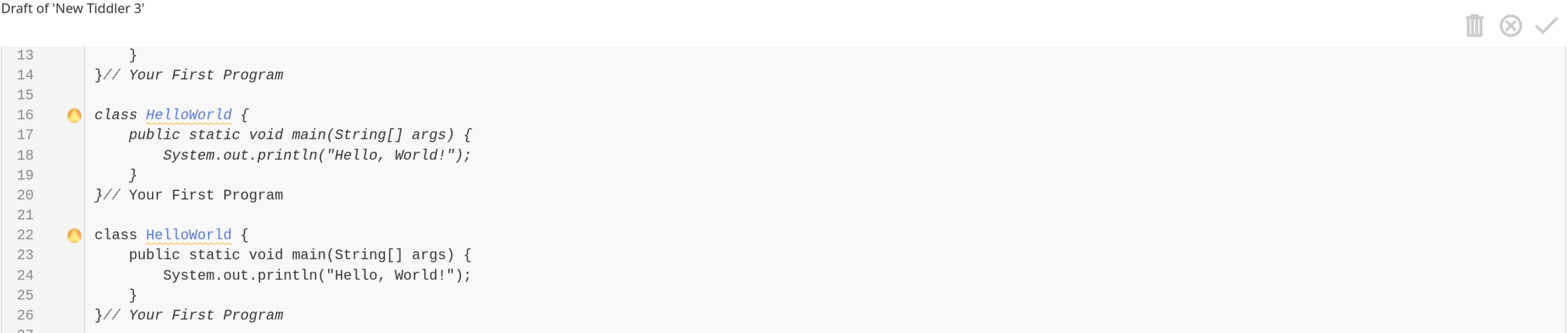
I have noticed a lot of the code says MIT licenced with copyright to TiddlyWiki. Surely that can’t be right, unless you really wrote all those rules yourself? If not, then the original authors should be credited also in the licences. It would be good to also include a link back in case users want to raise issues with those authors directly (assuming the issues are strictly to do with).
I admit this would be pure drudgery but it may be stopping integration into the official plugins, which carry a fairly high bar for attribution.
1 Like
I had the demo site in my browser but closed the related tab. I just returned to the top of this thread to find the link and I am no longer sure of the “definitive link” to the latest release. Is it TiddlyWiki v5.4.0-prerelease — a non-linear personal web notebook although this is a preview it seems to have version 0.0.28 of codemirror.
I don’t want to review the non-latest version. I see a problem on a prerelease v 0.0.28 but unsure If I have the correct release. And how to get it when you make changes.
Thank you @yan ! Very kind
I thought I had done so but probably the sticky titles have a higher z-index than the search panel, I’ll fix this!
This must be done by a combination of JavaScript and CSS. I don’t know if it’s suitable for the core but I’ll have a try
If I understand you correctly, this is the current behavior. If you choose application/javascript, the lang-javascript plugin is loaded. For text/plain, no plugin is loaded. For text/css the lang-css plugin is loaded and so on…
You’re right, I’ll fix this!
The various lang-* files (but not lang-tiddlywiki, I wrote that) are licensed MIT but you’re right, we should mention the creators of the lang-* files!
Thank you for your feedback and tips,
Simon
I just imported a bundle of all codemirror plugins and got this;
Error: Unrecognized extension value in extension set ([object Object]). This sometimes happens because multiple instances of @codemirror/state are loaded, breaking instanceof checks.
I can’t seem to access my wiki, any ideas how to recover?, of course I can delete or disable them in the HTML file. If not I will find out how, I am just hoping someone has a shortcut.
You have probably the plugins of the first demo site installed (they are named $:/plugins/BurningTreeC/tiddlywiki-codemirror*) and now you may have installed the plugins from the new demo, where they are named $:/plugins/tiddlywiki/codemirror-6* …
This breaks things since there are now two concurring editors installed
Meanwhile I’ve updated the plugin
- the issue @TW_Tones experienced that he already had an edit-codemirror-6 widget previously installed and installed a second one because the namespace of the plugin has changed is now handled by a safeguard that checks for existence of the edit-codemirror and edit-codemirror-6 widgets before loading our own
- the sticky search-panel on top now sticks to the sticky tiddler titles if they are configured
- for the menubar (sticky titles to menubar) I created a pull request on GitHub that adds handling for that, see: Titles sticky to menubar instead of document top by BurningTreeC · Pull Request #9584 · TiddlyWiki/TiddlyWiki5 · GitHub
Best wishes and have a nice day,
Simon
1 Like
Thanks for investigating, Simon.
Found small issues:
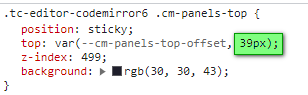
- With this setting the search panel is not complete sticky:
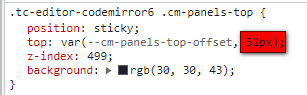

→ new:
- Cursor is not in sync with v 0.0.29:

Thanks.
Hi @StS
I believe now I’ve solved the issue with the sticky search panel. (version 0.0.30)
What’s the issue with the cursor exactly?
Thank you,
Simon
It doesn’t, but I deactivated the browser shortcut (I never need to bookmark all tabs) and that works. That is good enough for me.
The cursor is also working great now, thanks.
1 Like
Thanks but, I could not replicate this working.
Typed blocks (i.e. blocks starting and ending with $$$) are highlighted, but there seems to be no syntax highlighting when the tiddler type is application/javascript for example. Bizarrely it does work for text/x-markdown.
I haven’t pulled it into my own or an empty wiki if that makes a difference, I am just going off the preview wiki.
No, sorry.
Now the first line is disappearing again.

Cursor issue: Cursor “jumps”. First you see:
- the thin line
- than a little more right additional a thicker line
- than the thin line disappears and only the thicker line is visible
This runs in loop.
Thanks.
Hi @BurningTreeC, sometimes I get this (been that way for a few versions):

The console shows more information:
Uncaught RangeError: Invalid child in posBefore
    at fe.posBefore (codemirror-view.js:1:24165)
    at _e (codemirror-view.js:1:59280)
    at Ke (codemirror-view.js:1:58411)
    at vs.posAtCoords (codemirror-view.js:1:143711)
    at Ao.startHover (codemirror-view.js:1:176878)
    at Ao.checkHover (codemirror-view.js:1:176689)
This happens (sometimes) when I put a tiddler into edit mode and then press ESC to cancel back into view mode.
Also, concerning the Lint plugin (v0.0.29):
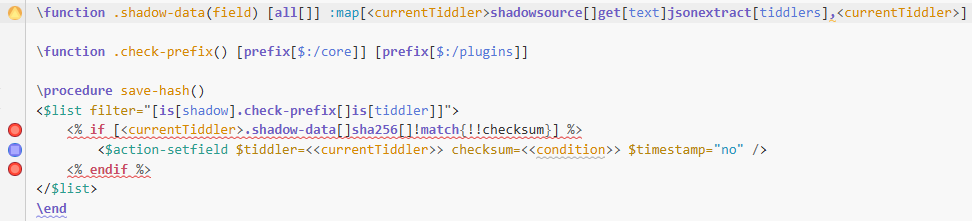
All of the warnings/errors are wrong:
- The comma in
jsonextractseparates multiple parameters (error is: “Unknown filter operator or function: ,”) - <% if %> and <% endif %> are not unclosed or unopened
- condition is a valid variable inside <% if %> and <% endif %>