Hi @TW_Tones
That made me laugh 
Thanks

Amazing. Just amazing. Thank you for your continued effort on this. I am struggling to come up with feedback, but I have a few things that came to mind.
It is not possible to see the Find (Ctrl+F) panel when something else is sticking to the top. I use sticky titles (under Appearance → Theme Tweaks or $:/themes/tiddlywiki/vanilla/options/stickytitles). Some people use the official menu bar plugin ($:/plugins/tiddlywiki/menubar). Unfortunately, these both make it impossible to see the sticky header.
This is a more general issue and probably not one you can affect, but if this could be resolved in the Core so that sticky elements can stack at the top, it would be amazing. It’s one of the main reasons I don’t use the menu bar.
It would be nice if CM6 met the following use case – and apologies if this has been mentioned before:
Given a tiddler has "type": "x-foo"
When the user selects “Edit this tiddler”
Then the CodeMirror 6 plugin matching $:/language/Docs/Types/x-foo is loaded
Note: I’m not sure if that’s how you actually load editing plugins, but you get the idea!
An example are the many application/javascript files built into TiddlyWiki.
(Minor polish item) Where CamelCase links are enabled, it would make sense for them to the same colour as [[wikilinks]], as they have the same purpose.

I have noticed a lot of the code says MIT licenced with copyright to TiddlyWiki. Surely that can’t be right, unless you really wrote all those rules yourself? If not, then the original authors should be credited also in the licences. It would be good to also include a link back in case users want to raise issues with those authors directly (assuming the issues are strictly to do with).
I admit this would be pure drudgery but it may be stopping integration into the official plugins, which carry a fairly high bar for attribution.
I had the demo site in my browser but closed the related tab. I just returned to the top of this thread to find the link and I am no longer sure of the “definitive link” to the latest release. Is it TiddlyWiki v5.4.0-prerelease — a non-linear personal web notebook although this is a preview it seems to have version 0.0.28 of codemirror.
I don’t want to review the non-latest version. I see a problem on a prerelease v 0.0.28 but unsure If I have the correct release. And how to get it when you make changes.
Thank you @yan ! Very kind
I thought I had done so but probably the sticky titles have a higher z-index than the search panel, I’ll fix this!
This must be done by a combination of JavaScript and CSS. I don’t know if it’s suitable for the core but I’ll have a try
If I understand you correctly, this is the current behavior. If you choose application/javascript, the lang-javascript plugin is loaded. For text/plain, no plugin is loaded. For text/css the lang-css plugin is loaded and so on…
You’re right, I’ll fix this!
The various lang-* files (but not lang-tiddlywiki, I wrote that) are licensed MIT but you’re right, we should mention the creators of the lang-* files!
Thank you for your feedback and tips,
Simon
I just imported a bundle of all codemirror plugins and got this;
Error: Unrecognized extension value in extension set ([object Object]). This sometimes happens because multiple instances of @codemirror/state are loaded, breaking instanceof checks.
I can’t seem to access my wiki, any ideas how to recover?, of course I can delete or disable them in the HTML file. If not I will find out how, I am just hoping someone has a shortcut.
You have probably the plugins of the first demo site installed (they are named $:/plugins/BurningTreeC/tiddlywiki-codemirror*) and now you may have installed the plugins from the new demo, where they are named $:/plugins/tiddlywiki/codemirror-6* …
This breaks things since there are now two concurring editors installed
Best wishes and have a nice day,
Simon
Thanks for investigating, Simon.
Found small issues:
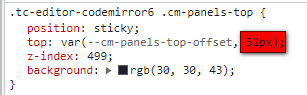
→ new:
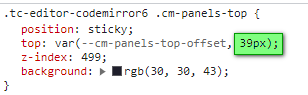
Thanks.
Hi @StS
I believe now I’ve solved the issue with the sticky search panel. (version 0.0.30)
What’s the issue with the cursor exactly?
Thank you,
Simon
It doesn’t, but I deactivated the browser shortcut (I never need to bookmark all tabs) and that works. That is good enough for me.
The cursor is also working great now, thanks.
Thanks but, I could not replicate this working.
Typed blocks (i.e. blocks starting and ending with $$$) are highlighted, but there seems to be no syntax highlighting when the tiddler type is application/javascript for example. Bizarrely it does work for text/x-markdown.
I haven’t pulled it into my own or an empty wiki if that makes a difference, I am just going off the preview wiki.
No, sorry.
Now the first line is disappearing again.
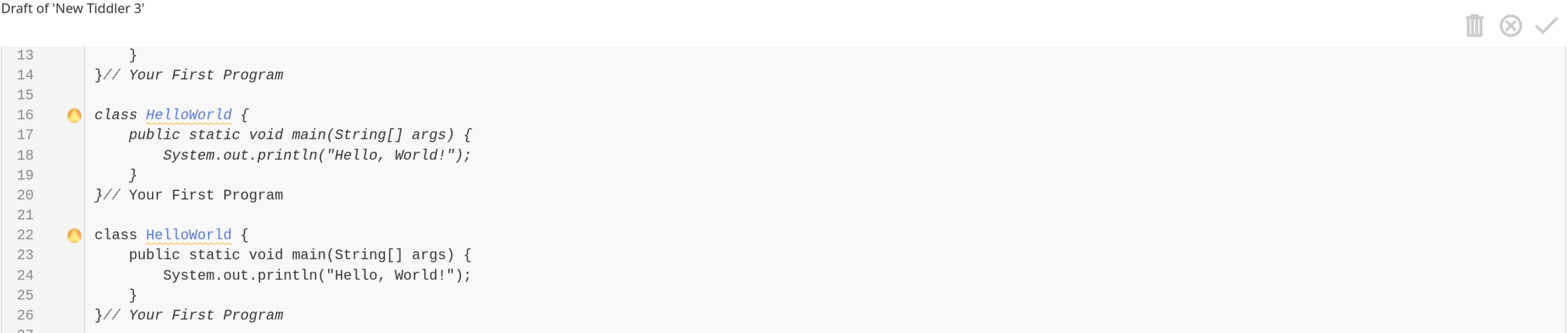
Cursor issue: Cursor “jumps”. First you see:
This runs in loop.
Thanks.
Hi @BurningTreeC, sometimes I get this (been that way for a few versions):
Uncaught RangeError: Invalid child in posBefore
    at fe.posBefore (codemirror-view.js:1:24165)
    at _e (codemirror-view.js:1:59280)
    at Ke (codemirror-view.js:1:58411)
    at vs.posAtCoords (codemirror-view.js:1:143711)
    at Ao.startHover (codemirror-view.js:1:176878)
    at Ao.checkHover (codemirror-view.js:1:176689)
This happens (sometimes) when I put a tiddler into edit mode and then press ESC to cancel back into view mode.
Also, concerning the Lint plugin (v0.0.29):
jsonextract separates multiple parameters (error is: “Unknown filter operator or function: ,”)Hello @Yaisog
if you have example code like this, could you please paste it here that I can copy it?
I don’t want to type all this code, but I’d like to inspect it.
Thank you
Hello Simon,
In the last version (as well as previous ones):
Tested in TiddlyWiki v5.4.0-prerelease — a non-linear personal web notebook and another TiddlyWiki in version 5.3.8.
BR,
Eskha
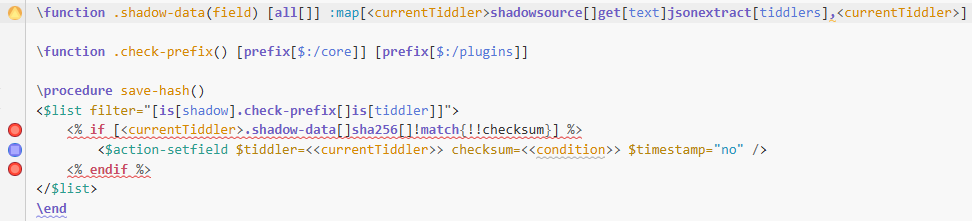
Hi @BurningTreeC, of course. I wanted you to see the error markers, too, therefore the screenshot.
\function .shadow-data(field) [all[]] :map[<currentTiddler>shadowsource[]get[text]jsonextract[tiddlers],<currentTiddler>]

\function .check-prefix() [prefix[$:/core]] [prefix[$:/plugins]]

\procedure save-hash()
<$list filter="[is[shadow].check-prefix[]is[tiddler]]">
	<% if [<currentTiddler>.shadow-data[]sha256[]!match{!!checksum}] %>
		<$action-setfield $tiddler=<<currentTiddler>> checksum=<<condition>> $timestamp="no" />
	<% endif %>
</$list>
\end
I am loving coding TiddlyWiki Script with codemirror. Trying to get real experience.
I used the $list widgets counter=item and the linter reported;
Possibly undefined or out-of-scope variable in filter: item
tiddlywiki
But not a peep about join=", " which is fine.
Just as the varible parameter this, counter does introduce another variable valid within the $list.
Other
~>, I don’t recall what this is called, but was discussed recently.This is my rewrite of the translink macro and the linter also mentions the closing $set
\define translink(title,mode:"block",tooltip,note)
\whitespace trim
<$set name="currentTiddler" value="""$title$""">
<$list filter="[<__mode__>match[block]]" variable=~>
<div class="tc-translink" title="$tooltip$" >
<$link to="""$title$""">
<h1><$text text="""$title$"""/> <small>($note$)</small></h1>
</$link>
<$transclude tiddler="""$title$""" mode="block">
<$transclude tiddler="$:/language/MissingTiddler/Hint"/>
</$transclude>
<hr>
<$list filter="[all[current]backlinks[]]" emptyValue="No backlinks" counter=item join=", "><$list filter="[<item>match[1]]" variable=~>Backlinks: </$list><$link/></$list>
<$list filter="[all[current]links[]]" emptyValue="No links" counter=item join=", "><$list filter="[<item>match[1]]" variable=~ >Links: </$list><$link/></$list>
<$list filter="[all[current]backtranscludes[]]" emptyValue="No other transclusions" counter=item join=", "><$list filter="[<item>match[1]]" variable=~ >Links: </$list><$link/></$list>
</div>
</$list>
<$list filter="[<__mode__>match[inline]]" variable=~>
<span class="tc-translink">
<$link to="""$title$""">
<$text text="""$title$"""/>
</$link>
 (<$transclude tiddler="""$title$""" mode="inline">
<$transclude tiddler="$:/language/MissingTiddler/Hint"/></$set>
</$transclude>)
</span>
</$list>
</$set>
\end
Hey everyone!
A new version of the CodeMirror 6 plugins is available (v0.0.31) with significant improvements to the parser, linter, and editor engine.
The linter now properly detects misplaced closing tags that were previously missed. For example:
<span class="my-class">
  <$transclude mode="inline">
    <$transclude tiddler="SomeTiddler"/></$set>   ← Now detected!
  </$transclude>
</span>
That orphan </$set> was invisible to the linter because it was inside a balanced <span> element. Now it’s properly flagged.
The parser now correctly handles complex nested widget scenarios:
<$list><$list>content</$list></$list> on a single line now highlights correctly</$widget> inside another unclosed widget won’t incorrectly close an outer widget<test> inside filters [<test>] are no longer mistaken for HTML tags<hr>, <br>, <img> are properly treated as self-closing<%if%>...<%endif%> blocks are now tracked for proper nestingtype or codemirror-type field of a tiddlerFixed potential crashes when Ctrl+clicking in certain edge cases where the editor view structure was inconsistent.
block-parsers.ts, inline-parsers.ts)Added findRealTags() helper function that properly detects real tags while excluding:
[...]
{{{...}}}, {{...}}, <<...>>
<%if%>...<%endif%>
The parser now tracks otherWidgetLevel alongside nestLevel for trapped close detection:
if (tag.name === tagName) {
  if (tag.isClose) {
    if (nestLevel === 1 && otherWidgetLevel === 0) {
      // This is our matching close
    } else if (nestLevel > 1) {
      nestLevel--
    }
    // If trapped (otherWidgetLevel > 0), skip this close
  }
}
lint.js)Tree-based orphan detection: Instead of relying on stack matching, the linter now walks up the parse tree to verify that a closing tag’s immediate Widget/InlineWidget ancestor has a matching name.
Fixed child iteration: Previously, balanced HTML tags caused the linter to skip all children. Now it continues iterating to find orphan tags for other element types.
Better inline conditional matching: <%if%>, <%elseif%>, <%else%>, <%endif%> in inline mode are now properly matched using depth tracking.
engine.js)registerCompletionSource(source, priority, plugin) now accepts a plugin reference for automatic cleanupunregisterCompletionSourcesForPlugin(plugin) removes all completion sources when a language plugin becomes inactiverefreshLanguageConditions() now detects type field changes and triggers full language switchesReplace your existing CodeMirror 6 plugins with the new versions from the repository.
Feedback and bug reports are welcome!