Hello @Yaisog
if you have example code like this, could you please paste it here that I can copy it?
I don’t want to type all this code, but I’d like to inspect it.
Thank you

Hello @Yaisog
if you have example code like this, could you please paste it here that I can copy it?
I don’t want to type all this code, but I’d like to inspect it.
Thank you
Hello Simon,
In the last version (as well as previous ones):
Tested in TiddlyWiki v5.4.0-prerelease — a non-linear personal web notebook and another TiddlyWiki in version 5.3.8.
BR,
Eskha
Hi @BurningTreeC, of course. I wanted you to see the error markers, too, therefore the screenshot.
\function .shadow-data(field) [all[]] :map[<currentTiddler>shadowsource[]get[text]jsonextract[tiddlers],<currentTiddler>]

\function .check-prefix() [prefix[$:/core]] [prefix[$:/plugins]]

\procedure save-hash()
<$list filter="[is[shadow].check-prefix[]is[tiddler]]">
	<% if [<currentTiddler>.shadow-data[]sha256[]!match{!!checksum}] %>
		<$action-setfield $tiddler=<<currentTiddler>> checksum=<<condition>> $timestamp="no" />
	<% endif %>
</$list>
\end
I am loving coding TiddlyWiki Script with codemirror. Trying to get real experience.
I used the $list widgets counter=item and the linter reported;
Possibly undefined or out-of-scope variable in filter: item
tiddlywiki
But not a peep about join=", " which is fine.
Just as the varible parameter this, counter does introduce another variable valid within the $list.
Other
~>, I don’t recall what this is called, but was discussed recently.This is my rewrite of the translink macro and the linter also mentions the closing $set
\define translink(title,mode:"block",tooltip,note)
\whitespace trim
<$set name="currentTiddler" value="""$title$""">
<$list filter="[<__mode__>match[block]]" variable=~>
<div class="tc-translink" title="$tooltip$" >
<$link to="""$title$""">
<h1><$text text="""$title$"""/> <small>($note$)</small></h1>
</$link>
<$transclude tiddler="""$title$""" mode="block">
<$transclude tiddler="$:/language/MissingTiddler/Hint"/>
</$transclude>
<hr>
<$list filter="[all[current]backlinks[]]" emptyValue="No backlinks" counter=item join=", "><$list filter="[<item>match[1]]" variable=~>Backlinks: </$list><$link/></$list>
<$list filter="[all[current]links[]]" emptyValue="No links" counter=item join=", "><$list filter="[<item>match[1]]" variable=~ >Links: </$list><$link/></$list>
<$list filter="[all[current]backtranscludes[]]" emptyValue="No other transclusions" counter=item join=", "><$list filter="[<item>match[1]]" variable=~ >Links: </$list><$link/></$list>
</div>
</$list>
<$list filter="[<__mode__>match[inline]]" variable=~>
<span class="tc-translink">
<$link to="""$title$""">
<$text text="""$title$"""/>
</$link>
 (<$transclude tiddler="""$title$""" mode="inline">
<$transclude tiddler="$:/language/MissingTiddler/Hint"/></$set>
</$transclude>)
</span>
</$list>
</$set>
\end
Hey everyone!
A new version of the CodeMirror 6 plugins is available (v0.0.31) with significant improvements to the parser, linter, and editor engine.
The linter now properly detects misplaced closing tags that were previously missed. For example:
<span class="my-class">
  <$transclude mode="inline">
    <$transclude tiddler="SomeTiddler"/></$set>   ← Now detected!
  </$transclude>
</span>
That orphan </$set> was invisible to the linter because it was inside a balanced <span> element. Now it’s properly flagged.
The parser now correctly handles complex nested widget scenarios:
<$list><$list>content</$list></$list> on a single line now highlights correctly</$widget> inside another unclosed widget won’t incorrectly close an outer widget<test> inside filters [<test>] are no longer mistaken for HTML tags<hr>, <br>, <img> are properly treated as self-closing<%if%>...<%endif%> blocks are now tracked for proper nestingtype or codemirror-type field of a tiddlerFixed potential crashes when Ctrl+clicking in certain edge cases where the editor view structure was inconsistent.
block-parsers.ts, inline-parsers.ts)Added findRealTags() helper function that properly detects real tags while excluding:
[...]
{{{...}}}, {{...}}, <<...>>
<%if%>...<%endif%>
The parser now tracks otherWidgetLevel alongside nestLevel for trapped close detection:
if (tag.name === tagName) {
  if (tag.isClose) {
    if (nestLevel === 1 && otherWidgetLevel === 0) {
      // This is our matching close
    } else if (nestLevel > 1) {
      nestLevel--
    }
    // If trapped (otherWidgetLevel > 0), skip this close
  }
}
lint.js)Tree-based orphan detection: Instead of relying on stack matching, the linter now walks up the parse tree to verify that a closing tag’s immediate Widget/InlineWidget ancestor has a matching name.
Fixed child iteration: Previously, balanced HTML tags caused the linter to skip all children. Now it continues iterating to find orphan tags for other element types.
Better inline conditional matching: <%if%>, <%elseif%>, <%else%>, <%endif%> in inline mode are now properly matched using depth tracking.
engine.js)registerCompletionSource(source, priority, plugin) now accepts a plugin reference for automatic cleanupunregisterCompletionSourcesForPlugin(plugin) removes all completion sources when a language plugin becomes inactiverefreshLanguageConditions() now detects type field changes and triggers full language switchesReplace your existing CodeMirror 6 plugins with the new versions from the repository.
Feedback and bug reports are welcome!
I’m rather fond of this series of plugins, though I’ve identified two areas for improvement. Firstly, whenever I paste text directly into the sidebar’s search box, it invariably triggers the import entries to pop up. This proves rather troublesome, as I frequently search for content and the import pop-up is entirely unnecessary. Perhaps a detection mechanism could be added, triggering the import only when pasted content is an image or file. Secondly, could spaces be highlighted within the editor? This is because invisible spaces frequently cause errors, particularly during batch processing of entries.
Hi @dongrentianyu and thank you for the feedback!
I’ve now added handling for pasting into the Editor / Inputs, it should no more trigger the TiddlyWiki Import mechanism.
Then I’ve also added a toolbar button that toggles showing whitespace.
Best wishes,
Simon
The problem isn’t solved. After importing the latest plugin into TiddlyWiki, pasting in the sidebar search works fine and doesn’t trigger the import. But now I can’t paste when editing entries either—the whole interface freezes and I have to refresh to restart. The problem seems to have gotten worse.
When exactly does that happen?
Sorry for the inconvenience!
No need to apologize, I haven’t lost anything. Reproducing the issue is simple: open the preview URL, edit an entry, and press Ctrl+V to paste. The whole interface then freezes and becomes unresponsive. If the clipboard contains an image, an import prompt appears instead. Not sure if this is from the plugin or TiddlyWiki core.
Within 5 minutes there should be a fixed version online
The import dialog for pasting images is TiddlyWiki internal
Within 5 minutes (from NOW  ) at the current development page (https://deploy-preview-9556--tiddlywiki-previews.netlify.app/) also the “Plugin Combiner” will be available (it’s in the Control Panel)
Please remember, if you use the Plugin Combiner to install a combined plugin and you want to update it, first remove that plugin bundle from your Wiki, save and reload, then import the new bundle
Also, please backup your data while testing!!!
actual 0.0.33 - cursor issue came with 0.0.28 (using TiddlyDesktop):
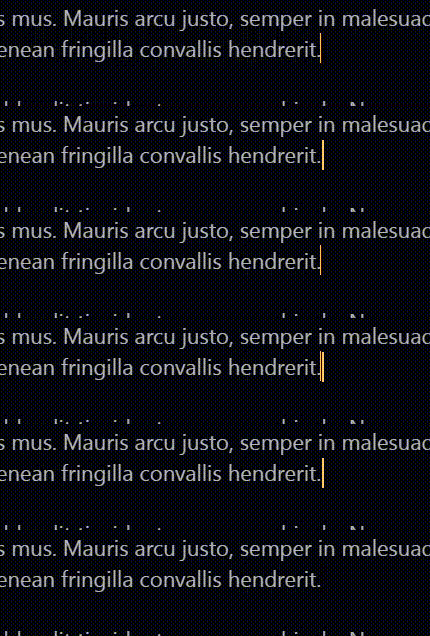
Edit: Click on image to start…
Search panel: first line still disappearing when scrolling down:
Thanks for your investigation.
Hi @StS - I’ll test in TiddlyDesktop now
Do you by any chance have custom styles for caret-color somewhere?
Thanks
Yes - changed color…
.cm-editor .cm-content { caret-color: rgb(255, 201, 102); }
That’s not the correct way because the caret-color should be transparent, I’m hiding the primary Browser cursor to get consistent styling for multiple cursors.
Ok - removed it and worked fine now.
Thanks 
I have no css for that - solved it with:
.tc-editor-codemirror6 .cm-panels-top { top: 1.8em; }.
This will override eventual styles if you have the menubar or sticky titles
