
updating the parser in a hurry
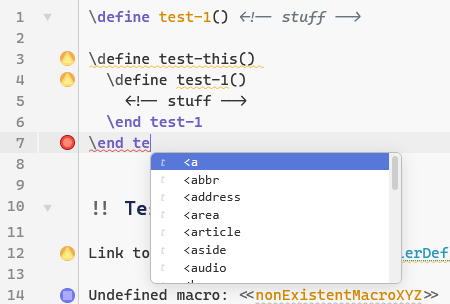
The \end completion popup doesn’t work (nor am I seeing it offered as predictive text).
Simon, is it possible to implement the CSS mode without setting the type field? If we could trigger it by tag(s) of my own choosing that would be great.
What’s a temporary switch, exactly? Do you mean like flick it on and we’re suddenly in CSS mode?
Keep in mind, I don’t use the toolbar 
Then you need a keyboard shortcut. Do you hide the toolbar?
I meant, do you want a persistent way to switch a tiddler to CodeMirror’s css mode without changing the tiddler type?
Yes.
Yes, but a toggle might be cool, too.
However, saying that, since TW allows us to have text, wikitext, html, css all jumbled up in one tiddler, maybe it’s a non-starter anyway. Back in the CM5 days, I went some way trying to get a truly mixed-mode to work… but I gave up when it got too unwieldy.
I’m happy to use what you have already. If you can add in the ability to switch mode based on tags (instead of type), I’ll add you to my Christmas card list 
I’ve added a dropdown in the toolbar and a keyboard shortcut Ctrl+Alt+L to choose the language. It can be persistent or temporary (configurable, by default temporary)
Did you know that you can mix languages in the tiddlywiki parser?
triple backticks followed by “javascript” parses the following block with the javascript parser. same for css.
I believe text between <style> tags is parsed as CSS IIRC
1 Like
Perfect. Doesn’t need the toolbar enabled, either. 
Parsed, yes. But not highlighted.
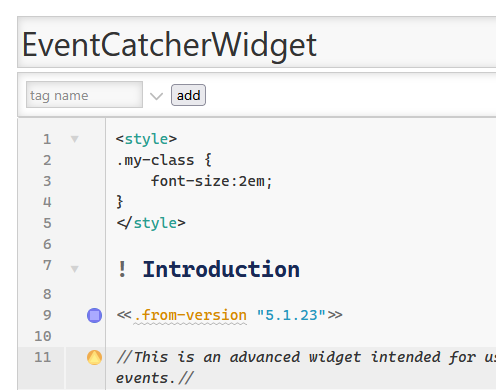
That’s no biggy, though.
It kinda is, for me. I want it to have mixed parsing (CSS and Wikitext  )
)
1 Like
Ok, you’ve finally got my attention!
I’ve generally ignored all the threads about alternative editors, as I rarely use almost any of any editor’s features. But this screenshot demonstrates that this editor contains two things I really appreciate: code-folding, and syntax highlighting. A quick peek at the demo shows that it also contains brace matching. With those three, you have everything I really want in a code editor. I tend to turn off auto-complete suggestions, and any predictive typing, except when they’re manually triggered by a keystroke. I mostly ignore toolbars. I only use a few editor commands (on the default editor, only Preview and Excise ever receive my attention.) But code-folding, brace matching, and syntax highlighting are very useful to me. And I love the look of this screenshot, and of your demo page.
I will play with it soon.
Two questions:
-
In the demo, is CTRL-SHIFT-Z supposed to bring up Zen mode? It seems like it should, but it doesn’t work for me. (I can toggle it on with the button, and off with
ESC) -
Is there any mechanism to combine the plugins into one? My wikis tend to have very few plugins, and all the ones I might need to use CM6 sound like a lot. I could easily see for myself a single bundle that had the core, one or two themes, and nearly all the languages. Obviously I can write myself a script to combine them, but I was wondering if there was already a mechanism.
1 Like
Not that I’m aware of, maybe @BurningTreeC can add that at some point?
In the meantime…
https://talk.tiddlywiki.org/search?expanded=true&q=@pmario%20bundle
@BurningTreeC thanks very much for your work here, looks great. I was at The new CodeMirror 6 — an advanced Editor for TiddlyWiki5 and went control panel settings and I get this error in a red box;
Internal JavaScript Error
Well, this is embarrassing. It is recommended that you restart TiddlyWiki by refreshing your browser
download tiddlers as json
ResizeObserver loop completed with undelivered notifications.
Distributing as a bookmarklet
I was looking at the above while researching a new CodeMirror6 Bookmarklet for you Scott, basically you should be able to install all the plugins you want here https://bookmarklets.tiddlyhost.com/ It has local storage so you can reload and test the plugins.
Then use advanced search eg; [all[shadows+tiddlers]prefix[$:/plugins/BurningTreeC/tiddlywiki-codemirror]plugin-type[plugin]] (you may want to add some other settings)
- to create a bookmarklet you drag the “bookmark icon” into the bookmarks. Then this the package can be installed with a click,
- however you also can use the “bookmarklet +” button to make a tiddler containing the bookmarklet code to distribute as a tiddler to any wiki or the first instance in a given browser.
- There is also a convenient export as JSON button as well (trivial)
The reason I was going to test it, ask if you want, was to see if the payload is not too big for browser bookmarklets.
- Distributing it as a tiddler allows you to click and install the package from the link in the tiddler. Without saving a bookmarklet in the browser.
Of note. Be carful installing a javascript playload such as this, however by using my site to build it you choose what is held inside that package.
After notes
- I have installed all tiddlers CM6 just now to save you a step (you may need to update later) approx. 2.7MB
- You could delete unnecessary ones in your instance of bookmarklets before generating
- I have tested it in the bookmarks, for you and it installed. but there is another error appearing but that is possibly for @BurningTreeC I will report after eliminating my bookmarklet.
Over here https://bookmarklets.tiddlyhost.com/ I engage spell check and enter the word “detnails” in a tiddler, r-click select details results in
Internal JavaScript Error
Well, this is embarrassing. It is recommended that you restart TiddlyWiki by refreshing your browser
RangeError: A document must have at least one line
It also happens in an empty.html
1 Like
Hi @TW_Tones I’ll investigate this. Spellcheck currently only toggles the spellcheck attribute on the editor on / off … I haven’t even tested if / how it works
I will do some more research in case it’s specific and not coincidental
Thank you. I will take a look.
What I meant by using few plugins is demonstrated here:
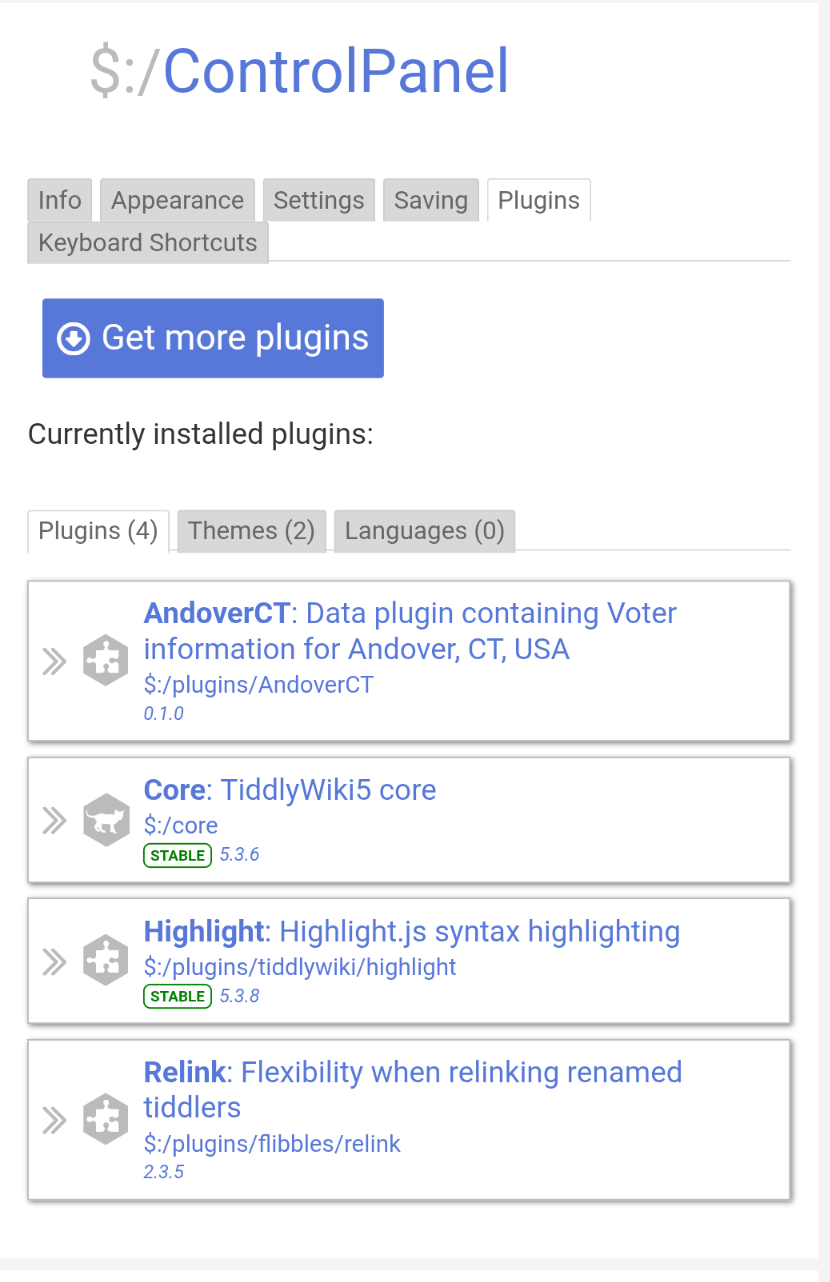
This is the most plugins I have in any currently-developing wiki: the core plus three others, one of which contains my own data… and I think I might now be able remove Highlight.
It’s not precisely an aversion to plugins. Mostly it’s a sense of tidiness (and probably a bit of not-invented-here syndrome.) That tidiness is what would make me prefer to use one single CM6 plugin rather than a dozen, even if that makes absolutely no difference in how they work or their combined size.
Some online tools have built-in bundlers. With the sophisticated work demonstrated by @BurningTreeC here, I wondered if he’d done something like that too, that’s all.
1 Like
I was thinking about two possible solutions:
- adding a mechanism to the core so that sub-plugins of a plugin are only shown if a dropdown of the parent plugin is toggled
- adding a bundler where users can create their custom bundles as single plugins
I know there’s a bundler plugin somewhere out there, I believe @pmario made one, but I don’t know if it can be used for this. I’d prefer not reinventing the wheel if there’s already a solution and / or if it can be extended for the use-case here
Thank you for your input!
Simon
1 Like
I was asking if this already existed. I’m not looking to add to the queue of work for this excellent project.
If I find I really want it, I will look to try it myself. If I manage to do so and it seems appropriate, I will try to contribute it back.
Thank you for your amazing tools.
1 Like
Hi all,
I wanted to say thank you for the amazing feedback you’re giving me here
I have a long list of bugs now I want to resolve
I’m still all ears for feature requests
If you have an idea for a nice plugin, just let me know
If you find a bug, something that behaves strange, also let me know
Thanks, you’re helping me a lot!
Simon
4 Likes