Logseq-like Alias Field behavior, am I missing something?

Hello All, Logseq had a feature called “Aliases” which was a special field you could give to blocks; and would serve as an ‘secondary title’ to that block. For instance

(tiddlername) Foo
(fields) alias:Bar

in Logseq, [[Foo]] and [[Bar]] would render as links with their original display text, but would navigate to the Foo block when clicked. Also any backlinks for [[Foo]] and [[Bar]] are aggregated under the Foo block.

I checked out Uni-links which has something called ‘aliases’ and also the built-in Caption field, but unless I am missing something these don’t behave like this, exactly.

I suppose I could have Bar’s contents be a transclusion of {{Foo}} but that wouldn’t give me the backlink aggregation would it?

Anyway, just let me know if there is a way to do this and if I am misunderstanding something, thanks!

-Xyvir
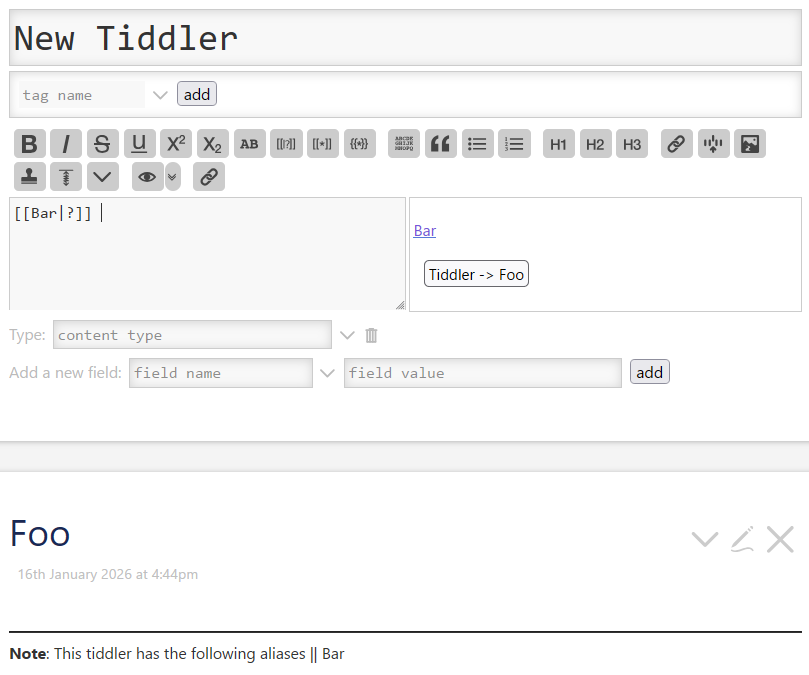
I think uni-link is the state of the art here. It does much more than this, but this sort of linking is one of its key behaviors. But it does require a slightly different link syntax.

Because of TW’s strong insistence on backward compatibility, I’m pretty sure it would be nearly impossible to change the core link syntax to also support aliases.

I had tried uni-link but couldn’t get this working

I had something like

Foo
aliases:Bar

Then links via [[Bar|?]] Should lead to foo right? But I couldn’t get it working.

Two guesses:

  • Did you save and refresh your wiki before testing? uni-link includes some new and altered JS features, which are only initialized when the wiki is first loaded.
  • Did your test alias contain one or more spaces? The aliases field expects a title list, so [[multi-word aliases]] require square brackets.

Your Foo/Bar test does work on the uni-link demo site:

I also wanted to suggest @mklauber’s Aliases plugin as an alternative to uni-link in case you hadn’t come across it before. Of the two, uni-link is generally my personal preference as it adds some features Aliases doesn’t have… but Matt’s plugin does use the more Logseq-like syntax you’re looking for, though it doesn’t include the alias backlink aggregation.

1 Like

With the uni-link — extended link functions plugin it should work with both: [[Bar|?]] and [[bar|?]] . Aliases are not case sensitive.

The demo page also contains a button, to create several test tiddlers, so you can play with it.

As I am not a logseq user I can’t be sure what you are after but I confidently assure you you can reproduce it and extend it even further.

Some relevant disembodied notes

  • We use the editor toolbar excise tool move a block from a tiddler into its own, thus can place metadata on it, link, transclude and macro options are available
  • Even without using the excise tool you can do this, create your block/tiddler and transclude it elsewhere
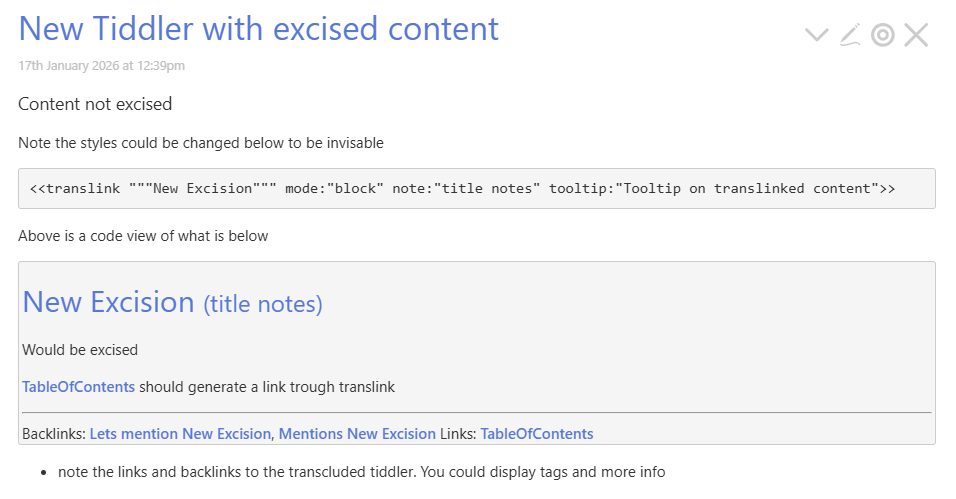
  • One excise option also uses the macro <<translink """New Excision""">>
    • You could always display the transclusions/block through another macro or template that you design including your aforementioned " any backlinks for [[Foo]] and [[Bar]] are aggregated". Although if you explain this a little more I can demonstrate.
  • Select some text and use excise even if you do not yet have content to be there in still works

If you use the new code mirror 6 or other solutions like autocomplete its easy to insert content from one tiddler in another. With the new transclusion operator you can find the tiddlers transcluding another.

It is possible to add tabs to the search mechanism so if you organise your tiddlers with tags, fields, link/backlinks, transclusions etc… you can have quick access to such tiddlers to search. Ctrl-L in the editor allows you to use these custom tabs. You could create custom editor toolbar buttons to support this byt ctrl-L inserts a link to a tiddler, you can then remove the [[]] and apply the {{}} or {{tiddleranme|template}} or macro <<my macro "tiddlername">>

So hopefully I have expanded your view of what can be done, now you need to explain what you are after so we can help.

  • If you want to use the translink macro since most don’t, you could modify it here to include additional content.
  • When transcluding a useful piece of information is the transcluded template tiddlers can reference the <<thisTiddler>> and within the tiddler, not the template, you can use the currentTiddler variable depending on how you transclude {{targetcontent|template}} current tiddler will be targetcontent.

Here is a quick hack of the translink macro translink.json (1.3 KB)

Note: the core tiddler uses the deprecated \define

That will look like this;

  • There is also a mouse over tooltip not displayed here
  • perhaps backlinks could be labelled “mentions”

Thank you, this plugin does exactly what I was asking! I appreciate you pointing it to me. I wasn’t able to find it myself after searching around a bit. Much obliged.