I hope someone can help me debug the following. I have been looking at this for 2 days now, character by character and can not figure out out why it is doing what it is doing which is why I titled this ‘parser issue?’.
<%if [{$:/TLS/State/EditMode!!editMode}match[true]] %>

Add the information for the new gun below and press the //Add this gun// button

Gun Type:  <$edit-text tiddler="$:/TLS/type" tag="input" size="50" />
<br>Format: GT-123 where this is a link to the relevant [[gun type|Gun Types]] record

State Code: <$select tiddler="$:/TLS/selectedstate" field="state-code">
{{$:/TLS/Select/State}}
</$select>
OS for overseas, PRI for private
<%if [{$:/TLS/selectedstate!!state-code}match[-]] %>
     <br>@@The selected state code can not be '-'@@
<%endif%>
<%if [<f.TLSisempty $:/TLS/selectedstate!!statecode>match[yes]] %>
     <br>@@The selected state code can not be empty@@
<%endif%>

City/Town: <$edit-text tiddler="$:/TLS/city" tag="input"/>

Location: <$edit-text tiddler="$:/TLS/location" tag="textarea" rows="2"  />

Location Coordinates
<br>

Latitude: <$edit-text tiddler="$:/TLS/latitude" tag="input" overwrite="yes"/>
<br> Format decimal, eg -33.1234
<p> or in <br>
Degrees: <$edit-text field="lathours" tag="input" overwrite="yes" size="6"/>
Minutes: <$edit-text field="latminutes" tag="input" overwrite="yes" size="6"/>
Seconds: <$edit-text field="latseconds" tag="input" overwrite="yes" size="6"/>
<$button set="$:/TLS/latitude"
   setTo={{{ [function[DMS2DD],{!!lathours},{!!latminutes},{!!latseconds}] }}}>
   Convert
</$button>
<br>Negative degrees for southern hemisphere
<br>
<br>
Longitude: <$edit-text tiddler="$:/TLS/longitude" tag="input" overwrite="yes"/>
<br>
Format decimal, eg 150.4567
<p> or in <br>
Degrees: <$edit-text field="longhours" tag="input" overwrite="yes" size="6"/>
Minutes: <$edit-text field="longminutes" tag="input" overwrite="yes" size="6"/>
Seconds: <$edit-text field="longseconds" tag="input" overwrite="yes" size="6"/>
<$button set="$:/TLS/longitude"
   setTo={{{ [function[DMS2DD],{!!llonghours},{!!longminutes},{!!longseconds}] }}}>
   Convert
</$button>
<br><br>
Picture Link: <$edit-text tiddler="$:/TLS/pictureLink" tag="input" overwrite="yes"/>
<$image source="$:/TLS/pictureLink" width="100px"/>
<br>
The link for the main picture of the gun. Of the form //WA-image-0030//
<br>
<$button>
<$let
    selectedstatecode={{$:/TLS/selectedstate!!state-code}}
    selectedstatename={{{ [{$:/TLS/StateData}jsonget<selectedstatecode>] }}}
    locationTag={{$:/TLS/location}}
    typeTag={{$:/TLS/type}}
    cityTag={{$:/TLS/city}}
    gunprefix="MGA"
     gunID={{{[<now 0DD0XXX>addprefix<gunprefix>]}}}
>
<$action-setfield $tiddler="$:/TLS/incremental" $field="text" $variable=<<now 0XXX>> />
<$action-createtiddler
        $basetitle={{{ [<gunID>] }}}
         caption={{{ [<selectedstatename>addsuffix[ : ]addsuffix<cityTag>addsuffix[ - ]addsuffix{$:/TLS/type}] }}}
         tags={{{ [[All Guns]] [<cityTag>] [<selectedstatename >] [<locationTag>] [<typeTag>] +[format:titlelist[]join[ ]] }}}
          ID={{{ [<gunID>] }}}
          CityTown={{$:/TLS/city}}
          Location={{$:/TLS/location}}
          State=<<selectedstatename>>
         GunType={{$:/TLS/type}}
          pictureLink={{$:/TLS/pictureLink}}
           Longitude={{$:/TLS/longitude}}
          Latitude={{$:/TLS/latitude}}
           $template="$:/TLS/CreateTemplateGun"
        <$action-navigate $to=<<createTiddler-title>>>
</$action-createtiddler>
<$action-createtiddler
        $basetitle={{{ [<gunID>addsuffix[_History]] }}}
         caption="History"
         tags={{{ [<gunID>] }}}
          parentGun={{{ [<gunID>] }}}
           $template="$:/TLS/CreateTemplateHistory">
</$action-createtiddler>
<$action-createtiddler
        $basetitle={{{ [<gunID>addsuffix[_Gallery]] }}}
         caption="Gallery"
         tags={{{ [<gunID>] }}}
          parentGun={{{ [<gunID>] }}}
           $template="$:/TLS/CreateTemplateGallery">
</$action-createtiddler>
<$action-createtiddler
        $basetitle={{{ [<gunID>addsuffix[_LocalHistory]] }}}
         caption="Local History"
         tags={{{ [<gunID>] }}}
          parentGun={{{ [<gunID>] }}}
           $template="$:/TLS/CreateTemplateLocalHistory">
</$action-createtiddler>
<$action-createtiddler
        $basetitle={{{ [<gunID>addsuffix[_Technical]] }}}
         caption="Technical"
         tags={{{ [<gunID>] }}}
          parentGun={{{ [<gunID>] }}}
           $template="$:/TLS/CreateTemplateTechnical">
</$action-createtiddler>
<$action-setfield $tiddler="Location" $field="parentGun" $value=<<gunID>> />
<$action-setfield $tiddler="$:/TLS/dateofmanufacture" text=""/>
<$action-setfield $tiddler="$:/TLS/city" text=""/>
<$action-setfield $tiddler="$:/TLS/location" text=""/>
<$action-setfield $tiddler="$:/TLS/pictureLink" text=""/>
<$action-setfield $tiddler="$:/TLS/longitude" text=""/>
<$action-setfield $tiddler="$:/TLS/latitude" text=""/>
<$action-setfield $tiddler="$:/TLS/type" text=""/>
<$action-setfield $tiddler="$:/TLS/selectedstate" $field="state-code" $value=""/>
<$action-setfield $tiddler="$:/TLS/selectedstate" $field="state-name" $value=""/>
</$let>
Add new gun
</$button>
<%endif%>
<%else%>
Sorry, this function is only available in edit mode
<%endif%>
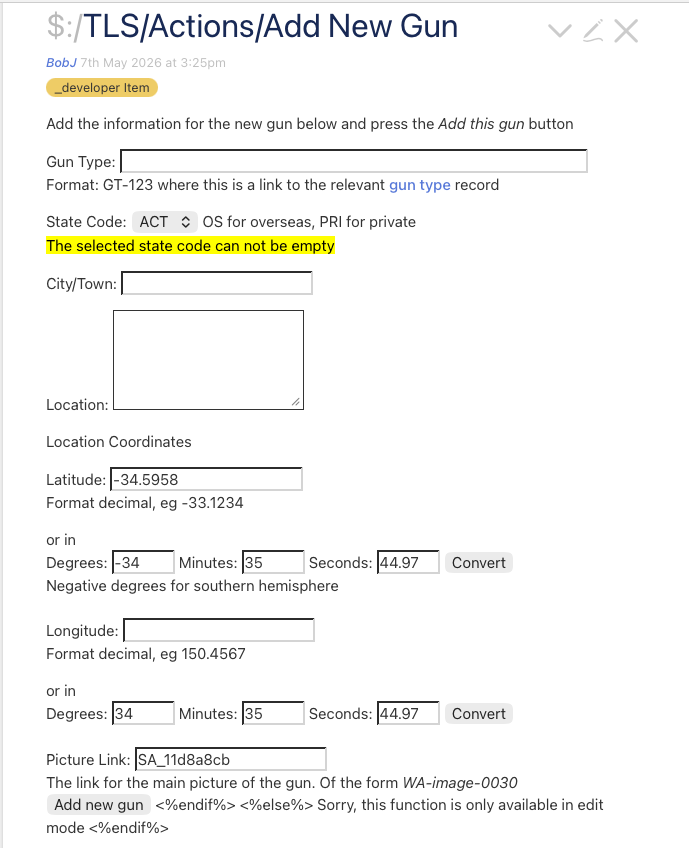
The rendered display, note the extraneous <% statements at the foot of the rendered display.
Also note that the <$image is not displaying the selected image nor the usual ‘broken image link’ icon. The stated image definitely exists in the wiki. If I hard code an image title into the $image statement, still no image is displayed. Deleting the $image statement does not get rid of those extraneous texts at the foot of the display.
I can not see why the display has those extraneous <% statements. I have gone through the code with the BBEDIT text editor, showing invisible characters in case that was causing the issue but nothing was found. I have zapped any gremlins, no better.
I have checked the nested %if’s and can not see a problem there but suspect it must have something to do with that.
Sorry @pmario that didn’t fix the issue. @buggyj your suggestion did the trick, changing both <p> to <br> and everything now displays perfectly except the image. Still no image after the Picture Link field.
<%if [{$:/TLS/State/EditMode!!editMode}match[true]] %>
Add the information for the new gun below and press the //Add this gun// button
Gun Type: <$edit-text tiddler="$:/TLS/type" tag="input" size="50" />
<br>Format: GT-123 where this is a link to the relevant [[gun type|Gun Types]] record
State Code: <$select tiddler="$:/TLS/selectedstate" field="state-code">
{{$:/TLS/Select/State}}
</$select>
OS for overseas, PRI for private
<%if [{$:/TLS/selectedstate!!state-code}match[-]] %>
<br>@@The selected state code can not be '-'@@
<%endif%>
<%if [<f.TLSisempty $:/TLS/selectedstate!!statecode>match[yes]] %>
<br>@@The selected state code can not be empty@@
<%endif%>
City/Town: <$edit-text tiddler="$:/TLS/city" tag="input"/>
Location: <$edit-text tiddler="$:/TLS/location" tag="textarea" rows="2" />
Location Coordinates
<br>
Latitude: <$edit-text tiddler="$:/TLS/latitude" tag="input" overwrite="yes"/>
<br> Format decimal, eg -33.1234
<br> or in <br>
Degrees: <$edit-text field="lathours" tag="input" overwrite="yes" size="6"/>
Minutes: <$edit-text field="latminutes" tag="input" overwrite="yes" size="6"/>
Seconds: <$edit-text field="latseconds" tag="input" overwrite="yes" size="6"/>
<$button set="$:/TLS/latitude"
setTo={{{ [function[DMS2DD],{!!lathours},{!!latminutes},{!!latseconds}] }}}>
Convert
</$button>
<br>Negative degrees for southern hemisphere
<br>
<br>
Longitude: <$edit-text tiddler="$:/TLS/longitude" tag="input" overwrite="yes"/>
<br>
Format decimal, eg 150.4567
<br> or in <br>
Degrees: <$edit-text field="longhours" tag="input" overwrite="yes" size="6"/>
Minutes: <$edit-text field="longminutes" tag="input" overwrite="yes" size="6"/>
Seconds: <$edit-text field="longseconds" tag="input" overwrite="yes" size="6"/>
<$button set="$:/TLS/longitude"
setTo={{{ [function[DMS2DD],{!!llonghours},{!!longminutes},{!!longseconds}] }}}>
Convert
</$button>
<br><br>
Picture Link: <$edit-text tiddler="$:/TLS/pictureLink" tag="input" overwrite="yes"/>
<$image source="$:/TLS/pictureLink" width="100px"/>
<br>
The link for the main picture of the gun. Of the form //WA-image-0030//
<br>
<$button>
<$let
selectedstatecode={{$:/TLS/selectedstate!!state-code}}
selectedstatename={{{ [{$:/TLS/StateData}jsonget<selectedstatecode>] }}}
locationTag={{$:/TLS/location}}
typeTag={{$:/TLS/type}}
cityTag={{$:/TLS/city}}
gunprefix="MGA"
gunID={{{[<now 0DD0XXX>addprefix<gunprefix>]}}}
>
<$action-setfield $tiddler="$:/TLS/incremental" $field="text" $variable=<<now 0XXX>> />
<$action-createtiddler
$basetitle={{{ [<gunID>] }}}
caption={{{ [<selectedstatename>addsuffix[ : ]addsuffix<cityTag>addsuffix[ - ]addsuffix{$:/TLS/type}] }}}
tags={{{ [[All Guns]] [<cityTag>] [<selectedstatename >] [<locationTag>] [<typeTag>] +[format:titlelist[]join[ ]] }}}
ID={{{ [<gunID>] }}}
CityTown={{$:/TLS/city}}
Location={{$:/TLS/location}}
State=<<selectedstatename>>
GunType={{$:/TLS/type}}
pictureLink={{$:/TLS/pictureLink}}
Longitude={{$:/TLS/longitude}}
Latitude={{$:/TLS/latitude}}
$template="$:/TLS/CreateTemplateGun"
<$action-navigate $to=<<createTiddler-title>>>
</$action-createtiddler>
<$action-createtiddler
$basetitle={{{ [<gunID>addsuffix[_History]] }}}
caption="History"
tags={{{ [<gunID>] }}}
parentGun={{{ [<gunID>] }}}
$template="$:/TLS/CreateTemplateHistory">
</$action-createtiddler>
<$action-createtiddler
$basetitle={{{ [<gunID>addsuffix[_Gallery]] }}}
caption="Gallery"
tags={{{ [<gunID>] }}}
parentGun={{{ [<gunID>] }}}
$template="$:/TLS/CreateTemplateGallery">
</$action-createtiddler>
<$action-createtiddler
$basetitle={{{ [<gunID>addsuffix[_LocalHistory]] }}}
caption="Local History"
tags={{{ [<gunID>] }}}
parentGun={{{ [<gunID>] }}}
$template="$:/TLS/CreateTemplateLocalHistory">
</$action-createtiddler>
<$action-createtiddler
$basetitle={{{ [<gunID>addsuffix[_Technical]] }}}
caption="Technical"
tags={{{ [<gunID>] }}}
parentGun={{{ [<gunID>] }}}
$template="$:/TLS/CreateTemplateTechnical">
</$action-createtiddler>
<$action-setfield $tiddler="Locaion" $field="parentGun" $value=<<gunID>> />
<$action-setfield $tiddler="$:/TLS/dateofmanufacture" text=""/>
<$action-setfield $tiddler="$:/TLS/city" text=""/>
<$action-setfield $tiddler="$:/TLS/location" text=""/>
<$action-setfield $tiddler="$:/TLS/pictureLink" text=""/>
<$action-setfield $tiddler="$:/TLS/longitude" text=""/>
<$action-setfield $tiddler="$:/TLS/latitude" text=""/>
<$action-setfield $tiddler="$:/TLS/type" text=""/>
<$action-setfield $tiddler="$:/TLS/selectedstate" $field="state-code" $value=""/>
<$action-setfield $tiddler="$:/TLS/selectedstate" $field="state-name" $value=""/>
</$let>
Add new gun
</$button>
<%else%>
Sorry, this function is only available in edit mode
<%endif%>
$edit-text has no overwrite attribute; you should remove overwrite="yes" from all your $edit-text widgets.
$edit-text also defaults to tag="input" for all fields other than field="text", so you can safely remove this attribute from your input widgets other than <$edit-text tiddler="$:/TLS/pictureLink".
@etardiff , you are correct of course. Many of my procedures have come from earlier versions of TW. I reuse them cause I know they work and can be reused with little editing. I seem to remember the earlier version needed the overwrite attribute. However, having it here does not seem to cause any problems.
I can’t explain why but I have found that the source file information was not being provided through the <$image statement. Using the browser’s inspector window, it showed that the url for the image file was incomplete, missing the actual file name details from the URL. Why this was happening, I have no idea.
However, I replaced the <$image statement with a call to a procedure for displaying images, as follows, and this solved the problem.
<!-- DISPLAYS ONLY THE IMAGE FROM THE SUPPLIED TIDDLER  -->
\procedure displayIonly(IOTitle,IOWidth:"100%")

<!--see also $:/TLS/EditTemplate/ImageLink -->

<$let
     baseURL={{{ [{$:/TLS/onlineImages!!onlineimageURL}] }}}
     onlineURL={{{ [<IOTitle>get[imageURL]] }}}
>
<$image source={{{ [<IOTitle>get[imageURL]] }}} width=<<IOWidth>> loading="lazy" >
     <$image source={{{ [<baseURL>addsuffix<onlineURL>] }}} width=<<IOWidth>> loading="lazy" />
</$image>
</$let>
\end
Again, no idea why the initial <$image statement would not work but at least I have a workaround (which incidentally incorporates our image fallback solution: Fallback handling for $image widget ).
doesn’t work because “$:/TLS/pictureLink” is just the name of the tiddler into which you’ve entered the image tiddler title.
<$image source={{$:/TLS/pictureLink}} .../>
also doesn’t work because, although you are now pointing to the actual image tiddler, it expects that tiddler to either contain a base64-encoded binary image (an “attached” image) or a _canonical_uri field referencing an external image source, but your image tiddlers are using an imageURL field to reference external images.
Thus, your “workaround” (which includes the fallback handling) is actually the correct solution for your particular use-case.