list
September 14, 2022, 1:02pm
1
# corresponds to the HTML <ol> tag, but the # is interrupted by the content block, resulting in all sequence numbers being 1.
To get this effect:
One...
Paragraph 1
Second...
Paragraph 2
Three...
Only two types of labels can be mixed in TW, like this:
# 1...<p>Paragraph 1</p>
# 2...<p>Paragraph 2</p>
# 3...
Can an end marker be introduced for #? For example #/.
Or imply the end of the ordered list with two blank lines?
Using ordered lists in longer texts is currently very inconvenient.
I understand that labels of the same type should be logically and formally unified, but this ordered list is used too frequently.
But I’ve almost given up on using it for the reasons mentioned above.
If you were working directly in HTML then this link might be of use
twMat
September 14, 2022, 5:21pm
3
If every section is wrapped in some html element then you can add a class to it and use a CSS counter. This will guaranteed be sequential. E.g:
<div class="myclass">
as much stuff as you want
</div>
In a stylesheet:
body {
  counter-reset: mycount;
}

.myclass::before {
  counter-increment: mycount;
  content: counter(mycount) ". ";
}
I use css counter too .tc-tiddler-body instead of the html body tag, to make each counter independant for each tiddler.
I also use a reset class to get more control on my lists. Here’s my code :
/*
Counter elements
*/

.tc-tiddler-body {
  counter-reset: list-count;
}

.c.reset{
  counter-set:list-count 0;
}

ol {
  list-style-position: inside;
	padding-left: 20px;
}

ol li.c{
list-style-type: none;
}

.tc-tiddler-body .c::before {
  counter-increment: list-count;
  content: counter(list-count) ". ";
}
E.g :
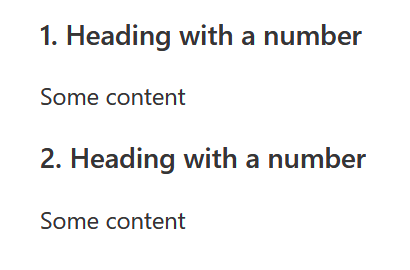
!!!.c Heading with a number

Some content

!!!.c Heading with a number

Some content
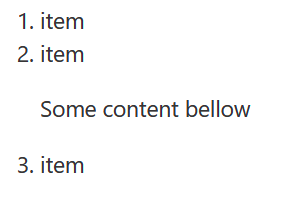
Without CSS, you can also use html element to prevent the list from resetting, e.g :
# item
# item<p>
Some content bellow
</p>
# item
Hello list and all,
If you don’t mind doing a tad more work the following that I encountered way back in the past. Tested it in Tiddlywiki.com and in theory the idea seems to work.
# <h2>Heading 1</h2><div><p>Paragraph 1</p><p>Paragraph 2</p><p>Paragraph 3</p></div>
# <h2>Heading 2</h2><div><p>Paragraph 1</p><p>Paragraph 2</p></div>
# <h2>Heading 3</h2><div><p>Paragraph 1</p></div>
Best regards,
Mark_S
September 18, 2022, 2:13pm
6
When/how does .c.reset get used? Thanks!
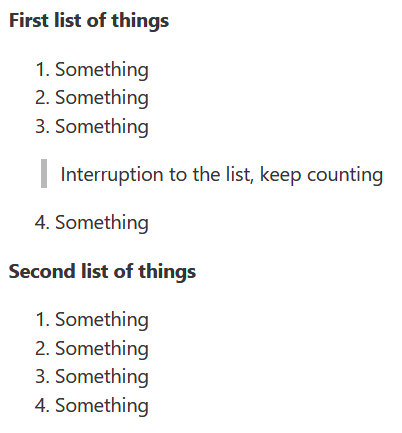
If I want to use several numbered list in the same tiddler, e.g :
;First list of things

#.c Something
#.c Something
#.c Something

> Interruption to the list, keep counting

#.c Something

;Second list of things

#.c.reset Something
#.c Something
#.c Something
#.c Something
Is c a dummy CSS class?
Does not work for me!
Its defined in @telumire css above.
Ste_W
November 21, 2022, 10:51am
10
Sorry to resurrect this one…@telumire
I have put your code into a tiddler and tagged it $:/tags/Stylesheet but using #.c in a tiddler just gives a blank.
Ste_W
November 21, 2022, 10:52am
11
Never mind…It doesn’t show in the preview but is fine on the main view. I’ll get my coat…
 However I think you need to reset the counter on the class