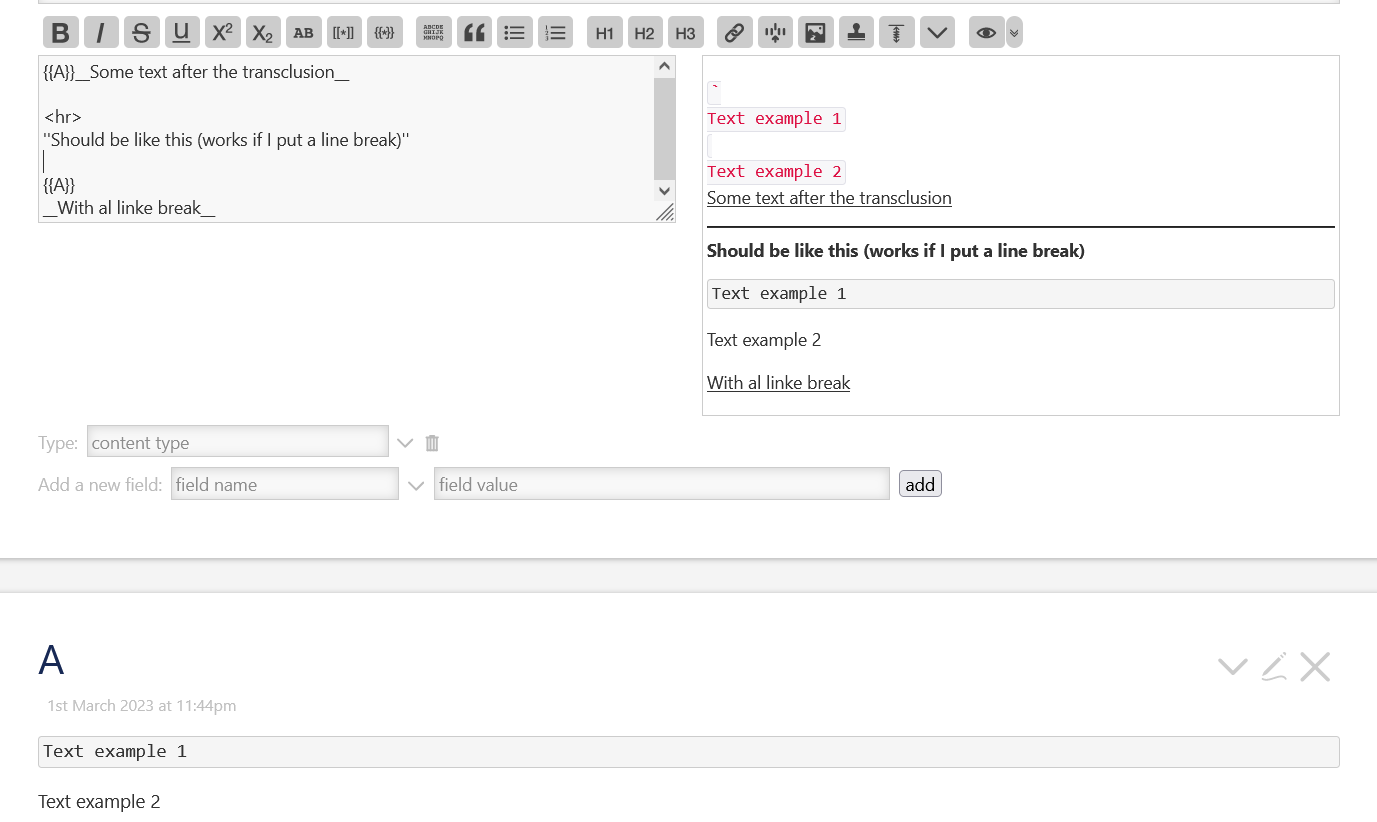
I don’t know why this happens, but if I have a tiddler “A” that contains monospaced block formatting followed by some text, if i transclude “A” in a tiddler “B” and after the transclusion I put some text without a linke break the monospaced block formatting is messed up.
• Does anyone know why, and most importantly how could I put some text without this happening but at the same time without having to put a line break?
I don’t want to use a line break because I would like to use a macro that places a small icon next to the transcluded text that links back to the transcluded tiddler, to facilitate editing, but without making this link too obvious
To do this I’m using a macro I found here, in case anyone is interested (and a custom snipped to write that macro easly)

In fact, oddly it's worse, the text is messed up even if I don't write anything afterwards, it's strange.
Edit: It’s not worse, I forgot that A is not inline. Writing <$transclude tiddler=A mode=block/> works, but clearly it’s not possible anymore to have inline text after the transclusion.
That’s right. In the future there will be parametrised transclusions, where you can give the inline text to the transclusion template, which can then show it inline. .. Should be possible once v5.3.0 is available.
To answer the OP directly, the TiddlyWiki parser operates in two modes: block mode, and inline mode. In block mode, block formatting such as headings and triple backticks are recognised. In inline mode, only character formatting and other inline formatting is recognised. (It’s worth noting that all Markdown parsers make the same distinction too).
The parser starts out in block mode. A transclusion on its own followed by a new line will be recognised as a block mode transclusion, and the target text will be parsed in block mode. For example:
{{A}}
A transclusion that is preceded or followed by other text is switched to inline mode, such that the target text will be parsed in inline mode.
{{A}} is a transclusion
As others have noted, you can use the underlying transclude widget directly to override this behaviour.
Very interesting, thanks. Now I understand why. So I guess (at least that’s how I understood by reading your answers and documentation) that you can’t put text on the same line after a block-mode transclusion, right? Or there still is some workaround for this?
Yes, that’s right, good question. What I would like is a system to put a link immediately after a portion of the transcluded text that takes us to the source of the transcluded text.
If for example I have a long tiddler “B” I like to break it up into smaller shadows “$:/A” for example. Particularly if there is text I use in multiple tiddlers “B”, “C”…
Think of it like wikipedia quotes, but with transclusions.
Or with code like this: {{$:/A}}[[^|$:/A]] (This normally works, but as we saw before not with some things are not displayed in the same way if they are put inline)
Not a big deal though now that I understand why it happens, I initially thought there was something not working right. The reason I was looking for an alternative solution was so that I could transclude the text and at the same time link to the transcluded tiddler in the least intrusive way possible. (Unfortunately at the moment I should create a new line which is quite intrusive)
• So I was wondering if there was a way to put a block mode transclusion followed by something (a link) on the same line.
If there was something simple that I missed, good, otherwise if the workaround would be complicated, let’s not think about it for too long, it’s not a big problem
I tried playing around with it a bit but I don’t understand how to get anything useful out of what you wrote (Partly because I don’t quite understand everything). But still, if there is no simple workaround to my problem, don’t worry.
Doing some research I found not a solution but something really similar: I could more simply do as Dave Gifford does in this post Draggable blocks, experiment #2! Oh my goodness!, where he inserts directly into the tiddler to be transcluded the link at the end of the field text.
And maybe with a filter I could make the link appear only if I’m not in the original tiddler (? idk, need to test it)