I have a Tiddlywiki that I use as a diary. Recently, I found some old entries from 2015 that I placed in Evernote which I want to transfer into my Tiddlywiki diary. But the entries I’ve added naturally have today’s date and I want to replace the created dates with the original date from 2015. There are only about 30 posts, so I’m happy to manually change each post if necessary. How can I have a custom date for these old 2015 posts, but continue as normal for any new 2026 posts? Any suggestions please?
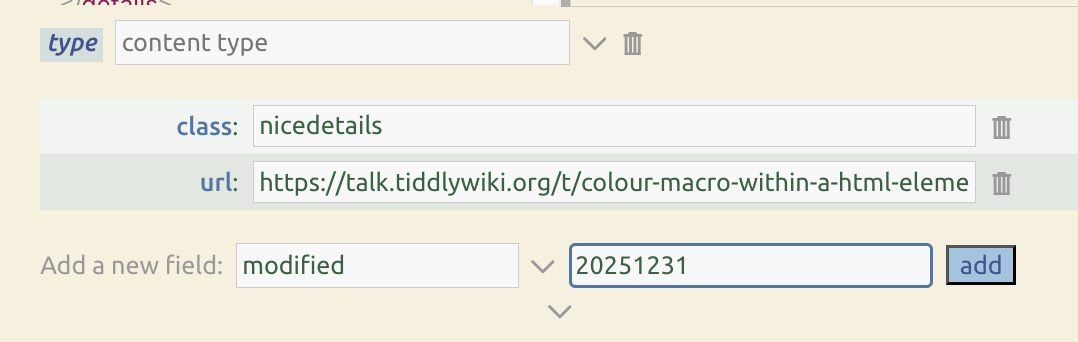
Edit each old post and in the “add new field” input, enter created as the field name. Note that, while the “created” field is not normally shown in the tiddler editor, you are actually editing the tiddler’s existing “created” date rather than adding a new field.
Then, in the field value input, enter a value using the TWCore’s 17-digit datetime format, like this: YYYYMMDD120000000 where “YYYY” is the year, “MM” is the month, and “DD” is the day number.
Note the rest of the datetime is “120000000”, which represents midday “HHMMSSXXX” (where HH=hours, MM=minutes, SS=seconds, XXX=milliseconds). Since the TWCore datetime values are stored as UTC, using “120000000” ensures that your input won’t result in a 1-day shift due to any timezone offset between UTC and your actual timezone.
I am putting the word created for the field name in “Add a new field” and then 20150203120000000 as the field value then clicking Add, but nothing is happening. I saved the file and refreshed too, but still nothing.
The created field is never shown in the tiddler editor, but “adding” it should still change it’s value. After clicking “add”, if you save and exit the tiddler editor using the “done” (checkmark) button, and then check the tiddler’s info (usually in the “more” dropdown menu), the date you entered should be shown as the “created” value.
I highly recommend the Commander plugin for anyone ever doing batch-handling operations or cleanup work.
Maybe in this case, your edits do need to be done one-by-one, but the Commander tool is great if you’re doing something like importing a batch of tiddlers and wanting everything in the imported batch to get a certain tag, or rename a certain field, or delete cruft (which evernote imports do tend to have, in my experience).
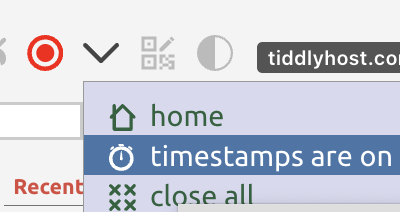
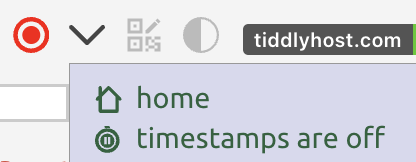
One other note: I often want to add/change not just the created field for old stuff, but also the modified field so the old stuff is not at the top of my recents sidebar. Modifying the modified field is tricky, because whenever you modify a tiddler — including by adding a value for modified field! — TiddlyWiki’s last step is to update the modified field to now. So, the workflow in this case requires turning timestamps off (usually in the “more” dropdown of page controls, where I have it near the top):
Note, you don’t have to include the full timestamp string. The above would get you Dec 31 2025 (though occasionally I add another 1 which works like 10am timestamp, and helps reduce glitches around universal vs local timezone for someone in UTC-negative (Western) hemisphere).
WARNING! You need to be extra-vigilant to turn your timestamps back on afterwards! Leaving timestamps off by accident can cause all sorts of mischief.
@EricShulman - I checked again and realised that your instructions did, in fact, change the created date and I was looking at the modified date. My apologies.
@Springer - I did install the Commander plugin, but as the posts had different created dates felt they had to be changed manually, which I’ve done.
However, I now need help in working out how to display the created date. I know I have to change the subtitle shadow tiddler, but the instructions I found seemed to be for older versions of Tiddlywiki. Could I ask for the code for the latest version please?
To change what appears in the subtitle, I recommend using the Advanced Search Filter panel. Search for this:
[[$:/tags/ViewTemplate/Subtitle]tagging[]]
You’ll probably see templates only for modifier and modified.
Clone the modifier one ($:/core/ui/ViewTemplate/subtitle/modified), and call it something helpful such as $:/thescribe/ViewTemplate/subtitle/created… and just change the contents so they transclude the created field rather than modified (perhaps you also want to add explanatory note, so that it’s easy to distinguish created and modified dates).
Somewhere I have a solution with lots of conditional logic, so if created and modified fields are the same, that fact pops out (without repeating the date), and if the two values differ but within the same year, the year only shows on the created side, and if the two dates are even in the same month, the month only shows on the created side (as in dates: Jan 5–22, 2026)… but all that’s probably a bit too baroque. Still, it’s cool to see how if you can think of something you’d like to see, there’s pretty likely a way to make it happen.
I hope that helps. Follow up if there are still unresolved questions.
Since you have about 30 posts, you might want to “industrialize” the process so it doesn’t take so much of your time.
Method 1: EASY
Press the Create New Tiddler button 30 times and get them open and ready for editing.
In the field type: “created” and copy and paste that all through your new tiddlers.
Then do the same for the field: type “201501” for all of them (if they’re from January). But DO NOT HIT THE “ENTER” key just yet.
Go through the tiddlers once more and type in the date portion “01”, “02”, etc.
Do the the same for your desired titles.
Place the diary notes in the text field.
METHOD 2: Export To a JSON
Create a custom exporter:
Follow the instructions: https://tiddlywiki.com/#Creating%20a%20custom%20export%20format
create that tiddler and have it export to .json
Save it.
Then…
Create two or three new tiddlers with the desired tags and some text in the text area. Anything, don’t matter. Same for title and “created” field. Doesn’t matter.
Save them. They’ll be dummy tiddlers.
Then go to Advanced Search and in the the pull-down filter menu, select “Recently modified tiddlers”
but change the “limit[50]” to → limit[2]: [!is[system]has[modified]!sort[modified]limit[2]]
Export those tiddlers as JSON (not the custom JSON one you created) but the JSON one that comes with your TW.
You’ll now have a model of the JSON text you can study and duplicated.
Before importing them back to TiddlyWiki, though you’re going to change the extention from “.json” to “.txt”. This will trick TW into thinking it’s a text file. And you’ll be able to edit the contents.
Study it and duplicated the “fields” in the text area. Replacing the items as you see fit.
Export THAT tiddler in your custom .JSON exporter.
Finally, import that new tiddler.
I’m sure you’d be able to create a whole year of diary tiddlers within just a few minutes.
To avoid issues like this I have modified the new journal buttons to also set a journal-date field. This is created using the tiddlywiki timestamp format, and more friendly date format used for the title. When listing and reviewing journal entries I use this rather than the created date.
If I was in your situation or writing backdated Journal entries I would create the tiddlers and set the journal-date field. To me modifying the created date is corrupting the fields meaning. Its like allowing people to backdate their financial records, a legal no no.
It sounds like you needed to use the created date because you have no journal-date, and the title is hard to parse, but lets “call a spade a spade”.
I just added journal-date=<<now "YYYY0MM0DD0hh0mm0ss000">>
To get started make this change then make a batch/commander actions to set journal-date to created for your legacy records (on tiddlers without a journal-date)